
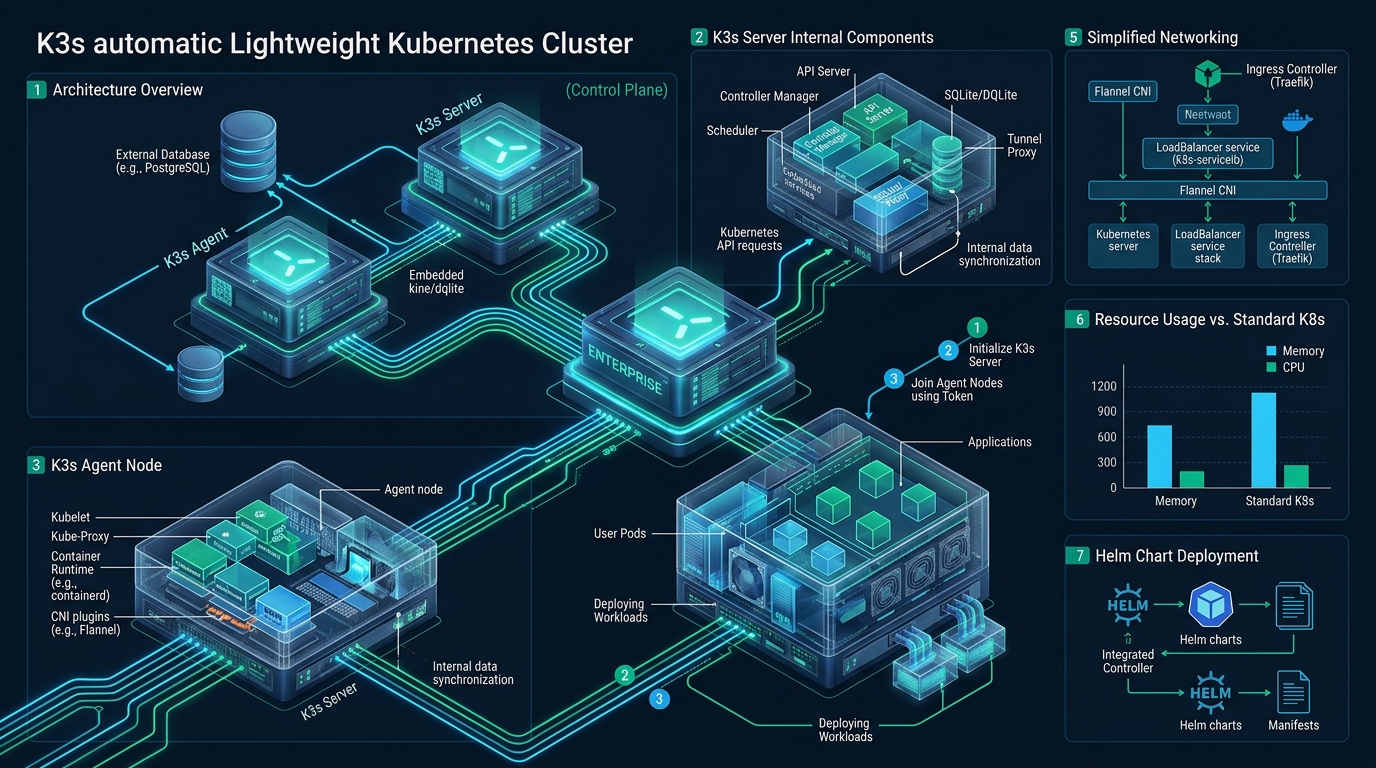
Deploying full-scale upstream Kubernetes in edge architectures, devops staging sandboxes, or resource-constrained nodes frequently burns 2 GB of memory per node before hosting a single workload pod. Systems engineers seeking production-grade orchestration without control-plane bloat leverage lightweight distributions tested in environments like CpanelFree to validate cloud-native architectures at zero infrastructure cost. By stripping legacy in-tree cloud providers and substituting heavy multi-process etcd clusters with SQLite or embedded etcd via kine, K3s reduces node control-plane memory consumption to under 512 MB while preserving 100% CNCF certified API conformance.
What is K3s and How Do You Deploy a Lightweight Kubernetes Cluster?
Direct Answer: To deploy a lightweight Kubernetes cluster with K3s, execute the official installer curl -sfL https://get.k3s.io | sh - on your control node, retrieve the cluster join token from /var/lib/rancher/k3s/server/node-token, and register worker agents using K3S_URL and K3S_TOKEN. K3s bundles containerd, Flannel, CoreDNS, and Traefik inside a single binary requiring under 512MB RAM.
Originally engineered by Rancher Labs and maintained by the Cloud Native Computing Foundation (CNCF), K3s represents a masterclass in software pruning. Rather than maintaining dozens of detached binaries—such as kube-apiserver, kube-controller-manager, kube-scheduler, kube-proxy, and kubelet—K3s consolidates the control plane and node agent components into a single self-extracting Go binary under 120 megabytes.
Architecture Note: K3s strips out legacy, non-default alpha features, in-tree storage volume plugins, and third-party cloud provider integrations. These modules have been superseded by out-of-tree CSI (Container Storage Interface) and CNI (Container Network Interface) plugins, shrinking the binary footprint by over 60% compared to upstream kubeadm builds.
Architectural Dissection: How K3s Optimizes Control Plane Footprint
The secret behind K3s efficiency is its datastore abstraction layer called Kine (Kine is not etcd). Upstream Kubernetes strictly mandates etcd v3—a consensus-heavy distributed key-value store requiring high IOPS, dedicated flash storage disks, and substantial resident memory (often 500MB to 1.5GB alone on active clusters). Kine translates the Kubernetes etcd v3 API calls into standard relational SQL dialects on the fly.
As a result, a standalone K3s control node stores cluster state within an embedded, zero-configuration SQLite datastore. When high availability (HA) is required for mission-critical enterprise failover, K3s natively supports embedded etcd using the Raft consensus protocol across an odd number of master nodes (3 or 5), or connects to external HA databases like PostgreSQL, MySQL, or managed RDS instances.
| Feature / Metric | Standard / Default | Tuned / Production |
|---|---|---|
| Control Plane Memory | 1.8 GB – 2.5 GB (kube-apiserver, etcd, controller) | 380 MB – 512 MB (Single K3s binary) |
| Binary Footprint on Disk | > 1.2 GB distributed components | < 120 MB self-extracting payload |
| Bootstrap Initialization Time | 180 – 300 seconds (kubeadm multi-stage) | < 35 seconds (systemd daemon launch) |
| Datastore Engine | Dedicated etcd v3 (high IOPS required) | Embedded SQLite / Kine / Embedded HA etcd |
| Bundled Networking (CNI) | None (Requires manual Calico/Cilium) | Flannel VXLAN / WireGuard out-of-the-box |
| Ingress & ServiceLB | External Cloud Controller (MetalLB/Ingress-NGINX) | Integrated Klipper ServiceLB + Traefik Ingress |
Step 1: Production Linux Host Preparation and Kernel Hardening
Before firing up the K3s installation script, Linux systems administrators must configure critical networking kernel modules and sysctl parameters. Kubernetes relies heavily on Linux bridges, netfilter packet forwarding, and connection tracking tables. When high container density triggers socket churn, unoptimized default kernel parameters cause packet drops and nf_conntrack: table full crashes.
Create the kernel module loading file at /etc/modules-load.d/k3s.conf:
# /etc/modules-load.d/k3s.conf
overlay
br_netfilter
ip_vs
ip_vs_rr
ip_vs_wrr
ip_vs_sh
Load the required modules immediately using modprobe overlay && modprobe br_netfilter, and configure enterprise networking optimizations inside /etc/sysctl.d/99-kubernetes-k3s.conf:
# /etc/sysctl.d/99-kubernetes-k3s.conf
# Enable bridge netfilter packet inspection
net.bridge.bridge-nf-call-iptables = 1
net.bridge.bridge-nf-call-ip6tables = 1

# Enable IPv4 & IPv6 packet forwarding
net.ipv4.ip_forward = 1
net.ipv6.conf.all.forwarding = 1

# Prevent ARP flux and adjust memory caches
net.ipv4.conf.all.rp_filter = 1
net.ipv4.conf.default.rp_filter = 1

# Expand conntrack table capacity for dense container communication
net.netfilter.nf_conntrack_max = 524288
net.netfilter.nf_conntrack_tcp_timeout_established = 86400

# Increase inotify limits for CoreDNS and Kubernetes file watchers
fs.inotify.max_user_watches = 524288
fs.inotify.max_user_instances = 8192

# Virtual Memory Tuning: Avoid aggressive swapping while maintaining paging capability
vm.swappiness = 10
vm.overcommit_memory = 1
Apply these sysctl settings instantly without rebooting by running sudo sysctl --system.
Production Best Practice: While upstream Kubernetes historically mandated
swapoff -a, modern K3s releases (v1.28+) gracefully support Linux swap with cgroup v2 memory throttling. Settingvm.swappiness = 10guarantees emergency burst capacity without evicting active Kubernetes pod working sets.
Step 2: Declarative Control Plane Installation with config.yaml
Most introductory tutorials pass dozens of inline CLI arguments to the install.sh script. In professional DevOps environments, declarative configuration files are essential for reproducibility, infrastructure-as-code (IaC) pipelines, and audit compliance. K3s natively parses /etc/rancher/k3s/config.yaml during startup.
Create the directory structure and establish your declarative cluster specification:
# Create directory
sudo mkdir -p /etc/rancher/k3s

# /etc/rancher/k3s/config.yaml
write-kubeconfig-mode: "0644"
tls-san:
  - "10.0.10.10"
  - "k8s-master.production.local"
  - "cluster.merahost.internal"

# Networking Configuration
cluster-cidr: "10.42.0.0/16"
service-cidr: "10.43.0.0/16"
flannel-backend: "vxlan"

# Token for joining agents
token: "K3s-SuperSecure-ProductionToken-987453210-ClusterMesh"

# Ingress & Service Components
disable:
  - traefik        # Disabled here if deploying custom Traefik v3 or Ingress-NGINX
  - servicelb      # Disabled if utilizing external MetalLB or hardware BGP routers

# Performance & Security Arguments
kube-apiserver-arg:
  - "service-node-port-range=30000-32767"
  - "anonymous-auth=false"
kubelet-arg:
  - "max-pods=110"
  - "image-gc-high-threshold=85"
  - "image-gc-low-threshold=80"
With the configuration file primed, launch the official installation script. Notice that no extra command line switches are needed because K3s reads config.yaml automatically:
curl -sfL https://get.k3s.io | sh -The installer configures a systemd service (k3s.service), enables it across reboots, downloads the single static binary into /usr/local/bin/k3s, symlinks kubectl, crictl, and ctr, and initiates the control plane daemon.
Verify that the control plane node reached the Ready state:
kubectl get nodes -o wide
kubectl get pods -A
Step 3: Hardening the Systemd Service Unit
Under extreme workloads or container burst scenarios, the Linux systemd init system must guarantee that K3s is protected from the Linux kernel Out-Of-Memory (OOM) killer and file descriptor exhaustion. Configure a systemd drop-in override at /etc/systemd/system/k3s.service.d/override.conf:
# /etc/systemd/system/k3s.service.d/override.conf
[Service]
# Ensure systemd does not terminate daemon prematurely
TimeoutStartSec=0
Restart=always
RestartSec=5s

# Uncap file descriptors and running process limits
LimitNOFILE=1048576
LimitNPROC=infinity
LimitCORE=infinity
TasksMax=infinity

# Protect control plane from aggressive kernel OOM scoring
OOMScoreAdjust=-999

# Delegate cgroup management cleanly to containerd
Delegate=yes
Reload systemd manager configurations and restart K3s to enforce limits:
sudo systemctl daemon-reload
sudo systemctl restart k3s
Step 4: Joining Worker Agent Nodes to the Cluster Mesh
With your primary control plane established, adding worker nodes (K3s agents) is extraordinarily streamlined. Each worker node requires identical kernel preparation (modules and sysctl parameters) as completed in Step 1.
On the worker node, define the declarative agent configuration file at /etc/rancher/k3s/config.yaml:
# /etc/rancher/k3s/config.yaml (Agent Node)
server: "https://10.0.10.10:6443"
token: "K3s-SuperSecure-ProductionToken-987453210-ClusterMesh"
node-name: "k3s-worker-01"
node-label:
  - "topology.kubernetes.io/zone=eu-central-1"
  - "node-role.kubernetes.io/worker=worker"
kubelet-arg:
  - "max-pods=110"
Execute the K3s installation script in agent mode by exporting K3S_URL and K3S_TOKEN or letting the installer pick up the local config file:
curl -sfL https://get.k3s.io | K3S_URL=https://10.0.10.10:6443 K3S_TOKEN=K3s-SuperSecure-ProductionToken-987453210-ClusterMesh sh -Within 15 to 25 seconds, the worker establishes a secure mutual TLS (mTLS) WebSocket tunnel back to the control plane. Switch to your master terminal and verify the expanded cluster topology:
$ kubectl get nodes -L topology.kubernetes.io/zone
NAME            STATUS   ROLES                  AGE     VERSION        ZONE
k3s-master-01   Ready    control-plane,master   12m     v1.31.1+k3s1   eu-central-1
k3s-worker-01   Ready    worker                 1m45s   v1.31.1+k3s1   eu-central-1
Step 5: Storage Provisioning and Ingress Traffic Routing
Out of the box, K3s includes Rancher’s Local Path Provisioner, which automatically supplies persistent storage volumes by binding dynamic host filesystem directories under /var/lib/rancher/k3s/storage. For stateful database pods (such as PostgreSQL, Redis, or MariaDB), this delivers raw local NVMe performance with zero network storage protocol overhead.
When deploying customer-facing microservices, you need dynamic Layer 7 routing. If you retained the default bundled Traefik ingress, K3s provisions a native Ingress controller automatically. Deploy an example production ingress manifest for a secure web application:
# /opt/k8s/production-app-ingress.yaml
apiVersion: networking.k8s.io/v1
kind: Ingress
metadata:
  name: enterprise-web-ingress
  namespace: production
  annotations:
    traefik.ingress.kubernetes.io/router.entrypoints: websecure
    traefik.ingress.kubernetes.io/router.tls: "true"
spec:
  rules:
  - host: app.merahost.internal
    http:
      paths:
      - path: /
        pathType: Prefix
        backend:
          service:
            name: enterprise-web-service
            port:
              number: 80
Production Workload Scalability and Cloud Hosting Realities
While K3s cuts control-plane overhead dramatically, Kubernetes clusters still run on physical hardware under the hood. In virtualized or multi-tenant cloud environments with noisy neighbors, sluggish mechanical disks, or throttled CPU quotas, etcd Raft heartbeats can easily miss deadlines, throwing agent nodes into sudden NotReady flapping loops.
For mission-critical production clusters, latency-sensitive database pods, and zero-compromise Kubernetes workloads, provisioning bare metal or dedicated enterprise infrastructure on MeraHost Enterprise Cloud guarantees dedicated compute cycles, unthrottled Enterprise NVMe storage arrays, and sub-millisecond network fabrics with fixed, predictable pricing that never increases at renewal.
Frequently Asked Questions
Is K3s fully compliant with upstream Kubernetes APIs?
Yes. K3s is a fully certified Kubernetes distribution governed by the CNCF. It passes 100% of the Kubernetes Conformance tests. Any standard YAML manifest, Helm chart, custom resource definition (CRD), or operator built for upstream Kubernetes runs identically on K3s without code modification.
Can K3s be configured for High Availability (HA) across multiple masters?
Absolutely. K3s supports native HA control planes using an embedded etcd cluster (instantiated with --cluster-init on the primary node and joining subsequent masters via --server) or using an external database cluster such as PostgreSQL, MySQL, or Amazon RDS via the integrated Kine translation engine.
How does K3s handle container storage compared to vanilla Kubernetes?
K3s bundles Rancher Local Path Provisioner as its default StorageClass. This enables zero-configuration PersistentVolumeClaims (PVCs) mapped to local node storage. For distributed block storage with cross-node replication and snapshots, engineers frequently deploy Longhorn or Rook-Ceph on top of K3s.
What is the recommended method to upgrade a live production K3s cluster?
K3s can be upgraded seamlessly in place by re-running the installation script with the desired version tag or by deploying Rancher’s System Upgrade Controller (SUC). The SUC manages automated, rolling daemonset upgrades across nodes while honoring pod disruption budgets (PDBs) and cordoning nodes before daemon restart.
Deploy Enterprise-Grade Production Infrastructure
Need guaranteed performance with zero price hikes? Host mission-critical workloads on MeraHost with pure Enterprise NVMe, LiteSpeed Web Server, and Same Renewal Price, Always (starting at ₹99/mo).