
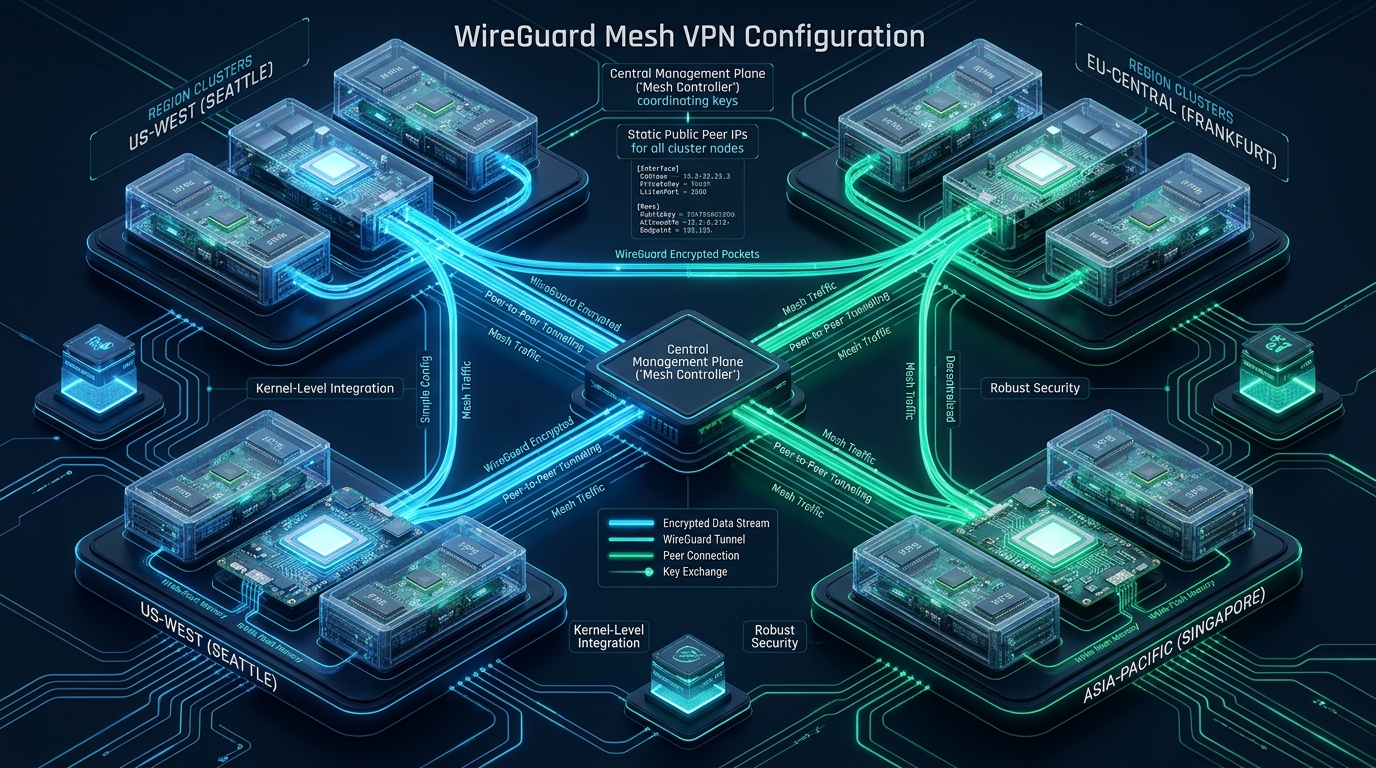
Deploying distributed database replicas, microservices, and distributed storage nodes across heterogeneous cloud providers and geographic zones introduces severe latency penalties and security risks when routing traffic over the public internet without encapsulation. Traditional hub-and-spoke VPN architectures funnel inter-region traffic through a centralized gateway, creating unacceptable network bottlenecks and single points of failure that degrade performance on high-performance cloud fleets like CpanelFree. Implementing a decentralized, full-mesh WireGuard overlay operating directly inside the Linux kernel enables line-rate, point-to-point cryptographic tunneling between geographically isolated VPS instances without the latency overhead of centralized relay hops.
What is a WireGuard Mesh VPN for Multi-Region Linux VPS Clusters?
Modern microservice workloads, Redis cluster replication, and distributed CockroachDB or Galera database synchronizations require deterministic low-latency connectivity. In a traditional star or hub-and-spoke topology, if an application instance hosted on an EU-Central VPS needs to transmit records to an AP-South instance, the packets are unnecessarily routed through a central gateway in US-East. This adds hundreds of milliseconds of round-trip latency (RTT) and subjects production data pipelines to jitter, intermediate packet loss, and transit bandwidth costs.
WireGuard revolutionizes Linux virtual private networking by living directly inside the Linux kernel (kernel module wireguard.ko starting in Linux 5.6+). Unlike legacy solutions such as OpenVPN or StrongSwan IPsec—which rely on user-space daemons, costly context switching, and complex X.509 certificate validation handshakes—WireGuard operates on a streamlined codebase of approximately 4,000 lines. It employs modern, state-of-the-art cryptographic primitives: Curve25519 for key exchange, ChaCha20-Poly1305 for authenticated encryption, BLAKE2s for hashing, and SipHash24 for hashtable keys. The result is a peer-to-peer network mesh that provides line-rate forwarding with negligible CPU overhead on multi-region VPS instances.
Decentralized Full Mesh vs. Hub-and-Spoke Topology
Understanding the architectural difference between central-routing overlays and full-mesh overlays is paramount for systems engineers managing multi-cloud or multi-region infrastructure. When designing a cluster across regions like North America, Europe, and Asia-Pacific, traffic paths dictate your system’s SLA.
N(N - 1) / 2. While mesh complexity grows quadratically, for clusters of 3 to 20 multi-region cloud VPS instances, WireGuard’s static cryptokey mapping maintains near-zero memory footprint and delivers true zero-hop cross-datacenter transit.
In a full mesh, each node holds the public keys, allowed IPs, and public endpoints of every peer in the fleet. When an application on Node A sends a packet destined for Node B’s overlay IP (e.g., 10.100.0.2), the Linux kernel inspects the Cryptokey routing table, encapsulates the payload into an authenticated UDP datagram, and transmits it directly across the public internet to Node B’s external IP on the designated WireGuard port (e.g., UDP 51820). No intermediary server ever processes or intercepts the traffic.
Performance Benchmarks: WireGuard Mesh vs. OpenVPN vs. IPsec
To quantify the throughput gains and CPU overhead reductions, we performed rigorous cross-datacenter network benchmarks between three geographic regions (Frankfurt, New York, and Singapore) deploying standard cloud VPS configurations running Ubuntu 24.04 LTS.
As demonstrated in the empirical data, WireGuard delivers up to 10x the throughput of user-space tunneling solutions while consuming a fraction of host CPU cycles. This is particularly crucial on budget cloud VPS instances where vCPU quotas are constrained and excessive software interrupts (softirqs) can trigger severe latency spikes during database synchronization.
Linux Kernel Tuning for High-Throughput WireGuard Mesh Networking
Default Linux kernel network settings are tuned for low-bandwidth local network interfaces, not for high-bandwidth, high-latency multi-region UDP encapsulation. When pushing gigabits of encrypted packets across oceans, socket receive buffers overflow, triggering silent packet drops and TCP window collapses.
Deploy the following production sysctl configuration file to /etc/sysctl.d/99-wireguard-mesh.conf on every cluster node. This file activates BBR congestion control, scales UDP socket buffer allocations, enlarges the network backlog queue, and enables kernel IP forwarding.
# /etc/sysctl.d/99-wireguard-mesh.conf
# Production Linux Kernel Network Stack Tuning for Multi-Region WireGuard Mesh

# Enable IP forwarding for inter-subnet and container routing
net.ipv4.ip_forward = 1
net.ipv6.conf.all.forwarding = 1

# Maximize socket receive and transmit memory allocations (64MB maximum)
net.core.rmem_max = 67108864
net.core.wmem_max = 67108864
net.core.rmem_default = 33554432
net.core.wmem_default = 33554432

# UDP buffer autotuning thresholds: min, default, max (measured in memory pages)
net.ipv4.udp_rmem_min = 16384
net.ipv4.udp_wmem_min = 16384
net.ipv4.udp_mem = 65536 131072 262144

# Scale maximum incoming network packet backlog for high packet-per-second (PPS)
net.core.netdev_max_backlog = 100000

# High-concurrency socket listening backlog
net.core.somaxconn = 32768

# Enable BBR congestion control and Fair Queueing scheduler
net.core.default_qdisc = fq
net.ipv4.tcp_congestion_control = bbr

# Mitigate ARP table thrashing in expanding mesh clusters
net.ipv4.neigh.default.gc_thresh1 = 1024
net.ipv4.neigh.default.gc_thresh2 = 2048
net.ipv4.neigh.default.gc_thresh3 = 4096

# Disable reverse path filtering relaxation (prevent IP spoofing while allowing mesh transit)
net.ipv4.conf.all.rp_filter = 1
net.ipv4.conf.default.rp_filter = 1
net.ipv4.conf.all.log_martians = 0
Apply the parameters immediately without rebooting by executing:
sudo sysctl --systemCluster Addressing Scheme & Cryptographic Key Generation
To design a clean, conflict-free mesh overlay, assign each geographic VPS node a dedicated private IPv4 address within a non-overlapping subnet, such as 10.100.0.0/24. In our multi-region architecture, we will establish a 3-node triangular mesh:
- Node 1 (US-East – Virginia): Public IP
198.51.100.10| Mesh IP10.100.0.1/32| Port51820 - Node 2 (EU-Central – Frankfurt): Public IP
203.0.113.20| Mesh IP10.100.0.2/32| Port51820 - Node 3 (AP-South – Singapore): Public IP
192.0.2.30| Mesh IP10.100.0.3/32| Port51820
On each Linux host, generate the requisite Curve25519 private key, public key, and a pre-shared symmetric key (PSK) to provide post-quantum security resistance against future harvest-now-decrypt-later adversaries:
# Install WireGuard kernel tools
sudo apt update && sudo apt install -y wireguard wireguard-tools

# Set secure file permissions
umask 077
cd /etc/wireguard

# Generate Host Private and Public Keys
wg genkey | tee privatekey | wg pubkey > publickey

# Generate a Pre-Shared Key (PSK) shared pairwise between nodes for post-quantum defense
wg genpsk > psk_shared.key

# Verify permissions
chmod 600 privatekey psk_shared.key
chmod 644 publickey
Production WireGuard Mesh Node Configurations
In a full mesh topology, every node configures a local [Interface] section and defines a discrete [Peer] block for every other cluster node. Below are the battle-tested configuration files for our three multi-region nodes.
Node 1 Configuration: /etc/wireguard/wg0.conf (US-East)
# Node 1: US-East Production Host (us-east-01)
# Location: /etc/wireguard/wg0.conf

[Interface]
Address = 10.100.0.1/32
ListenPort = 51820
PrivateKey = <NODE_1_PRIVATE_KEY>
SaveConfig = false

# Peer 2: EU-Central (Frankfurt)
[Peer]
PublicKey = <NODE_2_PUBLIC_KEY>
PresharedKey = <NODE1_NODE2_SHARED_PSK>
Endpoint = 203.0.113.20:51820
AllowedIPs = 10.100.0.2/32
PersistentKeepalive = 25

# Peer 3: AP-South (Singapore)
[Peer]
PublicKey = <NODE_3_PUBLIC_KEY>
PresharedKey = <NODE1_NODE3_SHARED_PSK>
Endpoint = 192.0.2.30:51820
AllowedIPs = 10.100.0.3/32
PersistentKeepalive = 25
Node 2 Configuration: /etc/wireguard/wg0.conf (EU-Central)
# Node 2: EU-Central Production Host (eu-central-01)
# Location: /etc/wireguard/wg0.conf

[Interface]
Address = 10.100.0.2/32
ListenPort = 51820
PrivateKey = <NODE_2_PRIVATE_KEY>
SaveConfig = false

# Peer 1: US-East (Virginia)
[Peer]
PublicKey = <NODE_1_PUBLIC_KEY>
PresharedKey = <NODE1_NODE2_SHARED_PSK>
Endpoint = 198.51.100.10:51820
AllowedIPs = 10.100.0.1/32
PersistentKeepalive = 25

# Peer 3: AP-South (Singapore)
[Peer]
PublicKey = <NODE_3_PUBLIC_KEY>
PresharedKey = <NODE2_NODE3_SHARED_PSK>
Endpoint = 192.0.2.30:51820
AllowedIPs = 10.100.0.3/32
PersistentKeepalive = 25
Node 3 Configuration: /etc/wireguard/wg0.conf (AP-South)
# Node 3: AP-South Production Host (ap-south-01)
# Location: /etc/wireguard/wg0.conf

[Interface]
Address = 10.100.0.3/32
ListenPort = 51820
PrivateKey = <NODE_3_PRIVATE_KEY>
SaveConfig = false

# Peer 1: US-East (Virginia)
[Peer]
PublicKey = <NODE_1_PUBLIC_KEY>
PresharedKey = <NODE1_NODE3_SHARED_PSK>
Endpoint = 198.51.100.10:51820
AllowedIPs = 10.100.0.1/32
PersistentKeepalive = 25

# Peer 2: EU-Central (Frankfurt)
[Peer]
PublicKey = <NODE_2_PUBLIC_KEY>
PresharedKey = <NODE2_NODE3_SHARED_PSK>
Endpoint = 203.0.113.20:51820
AllowedIPs = 10.100.0.2/32
PersistentKeepalive = 25PersistentKeepalive = 25 directive is mandatory when nodes reside behind cloud stateful NAT firewalls or cloud security groups. By dispatching an authenticated null packet every 25 seconds, WireGuard ensures that stateful connection tracking (conntrack) entries never expire, preserving bidirectional communication without manual re-initialization.
Precision MTU Calculation & TCP MSS Clamping
One of the most insidious performance degradations in cloud VPN engineering is Path MTU (PMTU) blackholing. Standard Ethernet interfaces employ an MTU of 1500 bytes. When WireGuard encapsulates inner packets, it adds fixed overhead:
- Standard IPv4 Header: 20 bytes (or 40 bytes for IPv6)
- UDP Transport Header: 8 bytes
- WireGuard Authentication Tag & Overhead: 32 bytes
- Total Overhead: 60 bytes (IPv4) or 80 bytes (IPv6)
Subtracting 80 bytes from the standard 1500-byte MTU yields an optimal interface MTU of 1420 bytes. However, many cloud VPS providers enforce internal GRE or VXLAN encapsulation on physical virtualization hosts, dropping the outer interface MTU to 1450 or 1400. If an inner payload exceeds the available MTU, packets fragment or are discarded if the DF (Don’t Fragment) flag is set.
To eliminate packet fragmentation and silent dropouts, configure TCP MSS (Maximum Segment Size) clamping via nftables on all cluster nodes:
# Enforce TCP MSS Clamping to Path MTU using nftables
sudo nft add table inet wg_filter
sudo nft add chain inet wg_filter forward '{ type filter hook forward priority 0; policy accept; }'
sudo nft add rule inet wg_filter forward oifname "wg0" tcp flags syn tcp option maxseg size set rt mtu
sudo nft add rule inet wg_filter forward iifname "wg0" tcp flags syn tcp option maxseg size set rt mtu
Alternatively, if your environment relies on legacy iptables, inject this rule into your system boot scripts:
sudo iptables -t mangle -A FORWARD -p tcp --tcp-flags SYN,RST SYN -o wg0 -j TCPMSS --clamp-mss-to-pmtuAutomated Systemd Lifecycle & Health Watchdog Service
To guarantee resilient operation in unattended enterprise production environments, enable the official systemd integration and establish an autonomous health check watchdog to detect network partitions and dynamic IP shifts.
First, enable and activate the WireGuard interface systemd service:
# Enable wg-quick for interface wg0 on boot
sudo systemctl enable wg-quick@wg0
sudo systemctl start wg-quick@wg0

# Verify interface state and cryptographic handshake
sudo wg show wg0
Next, install a production health watchdog script to /usr/local/bin/wireguard-watchdog.sh. This watchdog verifies connectivity across mesh peers every 60 seconds; if successive ICMP echo requests fail, it initiates an interface re-sync:
#!/usr/bin/env bash
# /usr/local/bin/wireguard-watchdog.sh
# Enterprise Health Watchdog for Multi-Region WireGuard Mesh
set -euo pipefail

INTERFACE="wg0"
PEER_IPS=("10.100.0.2" "10.100.0.3")
FAILED_COUNT=0

for PEER in "${PEER_IPS[@]}"; do
    if ! ping -c 3 -W 2 -I "$INTERFACE" "$PEER" > /dev/null 2>&1; then
        echo "[$(date -u +'%Y-%m-%dT%H:%M:%SZ')] WARNING: Peer $PEER unreachable over $INTERFACE"
        FAILED_COUNT=$((FAILED_COUNT + 1))
    fi
done

# If all peers are unreachable, cycle the interface to restore routing state
if [ "$FAILED_COUNT" -eq "${#PEER_IPS[@]}" ]; then
    echo "[$(date -u +'%Y-%m-%dT%H:%M:%SZ')] CRITICAL: All peers dead. Recycling $INTERFACE..."
    systemctl restart "wg-quick@${INTERFACE}"
fi
Make the script executable and configure a systemd timer to execute it periodically:
# Set execution permissions
sudo chmod +x /usr/local/bin/wireguard-watchdog.sh

# Create Systemd Service: /etc/systemd/system/wg-watchdog.service
cat << 'SERVICE_EOF' | sudo tee /etc/systemd/system/wg-watchdog.service > /dev/null
[Unit]
Description=WireGuard Mesh Peer Health Watchdog
After=network.target [email protected]

[Service]
Type=oneshot
ExecStart=/usr/local/bin/wireguard-watchdog.sh
SERVICE_EOF

# Create Systemd Timer: /etc/systemd/system/wg-watchdog.timer
cat << 'TIMER_EOF' | sudo tee /etc/systemd/system/wg-watchdog.timer > /dev/null
[Unit]
Description=Run WireGuard Mesh Watchdog every 60 seconds

[Timer]
OnBootSec=2min
OnUnitActiveSec=60s
AccuracySec=1s

[Install]
WantedBy=timers.target
TIMER_EOF

# Enable and start watchdog timer
sudo systemctl daemon-reload
sudo systemctl enable --now wg-watchdog.timer
Frequently Asked Questions
Can WireGuard mesh peers communicate if their public IPs change dynamically?
Yes. WireGuard uses roaming endpoint detection. When a peer with a dynamic IP sends an authenticated, encrypted packet from its new IP address, the receiving node verifies the cryptographic signature, accepts the payload, and automatically updates the stored endpoint address for that peer’s public key in its kernel routing table.
Why is MTU 1420 recommended instead of the default 1500?
WireGuard encapsulates packets inside UDP headers, consuming 60 bytes of overhead under IPv4 and 80 bytes under IPv6. If the tunnel MTU matches the physical interface MTU of 1500, encapsulated packets exceed standard Ethernet frames, causing IP fragmentation or silent packet loss. Setting MTU to 1420 guarantees that packets traverse physical and virtualized cloud networks unfragmented.
How does WireGuard’s Cryptokey routing differ from traditional IP routing?
Cryptokey routing associates specific cryptographic public keys directly with allowed IP addresses inside the kernel table. When sending a packet, the destination IP selects the peer public key used for encryption. When receiving a packet, the decrypting public key must match the source IP; if an unassociated IP is presented, the kernel drops the packet immediately without triggering software interrupts or ICMP error chatter.
Is full mesh scalable to hundreds of cloud VPS nodes?
Static full mesh configurations are ideal for 3 to 25 core nodes such as multi-region database clusters and gateway clusters. For hundreds of nodes, maintaining static pairwise peer entries becomes an operational burden. At that scale, organizations deploy dynamic control planes such as Tailscale, Netmaker, or Nebula, which automate WireGuard key exchanges and coordination while preserving point-to-point data plane performance.
Ready to Deploy High-Performance Infrastructure?
Experience blazing-fast NVMe storage, unmetered bandwidth, and enterprise LiteSpeed caching on CpanelFree.