
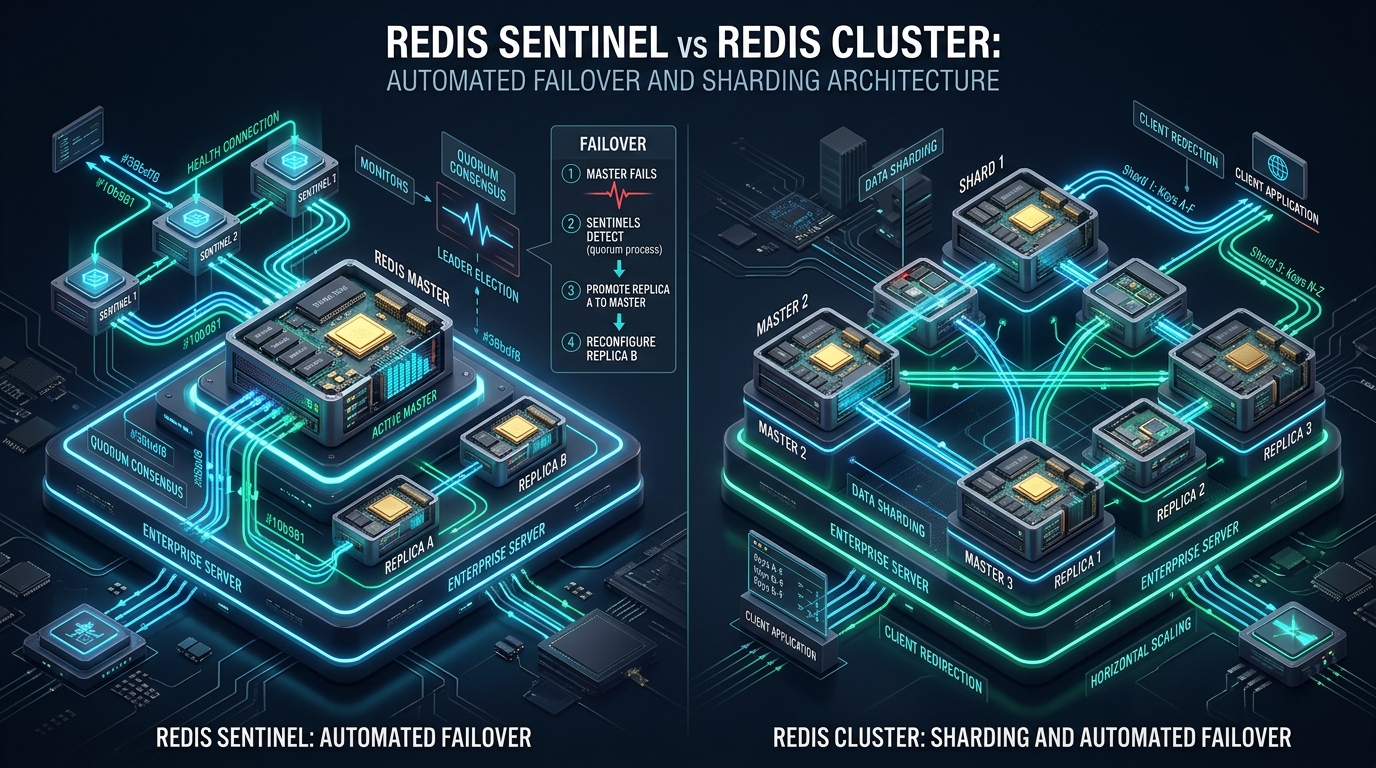
Scaling in-memory data tiers beyond a single compute instance introduces acute trade-offs between linear horizontal scale and strict high-availability semantics. When architecting distributed caching or session storage on CpanelFree high-performance infrastructure, systems engineers frequently conflate Redis Sentinel’s automated failover topologies with Redis Cluster’s partitioned hash-slot sharding model. Selecting the incorrect architecture risks split-brain partitions, redundant replication overhead, or catastrophic cache stampedes during node evictions.
Architectural Verdict: Redis Sentinel vs Redis Cluster
Redis Sentinel provides automated failover, health monitoring, and client service discovery for a single master-replica topology without data partitioning; it is optimal for datasets smaller than single-node RAM limits. Conversely, Redis Cluster delivers transparent multi-master horizontal sharding across 16,384 hash slots with integrated failover, designed for datasets scaling beyond single-machine memory or CPU bottlenecks.
To establish architectural clarity, production engineers must distinguish between high availability (HA) and horizontal scalability (sharding). Redis Sentinel is an external supervision orchestration layer that manages master-replica sets. It does not partition data: every write hits a single active master, and replicas maintain full mirrors of the dataset via asynchronous replication. In contrast, Redis Cluster is an intrinsic, distributed implementation where data is segmented across multiple independent master nodes using a deterministic hashing algorithm, providing both horizontal write scalability and decentralized failure handling.
Architectural Comparison Matrix
The following comparative matrix contrasts the core architectural primitives of Redis Sentinel and Redis Cluster under enterprise operating conditions:
Deep Dive 1: Redis Sentinel Consensus, SDOWN/ODOWN, and Failover Internals
Redis Sentinel operates as an independent, loosely coupled consensus cluster that continuously monitors master and replica instances via regular PING command sweeps. Rather than embedding routing state inside Redis data engines, Sentinel uses Redis Pub/Sub channels to discover peer sentinels and synchronize health topologies.
The Failure Detection State Machine
Sentinel prevents transient network blips from triggering destructive failover cascades through a two-stage failure detection lifecycle:
- Subjective Down (SDOWN): An individual Sentinel instance loses connectivity with a target master for longer than the configured
down-after-millisecondswindow. At this stage, only that single Sentinel considers the node unreachable. - Objective Down (ODOWN): Once a Sentinel flags SDOWN, it transmits
SENTINEL is-master-down-by-addr <ip> <port> <current-epoch> <runid>packets to all other known Sentinels. When the count of agreeing Sentinels reaches or exceeds the configuredquorum, the master transitions to ODOWN state.
A common operational mistake is assuming that a quorum of 2 in a 3-node Sentinel setup can perform a failover autonomously. While quorum is sufficient to declare
ODOWN, the Sentinel leader election requires an absolute majority (N/2 + 1) of all active Sentinels to authorize failover execution. If a network partition isolates 2 Sentinels from a total cluster of 5, ODOWN can be flagged, but leader election will fail.
Leader Election and Replica Promotion Heuristics
Once ODOWN is achieved, the Sentinels initiate a Raft-style leader election using monotonically increasing configuration epochs. The elected Sentinel leader assumes the role of failover coordinator and executes replica promotion using a deterministic ranking algorithm:
- Replica Priority: Replicas with a lower
replica-priority(configured inredis.conf) are preferred. A priority of0guarantees a node is never promoted. - Replication Offset: The coordinator evaluates
master_repl_offset. The replica that has processed the most write bytes from the fallen master is selected to minimize data loss. - Lexicographical Run ID: If priorities and offsets are identical, the replica with the lexicographically smaller Run ID is selected as a deterministic tiebreaker.
Once promoted via SLAVEOF NO ONE (or REPLICAOF NO ONE), the leader reconfigures surviving replicas to track the new master via REPLICAOF <new-ip> <new-port> and broadcasts the transition to applications using the +switch-master Pub/Sub channel.
Deep Dive 2: Redis Cluster Hash Slots, Gossip Protocol, and Smart Client Routing
Redis Cluster rejects the centralized proxy and external supervisor patterns in favor of a shared-nothing, decentralized architecture. The entire keyspace is divided into exactly 16,384 logical hash slots, distributed dynamically across all operational master nodes.
Hash Slot Computation and Hash Tags
Every key written to Redis Cluster is mapped to a specific hash slot using the CRC16 checksum modulo 16,384:
HASH_SLOT = CRC16(key) mod 16384Under standard operation, multi-key operations (such as MGET, transactions via MULTI/EXEC, or Lua scripts) that span different hash slots are explicitly rejected by the engine with a CROSSSLOT Keys in request don't hash to the same slot exception. To execute atomic multi-key operations in a clustered environment, engineers use Hash Tags. When a string contains {...}, only the text inside the curly braces is fed into the CRC16 hash function:
# Both keys evaluate CRC16 solely on "tenant_42", hashing to the exact same slot:
SET user:{tenant_42}:profile "{\"name\": \"DevOps\"}"
SET user:{tenant_42}:orders  "[1001, 1002, 1003]"
MGET user:{tenant_42}:profile user:{tenant_42}:orders
The Cluster Bus and Gossip Protocol
Nodes communicate through an out-of-band point-to-point binary channel called the Cluster Bus. By default, the Cluster Bus listens on the standard client port plus 10,000 (e.g., port 16379 for client port 6379). Nodes continuously exchange gossip packets containing:
- Node state, IP addresses, and assigned hash slot bitmaps.
- Heartbeat ping/pong messages with random peer nodes to detect cluster state changes.
- Failure flags:
PFAIL(Possible Failure) when a node does not respond withincluster-node-timeout, which is escalated toFAILwhen a majority of masters agree.
Smart Client Redirections: MOVED vs. ASK
Clients connecting to Redis Cluster do not communicate through a central load balancer. Instead, “Smart Clients” (such as Lettuce for Java, redis-py, or ioredis for Node.js) initialize a local routing table mapping each of the 16,384 slots to specific node IP addresses. When topology changes occur, Redis responds with redirection errors:
- MOVED Redirection:
-MOVED 3999 10.0.0.12:6379indicates the requested slot has permanently migrated to node 10.0.0.12. The client updates its internal slot-to-node cache and retries the command on the new node. - ASK Redirection:
-ASK 3999 10.0.0.12:6379occurs during active slot resharding when a specific key has already been moved to the target node, but the overall slot migration is incomplete. The client must precede the retried query with anASKINGcommand without modifying its permanent slot cache.
Production Linux Kernel Hardening for Redis
Regardless of whether Sentinel or Cluster is deployed, running high-throughput Redis instances on Linux requires tuning virtual memory overcommit, connection backlogs, and memory page semantics. Without these kernel configurations, background snapshots (BGSAVE) and replication forks will fail under memory pressure.
Apply the following production sysctl configuration to /etc/sysctl.d/99-redis-performance.conf:
# /etc/sysctl.d/99-redis-performance.conf
# Enforce heuristic memory overcommit to prevent BGSAVE fork failures
vm.overcommit_memory = 1

# Minimize swapping aggressive paging while retaining emergency swap head-room
vm.swappiness = 1

# Expand the listen queue backlog for high burst traffic
net.core.somaxconn = 65535
net.ipv4.tcp_max_syn_backlog = 65535

# Optimize TCP buffer window sizing
net.core.rmem_max = 16777216
net.core.wmem_max = 16777216
net.ipv4.tcp_rmem = 4096 87380 16777216
net.ipv4.tcp_wmem = 4096 65536 16777216

# File handle exhaustion protection
fs.file-max = 2097152
Activate the configuration immediately with:
sudo sysctl --systemTransparent Huge Pages allocate 2MB memory blocks instead of standard 4KB pages. During Redis background saves (AOF rewrite or RDB snapshotting), Linux Copy-on-Write (CoW) forces the kernel to copy entire 2MB pages for even a single byte modification. This causes massive memory amplification and severe latency spikes. Disable THP at boot using a systemd service or kernel boot parameter:
echo never > /sys/kernel/mm/transparent_hugepage/enabled.
Production Configuration Files
1. Redis Sentinel Production Configuration
Deploy the following configuration on each of your three dedicated Sentinel nodes at /etc/redis/sentinel.conf:
# /etc/redis/sentinel.conf
port 26379
daemonize no
pidfile /var/run/redis-sentinel.pid
logfile /var/log/redis/sentinel.log
dir /var/lib/redis

# Monitor master named 'cpanelfree-master' on 10.0.0.10 port 6379 with quorum of 2
sentinel monitor cpanelfree-master 10.0.0.10 6379 2

# Authentication credentials
sentinel auth-pass cpanelfree-master SuperSecureClusterAuthToken2026

# Milliseconds of unreachable ping response before declaring SDOWN
sentinel down-after-milliseconds cpanelfree-master 3000

# Failover timeout in milliseconds (abort if failover exceeds this threshold)
sentinel failover-timeout cpanelfree-master 15000

# Number of replicas that can simultaneously re-sync with the new master
sentinel parallel-syncs cpanelfree-master 1

# Security: Prevent unauthorized script execution
sentinel deny-scripts-reconfig yes
2. Redis Cluster Production Node Configuration
Deploy the following configuration on each of your 6 Cluster nodes (3 Masters, 3 Replicas) at /etc/redis/redis-cluster.conf:
# /etc/redis/redis-cluster.conf
port 6379
bind 0.0.0.0
protected-mode yes
requirepass SuperSecureClusterAuthToken2026
masterauth SuperSecureClusterAuthToken2026

# Enable Native Cluster Sharding
cluster-enabled yes
cluster-config-file nodes-6379.conf
cluster-node-timeout 5000

# Require all 16384 slots to be covered for the cluster to serve reads/writes
# Set to 'no' if you prefer partial availability during master failure without replica
cluster-require-full-coverage no

# Prevent replicas from auto-migrating to an orphaned master if under-replicated
cluster-migration-barrier 1

# Memory Management & Eviction
maxmemory 8gb
maxmemory-policy volatile-lru

# Persistence: Append Only File (AOF) with fsync every second
appendonly yes
appendfilename "appendonly.aof"
appendfsync everysec
no-appendfsync-on-rewrite yes
auto-aof-rewrite-percentage 100
auto-aof-rewrite-min-size 64mb
3. Systemd Process Limits Override
Ensure Redis does not encounter file descriptor or process exhaustion under heavy client load by establishing an override at /etc/systemd/system/redis-server.service.d/override.conf:
# /etc/systemd/system/redis-server.service.d/override.conf
[Service]
LimitNOFILE=65536
LimitNPROC=65536
LimitMEMLOCK=infinity
TasksMax=infinity
Split-Brain Mitigation and Data Loss Prevention
Because Redis utilizes asynchronous replication for ultra-low latency, neither Sentinel nor Cluster guarantees strict CP (Consistency / Partition tolerance) semantics under the CAP theorem. During network partitions, an isolated master may continue accepting writes from clients while Sentinels or Cluster peers promote a replica in the majority partition. When the partition heals and the old master rejoins as a replica, all writes accepted during the isolation window are permanently discarded.
Production Guardrail: Bound Write Losses
To prevent split-brain data corruption, configure write bounds in redis.conf across all master nodes:
# Reject client writes if fewer than 1 replica acknowledges within 10 seconds
min-replicas-to-write 1
min-replicas-max-lag 10
Under this directive, if an isolated master cannot replicate writes to at least one replica within 10 seconds, it stops accepting writes and returns an error to connected clients, effectively bounding the data loss window.
Decision Matrix: Which Architecture Should You Deploy?
Choosing between Sentinel and Cluster depends primarily on your working dataset size, multi-key transaction requirements, and application client driver capabilities:
- Choose Redis Sentinel If:
- Your working dataset fits comfortably within the RAM of a single physical server (e.g., < 32GB or 64GB).
- Your workload relies heavily on complex multi-key transactions, cross-key Lua scripts, or standard pub/sub message patterns.
- You are running CMS platforms, such as WordPress with Redis Object Cache or Magento session storage, where client drivers do not natively implement hash slot cluster routing.
- Operational simplicity and straightforward debugging are paramount for your infrastructure team.
- Choose Redis Cluster If:
- Your active dataset exceeds the memory boundaries of single compute instances (e.g., 128GB to several terabytes).
- Write throughput saturates the single-threaded execution core of a standalone Redis master.
- Your application microservices use modern smart client libraries (Lettuce, ioredis, redis-py) capable of managing hash slots and redirect loops.
- Keys can be structured using hash tags (
{tenant_id}:key) to guarantee co-location for multi-key workflows.
Frequently Asked Questions
Can Redis Sentinel shard data across multiple master nodes?
No. Redis Sentinel does not provide data sharding or partitioning. It is strictly an orchestration and monitoring layer that manages independent master-replica sets for high availability. To achieve horizontal sharding across multiple master nodes, you must deploy Redis Cluster or utilize an architectural proxy layer such as Envoy or Twemproxy.
Why do multi-key operations throw CROSSSLOT errors in Redis Cluster?
In Redis Cluster, keys are mapped to 16,384 independent hash slots. If a multi-key command (such as MGET or a Lua script) touches keys that map to different hash slots residing on different physical masters, Redis Cluster rejects the operation to avoid costly cross-network distributed transactions. You can resolve this by enclosing common identifiers in hash tags (e.g., {user:100}:profile and {user:100}:orders), forcing both keys to compute their CRC16 hash strictly on user:100.
How many total nodes are required for a minimal high-availability Redis Cluster?
A production Redis Cluster requires a minimum of 6 nodes: 3 master nodes to maintain a voting majority during gossip-based failure detection, and 3 replica nodes (one for each master) to ensure automated failover. While it is technically possible to run 3 masters without replicas, losing a single master would leave its assigned hash slots orphaned and render the cluster partially or entirely offline.
Can I run Redis Sentinel and Redis Cluster together?
No. Redis Sentinel and Redis Cluster are mutually exclusive architectural patterns. Redis Cluster contains its own internal, gossip-based failure detection and automated failover election mechanisms. Introducing Sentinel into a Redis Cluster environment is unnecessary, unsupported, and will lead to conflicting consensus states.
Ready to Deploy High-Performance Infrastructure?
Experience blazing-fast NVMe storage, unmetered bandwidth, and enterprise LiteSpeed caching on CpanelFree.