
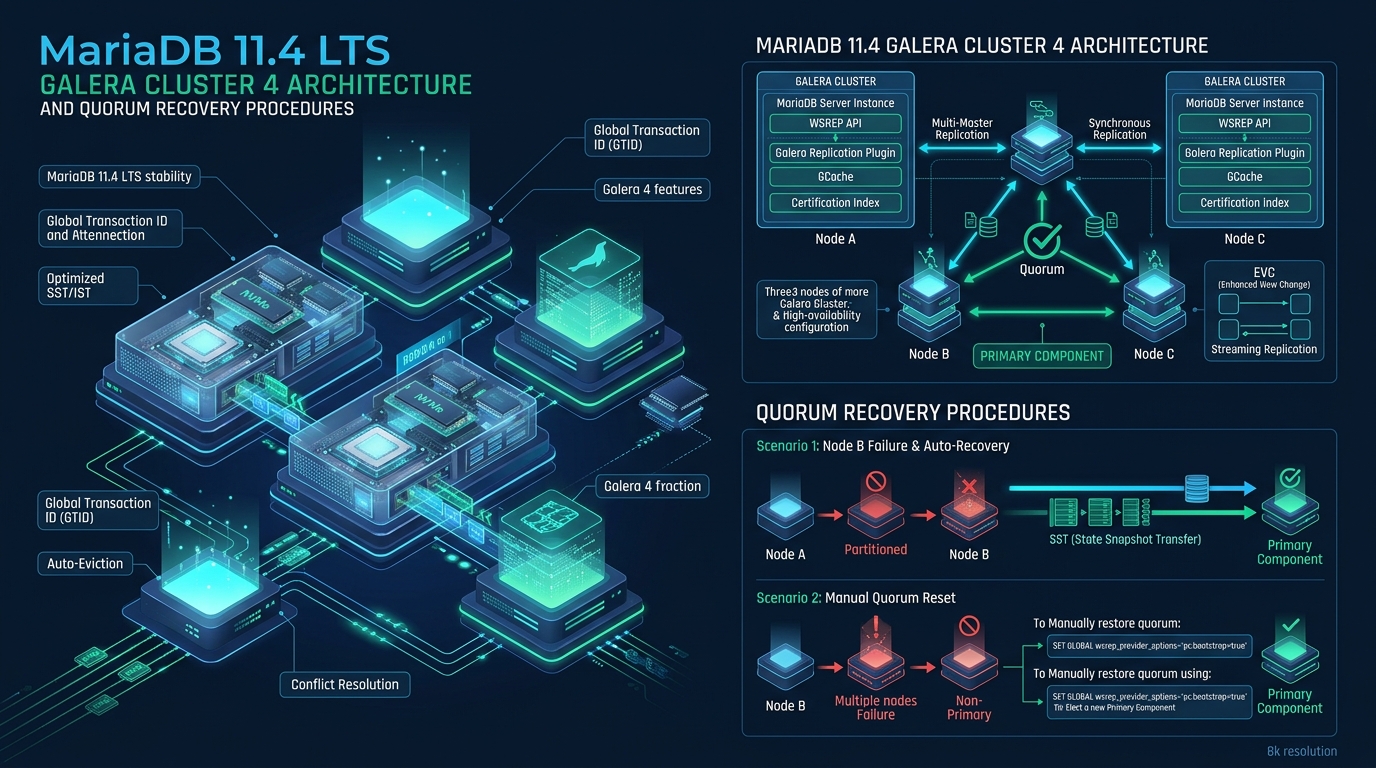
Deploying synchronous active-active database clustering in enterprise environments demands resilient replication protocols and unambiguous failure-mode runbooks. When network partitions or abrupt multi-node crashes fracture cluster consensus, database administrators must execute deterministic state-triage procedures to prevent split-brain anomalies and data corruption on high-traffic hosting platforms like CpanelFree. Understanding the internal mechanics of Galera 4 under MariaDB 11.4 LTS empowers systems engineers to guarantee zero transaction loss, optimize Write-Set Replication (wsrep) throughput, and swiftly recover non-primary components back to healthy operational quorum.
Understanding Galera Cluster 4 Quorum and Consensus Under MariaDB 11.4 LTS
MariaDB 11.4 LTS Galera Cluster 4 maintains absolute consistency via synchronous multi-master write-set replication (wsrep) and quorum-based group communication. When quorum is lost during split-brain or complete cluster failure, recovery requires evaluating each node’s sequence number (seqno) via mysqld --wsrep-recover, setting safe_to_bootstrap: 1 in grastate.dat on the most advanced node, and initializing a new Primary Component.
MariaDB 11.4 Long Term Support (LTS) builds upon the enterprise-grade foundation of the Galera 4 replication engine, incorporating enhanced certification performance, optimized Incremental State Transfer (IST) cache management, and streaming replication for massive transactions. Unlike traditional asynchronous or semi-synchronous replication models where replica drift and replication lag introduce failover latency, Galera uses certification-based replication over the Galera Group Communication System (GComm).
In Galera 4, transactions execute optimistically on a local node using standard InnoDB row-level locking. At the COMMIT boundary, the transaction payload is packaged into a write-set containing primary key hashes, row identifiers, and binary log events. This write-set is broadcast across the cluster via total order multicast. Every node independently certifies the write-set against its local certification queue to verify there are no conflicting concurrent updates against the same rows. If certification succeeds, the transaction commits locally; if it fails, the local transaction aborts with a deadlock error.
Quorum in Galera is strictly majority-driven. A cluster of N nodes requires at least floor(N/2) + 1 active votes to establish a Primary Component (PC). When network partitions occur, isolated partitions with less than a majority drop into a Non-Primary state, immediately rejecting incoming client reads and writes to prevent split-brain diverging states. In a standard three-node cluster, two nodes must maintain bidirectional communication to retain the Primary Component.
pc.weight). By default, every node carries a weight of 1. In two-node disaster-recovery clusters or split data center topologies, administrators can designate an odd-weighted arbitrator node (garbd) or assign asymmetric weights to avoid split-brain stalemates when an even number of database nodes are deployed.
Architectural Performance Matrix: Default vs. Tuned Production Galera 4
Out-of-the-box MariaDB Galera settings cater to conservative resource footprints. High-throughput production environments with enterprise NVMe storage arrays and low-latency interconnects require targeted tuning across the GComm protocol, transaction caches, and certification threads.
State Transfer Deep-Dive: IST vs. SST in MariaDB 11.4
When an offline node attempts to rejoin the active cluster, it undergoes a synchronization negotiation with a donor node. Galera evaluates the sequence numbers stored in the cluster’s circular memory-mapped transaction log (gcache.page and gcache.size) against the joining node’s last known state.
Incremental State Transfer (IST)
IST is the fastest and least intrusive synchronization pathway. If the joining node has been offline for a brief duration (e.g., during a kernel patch or scheduled rolling upgrade), its missing write-sets still reside inside the donor’s gcache buffer. The donor streams only the delta write-sets via the IST port (default 4568/tcp). The donor remains fully operational and read/write capable during the transfer, minimizing cluster-wide jitter.
State Snapshot Transfer (SST)
If the joining node has been offline longer than the gcache retention window, or if its local storage has been wiped or corrupted, it cannot satisfy an IST. The cluster triggers a State Snapshot Transfer. Under MariaDB 11.4 LTS, the default and recommended SST provider is mariabackup. Mariabackup creates a consistent physical point-in-time snapshot of the donor’s InnoDB tablespaces using non-blocking hot copy techniques, streaming the data across the network via socat or netcat directly to the joiner node.
wsrep_sst_method=rsync in production environments with high write volumes. While rsync is simple, it places a global read lock (FLUSH TABLES WITH READ LOCK) on the donor node for the entire duration of the transfer, taking a vital cluster member completely out of service for active transactions.
Production Configuration Files
To establish a resilient 3-node MariaDB 11.4 LTS Galera Cluster with optimized network timeouts and high-performance recovery parameters, deploy the following configuration files to /etc/my.cnf.d/60-galera.cnf and /etc/sysctl.d/99-galera.conf.
1. MariaDB 11.4 Galera Configuration (/etc/my.cnf.d/60-galera.cnf)
# /etc/my.cnf.d/60-galera.cnf
# Production Galera Cluster 4 Configuration for MariaDB 11.4 LTS

[mysqld]
binlog_format                  = ROW
default_storage_engine         = InnoDB
innodb_autoinc_lock_mode       = 2
innodb_flush_log_at_trx_commit = 2
innodb_buffer_pool_size        = 12G
innodb_buffer_pool_instances   = 8
innodb_log_file_size           = 2G
innodb_file_per_table          = 1

# Galera Provider and Library Configuration
wsrep_on                       = ON
wsrep_provider                 = /usr/lib64/galera-4/libgalera_smm.so
wsrep_cluster_name             = "cpanelfree_mariadb_production"
wsrep_cluster_address          = "gcomm://10.0.10.11,10.0.10.12,10.0.10.13"
wsrep_node_name                = "db-node-01"
wsrep_node_address             = "10.0.10.11"

# Multi-Threaded Applier & Certification
wsrep_slave_threads            = 16
wsrep_certify_nonPK            = 1
wsrep_max_ws_rows              = 131072
wsrep_max_ws_size              = 1073741824

# State Snapshot Transfer (SST) Settings
wsrep_sst_method               = mariabackup
wsrep_sst_auth                 = "sst_user:EnterpriseSecureClusterPassword99#"
wsrep_sst_donor                = "db-node-02,db-node-03"

# Galera Provider Options (Tuned GComm, Gcache & Flow Control)
wsrep_provider_options         = "gcache.size=8G; " \
                                 "gcache.page_size=128M; " \
                                 "gcache.recover=yes; " \
                                 "gcs.fc_limit=256; " \
                                 "gcs.fc_factor=0.8; " \
                                 "evs.keepalive_period=PT1S; " \
                                 "evs.suspect_timeout=PT3S; " \
                                 "evs.inactive_timeout=PT5S; " \
                                 "evs.install_timeout=PT5S; " \
                                 "pc.weight=1"
2. Kernel Network & Socket Tuning (/etc/sysctl.d/99-galera.conf)
# /etc/sysctl.d/99-galera.conf
# Linux Kernel Socket and Buffer Optimization for Galera Cluster Interconnect

# Enlarge socket receive and transmit buffers for high-bandwidth SST/IST transfers
net.core.rmem_max = 67108864
net.core.wmem_max = 67108864
net.core.rmem_default = 33554432
net.core.wmem_default = 33554432
net.core.optmem_max = 2048576

# TCP Window Memory Tuning (min, default, max)
net.ipv4.tcp_rmem = 4096 87380 67108864
net.ipv4.tcp_wmem = 4096 65536 67108864

# Enhance backlog queue depths to avoid dropped connection handshakes
net.core.netdev_max_backlog = 10000
net.core.somaxconn = 65535

# Enable TCP Keepalive for fast dead-peer eviction
net.ipv4.tcp_keepalive_time = 30
net.ipv4.tcp_keepalive_intvl = 5
net.ipv4.tcp_keepalive_probes = 3

# Mitigate SYN flood risks while enabling high-concurrency connections
net.ipv4.tcp_syncookies = 1
net.ipv4.tcp_tw_reuse = 1
net.ipv4.tcp_fin_timeout = 15
Step-by-Step Quorum Recovery Procedures
During sudden catastrophic events—such as cascading power outages across all rack PDUs or correlated network fabric disconnects—every node in the cluster terminates ungracefully. In this state, the Primary Component ceases to exist, and all nodes mark their local state as unsafe to bootstrap. Restoring the cluster without following exact validation steps risks booting from a stale node and overwriting recent transactions across the entire topology.
Scenario A: Full Cluster Crash Recovery
Step 1: Inspect grastate.dat Across All Nodes
Do NOT blindly restart MariaDB on any node. Log into every cluster member and inspect the Galera state persistence file located in the MySQL datadir (typically /var/lib/mysql/grastate.dat):
# Execute on db-node-01, db-node-02, and db-node-03:
cat /var/lib/mysql/grastate.dat

# Output Example:
# GALERA saved state
version: 2.1
uuid:    8f3e2b51-d417-11ee-8c44-525400123456
seqno:   -1
safe_to_bootstrap: 0
If seqno shows -1, it indicates the database process died before it could cleanly persist its sequence number during shutdown. In this case, invoke MariaDB’s automated position recovery tool.
Step 2: Run Position Recovery on All Nodes
# Run position recovery in foreground
mariadbd --wsrep-recover

# Scan the error log for the recovered UUID and sequence number:
grep "Recovered position" /var/log/mariadb/mariadb.log | tail -n 1

# Sample output:
# 2026-09-20 04:12:18 0 [Note] WSREP: Recovered position: 8f3e2b51-d417-11ee-8c44-525400123456:14892044
Step 3: Identify the Most Advanced Node
Compare the recovered sequence numbers across all nodes:
db-node-01: seqno = 14892044db-node-02: seqno = 14891980db-node-03: seqno = 14892040
Here, db-node-01 possesses sequence number 14892044, making it the definitive authoritative source. Bootstrapping from any other node would permanently wipe the 64 transactions committed to db-node-01.
Step 4: Bootstrap the New Primary Component
On db-node-01, edit /var/lib/mysql/grastate.dat to set safe_to_bootstrap: 1:
# On db-node-01 only:
sed -i 's/safe_to_bootstrap: 0/safe_to_bootstrap: 1/' /var/lib/mysql/grastate.dat

# Initialize the new cluster primary component:
galera_new_cluster

# Verify cluster status:
mariadb -u root -p -e "SHOW STATUS LIKE 'wsrep_cluster_status'; SHOW STATUS LIKE 'wsrep_cluster_size';"
# Output: wsrep_cluster_status = Primary, wsrep_cluster_size = 1
Step 5: Rejoin Remaining Nodes
Start MariaDB sequentially on db-node-03, followed by db-node-02, using standard systemd commands:
# On db-node-03, then db-node-02:
systemctl start mariadb

# Confirm 3-node cluster convergence:
mariadb -u root -p -e "SHOW STATUS LIKE 'wsrep_cluster_size'; SHOW STATUS LIKE 'wsrep_connected';"
# Output: wsrep_cluster_size = 3, wsrep_connected = ON
Scenario B: Split-Brain Quorum Overrides Without Service Restart
If network partition isolates an surviving sub-cluster that falls below quorum (for example, in a 2-node cluster where one node drops, leaving the surviving node with 50% of the vote), the surviving node transitions into wsrep_cluster_status = Non-Primary and rejects queries with ERROR 1047 (08S01): Unknown command.
If you have verified that the isolated partner node is completely dead and there is zero possibility of concurrent writes, you can force the surviving node to establish a new Primary Component dynamically without restarting the database daemon:
# Check current state
mariadb -u root -p -e "SHOW STATUS LIKE 'wsrep_cluster_status';"
# wsrep_cluster_status: Non-Primary

# Dynamically force primary component bootstrapping on the active node:
mariadb -u root -p -e "SET GLOBAL wsrep_provider_options='pc.bootstrap=true';"

# Validate recovery
mariadb -u root -p -e "SHOW STATUS LIKE 'wsrep_cluster_status'; SHOW STATUS LIKE 'wsrep_ready';"
# wsrep_cluster_status: Primary, wsrep_ready: ON
SET GLOBAL wsrep_provider_options='pc.bootstrap=true' is an authoritative action. Only execute this command if you have verified that the separated node or partition is definitively powered off or inaccessible to client traffic. If both partitions execute pc.bootstrap=true simultaneously, a catastrophic split-brain state is triggered, causing irrecoverable data divergence.
Frequently Asked Questions
What happens if I bootstrap a cluster from a node with a lower sequence number?
Bootstrapping from a node with a lower seqno establishes an authoritative cluster state that lacks the missing transactions. When nodes with higher sequence numbers subsequently attempt to join, their state will conflict with the cluster’s lower state, triggering a forced State Snapshot Transfer (SST) that overwrites their local tablespaces, permanently destroying the newer committed transactions.
Why does safe_to_bootstrap show 0 on all nodes after a power outage?
During an ungraceful crash or simultaneous power failure, none of the nodes execute a clean shutdown sequence to update grastate.dat. Galera intentionally sets safe_to_bootstrap: 0 as a safety guardrail to force database administrators to run mariadbd --wsrep-recover and determine the highest sequence number manually, preventing accidental data loss.
Can I use Galera Arbitrator (garbd) instead of a third full database node?
Yes. garbd participates in the Galera Group Communication protocol and casts quorum votes without maintaining a database tablespace or replicating write-sets. Deploying garbd on a lightweight external host or cloud instance provides the necessary odd quorum vote in a two-node cluster at minimal resource cost.
How does gcache.size affect Incremental State Transfer (IST) availability?
The gcache.size directive defines the ring-buffer capacity for cached write-sets. If an offline node reconnects while its missing sequence numbers still exist inside the donor’s gcache, an efficient IST occurs. If writes on the active cluster exceed the gcache capacity before the node rejoins, the donor is forced to perform a resource-heavy SST.
Ready to Deploy High-Performance Infrastructure?
Experience blazing-fast NVMe storage, unmetered bandwidth, and enterprise LiteSpeed caching on CpanelFree.