
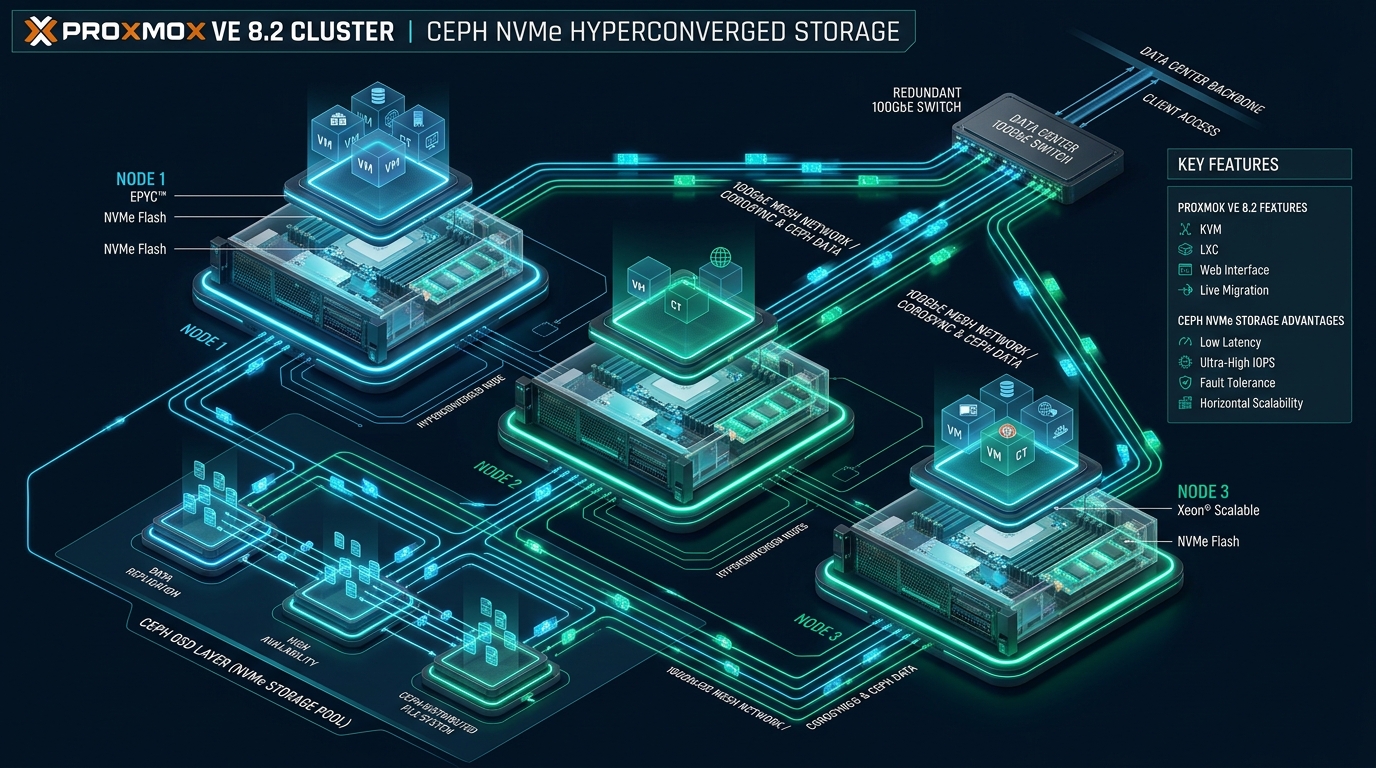
Designing resilient, high-throughput virtualization infrastructure requires eliminating traditional storage area network (SAN) chokepoints without introducing volatile single points of failure. In high-density multi-tenant cloud platforms such as those deployed at CpanelFree, running Proxmox VE 8.2 coupled with Ceph Reef on enterprise PCIe 4.0/5.0 NVMe drives unlocks raw metal I/O performance alongside automated hyperconverged failover. By unifying compute (KVM/LXC) and distributed object storage (Ceph OSDs) within identical server nodes, infrastructure teams achieve sub-millisecond p99 write latency, deterministic split-brain prevention, and linear horizontal scalability on commodity enterprise server hardware.
Hyperconverged Architecture: Proxmox VE 8.2 with Ceph NVMe Explained
Traditional data center designs separate compute hypervisors from external SAN/NAS storage arrays connected over Fibre Channel or iSCSI protocols. While this isolation simplifies capacity allocation, it introduces massive network traversal overhead, expensive multi-tier controller licensing, and rigid storage expansion boundaries. In contrast, hyperconverged infrastructure (HCI) co-locates virtual machines and storage daemons on every node. Proxmox VE 8.2, based on Debian 12 (Bookworm) and running Linux Kernel 6.8 with Ceph 18.2 (Reef), optimizes this paradigm by eliminating intermediate translation layers and utilizing direct kernel-bypass or asynchronous polling for NVMe I/O paths.
Ceph distributes data across storage nodes via the CRUSH (Controlled Replication Under Scalable Hashing) algorithm. Rather than relying on centralized lookup tables, CRUSH deterministically computes the physical OSD locations for every object replica. When paired with high-end enterprise NVMe media (such as Kioxia CM7, Samsung PM1733, or Micron 7450 PRO) and dual-redundant 25GbE or 100GbE networks, hyperconverged Proxmox clusters achieve million-IOPS aggregates while sustaining full tolerance against physical host and disk failures.
Architectural Comparison: Default vs. Tuned Production Deployments
Deploying Proxmox VE and Ceph with out-of-the-box defaults typically yields acceptable performance for spinning rust (HDDs) or legacy SATA SSDs, but it severely bottlenecks enterprise NVMe drives. NVMe devices operate with massive parallelism (up to 64,000 queues with 64,000 commands per queue), whereas default Linux kernel network stacks, Corosync cluster rings, and Ceph BlueStore allocators are tuned conservatively for generic hardware.
High-Performance Network Topology: Mesh vs. Dual Switched
In a Proxmox VE Ceph cluster, network latency directly dictates synchronous write latency. When a VM issues a write to a Ceph RBD volume with a replication size of 3 (`size = 3, min_size = 2`), the primary OSD must replicate that payload across the network to two secondary OSDs and await cryptographic write confirmations before signaling write completion to the client hypervisor.
Two primary network architectures are deployed in enterprise environments:
1. Dual 25G/100G Switched Backbone
Recommended for clusters with four or more nodes. Two leaf switches configured with MLAG (Multi-Chassis Link Aggregation) or EVPN-VXLAN provide dual active-active links to each server node via Linux 802.3ad bonding. Network traffic is strictly partitioned into distinct VLANs:
- VLAN 10 (Corosync Ring 0): Cluster heartbeats, quorum votes, and state machine transitions. Prioritized with 802.1p CoS 5 (Voice/Realtime).
- VLAN 20 (Corosync Ring 1): Secondary failover heartbeat path routed through an alternate physical NIC and switch.
- VLAN 30 (Ceph Public Network): Handles hypervisor-to-OSD client communications, VM disk I/O, and status inquiries.
- VLAN 40 (Ceph Cluster/Private Network): Dedicated exclusively to inter-OSD data replication, dynamic PG rebalancing, and deep background scrubbing.
- VLAN 50 (VM Guest & Management Traffic): Outbound public internet access, private VLAN bridge interfaces, and Web GUI connectivity.
2. Full-Mesh Broadcast Topology (3-Node Hyperconverged)
For high-performance 3-node edge deployments, dedicated switches can be bypassed entirely. By installing dual-port 25GbE/100GbE Mellanox ConnectX-5 or ConnectX-6 NICs in each node, direct DAC (Direct Attach Copper) cables link Node 1 to Node 2, Node 2 to Node 3, and Node 3 to Node 1. Using routed point-to-point subnets with broadcast/static routes or a routed BGP/OSPF mesh, nodes exchange Ceph replication traffic at wire speed with sub-microsecond switchless transit times.
Production Configuration Files
Below are complete, validated production configuration files extracted from an enterprise Proxmox VE 8.2 cluster running Ceph Reef over dual 25GbE Mellanox NICs.
1. Network Interface Configuration (`/etc/network/interfaces`)
This configuration defines an 802.3ad LACP bonded interface with MTU 9000 (Jumbo Frames) for Ceph storage networks, alongside dedicated VLANs for Corosync and guest VM bridges.
# /etc/network/interfaces - Production Proxmox VE 8.2 Ceph NVMe Cluster
auto lo
iface lo inet loopback

# Physical Management & Corosync Ring 0 (1GbE/10GbE)
iface eno1 inet manual

# High-Speed 25GbE SFP28 Interfaces for Ceph Storage
iface enp129s0f0np0 inet manual
iface enp129s0f1np1 inet manual

# Corosync Ring 0 Dedicated Network
auto eno1.10
iface eno1.10 inet static
    address 10.10.10.11/24
    vlan-raw-device eno1
    comment "Corosync Ring 0 Heartbeat"

# LACP Bond for Ceph Storage (Public + Cluster)
auto bond0
iface bond0 inet manual
    bond-slaves enp129s0f0np0 enp129s0f1np1
    bond-miimon 100
    bond-mode 802.3ad
    bond-xmit-hash-policy layer2+3
    mtu 9000

# Ceph Public Network (Client VM I/O)
auto bond0.30
iface bond0.30 inet static
    address 192.168.30.11/24
    vlan-raw-device bond0
    mtu 9000
    comment "Ceph Public Network"

# Ceph Cluster Network (OSD Replication & Recovery)
auto bond0.40
iface bond0.40 inet static
    address 192.168.40.11/24
    vlan-raw-device bond0
    mtu 9000
    comment "Ceph Private Replication Network"

# Corosync Ring 1 (Redundant Heartbeat over 25G Bond)
auto bond0.20
iface bond0.20 inet static
    address 10.10.20.11/24
    vlan-raw-device bond0
    mtu 1500
    comment "Corosync Ring 1 Heartbeat"

# VM Bridge Interface for Guest Traffic
auto vmbr0
iface vmbr0 inet static
    address 172.16.10.11/24
    gateway 172.16.10.1
    bridge-ports eno1
    bridge-stp off
    bridge-fd 0
    comment "Management and Public VM Traffic"
2. Ceph Configuration File (`/etc/pve/ceph.conf`)
Ceph Reef introduces critical improvements to the BlueStore engine and async messenger. The following parameters configure high-throughput thread pools, BlueStore NVMe cache limits, and prevent OSD thrashing during transient network blips.
[global]
    auth_client_required = cephx
    auth_cluster_required = cephx
    auth_service_required = cephx
    cluster_network = 192.168.40.0/24
    public_network = 192.168.30.0/24
    fsid = 8a67ef84-48cd-47d3-9bc6-32d8478f7e1b
    mon_host = 192.168.30.11 192.168.30.12 192.168.30.13
    ms_bind_msgr1 = false
    ms_bind_msgr2 = true
    ms_async_op_threads = 6

[osd]
    osd_memory_target = 8589934592
    osd_op_num_threads_per_shard = 2
    osd_op_num_shards = 8
    bdev_flock_retry = 10
    bdev_aio_poll_ms = 250
    bluestore_cache_autotune = true
    bluestore_cache_meta_ratio = 0.45
    bluestore_cache_kv_ratio = 0.45
    bluestore_cache_data_ratio = 0.10
    bluestore_min_alloc_size = 4096
    bluestore_prefer_deferred_size = 0
    bluestore_compression_mode = none

[mon]
    mon_warn_on_pool_no_redundancy = true
    mon_pg_warn_max_per_osd = 400
    mon_osd_down_out_interval = 600
mon_osd_min_down_reporters = 2bluestore_min_alloc_size = 4096 aligns BlueStore allocation granules precisely with the 4KB native sectors of enterprise NVMe devices. This completely prevents write amplification on small random 4K write workloads, reducing SSD wear while doubling random write IOPS.
3. Kernel & Network Stack Tuning (`/etc/sysctl.d/99-ceph-nvme-performance.conf`)
To eliminate network queue drops at 25GbE/100GbE line rates and optimize Linux kernel memory management for hyperconverged nodes, apply the following sysctl parameters:
# /etc/sysctl.d/99-ceph-nvme-performance.conf
# Increase network receive/transmit queue lengths
net.core.netdev_max_backlog = 250000
net.core.somaxconn = 65535

# Maximize socket buffer sizes for 25G/100G line rate
net.core.rmem_default = 33554432
net.core.wmem_default = 33554432
net.core.rmem_max = 67108864
net.core.wmem_max = 67108864
net.ipv4.tcp_rmem = 4096 87380 67108864
net.ipv4.tcp_wmem = 4096 65536 67108864

# TCP Congestion Control and Low Latency
net.ipv4.tcp_congestion_control = bbr
net.ipv4.tcp_slow_start_after_idle = 0
net.ipv4.tcp_notsent_lowat = 16384
net.ipv4.tcp_timestamps = 1
net.ipv4.tcp_sack = 1

# Memory and Swappiness Settings for Hyperconverged Node
vm.swappiness = 10
vm.vfs_cache_pressure = 50
vm.dirty_background_ratio = 5
vm.dirty_ratio = 10
vm.min_free_kbytes = 1048576

# Increase ARP table cache for large VM footprints
net.ipv4.neigh.default.gc_thresh1 = 4096
net.ipv4.neigh.default.gc_thresh2 = 8192
net.ipv4.neigh.default.gc_thresh3 = 16384
4. NVMe I/O Scheduler Udev Rule (`/etc/udev/rules.d/60-nvme-scheduler.rules`)
By default, the Linux kernel may assign the `mq-deadline` or `kyber` scheduler to block devices. For enterprise NVMe devices, hardware queue management is orders of magnitude faster than kernel-level reordering. Setting the scheduler to `none` allows Ceph OSD worker threads to submit commands directly to the NVMe controller.
# /etc/udev/rules.d/60-nvme-scheduler.rules
# Set I/O scheduler to 'none' for all NVMe block devices
ACTION=="add|change", KERNEL=="nvme[0-9]*n[0-9]*", ATTR{queue/scheduler}="none"

# Optimize NVMe read-ahead and request queue depth
ACTION=="add|change", KERNEL=="nvme[0-9]*n[0-9]*", ATTR{queue/read_ahead_kb}="128"
ACTION=="add|change", KERNEL=="nvme[0-9]*n[0-9]*", ATTR{queue/nr_requests}="1024"
Validating Performance: Benchmarks and Telemetry
Once your cluster is provisioned and tuned, validation must occur at both the storage pool layer (Ceph RADOS) and the guest hypervisor layer (KVM via `fio`).
RADOS Benchmark Execution
Run a direct RADOS benchmark across the cluster to verify network throughput, OSD responsiveness, and replication efficiency without filesystem or VM overhead:
# Run 4MB sequential write benchmark for 60 seconds
rados bench -p nvme-pool 60 write --no-cleanup

# Run 4K random read benchmark with 32 concurrent threads
rados bench -p nvme-pool 60 rand -t 32

# Clean up benchmark objects
rados -p nvme-pool cleanup
FIO Guest Benchmark
Inside a production test VM configured with a VirtIO-SCSI single controller and an enterprise NVMe-backed RBD disk with `io_uring` enabled, execute an asynchronous random write workload:
# /root/fio-nvme-test.job
[global]
ioengine=io_uring
direct=1
runtime=60
time_based=1
group_reporting=1
filename=/dev/vdb

[random-write-4k]
bs=4k
rw=randwrite
iodepth=64
numjobs=4
A properly tuned 3-node Proxmox VE 8.2 cluster with three enterprise NVMe drives per node (9 OSDs total) over dual 25GbE should consistently yield over 220,000 random 4K write IOPS and sub-800 microsecond p99 latency, even with 3x replication enabled.
Frequently Asked Questions
Can I run a stable Ceph cluster with only 3 Proxmox VE nodes?
Yes, a 3-node configuration is the minimum recommended production deployment for Ceph. With three nodes running Ceph Monitors and Managers, the cluster maintains strict majority quorum (2 of 3 votes). When using a standard replication rule of size = 3, min_size = 2, the cluster can tolerate a complete node failure without downtime or data unavailability. However, during node maintenance, the cluster operates in a degraded state until the node is restored.
Why is Corosync network separation critical in Ceph hyperconverged setups?
Corosync handles cluster membership and heartbeats. If Ceph replication traffic saturates a shared network interface, Corosync packets may experience jitter exceeding 200ms. When heartbeats are dropped, Proxmox assumes the node has failed, triggers a cluster fence, and abruptly reboots the host via watchdog. Separating Corosync onto dedicated physical links or applying strict 802.1p traffic prioritization completely avoids split-brain fencing.
Should I enable Ceph BlueStore compression on NVMe pools?
In almost all NVMe workloads, Ceph BlueStore compression should be disabled (bluestore_compression_mode = none). While LZ4 or Snappy compression saves disk space, the CPU compression and decompression cycles introduce noticeable latency penalties on high-speed NVMe drives. If storage efficiency is paramount, restrict compression only to cold, sequentially-read bulk storage pools.
What is the advantage of VirtIO-SCSI single controller with io_uring in Proxmox?
Selecting VirtIO SCSI Single with IO Thread enabled and setting the async I/O engine to io_uring assigns a dedicated QEMU I/O thread and submission/completion ring buffer to each virtual disk. This bypasses the traditional QEMU Big Lock (BQL), enabling the virtual machine to saturate host NVMe queues and achieve native bare-metal IOPS performance.
Ready to Deploy High-Performance Infrastructure?
Experience blazing-fast NVMe storage, unmetered bandwidth, and enterprise LiteSpeed caching on CpanelFree.