
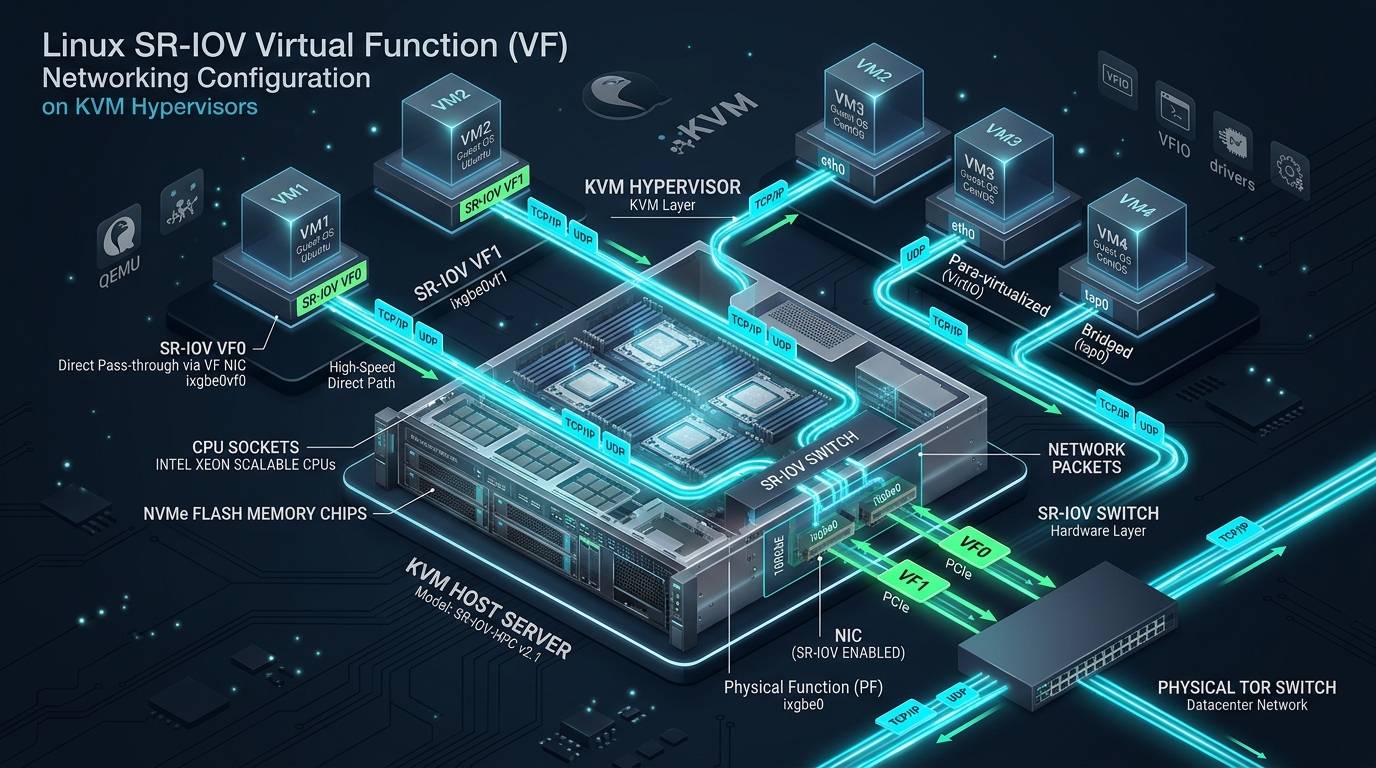
When scaling high-throughput I/O workloads, financial tick-data pipelines, or dense packet-processing clusters on Linux KVM hypervisors, traditional software-defined networking abstractions such as Linux bridges (br0), Open vSwitch (OVS), and standard virtio-net drivers inevitably hit severe throughput ceilings and CPU interrupt saturation. Bridging millions of packets per second (Mpps) across the Linux network stack triggers relentless kernel context switching, CPU core thrashing, and memory copy overhead across the hypervisor boundary. By leveraging Single Root I/O Virtualization (SR-IOV) to partition physical PCIe network interfaces into isolated Virtual Functions (VFs) mapped directly into KVM guest domains via VFIO-PCI, infrastructure engineers at platforms like CpanelFree achieve deterministic sub-microsecond latency, near-zero host CPU overhead, and wire-speed 100GbE line rates.
Direct Answer: What is SR-IOV Virtual Function Networking in KVM?
Under the Hood: PCIe Physical Functions, Virtual Functions, and IOMMU Isolation
SR-IOV is a PCI-SIG specification that converts standard PCIe peripherals into multi-tenant endpoints. Understanding how SR-IOV interfaces with modern Linux hypervisors requires dissecting three primary architectural pillars:
- Physical Function (PF): The primary PCIe function of the network adapter. The PF possesses full PCIe configuration space access, governs global NIC initialization, configures physical link speeds, loads firmware, and dynamically provisions/destroys Virtual Functions.
- Virtual Function (VF): Lightweight PCIe functions derived from the PF. Each VF possesses its own Base Address Registers (BARs), isolated transmit/receive ring buffers, dedicated MSI-X interrupt vectors, and distinct PCIe requester IDs, but shares the physical interface PHY, optical transceivers, and silicon ASIC pipeline.
- IOMMU & VFIO-PCI: The hardware Input-Output Memory Management Unit (Intel VT-d or AMD-Vi) manages Direct Memory Access (DMA) and interrupt remapping. The Linux Virtual Function I/O (
vfio-pci) framework safely exposes direct device access to user-space QEMU/KVM instances without compromising host memory protection.
virtio-balloon) and memory page sharing (KSM) are fundamentally incompatible with VFIO device assignment and must be disabled.
Performance Benchmark Matrix: Hypervisor Networking Topologies
Selecting the appropriate network virtualization model requires evaluating throughput, packet rate scalability, CPU overhead, and operational agility. The matrix below contrasts the standard Linux bridge stack against DPDK-accelerated virtual switches and native hardware SR-IOV passthrough.
Step 1: Hypervisor BIOS/UEFI and Kernel Boot Configuration
Before provisioning Virtual Functions, hardware virtualization extensions must be enabled in motherboard firmware. Verify that Intel VT-x, Intel VT-d (or AMD-V and AMD-Vi), and SR-IOV Global Support are set to Enabled in the server BIOS/UEFI setup utility.
Next, configure the Linux kernel to activate IOMMU hardware drivers and enable passthrough DMA mapping. Update /etc/default/grub on the KVM hypervisor host:
# /etc/default/grub - Hypervisor Kernel Parameters for Intel Systems
GRUB_CMDLINE_LINUX_DEFAULT="quiet intel_iommu=on iommu=pt vfio_iommu_type1.allow_unsafe_interrupts=0 pcie_aspm=off default_hugepagesz=1G hugepagesz=1G hugepages=32"

# For AMD EPYC Hypervisors, replace with:
# GRUB_CMDLINE_LINUX_DEFAULT="quiet amd_iommu=on iommu=pt pcie_aspm=off"
Generate the updated GRUB configuration and reboot the hypervisor:
# Update GRUB on Debian/Ubuntu systems
sudo update-grub

# Or on RHEL / Rocky Linux / AlmaLinux systems
sudo grub2-mkconfig -o /boot/efi/EFI/redhat/grub.cfg

# Reboot to apply IOMMU configuration
sudo systemctl reboot
Upon system reboot, verify that the IOMMU controller is successfully registered and initialized in the kernel ring buffer:
dmesg | grep -E -i "(iommu|dmar)"
# Expected output contains:
# [    0.054321] DMAR: IOMMU enabled
# [    0.189420] PCI-DMA: Using software bounce buffering for IO (TCE)
# [    0.412993] DMAR: Intel-IOMMU: initialized
Step 2: Persistent Virtual Function Provisioning via Systemd
Virtual Functions can be spawned dynamically via the sysfs filesystem by echoing the desired number of VFs into sriov_numvfs. However, this value resets upon host reboot. To ensure high availability across maintenance cycles, implement a dedicated systemd service unit.
Create the production unit file at /etc/systemd/system/sriov-init.service:
[Unit]
Description=Enterprise SR-IOV Virtual Function Initialization Service
After=network.target
Before=libvirtd.service

[Service]
Type=oneshot
RemainAfterExit=yes
# Ensure clean teardown prior to allocation
ExecStartPre=/bin/sh -c 'echo 0 > /sys/class/net/enp1s0f0/device/sriov_numvfs 2>/dev/null || true'
# Provision 8 Virtual Functions on 25GbE Physical Function enp1s0f0
ExecStart=/bin/sh -c 'echo 8 > /sys/class/net/enp1s0f0/device/sriov_numvfs'
# Configure hardware security policies: MAC anti-spoofing, trust flags, and link tracking
ExecStartPost=/sbin/ip link set enp1s0f0 vf 0 mac 52:54:00:12:34:01 spoofchk on trust off state auto
ExecStartPost=/sbin/ip link set enp1s0f0 vf 1 mac 52:54:00:12:34:02 spoofchk on trust off state auto
ExecStartPost=/sbin/ip link set enp1s0f0 vf 2 mac 52:54:00:12:34:03 spoofchk on trust off state auto
ExecStartPost=/sbin/ip link set enp1s0f0 vf 3 mac 52:54:00:12:34:04 spoofchk on trust off state auto
# Reset on shutdown
ExecStop=/bin/sh -c 'echo 0 > /sys/class/net/enp1s0f0/device/sriov_numvfs'

[Install]
WantedBy=multi-user.target
Reload systemd daemon state and start the service:
sudo systemctl daemon-reload
sudo systemctl enable --now sriov-init.service

# Confirm VFs are active on the interface:
ip link show enp1s0f0spoofchk on on multi-tenant hypervisors. When enabled, the NIC ASIC hardware discards any outbound frames emitted by the guest VM whose source MAC address does not match the administratively assigned MAC address, neutralizing ARP poisoning and MAC spoofing vectors at silicon speed.
Step 3: IOMMU Group Validation and VFIO-PCI Driver Binding
PCIe hardware isolation requires that every Virtual Function resides in its own discrete IOMMU group. Verify IOMMU isolation on your hypervisor using this bash diagnostic routine:
for d in /sys/kernel/iommu_groups/*/devices/*; do
  n=${d#*/iommu_groups/*}; n=${n%%/*}
  printf 'IOMMU Group %s: ' "$n"
  lspci -nns "${d##*/}"
done | grep -i "Ethernet"
Once verified, bind the target Virtual Function to the vfio-pci driver so KVM/QEMU can consume it without host kernel interference:
# Identify PCI address and vendor/device IDs for VF 0 (e.g., 0000:01:10.0 [8086:154c])
VF_PCI="0000:01:10.0"
VF_ID="8086 154c"

# Load VFIO kernel modules
modprobe vfio
modprobe vfio_pci

# Unbind VF from standard host driver (e.g., iavf or ixgbevf)
echo "$VF_PCI" > /sys/bus/pci/devices/"$VF_PCI"/driver/unbind

# Register vendor/device ID with vfio-pci
echo "$VF_ID" > /sys/bus/pci/drivers/vfio-pci/new_id
Step 4: KVM Libvirt Domain XML Configuration
Libvirt provides two distinct methods to pass Virtual Functions into guest domains: direct <hostdev> passthrough and the managed <interface type='hostdev'> model. The managed interface model is strictly recommended for enterprise production because Libvirt automatically handles driver unbinding, VFIO attachment, MAC injection, and VLAN tagging.
Inject the following snippet into the target KVM domain XML using virsh edit <vm-name>:
<devices>
  <!-- Enterprise SR-IOV VF Assignment with 802.1Q VLAN Tagging -->
  <interface type='hostdev' managed='yes'>
    <source>
      <address type='pci' domain='0x0000' bus='0x01' slot='0x10' function='0x0'/>
    </source>
    <mac address='52:54:00:12:34:01'/>
    <vlan>
      <tag id='105'/>
    </vlan>
    <rom bar='off'/>
    <address type='pci' domain='0x0000' bus='0x00' slot='0x06' function='0x0'/>
  </interface>
</devices>cat /sys/bus/pci/devices/0000:01:00.0/numa_node to identify the physical node.
Step 5: Production Network Stack Tuning (/etc/sysctl.d/99-sriov-kvm.conf)
While SR-IOV offloads packet routing from the hypervisor kernel, optimal guest throughput requires properly tuned kernel socket buffers, MTU sizing, and TCP congestion algorithms. Deploy the following configuration inside the guest VM and hypervisor:
# /etc/sysctl.d/99-sriov-kvm.conf - Enterprise High-Throughput Network Tuning
# Increase system-wide socket receive and transmit buffers
net.core.rmem_max = 67108864
net.core.wmem_max = 67108864
net.core.rmem_default = 33554432
net.core.wmem_default = 33554432

# Configure autotuning TCP buffer boundaries (min, default, max)
net.ipv4.tcp_rmem = 4096 87380 67108864
net.ipv4.tcp_wmem = 4096 65536 67108864

# Expand packet processing backlogs
net.core.netdev_max_backlog = 250000
net.core.somaxconn = 65535

# Select modern low-loss BBR congestion control
net.core.default_qdisc = fq
net.ipv4.tcp_congestion_control = bbr

# Disable slow-start restart on idle TCP connections
net.ipv4.tcp_slow_start_after_idle = 0

# Maximize socket memory pressure threshold
net.ipv4.tcp_mem = 786432 1048576 1572864
Apply the settings immediately without rebooting:
sudo sysctl -p /etc/sysctl.d/99-sriov-kvm.confAdditionally, configure maximum ring buffers and verify offload capabilities on the virtual interface within the guest operating system:
# Maximize RX and TX descriptor rings on the VF interface
sudo ethtool -G eth1 rx 4096 tx 4096

# Enable hardware Large Receive Offload (LRO) and Checksumming
sudo ethtool -K eth1 rx on tx on tso on gso on gro on
Step 6: High Availability & Live Migration with VF-VirtIO Failover Bonding
The most prominent limitation of direct SR-IOV passthrough is the disruption of KVM live migration: QEMU cannot serialize the internal silicon state of a physical PCIe endpoint. Modern enterprise architectures circumvent this constraint using Linux kernel failover bonding inside the guest VM.
By pairing the high-performance SR-IOV Virtual Function with a fallback para-virtualized virtio-net NIC inside an active-backup Linux bond (Mode 1), the VM utilizes the VF during normal operations. When a live migration event is triggered by the hypervisor orchestrator, the VF is hot-unplugged, triggering instantaneous, zero-packet-loss traffic failover to the virtio interface. Once migrated to the target hypervisor, a new local VF is hot-plugged and re-assumes the primary role.
Frequently Asked Questions
Does SR-IOV completely prevent KVM live migration?
Standard KVM live migration cannot snapshot physical PCIe registers. However, by deploying net_failover or active-backup bonding inside the guest—pairing the SR-IOV VF with a secondary virtio-net interface—hypervisors can hot-unplug the VF prior to migration and re-attach a local VF on the destination host with zero connection drops.
How does hardware VLAN tagging work with SR-IOV VFs?
VLAN tagging can be enforced transparently in hardware by the physical NIC ASIC. When configuring the VF on the host via ip link set <pf> vf <id> vlan <tag> or Libvirt’s <vlan> XML tag, the NIC automatically inserts the 802.1Q tag on outbound frames and strips it on inbound frames, securing multi-tenant network isolation without guest tampering.
What is the difference between standard PCI passthrough and SR-IOV?
Standard PCI passthrough grants an entire physical PCIe card to a single virtual machine, preventing any other VM or the host from using that adapter. SR-IOV divides a single physical PCIe card into dozens or hundreds of independent Virtual Functions, enabling multiple virtual machines to share the same hardware interface concurrently with native performance.
When should I choose OVS-DPDK over SR-IOV?
Choose OVS-DPDK if you require complex Software-Defined Networking (SDN) overlays (such as VXLAN, Geneve, OpenFlow rules, dynamic ACLs, and service function chaining) that exceed the hardware offloading capabilities of your physical NIC ASIC. Choose SR-IOV when absolute lowest latency, maximum throughput, and zero hypervisor CPU overhead are required.
Ready to Deploy High-Performance Infrastructure?
Experience blazing-fast NVMe storage, unmetered bandwidth, and enterprise LiteSpeed caching on CpanelFree.