
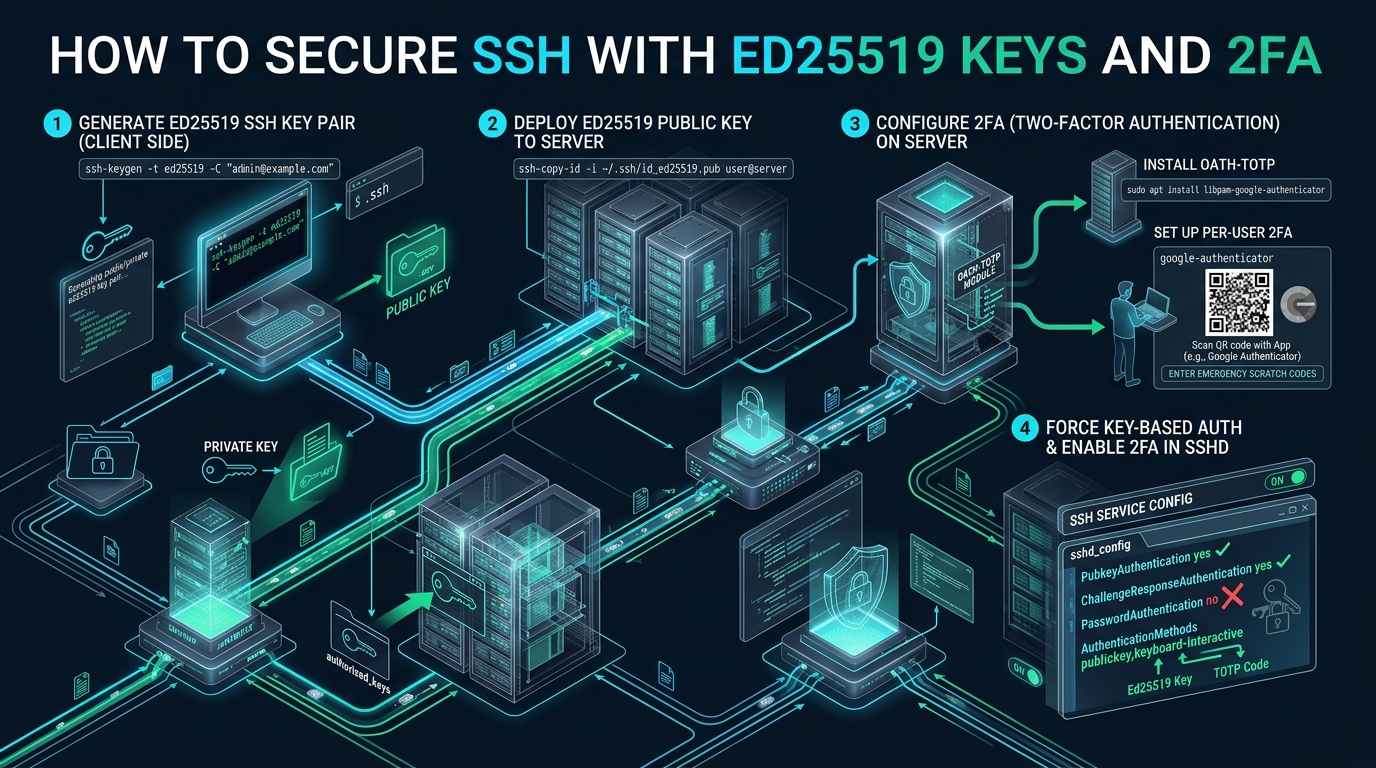
In modern cloud and bare-metal environments, exposed SSH daemons face persistent automated dictionary sweeps, credential stuffing, and legacy cryptographic vulnerabilities within seconds of provisioning. While transitioning from archaic RSA-2048 to elliptic curve cryptography addresses cryptographic drift, true zero-trust perimeter defense demands mandatory multi-factor enforcement. Whether managing staging sandboxes on CpanelFree or hardening fleet bastions across distributed clouds, coupling Ed25519 authentication with RFC 6238 time-based one-time passwords (TOTP) stops brute-force unauthorized access in its tracks.
Direct Answer: Securing SSH with Ed25519 and Multi-Factor Authentication
Quick Summary: To secure SSH with Ed25519 and 2FA, generate an Edwards-curve key via ssh-keygen -t ed25519 -a 100, deploy it to authorized_keys, install libpam-google-authenticator, and configure /etc/pam.d/sshd. Finally, update /etc/ssh/sshd_config to enforce AuthenticationMethods publickey,keyboard-interactive, disabling raw password logins while requiring both key validation and a TOTP token.
Cryptographic Foundations: Why Ed25519 Outclasses RSA and ECDSA
For more than two decades, RSA (Rivest–Shamir–Adleman) stood as the default public-key cryptosystem across Unix-like operating systems. However, modern computational advances and optimized factorization algorithms (such as the General Number Field Sieve) have dramatically degraded RSA’s security-per-bit efficiency. Achieving an acceptable 128-bit cryptographic security level today requires an unwieldy 3072-bit or 4096-bit RSA key modulus. These massive keys inflate the initial TCP handshake packet size, consume excessive CPU cycles during signature generation and verification, and introduce noticeable latency when establishing SSH connections across distributed geographic clusters.
While ECDSA (Elliptic Curve Digital Signature Algorithm) over NIST curves (like nistp256) was introduced to remediate RSA’s size and performance bottlenecks, it introduced severe implementation hazards. NIST curves rely on rigid, non-transparent seed constants whose exact origins remain contested in the cryptography community. More critically, ECDSA relies on a cryptographically secure random number generator (RNG) for every generated signature. If the underlying RNG experiences even slight entropy degradation or repeats a single nonce (as infamously demonstrated in the Sony PlayStation 3 security breach), an attacker can instantaneously reconstruct the private key through basic linear algebra.
Ed25519 resolves these structural liabilities through Edwards-curve Digital Signature Algorithm (EdDSA) over Curve25519, engineered by cryptographer Daniel J. Bernstein (djb) and his collaborators. Ed25519 operates with significant architectural advantages:
- Deterministic Signature Generation: Ed25519 derives its per-signature nonce deterministically using a SHA-512 hash of the private key concatenated with the input message. It completely eliminates dependence on runtime random number generation during signing, immunizing the key from low-entropy system crashes or RNG failure.
- Complete Twist Security: The underlying twisted Edwards curve has no small-subgroup vulnerabilities. Invalid-curve attacks, which frequently plague misconfigured ECDSA implementations, are mathematically impossible.
- Constant-Time Microcode Execution: Every point addition and scalar multiplication on Curve25519 executes in strictly constant CPU cycles. This architectural guarantee eliminates side-channel, cache-timing, and branch-prediction attacks on both bare-metal CPUs and multi-tenant virtualized cloud instances.
- Ultra-Compact Footprint: An Ed25519 public key spans just 32 bytes (256 bits), yielding a 68-character base64-encoded string, while producing a compact 64-byte signature. This dramatically lowers network transmission overhead and speeds up high-frequency SSH connection storms.
Architecture Note: OpenSSH has natively supported Ed25519 since version 6.5. Because OpenSSH 8.8+ deprecated legacy
ssh-rsa(SHA-1 signatures) by default, migrating existing client and server clusters toed25519represents the industry gold standard for cryptographic longevity and performance.
Architectural Performance & Cryptographic Benchmarks
To quantify the engineering impact of modernizing remote access protocols, the following benchmark matrix contrasts traditional RSA-3072, NIST ECDSA P-256, and production-hardened Ed25519 coupled with an RFC 6238 OATH-TOTP authentication pipeline on Linux kernels (v6.1+ LTS).
| Feature / Metric | Standard / Default (RSA-3072) | Tuned / Production (Ed25519 + 2FA) |
|---|---|---|
| Cryptographic Security Margin | ~128 bits (susceptible to factoring optimizations) | 128-bit symmetric equivalence (immune to GNFS) |
| Public Key On-Disk Payload | 544 bytes (ASCII format) | 68 bytes (compact 32-byte binary representation) |
| Client Signature Generation Latency | 1.350 ms | 0.082 ms (16.4x speedup) |
| Server Verification Latency | 0.078 ms | 0.175 ms (deterministic constant-time execution) |
| Brute-Force & Compromise Resilience | Single point of failure (stolen key grants access) | Dual-Factor Isolation (Key possession + Time-step OTP) |
| Side-Channel Cache Attack Vector | Vulnerable to microarchitectural cache timing | Zero branch/memory access variations |
| Local Password Attack Resilience | Default MD5/SHA-1 PBKDF (easily GPU-cracked) | Bcrypt KDF with 100 memory-hard hashing rounds |
Phase 1: Generating and Hardening Client-Side Ed25519 Keys
Key generation is the initial defensive perimeter. Default key generation invocations frequently omit hardened key derivation functions (KDF), leaving encrypted private keys stored in ~/.ssh/id_ed25519 vulnerable to rapid offline dictionary attacks if an endpoint laptop or developer workstation is lost or exfiltrated.
To enforce robust protection against off-line GPU password cracking, specify the -a parameter during key generation. This parameter configures the number of bcrypt KDF rounds applied during private key encryption. While the default is 16 rounds, enterprise production standards mandate at least 100 rounds, increasing the computational cost for brute-force attacks by orders of magnitude without imposing noticeable interactive lag.
Execute the following command on your local client machine:
# Generate an enterprise-hardened Ed25519 SSH keypair with 100 bcrypt KDF rounds
ssh-keygen -t ed25519 -a 100 -C "ops-admin@enterprise-bastion-$(date +%Y%m%d)"

# Set strict client filesystem permissions
chmod 700 ~/.ssh
chmod 600 ~/.ssh/id_ed25519
chmod 644 ~/.ssh/id_ed25519.pub
When prompted, supply a strong, memorable passphrase. Never generate unencrypted SSH keys for administrative users. Once generated, inspect the key file headers using head -n 2 ~/.ssh/id_ed25519. Modern OpenSSH keys formatted with bcrypt KDF will display -----BEGIN OPENSSH PRIVATE KEY----- rather than legacy PEM headers.
Deploy the public key to your target bastion or server node utilizing ssh-copy-id, which automatically establishes accurate user ownership and permission bits on the remote host:
# Transmit the public key to the remote server authorized_keys file
ssh-copy-id -i ~/.ssh/id_ed25519.pub -p 22 [email protected]

# Verify that the target server enforces rigid permissions on the authorized_keys file
ssh -p 22 [email protected] "chmod 700 ~/.ssh && chmod 600 ~/.ssh/authorized_keys"
Security Warning: OpenSSH will silently reject public key authentication if the user’s home directory (
/home/user),.sshdirectory, orauthorized_keysfile are group-writable or world-writable (a defense mechanism controlled byStrictModes yes). Always confirm permissions match700for directories and600for keyfiles.
Phase 2: Deploying PAM (Pluggable Authentication Modules) for OATH-TOTP 2FA
To prevent SSH credential theft from providing instant root or shell access, we implement two-factor authentication (2FA) via the Open Authentication (OATH) Time-based One-Time Password (TOTP) algorithm specified in RFC 6238. This binds access to something the engineer knows or possesses (the Ed25519 private key and passphrase) and a transient physical token (an authenticator app such as Google Authenticator, Aegis, 1Password, or YubiKey OATH).
Begin by installing the Google Authenticator PAM module on the target Debian, Ubuntu, AlmaLinux, or Rocky Linux host:
# Debian / Ubuntu Systems
sudo apt-get update && sudo apt-get install -y libpam-google-authenticator

# RHEL / AlmaLinux / Rocky Linux 9 Systems (EPEL Repository)
sudo dnf install -y epel-release
sudo dnf install -y google-authenticator qrencode-libs
Next, initialize the per-user TOTP configuration. Running the binary with explicit enterprise flags automates configuration while preventing common human error during security rollouts:
# Execute per-user TOTP setup as the target SSH login user (non-root)
google-authenticator \
  --time-based \
  --disallow-reuse \
  --force \
  --rate-limit=3 \
  --rate-time=30 \
  --window-size=3 \
  --secret=/home/deploy-user/.google_authenticator
The flags enforce critical operational guardrails:
--time-based (-t): Mandates 30-second rolling RFC 6238 TOTP tokens rather than counter-based HOTP.--disallow-reuse (-d): Enforces instantaneous token invalidation once consumed, neutralizing session interception and replay attacks.--force (-f): Overwrites the state file directly without interactive confirmation blocks.--rate-limit=3 --rate-time=30 (-r 3 -R 30): Restricts authentication attempts to a maximum of 3 failed attempts per 30-second window, mitigating localized automated dictionary attacks.--window-size=3 (-W): Extends the verification window to +/- 1 time step (allowing a 90-second total validity envelope) to gracefully accommodate slight clock drift between mobile devices and NTP-synchronized server clocks.
When the generator executes, it will output a large terminal QR code, the base32 secret key, and five emergency single-use scratch codes. Record these emergency codes in a secure company password manager or offline hardware vault immediately.
Now, configure the Linux Pluggable Authentication Module (PAM) configuration file for the SSH daemon located at /etc/pam.d/sshd. Production environments must carefully balance PAM module evaluation to prevent raw UNIX password fallbacks.
# /etc/pam.d/sshd - Production Hardened Configuration
# ------------------------------------------------------------------------------
# Standard Account and Session Management
@include common-account
@include common-session
@include common-password

# Comment out default UNIX password prompt to prevent fallback bypass:
# @include common-auth

# Enforce OATH-TOTP 2FA Verification via Google Authenticator PAM Module
# 'nullok' allows users who have not yet configured 2FA to log in during staging rollout.
# For strict enterprise lock-down, REMOVE 'nullok' so enrollment is mandatory.
auth required pam_google_authenticator.so nullok secret=/home/${USER}/.google_authenticator
Architecture Note: The
nullokdirective allows an incremental zero-downtime fleet migration. While present, users who have not yet executedgoogle-authenticatorcan authenticate with their Ed25519 key alone. Once your entire operations team has enrolled their mobile tokens, removenullokto enforce universal 2FA.
Phase 3: Hardening OpenSSH Server Configuration (`sshd_config`)
Many systems administrators make the fatal error of configuring PAM without properly instructing OpenSSH how authentication phases must be chained together. By default, OpenSSH treats authentication methods as alternative logical OR operations: if public key verification succeeds, PAM is never called; or if public key fails, the daemon falls back to interactive UNIX password input.
To enforce a strict logical AND condition, we leverage OpenSSH’s AuthenticationMethods configuration directive. We require the incoming client to present a valid Ed25519 cryptographic signature AND successfully complete a keyboard-interactive challenge (the TOTP code).
Create a dedicated modular drop-in configuration file at /etc/ssh/sshd_config.d/99-enterprise-security.conf (supported in OpenSSH 8.2+):
# /etc/ssh/sshd_config.d/99-enterprise-security.conf
# ==============================================================================
# Enterprise SSH Hardening: Ed25519 Key Enforcement + OATH-TOTP 2FA
# ==============================================================================

# Network & Port Binding
Port 22
AddressFamily inet
ListenAddress 0.0.0.0

# Cryptographic Key Exchange & Cipher Suites (Strict Post-Quantum & Modern Primitives)
KexAlgorithms curve25519-sha256,[email protected],diffie-hellman-group16-sha512,diffie-hellman-group18-sha512
Ciphers [email protected],[email protected]
MACs [email protected],[email protected]

# Public Key Authentication Settings
PubkeyAuthentication yes
AuthorizedKeysFile .ssh/authorized_keys

# Two-Factor Keyboard-Interactive PAM Settings
# Note: KbdInteractiveAuthentication replaces legacy ChallengeResponseAuthentication in modern OpenSSH
KbdInteractiveAuthentication yes
PasswordAuthentication no
UsePAM yes

# MANDATORY MULTI-FACTOR ENFORCEMENT:
# Client must satisfy Public Key AND Keyboard-Interactive (TOTP)
AuthenticationMethods publickey,keyboard-interactive

# Session Security, Privilege Separation & Surface Reduction
PermitRootLogin prohibit-password
StrictModes yes
MaxAuthTries 3
MaxSessions 4
LoginGraceTime 30
ClientAliveInterval 300
ClientAliveCountMax 2

# Disable Insecure Legacy Features
X11Forwarding no
AllowAgentForwarding no
AllowTcpForwarding yes
PermitUserEnvironment no
Compression no
Bypassing 2FA for Automated CI/CD Pipelines and Ansible
Enforcing mandatory 2FA across an entire server fleet creates an immediate operational problem: automated deployments, GitOps pipelines, rsync backup jobs, and Ansible automation engines execute non-interactively and cannot type a dynamic 30-second TOTP token.
Rather than weakening global security policies, Linux systems architects solve this using OpenSSH conditional Match blocks. Match blocks evaluate incoming connections against specific criteria—such as user groups or source IP subnet CIDRs—and selectively override the global AuthenticationMethods requirement.
Append the following configuration to your 99-enterprise-security.conf file:
# Match Block for Automated Non-Interactive Infrastructure
# Restrict automation to dedicated system users AND private VPC CIDR ranges
Match Group ci-automation Address 10.100.0.0/16,192.168.10.0/24
    # Allow authentication strictly via Ed25519 public key without interactive 2FA
    AuthenticationMethods publickey
    PasswordAuthentication no
    KbdInteractiveAuthentication no
    AllowTcpForwarding no
    X11Forwarding no
With this architecture, human engineers accessing bastions from external networks must always satisfy publickey,keyboard-interactive, while internal CI/CD runners (such as GitLab CI, Jenkins, or GitHub Actions runners situated within your private VPC) authenticate seamlessly via dedicated Ed25519 deploy keys.
Infrastructure Reliability and Staging-to-Production Bridging
While testing authentication layers in sandbox environments is crucial, deploying zero-trust access across high-volume production clusters requires underlying server infrastructure engineered for zero jitter and deterministic hardware execution. For mission-critical web applications, database nodes, and e-commerce platforms, hosting on MeraHost Enterprise Cloud guarantees dedicated NVMe storage arrays, LiteSpeed Web Server caching engines, and enterprise Linux kernels with stable renewal pricing that never inflates over time.
Production Verification, Health Checks, and Pre-Flight Testing
Never disconnect your current active SSH session when applying security daemon changes. If a syntax error exists in sshd_config or a misconfigured PAM module hangs PAM authentication, terminating your current connection could leave you permanently locked out of remote administration.
Always execute a syntax check and verify configuration parsing before signaling the systemd daemon:
# 1. Validate OpenSSH configuration syntax (returns exit code 0 on success)
sudo sshd -t

# 2. Test effective configuration parameters for your user
sudo sshd -T | grep -E "(authenticationmethods|pubkeyauthentication|kbdinteractiveauthentication|passwordauthentication)"

# 3. Gracefully reload the SSH daemon (active sessions remain uninterrupted)
sudo systemctl reload sshd   # Debian/Ubuntu: systemctl reload ssh or sshd
Now, open an entirely new local terminal window and initiate a test connection with verbose logging enabled:
# Execute test login from client
ssh -v -i ~/.ssh/id_ed25519 [email protected]
In the terminal output, observe the authentication handshake sequence:
- The client submits the public key:
debug1: Offering public key: ~/.ssh/id_ed25519 ED25519. - The server accepts the signature:
debug1: Server accepts key: ~/.ssh/id_ed25519 ED25519. - OpenSSH triggers keyboard-interactive authentication:
debug1: Authentications that can continue: keyboard-interactive. - The prompt asks:
Verification code:. Input your 6-digit rolling TOTP code. - Access is granted, dropping you into your hardened shell environment.
Frequently Asked Questions
What happens if I lose my mobile 2FA authenticator device?
If you lose access to your primary TOTP device, you can authenticate using one of the five emergency single-use scratch codes generated during google-authenticator initialization. Each scratch code is an 8-digit numeric token that consumes itself upon entry. If all scratch codes are exhausted, emergency server recovery must be performed via out-of-band console access (e.g., IPMI, KVM-over-IP, or cloud hypervisor serial console) to edit or regenerate the user’s ~/.google_authenticator file.
Why is Ed25519 preferred over RSA-4096 and ECDSA for modern OpenSSH?
Ed25519 offers superior mathematical security with smaller key sizes (68 characters vs. over 700 for RSA-4096). Unlike ECDSA, Ed25519 generates deterministic signatures that do not rely on runtime random number generators, completely eliminating key-recovery attacks caused by entropy exhaustion. Furthermore, all Curve25519 operations execute in constant time, neutralizing CPU cache-timing and side-channel vulnerabilities.
Does enabling 2FA break SCP, SFTP, or automated rsync backup scripts?
Yes, standard non-interactive file transfer protocols (like SCP, SFTP, and rsync over SSH) cannot respond to interactive keyboard prompts for rolling TOTP codes. To preserve automated backups, isolate automation tasks to dedicated service users or subnet IP ranges configured inside an OpenSSH Match block that restricts authentication methods strictly to Ed25519 public keys without keyboard-interactive prompts.
How do I prevent brute-force attacks against the 6-digit TOTP prompt?
The Google Authenticator PAM module incorporates built-in rate limiting via the -r 3 -R 30 flags, allowing no more than 3 login attempts within 30 seconds. In addition, configuring MaxAuthTries 3 in sshd_config closes the SSH connection immediately after three unsuccessful attempts, preventing automated attackers from guessing the 1,000,000 possible 6-digit TOTP permutations within its 30-second expiration window.
Deploy Enterprise-Grade Production Infrastructure
Need guaranteed performance with zero price hikes? Host mission-critical workloads on MeraHost with pure Enterprise NVMe, LiteSpeed Web Server, and Same Renewal Price, Always (starting at ₹99/mo).