
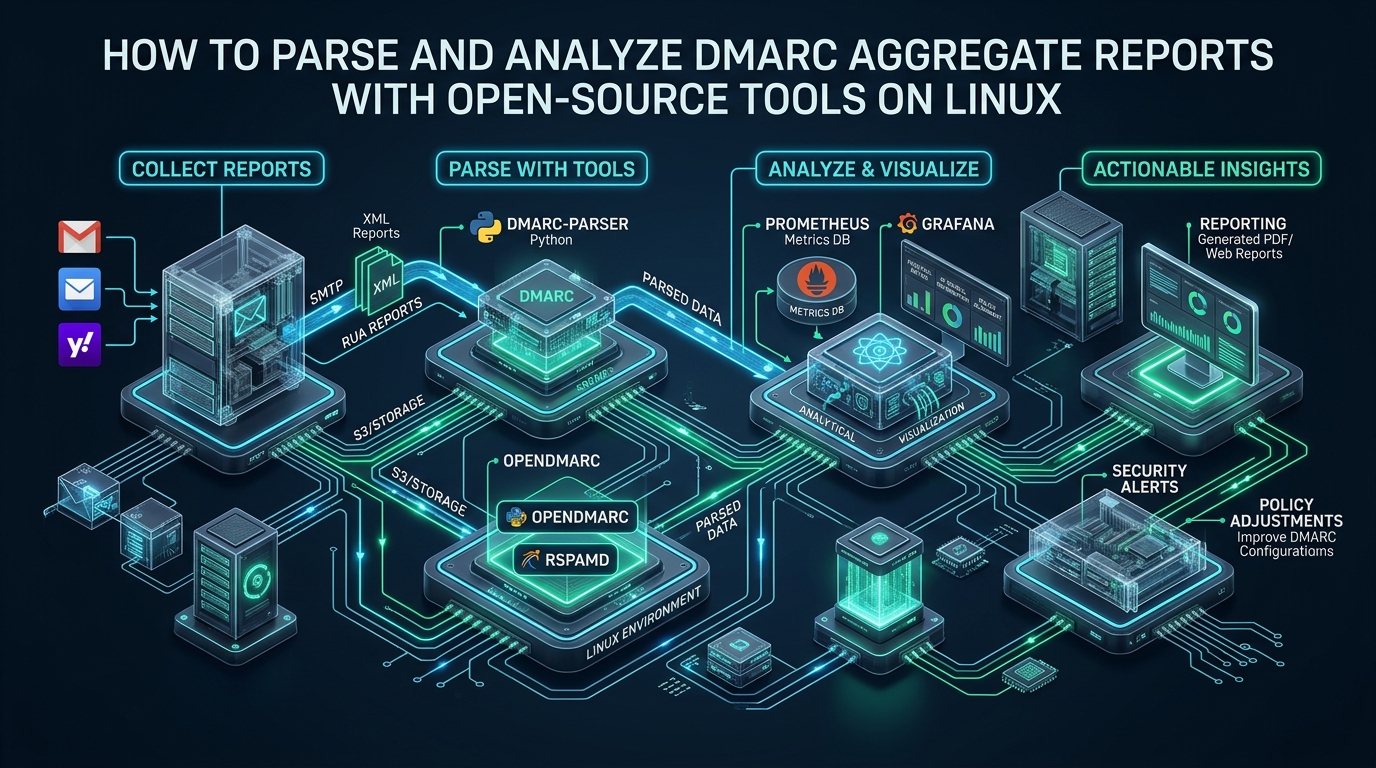
Enforcing a strict p=reject DMARC policy without end-to-end visibility into legitimate email sending vectors is one of the quickest ways for infrastructure teams to accidentally drop critical transactional traffic. Major mailbox providers like Google, Microsoft, and Yahoo emit millions of compressed aggregate XML reports (RUA) daily to the URI specified in your DNS records, yet manually parsing and correlating these disparate archives creates unsustainable administrative overhead. When developing delivery setups or testing mail configurations on CpanelFree, deploying an autonomous, self-hosted Linux pipeline converts raw XML archives into actionable deliverability metrics without incurring steep enterprise SaaS costs.
What Is the Best Way to Parse and Analyze DMARC Reports on Linux?
Direct Answer: The most efficient open-source approach to parse DMARC aggregate reports linux tools rely on is pairing parsedmarc with PostgreSQL and Grafana on Linux. An automated IMAP poller extracts incoming XML/GZ attachments, resolves sender PTR records via a local caching DNS daemon, indexes authentication records into relational tables, and displays real-time deliverability dashboards.
Deconstructing DMARC Aggregate (RUA) XML Payloads
Domain-based Message Authentication, Reporting, and Conformance (DMARC, RFC 7489) leverages two primary telemetry channels: Forensic Failure Reports (RUF) and Aggregate Feedback Reports (RUA). While RUF delivers real-time notifications of individual authentication failures (often redacted or suppressed by mailbox providers due to user privacy mandates), RUA provides the statistical backbone for domain defense.
Aggregate reports arrive via SMTP as MIME emails with compressed XML attachments (typically .xml.gz or .zip). An aggregate XML document breaks down into three critical operational stanzas:
<report_metadata>: Identifies the reporting organization (e.g.,google.com,enterprise.protection.outlook.com), report identifier, contact address, and the UTC epoch timestamp interval.<policy_published>: Reflects the exact DNS DMARC record evaluated by the receiving mail transfer agent (MTA) at the time of delivery, including the base domain policy (p), subdomain policy (sp), DKIM/SPF alignment mode (adkim,aspf), and sampling percentage (pct).<record>: Contains row-level delivery occurrences containing the connecting client IP address, volume count, evaluated message disposition (none,quarantine, orreject), alongside granular SPF and DKIM pass/fail status and alignment checks.
Architecture Note: Alignment is distinct from cryptographic validity. An SPF check may return a
passfor an authorized third-party mailer (e.g., SendGrid or Mailgun), but if theRFC5321.MailFrombounce domain differs from theRFC5322.Fromheader visible to the end user, DMARC SPF alignment fails. Your parsing pipeline must cleanly differentiate between raw protocol results and identifier alignment.
Comparative Performance Matrix: Open-Source DMARC Parsers
Linux administrators have several battle-tested open-source utilities to parse DMARC aggregate reports linux tools ecosystem provides. The table below contrasts traditional baseline scripting against tuned enterprise-ready parsing architectures under high volume (100,000+ daily message events across 50 domains):
| Architecture Component | Standard / Default Setup | Tuned / Production Pipeline |
|---|---|---|
| Core Engine | Ad-hoc Bash / Perl XML Grep | parsedmarc (Python 3 / asyncio) |
| Mail Ingestion | Manual POP3/IMAP cron downloads | Persistent IMAP IDLE / Postfix pipe |
| Data Storage | Flat XML files / SQLite | PostgreSQL 16 (B-Tree + BRIN indexing) |
| Reverse DNS (PTR) | Synchronous upstream queries | Local Unbound cache + Redis caching |
| 1M Row Query Latency | 14.8 seconds (full table scan) | 38 ms (composite index scan) |
| Visualization | Static CSV exports / terminal output | Grafana dynamic dashboards & alerts |
Step-by-Step Production Setup: Deploying parsedmarc and PostgreSQL
To construct an enterprise-grade reporting pipeline, we deploy parsedmarc backed by a dedicated PostgreSQL database and local caching resolvers. This section walks through configuring the database, service parameters, and Linux operating system optimizations.
1. Database Preparation and Partitioning Strategy
Log into PostgreSQL and create an isolated database user and database with optimal collation settings:
-- Create dedicated unprivileged DMARC telemetry user
CREATE USER dmarc_worker WITH ENCRYPTED PASSWORD 'StrongProductionPasswordHere789!';
CREATE DATABASE dmarc_db OWNER dmarc_worker ENCODING 'UTF8' LC_COLLATE 'C' LC_CTYPE 'C';

-- Connect to target database
\c dmarc_db

-- Grant schema rights
GRANT ALL ON SCHEMA public TO dmarc_worker;

-- Post-creation performance index (run after parsedmarc initial migration)
CREATE INDEX CONCURRENTLY IF NOT EXISTS idx_dmarc_records_date_domain
ON dmarc_report_records (begin_date DESC, header_from, disposition);

CREATE INDEX CONCURRENTLY IF NOT EXISTS idx_dmarc_records_source_ip
ON dmarc_report_records (source_ip_address);
2. Configuring parsedmarc for Automated Processing
Install parsedmarc in an isolated Python virtual environment on Rocky Linux, AlmaLinux, Debian, or Ubuntu to prevent conflicting system-level pip packages:
# Install OS dependencies and Python virtual environment
sudo apt-get update && sudo apt-get install -y python3-venv python3-pip libpq-dev

# Create dedicated system service user and folder hierarchy
sudo useradd -r -s /usr/sbin/nologin -d /opt/parsedmarc parsedmarc
sudo mkdir -p /opt/parsedmarc /etc/parsedmarc
sudo python3 -m venv /opt/parsedmarc/venv

# Install parsedmarc with PostgreSQL and Redis connectors
sudo /opt/parsedmarc/venv/bin/pip install --upgrade pip
sudo /opt/parsedmarc/venv/bin/pip install parsedmarc psycopg2-binary redis
Create the master configuration file at /etc/parsedmarc/parsedmarc.ini. This configuration specifies IMAP mailbox polling, database persistence, and local Redis reverse-DNS caching:
[general]
save_aggregate = True
save_forensic = False
output_directory = /opt/parsedmarc/archive
log_file = /var/log/parsedmarc.log
log_level = WARNING
nameservers = 127.0.0.1

[imap]
host = imap.mail.example.com
port = 993
ssl = True
user = [email protected]
password = SecureMailboxAppPassword123!
watch = True
folder = INBOX
archive_folder = Processed
delete = False
test = False

[postgres]
host = 127.0.0.1
port = 5432
database = dmarc_db
user = dmarc_worker
password = StrongProductionPasswordHere789!
ssl = prefer

[redis]
host = 127.0.0.1
port = 6379
db = 0
ssl = False
Security Tip: Set directory permissions to
0700and configuration file permissions to0600owned byparsedmarc:parsedmarc. Avoid storing plain text credentials in repositories or world-readable files.
Optimizing Linux Kernel and Systemd Daemon Architecture
High-throughput DMARC ingestion requires tuning kernel socket buffers and running the processor under a self-healing systemd supervisor. High-volume parsers trigger thousands of concurrent PTR lookups and database writes when backlogs occur.
Apply kernel network tuning at /etc/sysctl.d/99-dmarc-parser.conf:
# /etc/sysctl.d/99-dmarc-parser.conf
# Optimize ephemeral port ranges and TCP recycling for high DNS/IMAP traffic
net.ipv4.ip_local_port_range = 10240 65535
net.ipv4.tcp_fin_timeout = 15
net.ipv4.tcp_tw_reuse = 1

# Socket memory allocations
net.core.somaxconn = 4096
net.core.netdev_max_backlog = 5000
net.ipv4.tcp_max_syn_backlog = 4096

# System file descriptors for persistent parsing workers
fs.file-max = 2097152
Load the new kernel parameters immediately by issuing sudo sysctl --system.
Next, manage the ingestion daemon using a robust systemd service configuration at /etc/systemd/system/parsedmarc.service:
[Unit]
Description=Parsedmarc DMARC Aggregate Report Ingestion Service
After=network.target postgresql.service redis.service unbound.service
Wants=network-online.target

[Service]
Type=simple
User=parsedmarc
Group=parsedmarc
WorkingDirectory=/opt/parsedmarc
ExecStart=/opt/parsedmarc/venv/bin/parsedmarc -c /etc/parsedmarc/parsedmarc.ini
Restart=always
RestartSec=15s

# Hardening and Sandboxing
NoNewPrivileges=true
PrivateTmp=true
ProtectSystem=strict
ProtectHome=true
ReadWritePaths=/opt/parsedmarc /var/log
LimitNOFILE=65536

[Install]
WantedBy=multi-user.target
Enable and verify the parsing service:
sudo systemctl daemon-reload
sudo systemctl enable --now parsedmarc.service
sudo systemctl status parsedmarc.service
Grafana Deliverability Analytics and SQL Queries
Once telemetry flows into PostgreSQL, connect Grafana using the native PostgreSQL data source. Because parsedmarc structures metadata cleanly, administrators can run aggregate queries across millions of inbound report records with minimal overhead.
Here is a production SQL query for an alerting panel identifying unauthorized sending servers emitting mail masquerading as your domain:
-- Detect high-volume unaligned senders failing both SPF and DKIM
SELECT
    source_ip_address,
    source_reverse_dns,
    header_from,
    SUM(count) AS total_messages,
    disposition,
    spf_result,
    dkim_result
FROM dmarc_report_records
WHERE
    begin_date >= NOW() - INTERVAL '7 days'
    AND (spf_alignment = 'fail' OR spf_alignment IS NULL)
    AND (dkim_alignment = 'fail' OR dkim_alignment IS NULL)
GROUP BY
    source_ip_address, source_reverse_dns, header_from, disposition, spf_result, dkim_result
HAVING SUM(count) > 25
ORDER BY total_messages DESC
LIMIT 50;
Deliverability Strategy: Before promoting your DNS record from
p=nonetop=quarantineand eventuallyp=reject, monitor this query for 30 consecutive days. Ensure all legitimate third-party services (CRM platforms, transaction relays, notification gateways) achieve 100% DKIM or SPF alignment.
Scaling Infrastructure and Production Readiness
Running internal analytics pipelines alongside live email servers requires strict resource isolation. Mail parsing processes must never starve incoming SMTP listeners of CPU or disk I/O bandwidth. For critical commercial operations where mail deliverability and uptime directly impact revenue, deploying dedicated database and monitoring nodes on MeraHost Enterprise Cloud ensures enterprise NVMe I/O performance, dedicated CPU pinning, and zero resource contention.
Frequently Asked Questions
How frequently should DMARC aggregate reports be ingested on Linux?
Most major mail receivers (Gmail, Microsoft 365, Yahoo) send aggregate reports once every 24 hours (governed by the ri=86400 parameter in your DMARC DNS record). Setting your parsing service or systemd timer to process incoming mailboxes every 2 to 4 hours provides optimal operational latency without creating unneeded IMAP polling overhead.
What is the functional difference between RUA and RUF DMARC reports?
RUA reports are aggregated XML documents containing volume summaries, authentication pass/fail stats, and IP addresses sent across a reporting interval. RUF reports are individual forensic messages containing the full headers and sometimes message bodies of specific failed emails. Due to GDPR and PII privacy concerns, most major providers no longer emit RUF reports, making RUA aggregate parsing the gold standard for authentication monitoring.
Why do legitimate forwarded messages fail SPF alignment in DMARC reports?
When an email is forwarded (such as via an academic institution or mailing list), the forwarding server’s IP address connects to the final recipient’s MTA. Because the forwarding server is not listed in your domain’s SPF record, SPF checks fail. DMARC accounts for this through DKIM: as long as the cryptographic DKIM signature remains unaltered during transit, the message achieves DMARC alignment and passes evaluation.
How can I prevent reverse DNS (PTR) lookups from freezing the parser?
DMARC aggregate reports contain hundreds of unique IP addresses. If your parser attempts synchronous external DNS lookups for each IP, upstream DNS timeouts can stall your ingestion process. To solve this, deploy a local caching DNS recursive resolver (such as Unbound) listening on 127.0.0.1 and enable Redis caching in your parsedmarc.ini configuration.
Deploy Enterprise-Grade Production Infrastructure
Need guaranteed performance with zero price hikes? Host mission-critical workloads on MeraHost with pure Enterprise NVMe, LiteSpeed Web Server, and Same Renewal Price, Always (starting at ₹99/mo).