
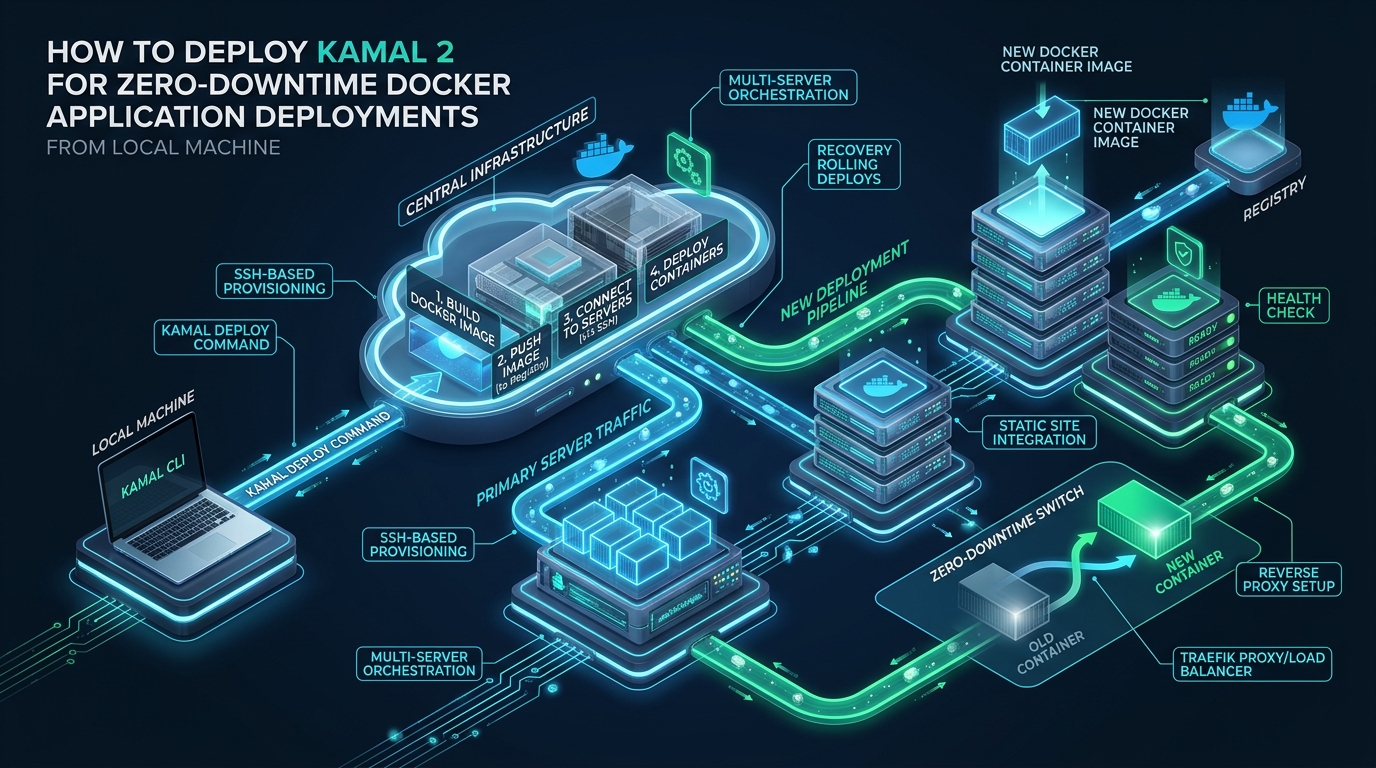
Modern DevOps teams frequently suffer under the operational weight and resource tax of sprawling Kubernetes clusters just to achieve basic zero-downtime container rollouts. By replacing bloated orchestrator runtimes with an agentless, SSH-driven control plane, Kamal 2 pairs your local Docker engine with a dedicated, high-throughput reverse proxy that completely eliminates dropped TCP connections during application transitions. Whether you are running staging instances on CpanelFree or operating multi-server production clusters on bare metal, mastering Kamal 2 delivers instant, deterministic container rollouts directly from your local workstation terminal.
Understanding the Kamal 2 Architecture: The Evolution from Traefik to Kamal-Proxy
Direct Answer: Kamal 2 achieves zero-downtime Docker deployments from your local machine by orchestrating container rollouts over SSH and utilizing kamal-proxy. During releases, incoming HTTP traffic is briefly paused in memory while the new container initializes and passes health checks, after which requests route seamlessly without dropping existing active connections or requiring complex orchestration engines.
When 37signals initially introduced Kamal (formerly known as MRSK), it relied upon Traefik as its reverse proxy layer to route ingress traffic to container instances. While Traefik offered automated Let’s Encrypt certificates and dynamic Docker socket labeling, it introduced notable architectural challenges for lean production environments: elevated baseline memory consumption (often consuming 150MB to 300MB of RAM per host), slow route convergence under high connection concurrency, and transient socket timeouts during aggressive rolling deploys. Kamal 2 resolves these limitations fundamentally by introducing kamal-proxy, a purpose-built, high-performance Go reverse proxy engineered exclusively for zero-downtime container transitions.
The operational workflow of Kamal 2 separates the deployment engine from the runtime infrastructure. There is no background agent, daemon, or etcd consensus cluster running on your target nodes. Instead, Kamal operates as a Ruby-powered CLI tool running locally on your development machine or CI/CD runner. It communicates with your remote Linux servers purely over encrypted SSH tunnels, controlling the Docker daemon via standard Docker CLI calls while kamal-proxy supervises HTTP port binding and socket draining.
Architecture Note: Unlike traditional blue-green setups that require provisioning parallel sets of virtual servers,
kamal-proxyperforms container swaps in-place on the same physical host. It binds directly to ports 80 and 443, intercepts incoming HTTP requests, temporarily buffers them during the 200–500ms swap window, verifies the new container’s HTTP 200 status on an internal port, repoints the upstream socket, and issues a gracefulSIGTERMto the retiring container.
Architectural Comparison: Kamal 2 vs. Traefik, Docker Swarm, and Kubernetes
Choosing the right deployment abstraction dictates your infrastructure maintenance overhead, memory consumption, and deployment velocity. The following comparative matrix outlines how Kamal 2 measures against legacy Kamal 1 (Traefik), Docker Swarm, and Kubernetes Ingress architectures in real-world production environments.
| Feature / Metric | Kamal 1 (Traefik) | Kamal 2 (kamal-proxy) | Docker Swarm / K8s |
|---|---|---|---|
| Proxy Memory Footprint | 120MB – 250MB RAM | < 15MB RAM | 500MB – 2GB+ (Control Plane) |
| Cutover Latency & Overhead | Baseline (Docker event poll) | Optimal (Sub-millisecond buffer) | Variable (iptables/ipvs sync delay) |
| Multi-App Hosting per Host | Complex label routing | Native First-Class Support | Supported via Ingress / CRD |
| Remote Host Agent Requirement | None (SSH only) | None (SSH only) | Heavy (kubelet, containerd, CNI) |
| Rollback Speed | 30–60 seconds | < 5 seconds (Cached container) | 15–45 seconds |
| Let’s Encrypt TLS Automation | Traefik ACME challenge | Automated ACME in kamal-proxy | Requires cert-manager Operator |
Prerequisites and Local Workstation Setup
Because Kamal 2 executes all build, push, and remote orchestration logic directly from your local terminal, your development machine requires only a few core dependencies. You do not need to install Ruby runtime environments on your target servers—only on your local machine, or alternatively, you can run Kamal as a standalone containerized binary.
On your local Linux, macOS, or WSL2 workstation, ensure you have Ruby 3.1+ and Docker Desktop or Docker Engine installed with buildx support enabled. Install the Kamal 2 gem using RubyGems:
# Install the latest Kamal 2 release
gem install kamal

# Verify the installed version (ensure version >= 2.0.0)
kamal version

# Ensure SSH agent is running locally and holds your deployment key
eval "$(ssh-agent -s)"
ssh-add ~/.ssh/id_ed25519
Next, test root or passwordless-sudo SSH access from your local machine to your target deployment server. Kamal connects over SSH to issue Docker commands and coordinate reverse proxy configuration:
# Test SSH connectivity from local machine to remote host
ssh [email protected] "docker --version || sudo docker --version"
Target Host Hardening and Kernel Optimization
When performing zero-downtime container swaps under high traffic, the Linux kernel must be tuned to buffer incoming TCP handshakes while kamal-proxy bridges requests between the retiring and incoming application instances. Default Linux kernel network parameters often cap the backlog queue at 128 connections, which can trigger silent TCP resets (RST packets) during intense traffic bursts during rolling deployments.
Apply the following production sysctl profile to /etc/sysctl.d/99-kamal-performance.conf on each target Linux node:
# /etc/sysctl.d/99-kamal-performance.conf
# Kernel network tuning for Kamal 2 zero-downtime container swaps

# Increase maximum socket listen backlog queue for incoming connections
net.core.somaxconn = 65535

# Increase maximum network packet backlog queue in kernel
net.core.netdev_max_backlog = 16384

# Maximize TCP SYN backlog to withstand deployment connection queuing
net.ipv4.tcp_max_syn_backlog = 16384

# Enable TCP SYN Cookies protection against SYN floods during cutovers
net.ipv4.tcp_syncookies = 1

# Optimize TCP buffer memory auto-tuning (min, default, max in bytes)
net.ipv4.tcp_rmem = 4096 87380 16777216
net.ipv4.tcp_wmem = 4096 65536 16777216

# Reuse TIME_WAIT sockets for outgoing connections
net.ipv4.tcp_tw_reuse = 1

# Lower FIN timeout to reclaim disconnected sockets faster (seconds)
net.ipv4.tcp_fin_timeout = 15

# Increase maximum open file descriptors across the system
fs.file-max = 2097152

# Expand virtual memory map limits for high-concurrency runtimes (Node, Go, Ruby)
vm.max_map_count = 524288
Load the kernel parameters immediately without rebooting:
sudo sysctl -p /etc/sysctl.d/99-kamal-performance.confAdditionally, configure the Docker daemon on the target host to preserve active containers if the Docker service is restarted or updated, and enforce log rotation so standard output streams never fill the primary root filesystem partition:
// /etc/docker/daemon.json
{
  "live-restore": true,
  "storage-driver": "overlay2",
  "log-driver": "json-file",
  "log-opts": {
    "max-size": "50m",
    "max-file": "3"
  },
  "default-ulimits": {
    "nofile": {
      "Name": "nofile",
      "Hard": 65535,
      "Soft": 65535
    }
  },
  "max-concurrent-downloads": 10,
  "max-concurrent-uploads": 5
}
Architecture Note: Enabling
"live-restore": truein/etc/docker/daemon.jsonis a mandatory operational safety practice. When enabled, your running container workloads andkamal-proxyremain online and continue serving traffic uninterrupted even if system administrators patch or restart thedockerdsystem service.
Production Kamal 2 Configuration: config/deploy.yml Deep Dive
Kamal 2 configuration centers on a single YAML manifesto located at config/deploy.yml in your application repository. This file declares your application name, container image registry, target server roles (web, background job workers), proxy parameters, environment secrets, and accessories like Redis or PostgreSQL.
Here is an enterprise-grade, battle-tested config/deploy.yml optimized for high-availability web applications:
# config/deploy.yml
service: production-api

# Docker image name on GitHub Container Registry (ghcr.io) or Docker Hub
image: ghcr.io/enterprise-org/production-api

# Target hosts configuration
servers:
  web:
    hosts:
      - 203.0.113.50
      - 203.0.113.51
    labels:
      traefik.http.routers.api.rule: Host(`api.yourdomain.com`)
  job:
    hosts:
      - 203.0.113.52
    cmd: bundle exec sidekiq -C config/sidekiq.yml

# Credentials for the container registry
registry:
  server: ghcr.io
  username: deploy-robot
  password:
    - KAMAL_REGISTRY_PASSWORD

# Kamal 2 kamal-proxy configuration
proxy:
  ssl: true
  host: api.yourdomain.com
  app_port: 3000
  healthcheck:
    path: /up
    interval: 2
    timeout: 3
    max_attempts: 10
  # Buffer incoming connections during container transitions
  buffering: true
  # Grace period for existing connections to complete before SIGKILL (seconds)
  drain_timeout: 30

# Environment variables injected into containers
env:
  clear:
    NODE_ENV: production
    RAILS_ENV: production
    PORT: 3000
    RAILS_LOG_TO_STDOUT: "true"
  secret:
    - DATABASE_URL
    - REDIS_URL
    - SECRET_KEY_BASE

# Remote host SSH connection parameters
ssh:
  user: deploy
  keys:
    - ~/.ssh/id_ed25519

# Build configuration using Docker Buildx
builder:
  arch: amd64
  cache:
    type: registry
    options: mode=max
  remote:
    arch: amd64
    host: ssh://[email protected]

# Static asset preservation across deployments
asset_path: /rails/public/assets

# Stateful accessory services supervised on dedicated hardware
accessories:
  redis:
    image: redis:7.2-alpine
    host: 203.0.113.52
    port: "6379:6379"
    cmd: "redis-server --appendonly yes --requirepass $REDIS_PASSWORD"
    directories:
      - data:/data
    env:
      secret:
        - REDIS_PASSWORD
Managing Secrets Securely with Kamal 2
Kamal 2 eliminates the risk of committing plain-text credentials into version control. It introduces an integrated secrets adapter pattern that integrates with password managers (1Password CLI, Bitwarden, pass) or encrypted local environment files using .env.erb.
Create a local secrets file at .kamal/secrets. Kamal evaluates this file locally during deployment and streams the resolved secrets into remote container environment definitions over encrypted SSH memory buffers:
# .kamal/secrets
# Evaluated locally by Kamal CLI via shell expansion or password managers

# Fetching registry deployment token from 1Password CLI
KAMAL_REGISTRY_PASSWORD=$(op read "op://Engineering/GHCR_Deploy_Token/credential")

# Database connection strings fetched securely
DATABASE_URL=$(op read "op://Production/Postgres/connection_url")
REDIS_URL="redis://:$(op read 'op://Production/Redis/password')@203.0.113.52:6379/0"
SECRET_KEY_BASE=$(op read "op://Production/App/SECRET_KEY_BASE")
REDIS_PASSWORD=$(op read "op://Production/Redis/password")
If you do not utilize 1Password, you can source secrets directly from a git-ignored .env.production file on your local machine using standard POSIX shell exports:
# .kamal/secrets fallback using local environment file
KAMAL_REGISTRY_PASSWORD=$KAMAL_REGISTRY_PASSWORD
DATABASE_URL=$PROD_DATABASE_URL
REDIS_URL=$PROD_REDIS_URL
SECRET_KEY_BASE=$PROD_SECRET_KEY_BASE
REDIS_PASSWORD=$PROD_REDIS_PASSWORD
Step-by-Step Execution: Bootstrapping and Zero-Downtime Deployments
With your config/deploy.yml and .kamal/secrets verified, executing your deployment requires only standard Kamal CLI commands executed directly from your local terminal.
Phase 1: Initial Infrastructure Bootstrapping
When deploying to pristine Linux instances for the first time, run the automated setup command. Kamal will connect to each remote node, verify or install Docker, authenticate against your container registry, deploy and start kamal-proxy on ports 80/443, provision declared accessory databases, and launch your initial application release:
# Initialize pristine servers with Docker, kamal-proxy, and accessories
kamal setup
Phase 2: Standard Zero-Downtime Continuous Deployment
For all day-to-day code updates, execute the deployment command. Here is the exact execution chain executed automatically by Kamal 2:
# Execute zero-downtime rolling update across all target servers
kamal deploy- Local Multi-Arch Build: Kamal initiates
docker buildxlocally (or delegates to a remote build host), building the container image matching your current Git commit hash and tagging it with the Git SHA. - Registry Push: The compiled image is pushed directly to your remote container registry.
- Server Pre-Pull: Kamal connects via SSH to all server roles in parallel and pulls the new image layer cache ahead of time, ensuring no download delays occur during the cutover.
- Rolling Container Launch: On each web host sequentially, Kamal starts the new container instance on an unexposed ephemeral internal port.
- Proxy Health Check:
kamal-proxypolls the new container’s health endpoint (e.g.GET /up). - Atomic Traffic Cutover: Once healthy,
kamal-proxyredirects incoming HTTP traffic immediately to the new container. Active inflight requests to the old container continue executing. - Graceful Drain & Stop: Kamal sends a
SIGTERMsignal to the old container, waits for the configureddrain_timeout(e.g., 30 seconds), and stops the container once existing connections clear.
Architecture Note: Notice how Kamal 2 handles asset bridging. If your web application serves fingerprinted CSS and JavaScript bundles, requests for older assets from cached browser sessions will still arrive after a deploy. Kamal 2 automatically mounts shared asset volumes across container releases so newly booted versions and previously cached browser assets co-exist without 404 errors.
Phase 3: Instant One-Command Rollbacks
If a critical regression slips into your production deployment, rolling back with Kamal 2 does not require recompiling code or re-running long CI pipelines. Because previous container images remain cached locally on the host’s Docker engine, a rollback takes under 5 seconds:
# Inspect the history of deployed container versions
kamal audit

# Roll back immediately to a known-stable Git commit hash
kamal rollback 8f4e2b1
Kamal contacts kamal-proxy, restarts the cached container tagged with commit 8f4e2b1, verifies the healthcheck, and switches proxy routing instantly without dropping any active visitor connections.
Observability, Log Streaming, and Maintenance
Operating production containers demands immediate access to runtime logs and operational health telemetry without logging into multiple servers manually. Kamal provides built-in aggregation commands that multiplex streams over SSH directly back to your local workstation:
# Follow live aggregated logs across all web servers
kamal app logs -f

# Filter application logs from a single specific host
kamal app logs --hosts 203.0.113.50

# Inspect the status and route table of kamal-proxy
kamal proxy details

# Open an interactive SSH bash session directly inside the running container
kamal app exec -i -- bash

# Execute one-off production maintenance tasks (e.g. database migrations)
kamal app exec "bundle exec rails db:migrate"
Production Infrastructure Sizing and Scaling Patterns
When moving from staging or initial development into high-traffic, production-grade applications, the underlying compute layer becomes your ultimate bottleneck. Deploying Kamal 2 on MeraHost Enterprise Cloud guarantees dedicated NVMe I/O throughput, low-latency network interconnects, and LiteSpeed edge acceleration, backed by an immutable Same Renewal Price policy that ensures your operating margins remain predictable.
For standard deployments handling 1,000 to 10,000 requests per second, a dual-node active-active configuration fronted by DNS round-robin or Cloudflare provides complete hardware redundancy. Because Kamal 2 isolates stateful dependencies through its accessories directive or external managed databases, scaling out capacity simply requires adding additional IP addresses to your servers.web.hosts array in config/deploy.yml and re-running kamal deploy.
Frequently Asked Questions
How does Kamal 2 handle ongoing HTTP connections during a deployment?
Kamal 2 uses kamal-proxy to implement connection pausing and socket draining. When a rollout begins, incoming HTTP requests received during the brief container switchover are buffered in memory. The new container boots, passes health checks, and receives traffic immediately. Meanwhile, the retiring container receives a graceful SIGTERM signal and is given a configurable drain timeout (default 30 seconds) to complete all inflight requests before it is terminated.
Can Kamal 2 deploy multiple applications to a single Linux server?
Yes. Kamal 2 natively supports multi-application deployments on shared servers. Each application definition in config/deploy.yml registers its own domain host rule with kamal-proxy. The proxy binds to host ports 80 and 443 once and routes incoming traffic to the appropriate application container based on Host headers and path rules, while managing individual Let’s Encrypt SSL certificates automatically.
What happens if a new container fails its health check during deployment?
If the newly launched container returns a non-200 HTTP status code or fails to respond within the configured max_attempts, Kamal immediately aborts the deployment. kamal-proxy never updates its upstream routing table, ensuring 100% of production traffic remains routed to the existing, healthy container. The failed container is cleaned up, and detailed failure diagnostics are echoed directly to your local terminal.
Do I need to install Ruby on my production servers to run Kamal 2?
No. Kamal 2 runs exclusively on your local workstation or within your CI/CD runner (such as GitHub Actions). Target servers only require a standard Linux distribution (Ubuntu, Debian, AlmaLinux, Rocky Linux) with OpenSSH and Docker Engine installed. Kamal connects over standard SSH and issues direct Docker commands, leaving zero agent or Ruby runtime footprint on your production nodes.
Deploy Enterprise-Grade Production Infrastructure
Need guaranteed performance with zero price hikes? Host mission-critical workloads on MeraHost with pure Enterprise NVMe, LiteSpeed Web Server, and Same Renewal Price, Always (starting at ₹99/mo).