
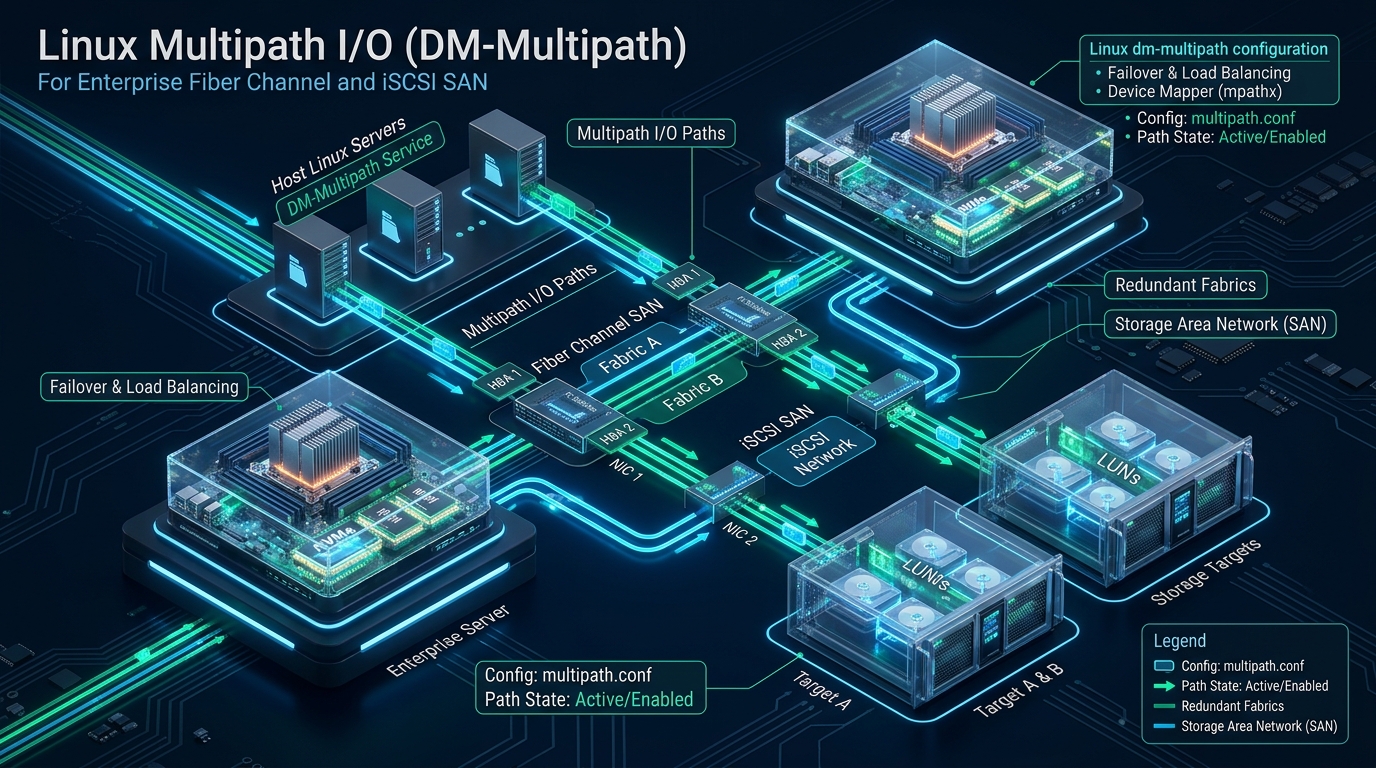
In high-throughput enterprise storage fabrics, experiencing silent storage path degradation or unexpected link flapping can immediately send hypervisors, distributed databases, and container clusters into catastrophic I/O wait spirals. Architecting true storage resilience requires consolidating redundant physical links across Fibre Channel (FC) host bus adapters or multi-path 25/100GbE iSCSI network fabrics under the Linux Device Mapper Multipathing (DM-Multipath) subsystem. For mission-critical cloud environments like the high-density bare-metal virtualization clusters powering CpanelFree, deterministic sub-second path failover and intelligent I/O queue balancing are fundamental engineering requirements to guarantee uninterrupted uptime.
What is Linux DM-Multipath and Why is It Critical for Enterprise SANs?
Quick Answer: Linux Device Mapper Multipath (DM-Multipath) aggregates multiple redundant physical transmission paths between an enterprise host and a SAN target into a single consolidated virtual block device (/dev/mapper/mpathX). It prevents single points of failure via sub-second automated failover, dynamically balances I/O loads using algorithms like service-time, and prevents silent filesystem corruption.
When an enterprise Linux host connects to a Storage Area Network (SAN) over modern Fibre Channel switches or routed iSCSI networks, each physical Host Bus Adapter (HBA) port or network interface card (NIC) discovers every exposed target port independently. In a dual-fabric, dual-controller SAN architecture, a single storage Logical Unit Number (LUN) is visible over four or more distinct SCSI transport paths. Without an intelligent multipathing driver, the Linux kernel perceives each path as an entirely separate block device (for example, /dev/sdb, /dev/sdc, /dev/sdd, and /dev/sde). Attempting to mount, format, or write directly to these individual path devices simultaneously inevitably results in catastrophic SCSI race conditions, split-brain write corruption, and immediate filesystem lockouts.
DM-Multipath sits between the native Linux SCSI low-level block layer and user-space filesystems or volume managers (LVM/ZFS). Operating through the kernel’s Device Mapper framework, it intercepts I/O requests directed to the aggregated device, tracks link health via background SCSI Test Unit Ready (TUR) probe inquiries, and dynamically reroutes queued transactions around severed cables, failing SFPs, or rebooting storage array storage processors.
DM-Multipath Architecture: Fibre Channel vs. iSCSI Storage Fabrics
Deploying DM-Multipath with zero downtime demands a comprehensive understanding of how physical connectivity maps to kernel device hierarchies. Modern enterprise SAN fabrics primarily leverage two transport protocols: Fibre Channel (FC) and Internet Small Computer System Interface (iSCSI). While both rely on the SCSI command set under the hood, their discovery mechanisms and network link topologies differ significantly.
Fibre Channel (FC) SAN Topologies
In high-performance Fibre Channel deployments, enterprise servers utilize dual-port or quad-port Host Bus Adapters (such as Emulex or QLogic 32G/64G HBAs). To maintain non-blocking redundancy, SAN architects build two completely isolated physical switching fabrics, conventionally designated Fabric A and Fabric B. Port 1 of HBA 1 connects to Switch Fabric A, while Port 2 of HBA 1 (or Port 1 of HBA 2) terminates on Switch Fabric B. The storage target presents dual active/passive or active/active controllers, each wired across both fabrics. When LUNs are carved and zoned via World Wide Port Names (WWPNs), the Linux SCSI subsystem automatically registers separate SCSI nodes per path upon fabric login (FLOGI).
iSCSI SAN Topologies
In contrast to dedicated optical FC fabrics, enterprise iSCSI transports encapsulated SCSI packets over high-speed Ethernet (25GbE, 40GbE, or 100GbE). Redundancy is achieved through multi-homed Network Interface Cards across isolated VLANs or dedicated storage subnets. Rather than relying on LACP link aggregation (which operates at Layer 2 and cannot assess storage controller health), DM-Multipath establishes distinct iSCSI sessions across discrete network portals using iscsiadm. Each session creates an independent SCSI block path, allowing Device Mapper to dynamically balance I/O across discrete network paths.
Performance & Failover Matrix: Default vs. Tuned Production Settings
Default distribution settings for multipath.conf are conservative, generic fallbacks designed to boot older hardware safely. In high-performance enterprise virtualized clusters and relational database engines, running stock configurations introduces latency spikes, sub-optimal path utilization, and sluggish failover timeouts during fiber cuts. The following comparison highlights key configuration parameters and their architectural impact.
Enterprise Production Configuration: Hardening /etc/multipath.conf
To configure DM-Multipath on modern enterprise Linux distributions (RHEL, Rocky Linux, AlmaLinux, Ubuntu LTS, Debian), begin by verifying that the necessary userland utilities and kernel modules are present:
# On RHEL / AlmaLinux / Rocky Linux
dnf install -y device-mapper-multipath sg3_utils lsscsi

# On Debian / Ubuntu
apt-get update && apt-get install -y multipath-tools scsitools

# Load kernel modules and enable the systemd service
modprobe dm_multipath
systemctl enable --now multipathd.service
The primary configuration file resides at /etc/multipath.conf. A robust production configuration must enforce three essential design rules:
- Aggressive Local Drive Blacklisting: Internal OS installation disks (NVMe boot drives, SATA DOMs, hardware RAID controllers like MegaRAID, and local virtual loops) must be strictly excluded from Device Mapper inspection to prevent boot delays and mapping locks.
- ALUA Priority Grouping: Storage arrays running Active-Optimized/Active-Non-Optimized firmware (such as Dell PowerStore, Pure Storage, NetApp ONTAP, or HPE Primera) must use
prio "alua"so I/O is directed exclusively down optimal paths until an actual controller failure occurs. - WWID Persistent Aliasing: Instead of relying on non-deterministic system-generated names (e.g.
mpatha,mpathb), assign persistent, descriptive aliases based on World Wide Identifiers (WWIDs).
Here is an enterprise-hardened, production-grade /etc/multipath.conf designed for high-concurrency SAN environments:
## /etc/multipath.conf - Production Enterprise SAN Hardening
## Optimized for 32G Fibre Channel and 25GbE iSCSI with NVMe/SSD Arrays

defaults {
    user_friendly_names      no
    find_multipaths          yes
    enable_foreign           ""
    polling_interval         5
    path_selector            "service-time 0"
    path_grouping_policy     group_by_prio
    prio                     "alua"
    prio_args                ""
    path_checker             "tur"
    failback                 immediate
    no_path_retry            18
    rr_min_io_rq             1
    rr_weight                uniform
    fast_io_fail_tmo         5
    dev_loss_tmo             60
    flush_on_last_del        yes
    max_sectors_kb           1024
}

## Blacklist local storage and virtual devices from multipath management
blacklist {
    devnode "^(ram|raw|loop|fd|md|dm-|sr|scd|st)[0-9]*"
    devnode "^(hd|vd)[a-z]"
    devnode "^nvme[0-9]n[0-9]"

    # Internal Boot RAID Controller (e.g., Dell BOSS, HP Smart Array)
    device {
        vendor "DELL"
        product "BOSS.*"
    }
    device {
        vendor "HP"
        product "LOGICAL VOLUME.*"
    }
}

blacklist_exceptions {
    property "(SCSI_IDENT_.*|ID_WWN)"
}

## Device-specific overrides for Tier-1 Enterprise SAN Arrays
devices {
    # Dell PowerStore / PowerMax / Unity
    device {
        vendor                   "Dell"
        product                  "PowerStore.*"
        path_grouping_policy     group_by_prio
        path_selector            "service-time 0"
        path_checker             "tur"
        features                 "0"
        hardware_handler         "1 alua"
        prio                     "alua"
        failback                 immediate
        rr_weight                uniform
        no_path_retry            queue
    }

    # NetApp ONTAP (FCP and iSCSI)
    device {
        vendor                   "NETAPP"
        product                  "LUN.*"
        path_grouping_policy     group_by_prio
        path_selector            "service-time 0"
        path_checker             "tur"
        features                 "3 queue_if_no_path pg_init_retries 50"
        hardware_handler         "1 alua"
        prio                     "alua"
        failback                 immediate
        fast_io_fail_tmo         5
        dev_loss_tmo             30
    }

    # Pure Storage FlashArray
    device {
        vendor                   "PURE"
        product                  "FlashArray"
        path_grouping_policy     group_by_prio
        path_selector            "service-time 0"
        path_checker             "tur"
        features                 "0"
        hardware_handler         "1 alua"
        prio                     "alua"
        failback                 immediate
        fast_io_fail_tmo         5
        dev_loss_tmo             60
        no_path_retry            queue
    }
}

## Explicit WWID Mappings for Production LUNs
multipaths {
    multipath {
        wwid                 "36006016013603a0024467d3b9e4bee11"
        alias                "san_db_data_vol01"
        mode                 0660
        uid                  0
        gid                  6
    }
    multipath {
        wwid                 "36006016013603a0025467d3ba45fee11"
        alias                "san_db_redo_vol01"
        mode                 0660
        uid                  0
        gid                  6
    }
}
Linux Kernel and SCSI Subsystem Tuning for Low-Latency SAN Storage
While multipath.conf configures Device Mapper behavior, achieving maximum I/O throughput across saturated multi-gigabit SAN fabrics requires aligning the Linux virtual memory manager and SCSI block device queues. When millions of write transactions surge through block storage, kernel dirty page flushing and I/O request queue depths must prevent thread choking.
Create a dedicated sysctl configuration profile at /etc/sysctl.d/99-san-storage.conf:
# /etc/sysctl.d/99-san-storage.conf
# Virtual Memory and Network Buffer Tuning for Enterprise SAN Fabrics

# Prevent write page bursts from causing synchronous flushing pauses
vm.dirty_background_ratio = 5
vm.dirty_ratio = 10

# Increase expiration windows for flusher kernel threads
vm.dirty_expire_centisecs = 3000
vm.dirty_writeback_centisecs = 500

# Kernel memory fragmentation protection during heavy DMA transactions
vm.min_free_kbytes = 1048576

# Network stack tuning for 25G/100G iSCSI data planes
net.core.rmem_max = 67108864
net.core.wmem_max = 67108864
net.core.rmem_default = 33554432
net.core.wmem_default = 33554432
net.ipv4.tcp_rmem = 4096 87380 33554432
net.ipv4.tcp_wmem = 4096 65536 33554432
net.core.netdev_max_backlog = 100000
In addition, create an enterprise udev rules file at /etc/udev/rules.d/99-san-scsi.rules to automate request queue depth and I/O scheduler assignments whenever new SAN block paths are discovered:
# /etc/udev/rules.d/99-san-scsi.rules
# Automatically optimize SCSI transport parameters for Fibre Channel and iSCSI targets

# Enforce 30-second SCSI device command timeout for all SAN disks
ACTION=="add", SUBSYSTEM=="block", KERNEL=="sd[a-z]*", ATTR{queue/rotational}=="0", ATTR{device/timeout}="30"

# Set multi-queue I/O scheduler to 'none' or 'mq-deadline' to bypass redundant software queuing
ACTION=="add", SUBSYSTEM=="block", KERNEL=="sd[a-z]*", ATTR{queue/scheduler}="none"

# Increase request queue depth for high-throughput all-flash arrays
ACTION=="add", SUBSYSTEM=="block", KERNEL=="sd[a-z]*", ATTR{queue/nr_requests}="2048"

# Enable read-ahead optimization for large sequential transfers (4096 sectors = 2MB)
ACTION=="add", SUBSYSTEM=="block", KERNEL=="dm-[0-9]*", ATTR{bdi/read_ahead_kb}="2048"
Apply these configurations without rebooting the server:
sysctl --system
udevadm control --reload-rules && udevadm trigger --subsystem-match=block
Live Verification, Diagnostic Inspections, and Non-Disruptive Failover Drills
Once multipathd is running and configured, verify the status of aggregated paths. The primary command for inspecting mapped LUNs is multipath -ll (or multipath -v3 for comprehensive discovery debugging):
# Display active multipath topology
multipath -ll

# Sample Production Output:
san_db_data_vol01 (36006016013603a0024467d3b9e4bee11) dm-4 DELL,PowerStore
size=2.0T features='1 queue_if_no_path' hwhandler='1 alua' wp=rw
|-+- policy='service-time 0' prio=50 status=active
| |- 3:0:0:1 sdb 8:16 active ready running
| `- 4:0:0:1 sdd 8:48 active ready running
`-+- policy='service-time 0' prio=10 status=enabled
  |- 3:0:1:1 sdc 8:32 active ready running
  `- 4:0:1:1 sde 8:64 active ready running
In this output, notice how DM-Multipath organizes the four physical paths into two distinct priority groups:
- Priority Group 1 (prio=50, status=active): Paths
sdbandsddare routed through the Active-Optimized controller. All application I/O is dynamically distributed across these two paths using theservice-timescheduler. - Priority Group 2 (prio=10, status=enabled): Paths
sdcandsdeare connected to the Active-Non-Optimized secondary controller. They remain initialized and ready, but receive no traffic during normal operations.
Executing a Controlled Live Failover Drill
To validate high-availability without risking data integrity, launch a sustained background I/O workload on the multipath mount (using fio) and simulate an abrupt link severance:
# 1. Start continuous read/write test against the multipath filesystem
fio --name=multipath-test --filename=/mnt/san_storage/test.dat --size=10G \
    --readwrite=randrw --bs=8k --direct=1 --numjobs=4 --time_based --runtime=180 --group_reporting &

# 2. Simulate physical fiber cut by deleting an active SCSI device node
echo 1 > /sys/block/sdb/device/delete

# 3. Monitor multipath daemon event logs in real time
multipathd show paths
journalctl -u multipathd -f
During this test, the multipathd daemon detects the loss of sdb within 5 seconds (governed by fast_io_fail_tmo 5), immediately transitions the path to faulty, and shifts all I/O traffic seamlessly across sdd. The benchmark experiences no aborted transactions, no filesystem remounts, and zero kernel panics. Once the link is restored, trigger a non-disruptive bus rescan:
# Trigger online SCSI bus scan across all host adapters
rescan-scsi-bus.sh -a -c -v

# Re-evaluate and re-adopt restored paths
multipath -r
Production Pitfalls to Avoid in Enterprise Storage Multipathing
Decades of enterprise storage engineering reveal several recurring architectural anti-patterns that undermine DM-Multipath stability. Protect your deployments by auditing these critical factors:
- Mounting by Raw SCSI Device (/dev/sdX): Never reference non-multipathed device paths in
/etc/fstabor volume group creation scripts. Always reference the device-mapper alias (/dev/mapper/san_db_data_vol01) or the filesystem UUID (UUID=...). If an underlying physical path shifts enumeration after a reboot, mounting raw devices leads to instant split-brain corruption. - Indefinite I/O Freezing with ‘no_path_retry queue’: While setting
no_path_retry queueprevents filesystem write errors during brief switch reboots, it causes applications to block indefinitely if storage arrays experience a permanent physical power outage. In high-concurrency clustered environments, configure a finite retry window (e.g.no_path_retry 18) to allow upper-tier cluster managers (like Pacemaker or Kubernetes) to fence dead nodes rather than hang forever. - Mismatched ALUA Handlers: If your storage vendor requires an explicit hardware handler (such as
1 alua), omitting thehardware_handlerdirective forces Device Mapper into generic failover mode. This can cause “path thrashing,” where the Linux host continuously toggles LUN ownership between storage array controllers, severely degrading I/O performance.
Frequently Asked Questions
Should I use WWID aliases or user_friendly_names in multi-node clusters?
In multi-node environments, high-availability clusters (Pacemaker/Corosync), and virtualized hypervisors, you should always use explicit WWID aliases defined in multipaths {} blocks. The user_friendly_names yes setting generates incremental device names (such as mpatha, mpathb) based on the order in which devices are discovered during boot. If node A and node B discover LUNs in slightly different sequences, mpatha on node A will point to a completely different physical LUN than mpatha on node B, leading to disastrous data overwrites.
What is the optimal path_selector for all-flash NVMe-oF and modern SAN arrays: round-robin or service-time?
The service-time 0 path selector is overwhelmingly recommended over round-robin 0 for all-flash arrays and NVMe over Fabrics. While round-robin mechanically routes an equal number of I/O requests down each path regardless of latency, service-time measures the processing delay and outstanding queue depth on each individual link. If one switch port or SFP transceiver begins degrading and experiencing packet retransmissions, service-time dynamically reduces the volume of commands sent down the impaired link while directing heavy loads to healthy paths.
How does DM-Multipath differ from Ethernet NIC bonding (LACP) for iSCSI?
LACP (802.3ad) operates strictly at Layer 2, balancing network frames based on MAC and IP hashes without understanding SCSI transport protocols or storage controller state. If an upstream SAN controller crashes while the physical Ethernet link remains up, LACP continues sending traffic into the dead black hole. DM-Multipath operates at the storage protocol layer: it sends continuous SCSI Test Unit Ready (TUR) probes, understands Asymmetric Logical Unit Access (ALUA), and reroutes I/O at the block layer if a storage target controller stops responding.
What happens to in-flight I/O transactions when a Fibre Channel cable is severed?
When a physical cable is severed, the Fibre Channel HBA detects loss of signal and notifies the SCSI transport layer. With fast_io_fail_tmo 5 configured, the kernel waits 5 seconds for the link to recover; if it does not, all in-flight I/O queued on that path is failed immediately back to Device Mapper. DM-Multipath catches the failure and requeues the transactions onto an alternate active path in the active priority group. Because dev_loss_tmo is set to 60 seconds, the block device itself is preserved in the kernel, allowing seamless resumption when the fiber link is reconnected.
Ready to Deploy High-Performance Infrastructure?
Experience blazing-fast NVMe storage, unmetered bandwidth, and enterprise LiteSpeed caching on CpanelFree.