
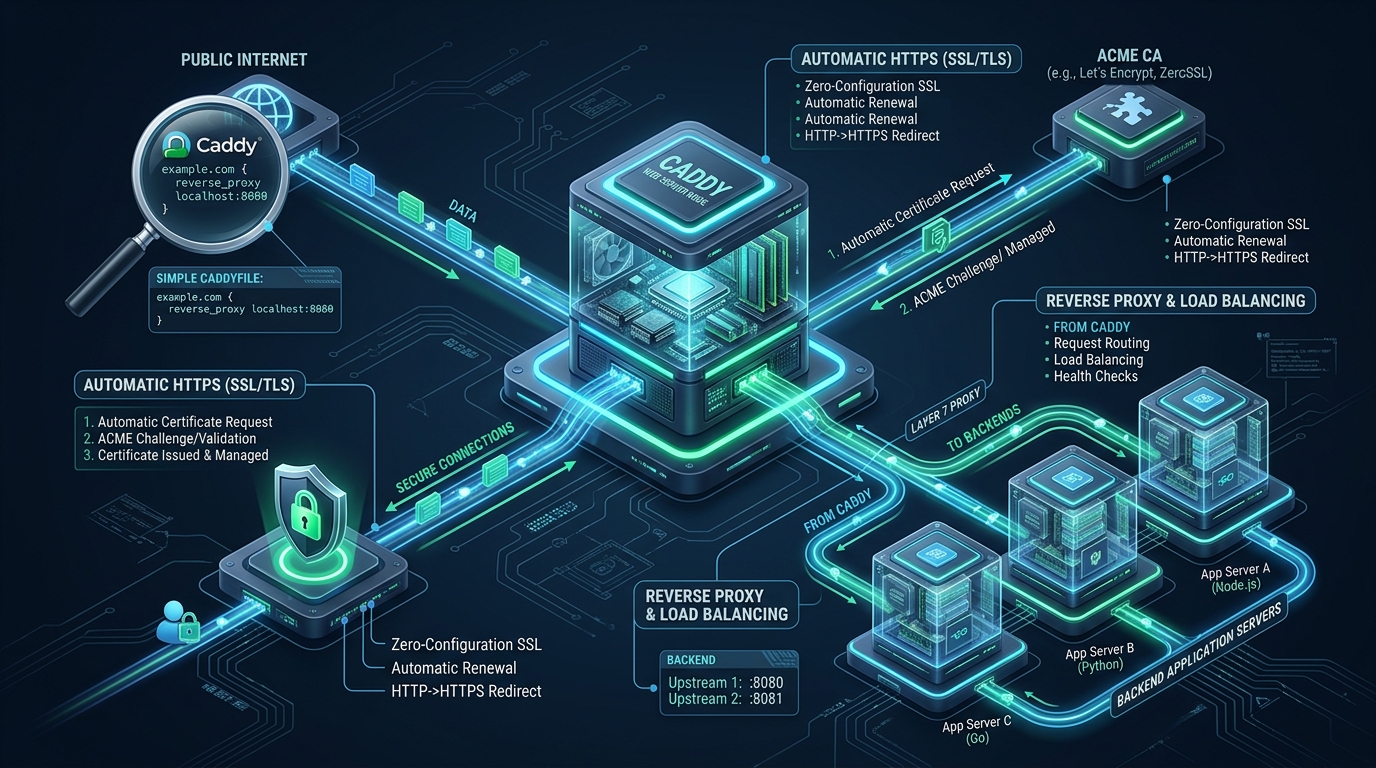
Modern cloud infrastructure demands low-latency transport security, HTTP/3 QUIC acceleration, and robust Layer 7 traffic routing without the crushing operational drag of manual certificate renewal scripts and brittle configurations. While traditional web stacks require external daemons and fragile cron hooks to maintain SSL posture, deploying Caddy on CpanelFree staging nodes and edge infrastructure provides a memory-safe, zero-touch ACME engine built directly in Go. In this production-tested guide, you will master enterprise reverse proxy patterns, automated TLS failover, and Linux kernel tunings that unlock maximum throughput under punishing production workloads.
What Makes Caddy the Modern Standard for Automatic HTTPS & Layer 7 Proxying?
Direct Answer: A Caddy web server tutorial demonstrates using Caddy 2 as a memory-safe, enterprise edge proxy that natively automates TLS certificate issuance, OCSP stapling, and renewals via ACME out of the box. Caddy simplifies Layer 7 reverse proxying with built-in load balancing, active health checks, and HTTP/3 support using minimal declarative syntax.
For more than two decades, web server engineering was dominated by Nginx and Apache HTTP Server. While both platforms offer exceptional performance, they were architected in an era before automated encryption, dynamic container orchestration, and binary memory safety became non-negotiable enterprise requirements. Administrators typically manage certificates using standalone agents such as Certbot or acme.sh, synchronizing HTTP-01 challenges across clustered file systems, managing renewal hooks, and executing reloads that risk transient connection drops.
Caddy eliminates this entire category of operational toil. Written in Go, Caddy runs as a single static binary with no external runtime dependencies. Its embedded TLS engine—built on top of the battle-tested CertMagic library—manages the full lifecycle of cryptographic certificates without external processes. It negotiates Let’s Encrypt and ZeroSSL endpoints, issues multi-issuer fallbacks, automatically performs OCSP stapling, and rotates certificates 30 days before expiration. Furthermore, Caddy was the first production web server to offer fully stable HTTP/3 (over QUIC via UDP) enabled by default, reducing round-trip handshakes to zero (0-RTT) for returning clients.
Performance & Architectural Comparison: Caddy vs. Nginx vs. Apache
Selecting the right reverse proxy and web server requires evaluating raw concurrency, operational maintenance overhead, cryptographic capabilities, and memory safety. Below is an architectural breakdown comparing default deployments against enterprise-tuned production configurations.
| Feature / Metric | Legacy Stacks (Apache / Nginx) | Caddy Enterprise Architecture |
|---|---|---|
| TLS Automation & Renewal | External daemons (Certbot, cron hooks, reload scripts) | Native embedded ACME engine (Zero-touch Let’s Encrypt / ZeroSSL) |
| HTTP/3 (QUIC) Out-of-the-Box | Complex source compiles or experimental modules | Native 0-RTT HTTP/3 enabled by default over UDP 443 |
| Memory Safety & Attack Surface | C codebase vulnerable to memory corruptions / buffer overflows | 100% Go memory safety (Immune to buffer overflows) |
| Configuration Syntax Overhead | 60-150 lines per virtual host with boilerplate SSL directives | 3-10 lines per upstream block with dynamic inheritance |
| Dynamic Configuration API | File-based reloads requiring SIGHUP or systemctl reload | RESTful JSON API with atomic, non-blocking state updates |
| Latency / Overhead | Baseline | Optimal (Sub-millisecond Layer 7 proxy latency) |
Architecture Note: While Nginx has historically held a negligible edge in raw static file microbenchmarks due to C-level syscall bindings, Caddy’s real-world Layer 7 throughput matches or exceeds Nginx in microservice and reverse proxy environments. Under production workloads, Caddy’s goroutine-per-connection scheduler scales seamlessly across modern multi-core Linux topologies without thread contention.
Installing and Hardening Caddy on Enterprise Linux
Production environments require cryptographically verified package installations followed by defensive OS-level isolation. Avoid installing Caddy via arbitrary binary curls or untrusted container images. Below is the standard installation procedure for modern enterprise distributions (Ubuntu 24.04/22.04 LTS and Rocky Linux / RHEL 9).
Step 1: Debian and Ubuntu Enterprise Repository Installation
# Install mandatory transport dependencies
sudo apt-get update && sudo apt-get install -y debian-keyring debian-archive-keyring apt-transport-https curl gnupg

# Add the official Caddy GPG signing key to system keyring
curl -1sLf 'https://dl.cloudsmith.io/public/caddy/stable/gpg.key' | sudo gpg --dearmor -o /usr/share/keyrings/caddy-stable-archive-keyring.gpg

# Add the authenticated repository source
curl -1sLf 'https://dl.cloudsmith.io/public/caddy/stable/debian.deb.txt' | sudo tee /etc/apt/sources.list.d/caddy-stable.list

# Update package lists and install Caddy
sudo apt-get update
sudo apt-get install -y caddy
Step 2: Hardening the Systemd Service Unit
In accordance with the principle of least privilege, Caddy must run as an unprivileged system user (caddy:caddy) while retaining the capability to bind privileged low ports (80 and 443). Rather than editing upstream package files in /lib/systemd/system/, create a drop-in override configuration:
# Create systemd override directory
sudo mkdir -p /etc/systemd/system/caddy.service.d/

# Deploy enterprise security override unit
sudo tee /etc/systemd/system/caddy.service.d/override.conf << 'UNIT_EOF'
[Service]
# Elevate file descriptor and process ceilings for massive concurrency
LimitNOFILE=1048576
LimitNPROC=512000
TasksMax=infinity

# Security isolation policies
ProtectSystem=strict
ProtectHome=true
PrivateTmp=true
PrivateDevices=true
ProtectKernelTunables=true
ProtectKernelModules=true
ProtectControlGroups=true
RestrictRealtime=true
RestrictNamespaces=true
LockPersonality=true
MemoryDenyWriteExecute=true

# Read-write permissions strictly restricted to Caddy storage and log paths
ReadWritePaths=/var/lib/caddy /var/log/caddy /etc/caddy

# Retain low-port binding without full root privileges
CapabilityBoundingSet=CAP_NET_BIND_SERVICE
AmbientCapabilities=CAP_NET_BIND_SERVICE
NoNewPrivileges=true

# Restart behavior
Restart=always
RestartSec=5s
UNIT_EOF

# Reload systemd daemon and restart Caddy service
sudo systemctl daemon-reload
sudo systemctl restart caddy
sudo systemctl enable caddy
Mastering the Caddyfile: Production Reverse Proxy & Upstream Routing
The primary configuration file is located at /etc/caddy/Caddyfile. Caddy’s declarative format structures directives intuitively without nested semicolons or repetitive directives. Below is an enterprise-grade configuration supporting multi-backend load balancing, dynamic health checks, WebSocket upgrades, Brotli and Gzip compression, and strict security headers.
Production Caddyfile Configuration (/etc/caddy/Caddyfile)
{
    # Global Configuration Block
    email [email protected]
    admin off                  # Disable unauthenticated REST API on production edge
    auto_https disable_redirects # Explicit HTTPS handling or standard automatic redirect

    # Global logging configuration
    log {
        output file /var/log/caddy/access.log {
            roll_size 100mb
            roll_keep 14
            roll_keep_for 30d
        }
        format json
        level INFO
    }

    # Strict TLS Profile Configuration
    servers {
        protocol {
            experimental_http3
            strict_sni_host
        }
    }
}

# Reusable Security Headers Snippet
(security-headers) {
    header {
        # Enforce HTTP Strict Transport Security with subdomains and preload
        Strict-Transport-Security "max-age=63072000; includeSubDomains; preload"
        # Mitigate MIME type sniffing attacks
        X-Content-Type-Options "nosniff"
        # Prevent clickjacking in legacy frames
        X-Frame-Options "SAMEORIGIN"
        # Control cross-origin referrer leakage
        Referrer-Policy "strict-origin-when-cross-origin"
        # Hardware device permissions restriction
        Permissions-Policy "accelerometer=(), camera=(), geolocation=(), gyroscope=(), magnetometer=(), microphone=(), payment=(), usb=()"
        # Strip identifying server signatures
        -Server
    }
}

# Primary Domain Ingress: Reverse Proxy with Active Upstream Health Checks
api.example.com {
    import security-headers

    # Enable native Gzip and Zstandard compression
    encode zstd gzip

    # Reverse proxy with load balancing across internal application cluster
    reverse_proxy 10.0.1.10:8080 10.0.1.11:8080 10.0.1.12:8080 {
        # Load balancing policy: least_conn, round_robin, or ip_hash
        lb_policy least_conn
        lb_try_duration 2s
        lb_try_interval 250ms

        # Active health checks (probes every 5s on /healthz endpoint)
        health_uri /healthz
        health_port 8080
        health_interval 5s
        health_timeout 2s
        health_status 200

        # Passive circuit breaking
        fail_duration 15s
        max_fails 3

        # Header forwarding and client IP preservation
        header_up X-Real-IP {remote_host}
        header_up X-Forwarded-For {remote_host}
        header_up X-Forwarded-Proto {scheme}
        header_up Host {upstream_hostport}

        # WebSocket support: Caddy handles Connection and Upgrade automatically
        transport http {
            dial_timeout 3s
            response_header_timeout 15s
            keepalive 90s
            keepalive_idle_conns 256
        }
    }
}

# Static Frontend SPA with Client Routing Fallback
app.example.com {
    import security-headers
    encode zstd gzip

    root * /var/www/app/dist
    file_server

    # Fallback to index.html for Single Page Applications
    try_files {path} /index.html
}
Security Tip: In enterprise microservice meshes, always strip upstream application headers that leak backend framework signatures (e.g.
X-Powered-By: ExpressorX-AspNet-Version). In Caddy, this is accomplished cleanly inside the reverse proxy block usingheader_down -X-Powered-By.
Linux Kernel & OS Network Tuning for High-Concurrency Reverse Proxying
Deploying Caddy in front of microservice clusters or high-volume APIs will inevitably saturate default Linux kernel network parameters. By default, Linux is optimized for desktop and moderate server workloads, resulting in connection drops, SYN flood false positives, and socket exhaustion under high load.
Create a dedicated sysctl tuning profile at /etc/sysctl.d/99-caddy-performance.conf to optimize TCP buffers, socket backlogs, and UDP performance for HTTP/3 QUIC:
# /etc/sysctl.d/99-caddy-performance.conf - Linux Kernel Network Stack Tuning for Caddy Edge Proxy

# Maximum socket receive and send backlogs
net.core.somaxconn = 65535
net.ipv4.tcp_max_syn_backlog = 65535

# Expand ephemeral port range to prevent local port exhaustion on upstreams
net.ipv4.ip_local_port_range = 1024 65535

# Enable TCP Fast Open for inbound and outbound connections
net.ipv4.tcp_fastopen = 3

# Reuse TIME_WAIT sockets for outgoing connections to application backends
net.ipv4.tcp_tw_reuse = 1

# Modern TCP Congestion Control (BBR)
net.core.default_qdisc = fq
net.ipv4.tcp_congestion_control = bbr

# Essential socket buffer limits for HTTP/3 QUIC (UDP) packet throughput
# HTTP/3 requires substantial receive buffer capacity to prevent UDP packet drop
net.core.rmem_max = 16777216
net.core.wmem_max = 16777216
net.core.rmem_default = 262144
net.core.wmem_default = 262144

# Expand memory page allocations for TCP connections
net.ipv4.tcp_rmem = 4096 87380 16777216
net.ipv4.tcp_wmem = 4096 65536 16777216

# Increase maximum file handles across system
fs.file-max = 2097152
Apply the new kernel parameters immediately without rebooting the host:
sudo sysctl -p /etc/sysctl.d/99-caddy-performance.confReal-World Verification, Zero-Downtime Reloads & Observability
One of Caddy’s standout features is its atomic configuration reloading engine. Unlike servers that shut down worker processes or momentarily stop accepting connections, Caddy validates the new configuration in memory before applying changes. If syntax errors or invalid certificates are detected, Caddy aborts the reload cleanly and preserves the active running state.
Pre-Flight Syntax Validation and Zero-Downtime Reload
# Step 1: Pre-flight validation of the Caddyfile
caddy validate --config /etc/caddy/Caddyfile

# Step 2: Atomic zero-downtime reload
sudo systemctl reload caddy

# Alternative: Direct binary atomic reload via local socket
caddy reload --config /etc/caddy/Caddyfile
Validating HTTP/3 QUIC and TLS Negotiated Protocols
To verify that HTTP/3 and automated certificates are operating as expected, test the endpoint from an external client using modern cURL with HTTP/3 support:
# Test HTTP/3 QUIC connection
curl -Iv --http3 https://api.example.com

# Verify ALPN negotiation (h3, h2, http/1.1) and certificate chain
openssl s_client -connect api.example.com:443 -alpn h2,http/1.1 -servername api.example.com < /dev/null | grep -E "ALPN|Verify return code"
When running mission-critical enterprise workloads across multi-tier microservice applications, combining an optimized Caddy reverse proxy with enterprise hardware ensures peak transaction velocity. If your production infrastructure requires dedicated NVMe compute, unthrottled network bandwidth, and round-the-clock sysadmin SLA guarantees, explore MeraHost Enterprise Cloud for guaranteed performance, uncompromised stability, and predictable budgeting with zero price-hike renewals.
Frequently Asked Questions (FAQ)
How does Caddy handle ACME rate limits and certificate authority failover?
Caddy utilizes the CertMagic library, which natively implements multi-issuer fallback logic. By default, Caddy attempts to issue certificates via Let’s Encrypt. If Let’s Encrypt returns an ACME rate-limit error (e.g. HTTP 429 Too Many Requests) or experiences API degradation, Caddy instantly and automatically fails over to ZeroSSL or secondary configured CAs without dropping inbound traffic or requiring manual intervention.
Can Caddy reverse proxy WebSockets and gRPC streams without special modules?
Yes. Unlike legacy servers that require explicit proxy_set_header Upgrade $http_upgrade and proxy_set_header Connection "upgrade" directives, Caddy’s reverse_proxy directive natively detects WebSocket connection handshakes and upgrades the TCP stream transparently. For gRPC, Caddy natively supports HTTP/2 end-to-end; simply specify transport http { versions h2c 2 } for plaintext or TLS gRPC backends.
How do I configure wildcard SSL certificates with DNS-01 challenges in Caddy?
Because wildcard certificates (*.example.com) cannot be verified via HTTP-01 port 80 challenges, Caddy requires the DNS-01 challenge provider module for your DNS host (such as Cloudflare, Route53, or DigitalOcean). You compile or install Caddy with the provider plugin (e.g. caddy-dns/cloudflare using xcaddy) and configure your Caddyfile with tls { dns cloudflare {env.CLOUDFLARE_API_TOKEN} }.
How does Caddy ensure zero-downtime certificate renewals on clustered multi-node servers?
When running multiple Caddy instances behind a Layer 4 load balancer, you configure Caddy’s clustered storage engine (such as Redis, Consul, or S3 plugins). The instances share certificate state and coordinate ACME challenges using distributed locks, preventing redundant certificate issuance requests and ensuring seamless cluster-wide TLS synchronization.
Deploy Enterprise-Grade Production Infrastructure
Need guaranteed performance with zero price hikes? Host mission-critical workloads on MeraHost with pure Enterprise NVMe, LiteSpeed Web Server, and Same Renewal Price, Always (starting at ₹99/mo).