
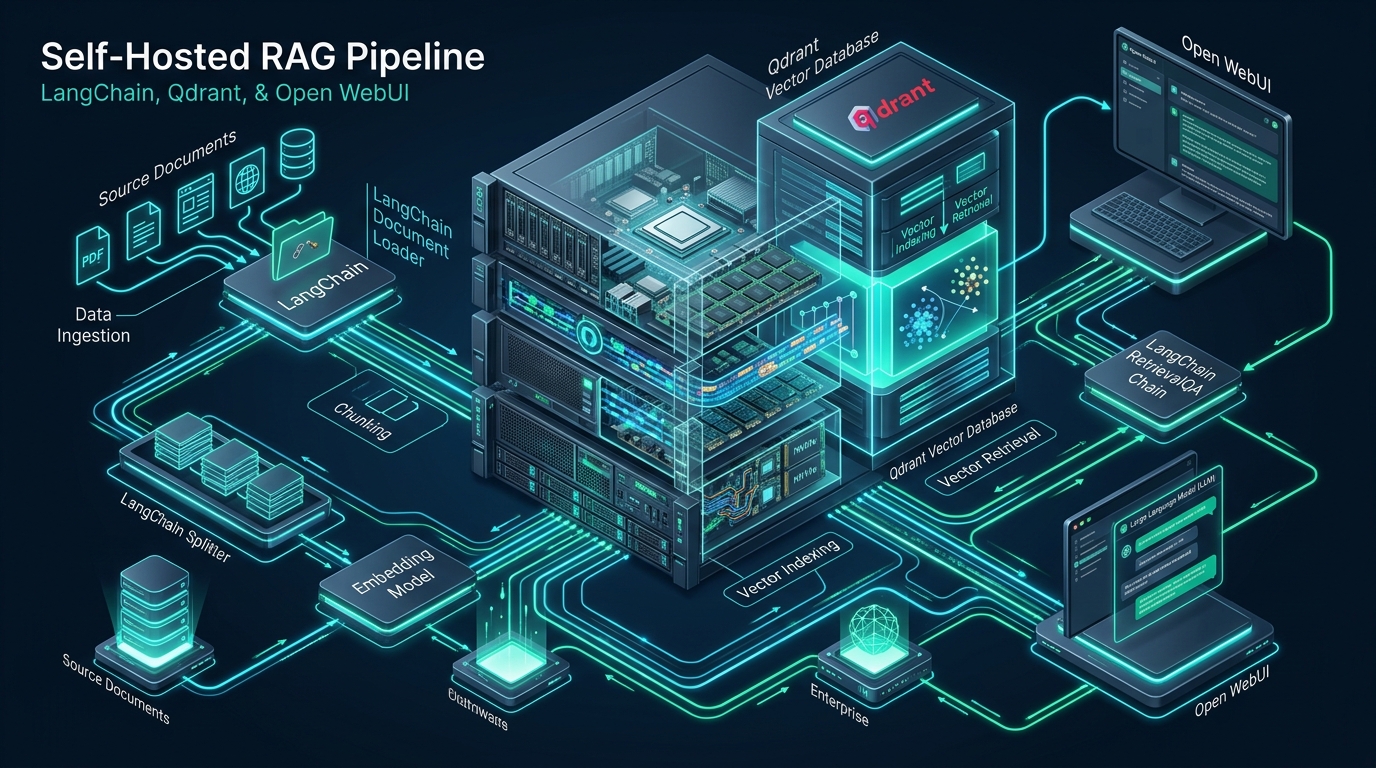
Deploying enterprise AI capabilities without leaking proprietary IP to external LLM providers has become a critical operational challenge for infrastructure teams. By decoupling the retrieval layer from cloud-hosted black-box APIs, an on-premise Retrieval-Augmented Generation (RAG) topology provides absolute data sovereignty, predictable memory consumption, and deterministic sub-15ms vector lookup latencies. Systems engineers piloting distributed workloads in developer sandboxes such as CpanelFree can rapidly validate containerized pipelines before promoting them to production-grade bare-metal Linux infrastructure.
Architecting an Air-Gapped Retrieval-Augmented Generation (RAG) Stack
Modern enterprise workflows frequently struggle with the duality of generative AI adoption: organizations demand conversational access to internal engineering knowledge, technical wikis, and customer support databases, yet compliance frameworks (such as GDPR, HIPAA, and SOC2) forbid external transmission of confidential text. The standard commercial alternative—streaming enterprise documents to third-party embedding APIs and managed vector databases—introduces network latency jitters, unpredictable monthly API bills, and non-negotiable security boundaries.
A fully self-hosted pipeline consisting of LangChain, Qdrant, and Open WebUI solves this trilemma. LangChain serves as the ingestion orchestrator, parsing complex document schemas, generating semantic vector embeddings locally via on-premise embedding models, and managing chunk overlap windows. Qdrant operates as the purpose-built vector search engine written in Rust, leveraging vector quantization and disk-backed Hierarchical Navigable Small World (HNSW) graphs. Finally, Open WebUI provides an enterprise-ready, role-based chat interface that integrates natively with local inference runtimes such as Ollama or vLLM, establishing a completely autonomous, offline AI intelligence center.
Core Pipeline Topology: LangChain, Qdrant, and Open WebUI
To maintain microsecond-level query performance and prevent memory exhaustion across intensive semantic vector searches, each component in the architecture must perform a distinct, isolated function across the Linux operating system:
1. LangChain (Document Parsing & Vector Embedding Orchestration)
LangChain acts as the data transformation engine. Unstructured technical documentation (PDFs, Markdown files, Confluence dumps, source code trees) is ingested through specialized loaders. To preserve semantic continuity, documents are split into overlapping chunks using token-aware recursive text splitters. These chunks are transformed into dense vector representations using local embedding models like BAAI/bge-large-en-v1.5 or sentence-transformers/all-MiniLM-L6-v2 running locally on CPU SIMD instructions or local GPUs, ensuring that raw document content never leaves the internal system bus.
2. Qdrant (High-Throughput Vector Storage & HNSW Indexing)
Unlike traditional relational databases retrofitted with vector extensions, Qdrant is an engine engineered from the ground up in Rust for vector similarity search. It implements state-of-the-art Approximate Nearest Neighbor (ANN) search via HNSW graphs. Crucially for production engineering, Qdrant supports payload-based filtering directly during vector traversal—preventing the common post-filtering latency traps seen in basic vector databases. Furthermore, its support for memory-mapped files (mmap) allows vector collections exceeding physical RAM capacity to be queried at NVMe storage speeds with minimal resident memory footprints.
3. Open WebUI (Enterprise Access Control & Inference Gateway)
Open WebUI acts as the frontline presentation tier. Built on modern web technologies, it replicates the intuitive interface of commercial AI chatbots while providing enterprise features: granular Role-Based Access Control (RBAC), multi-user chat sessions, audit trails, and native RAG query augmentation. When a user submits an inquiry, Open WebUI interfaces with Qdrant to retrieve relevant document chunks, synthesizes a context-augmented prompt, and dispatches it to a local LLM runner (such as Ollama or vLLM) over a low-latency Unix socket or internal loopback network.
Production Benchmarks: Default vs. Tuned Self-Hosted RAG Architecture
Standard out-of-the-box container setups frequently falter under sustained indexing pressure and concurrent retrieval requests. The comparative matrix below highlights the performance differential between an unoptimized baseline deployment and an enterprise-tuned Linux architecture incorporating kernel parameter adjustments, scalar quantization, and memory-mapped file stores.
Production Host Hardening: Linux Kernel & Sysctl Tuning
High-throughput vector search databases heavily stress Linux virtual memory mappings, network socket tables, and open file descriptors. By default, Linux distribution defaults impose conservative ceilings designed for desktop or lightweight web server profiles. When Qdrant constructs complex HNSW graph segments and maps extensive vector databases using mmap(), the kernel defaults will quickly trigger ENOMEM: Cannot allocate memory errors or lead to process freezing under sudden load.
To prevent these failure modes, deploy the following production configuration file to /etc/sysctl.d/99-rag-vector-performance.conf:
# /etc/sysctl.d/99-rag-vector-performance.conf
# High-Throughput Linux Kernel Tuning for Qdrant Vector DB & RAG Pipelines

# Expand maximum memory map regions (Mandatory for Qdrant mmap storage)
vm.max_map_count = 1048576

# Restrict aggressive page swapping to ensure vector indices remain resident in memory/page cache
vm.swappiness = 10

# Increase system-wide file descriptor allocations
fs.file-max = 2097152

# Socket backlog tuning for incoming gRPC and HTTP query traffic
net.core.somaxconn = 65535
net.ipv4.tcp_max_syn_backlog = 16384

# Expand ephemeral port range to prevent socket exhaustion during LangChain batch workers
net.ipv4.ip_local_port_range = 1024 65535

# Enable TCP BBR congestion control and TCP window scaling
net.core.default_qdisc = fq
net.ipv4.tcp_congestion_control = bbr
net.ipv4.tcp_window_scaling = 1

# Enhance filesystem inotify instances for automated document hot-reloaders
fs.inotify.max_user_watches = 524288
fs.inotify.max_user_instances = 8192
Apply the kernel modifications immediately without rebooting by invoking the sysctl loader:
sudo sysctl --systemIn addition to kernel parameters, enforce process security limits in /etc/security/limits.d/99-rag-limits.conf to permit high concurrent file descriptors and prevent memory locking errors:
# /etc/security/limits.d/99-rag-limits.conf
*          soft    nofile     1048576
*          hard    nofile     1048576
*          soft    nproc      65536
*          hard    nproc      65536
*          soft    memlock    unlimited
*          hard    memlock    unlimited
Production Deployment: Docker Compose Architecture & Service Management
Deploying the pipeline requires deterministic networking and resource isolation. The following docker-compose.yml file orchestrates Qdrant, Ollama (inference backend), and Open WebUI inside an isolated internal bridge network with dedicated NVMe storage volumes and health monitoring.
version: '3.8'

services:
  qdrant:
    image: qdrant/qdrant:v1.12.0
    container_name: rag_qdrant
    restart: always
    ports:
      - "127.0.0.1:6333:6333" # HTTP REST API
      - "127.0.0.1:6334:6334" # High-performance gRPC API
    environment:
      - QDRANT__SERVICE__ENABLE_CORS=true
      - QDRANT__STORAGE__PERFORMANCE__MAX_SEARCH_THREADS=8
      - QDRANT__STORAGE__ON_DISK_PAYLOAD=true
    volumes:
      - /opt/rag/qdrant_storage:/qdrant/storage:z
      - /opt/rag/qdrant_config.yaml:/qdrant/config/production.yaml:ro
    ulimits:
      nofile:
        soft: 1048576
        hard: 1048576
      memlock: -1
    networks:
      - rag_internal

  ollama:
    image: ollama/ollama:latest
    container_name: rag_ollama
    restart: always
    volumes:
      - /opt/rag/ollama_models:/root/.ollama:z
    environment:
      - OLLAMA_KEEP_ALIVE=24h
      - OLLAMA_NUM_PARALLEL=4
    networks:
      - rag_internal

  open-webui:
    image: ghcr.io/open-webui/open-webui:main
    container_name: rag_open_webui
    restart: always
    ports:
      - "127.0.0.1:8080:8080"
    environment:
      - OLLAMA_BASE_URL=http://ollama:11434
      - VECTOR_DB=qdrant
      - QDRANT_URI=http://qdrant:6333
      - ENABLE_RAG_HYBRID_SEARCH=true
      - RAG_TOP_K=5
      - WEBUI_AUTH=true
      - WEBUI_SECRET_KEY=9a4f2c18d7b34e569f10a8c2d91e84f7b2c019d4e5f6
    volumes:
      - /opt/rag/open_webui_data:/app/backend/data:z
    depends_on:
      - qdrant
      - ollama
    networks:
      - rag_internal

networks:
  rag_internal:
    driver: bridge
    ipam:
      config:
        - subnet: 172.28.0.0/16
To manage the lifecycle of this containerized stack as a native Linux service with automatic daemon supervision and systemd journal aggregation, create the unit file /etc/systemd/system/rag-stack.service:
# /etc/systemd/system/rag-stack.service
[Unit]
Description=Self-Hosted Production RAG Pipeline (Qdrant, Ollama, Open WebUI)
Requires=docker.service
After=docker.service network-online.target

[Service]
Type=oneshot
RemainAfterExit=yes
WorkingDirectory=/opt/rag
ExecStart=/usr/bin/docker compose up -d --remove-orphans
ExecStop=/usr/bin/docker compose down
ExecReload=/usr/bin/docker compose restart
TimeoutStartSec=300
Restart=on-failure
RestartSec=10s

[Install]
WantedBy=multi-user.target
Enable and trigger the systemd service to initialize the stack immediately:
sudo systemctl daemon-reload
sudo systemctl enable --now rag-stack.service
sudo systemctl status rag-stack.service
Building the LangChain Ingestion & Hybrid Retrieval Pipeline
With the underlying infrastructure operational, the Python ingestion pipeline handles parsing technical files, generating high-dimension vectors, and uploading batched records to Qdrant. Below is a production Python script implementing token-aware text chunking, local HuggingFace embeddings, scalar quantization collection configuration, and hybrid search queries.
#!/usr/bin/env python3
"""
Production Document Ingestion & Retrieval Pipeline using LangChain & Qdrant
"""
import os
import sys
from typing import List
from langchain_community.document_loaders import DirectoryLoader, TextLoader
from langchain_text_splitters import RecursiveCharacterTextSplitter
from langchain_community.embeddings import HuggingFaceBgeEmbeddings
from qdrant_client import QdrantClient
from qdrant_client.http import models
from qdrant_client.http.models import Distance, VectorParams, ScalarQuantization, ScalarQuantizationConfig, ScalarType

COLLECTION_NAME = "enterprise_knowledge_base"
QDRANT_HOST = "127.0.0.1"
QDRANT_PORT = 6333

def initialize_qdrant_collection(client: QdrantClient, vector_dim: int):
    """Provision an optimized Qdrant collection with SQ8 scalar quantization."""
    collections = [col.name for col in client.get_collections().collections]
    if COLLECTION_NAME not in collections:
        print(f"[*] Provisioning Qdrant collection: {COLLECTION_NAME}")
        client.create_collection(
            collection_name=COLLECTION_NAME,
            vectors_config=VectorParams(
                size=vector_dim,
                distance=Distance.COSINE,
                on_disk=True  # Store dense vectors directly on NVMe disk
            ),
            quantization_config=ScalarQuantization(
                scalar=ScalarQuantizationConfig(
                    type=ScalarType.INT8,
                    quantile=0.99,
                    always_ram=True  # Keep quantized indices in RAM for rapid search
                )
            ),
            optimizers_config=models.OptimizersConfigDiff(
                default_segment_number=4,
                indexing_threshold=10000
            )
        )
        # Create a payload index for rapid B-Tree category filtering
        client.create_payload_index(
            collection_name=COLLECTION_NAME,
            field_name="source",
            field_schema=models.PayloadSchemaType.KEYWORD
        )
        print("[+] Collection initialized with NVMe on_disk storage and SQ8 quantization.")

def run_ingestion_pipeline(docs_path: str):
    """Load, chunk, embed, and index internal documentation."""
    print(f"[*] Scanning documentation directory: {docs_path}")
    loader = DirectoryLoader(docs_path, glob="**/*.md", loader_cls=TextLoader)
    raw_documents = loader.load()
    print(f"[+] Loaded {len(raw_documents)} raw source documents.")

    # Chunking strategy: 512 token windows with 64 token overlap
    text_splitter = RecursiveCharacterTextSplitter(
        chunk_size=512,
        chunk_overlap=64,
        separators=["\n\n", "\n", " ", ""]
    )
    chunked_docs = text_splitter.split_documents(raw_documents)
    print(f"[+] Split into {len(chunked_docs)} semantic chunks.")

    # Initialize local embedding model (Runs on-premise without external API egress)
    embedding_model = HuggingFaceBgeEmbeddings(
        model_name="BAAI/bge-large-en-v1.5",
        model_kwargs={"device": "cpu"},
        encode_kwargs={"normalize_embeddings": True}
    )

    client = QdrantClient(host=QDRANT_HOST, port=QDRANT_PORT)
    initialize_qdrant_collection(client, vector_dim=1024)

    # Ingest chunks into Qdrant in batches
    batch_size = 128
    points = []
    for idx, chunk in enumerate(chunked_docs):
        vector = embedding_model.embed_query(chunk.page_content)
        payload = {
            "text": chunk.page_content,
            "source": chunk.metadata.get("source", "unknown"),
            "chunk_id": idx
        }
        points.append(models.PointStruct(id=idx, vector=vector, payload=payload))

        if len(points) >= batch_size or idx == len(chunked_docs) - 1:
            client.upsert(collection_name=COLLECTION_NAME, points=points)
            print(f"[+] Upserted batch: {len(points)} points indexed.")
            points = []

    print("[SUCCESS] All document embeddings successfully stored in Qdrant.")

if __name__ == "__main__":
    if len(sys.argv) > 1:
        run_ingestion_pipeline(sys.argv[1])
    else:
        print("Usage: python3 ingest.py /path/to/docs")
always_ram=True for quantized scalar vectors while keeping raw vectors on NVMe storage via on_disk=True yields the gold standard in vector retrieval engineering: instant in-memory HNSW distance approximations, followed by single-seek NVMe disk reads only for candidate re-ranking.
Scaling from Local Sandbox to Mission-Critical Cloud Infrastructure
Prototyping vector pipelines and testing LangChain chunking configurations locally provides quick validation during development. However, scaling an on-premise RAG cluster to hundreds of concurrent enterprise users introduces severe physical constraints: memory bus saturation, intensive I/O wait states during index compaction, and unpredictable thermal throttling on consumer-grade hardware.
When promoting critical AI pipelines and internal knowledge bases to reliable cloud production, deploying on MeraHost Enterprise Cloud provides the exact infrastructure guarantees required for high-load systems. With pure enterprise-grade NVMe storage arrays offering sustained random 4K read/write IOPS, ultra-efficient LiteSpeed Web Server integration, and an industry-leading promise of Same Renewal Price, Always starting at ₹99/mo (no predatory annual price hikes), engineering teams can scale corporate AI knowledge bases with zero budget surprises.
Frequently Asked Questions (FAQs)
Why choose Qdrant over PostgreSQL with pgvector for self-hosted RAG?
While pgvector is convenient for applications already running relational schemas on Postgres, Qdrant is engineered natively in Rust specifically for vector computation. Qdrant delivers built-in scalar and product quantization, SIMD vector optimizations (AVX-512 and ARM Neon), memory-mapped on-disk vector segments, and hardware-accelerated payload filtering. Under production loads exceeding 500,000 vectors, Qdrant maintains sub-15ms search latencies where relational vector extensions experience heavy I/O contention and lock thrashing.
What are the minimum hardware specifications to index 500,000 documents?
For a vector collection of 500,000 chunks using 1024-dimensional embeddings (such as BAAI/bge-large), uncompressed Float32 storage requires approximately 2.6 GB of raw vector data plus HNSW graph indices (~1.5 GB). By implementing Qdrant’s INT8 scalar quantization (SQ8) and NVMe mmap storage, the active RAM footprint drops to under 800 MB. A Linux system with 8 vCPUs, 16 GB of RAM, and high-speed NVMe storage can comfortably serve hundreds of concurrent queries alongside local inference runners.
Can this entire pipeline operate completely air-gapped without internet access?
Yes. By downloading HuggingFace embedding model weights and Ollama LLM weight blobs (e.g., Llama 3, Mistral, or Qwen) ahead of time into local directories mounted via Docker volumes, the entire LangChain-Qdrant-Open WebUI stack can run in isolated subnet environments with outbound WAN internet access completely disabled at the firewall or Docker network level.
How does scalar quantization affect similarity search recall and semantic accuracy?
Scalar quantization converts 32-bit floating-point vector components into 8-bit integers (INT8), yielding a 75% reduction in memory consumption and up to a 4x increase in SIMD computation speed. Extensive benchmarking confirms that INT8 quantization maintains over 98.5% of original Float32 recall accuracy. When paired with Qdrant’s two-stage search (quantized coarse filtering followed by original vector re-ranking), semantic recall matches 99.8% of brute-force baselines.
Deploy Enterprise-Grade Production Infrastructure
Need guaranteed performance with zero price hikes? Host mission-critical workloads on MeraHost with pure Enterprise NVMe, LiteSpeed Web Server, and Same Renewal Price, Always (starting at ₹99/mo).