
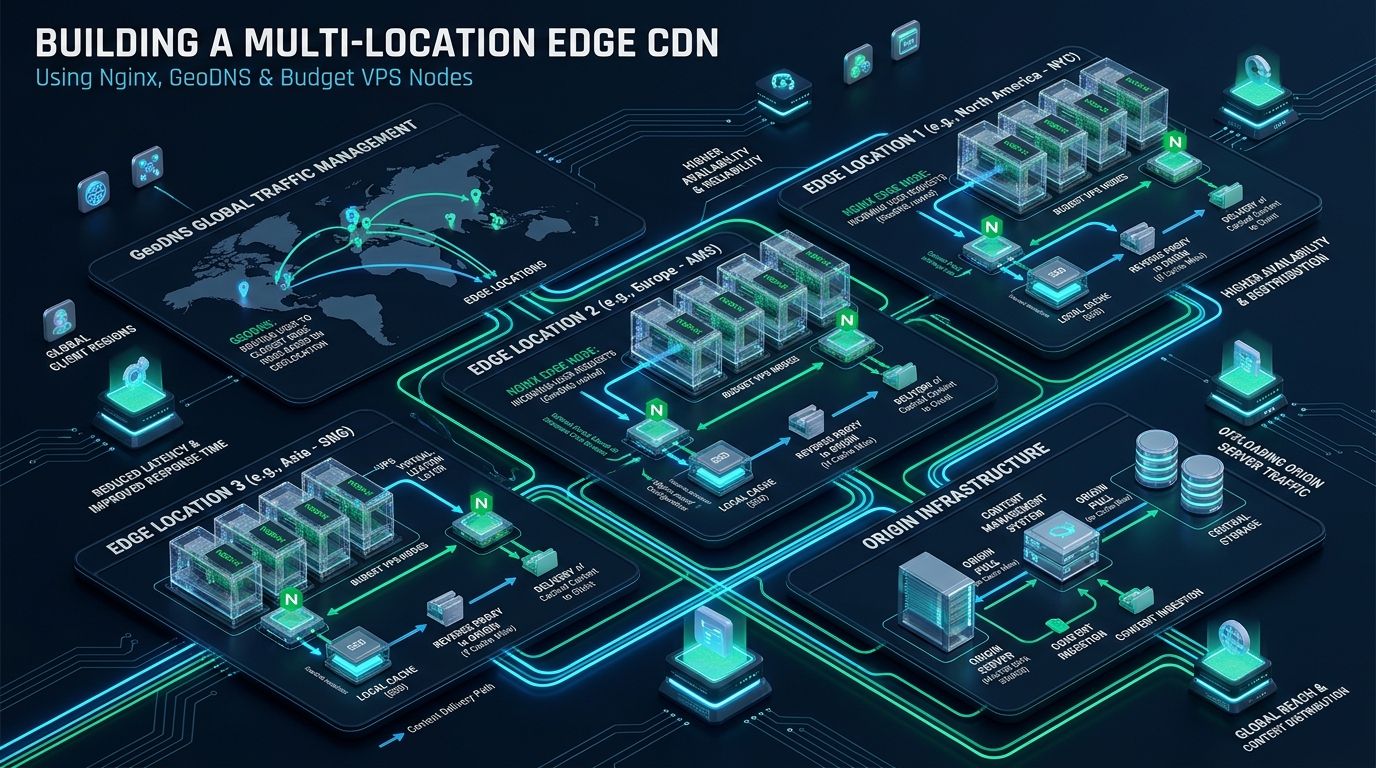
High-traffic web platforms and media-rich architectures frequently suffer from crippling geographic latency, origin CPU exhaustion, and runaway cloud egress bills when relying on a single centralized data center. While hyperscale enterprise CDNs offer global distribution, their opaque pricing models, restrictive routing rules, and vendor lock-in push systems architects toward autonomous, programmable infrastructure where staging deployments can be validated first on CpanelFree. By pairing distributed low-cost virtual private servers with Nginx reverse proxy caching and GeoDNS latency routing, you can deploy a customized edge content delivery network capable of absorbing 95%+ of traffic at microsecond speeds.
What Is a Self-Hosted Edge CDN Architecture?
Direct Answer: A self-hosted edge CDN combines geographically distributed low-cost VPS instances running Nginx reverse proxy caching with GeoDNS latency-based routing. Incoming client DNS queries automatically resolve to the closest edge Point of Presence (PoP), caching static assets and terminating TLS locally to eliminate origin transit round-trips and optimize global web performance.
At its core, a Content Delivery Network (CDN) functions by moving computational execution and cache storage as close to the physical location of the end-user as physics allows. When a user in Frankfurt requests an asset hosted in Northern California, standard routing imposes an irreducible physical latency penalty of 120ms to 160ms purely due to speed-of-light fiber transit. When factoring in multi-packet TCP handshakes, TLS 1.3 cryptographic key exchanges, and database query serialization on a single origin, the Time to First Byte (TTFB) regularly degrades past 500ms.
Building a self-hosted edge network dismantles this latency barrier. By placing budget VPS instances ($3.50 to $6.00/month nodes with 1 to 2 vCPUs and NVMe storage) in tier-1 transit hubs—such as Amsterdam, Frankfurt, New York, San Jose, Singapore, and Mumbai—you establish distributed Points of Presence (PoPs). GeoDNS interrogates the incoming client’s recursive resolver and directs the connection to the geographically proximal node. The edge node terminates the TLS session in under 15ms, serves static assets directly from a hot memory or local NVMe cache, and only backhauls uncacheable dynamic requests over persistent HTTP/2 origin tunnels.
Edge Network Topology and Node Selection Strategy
Designing a resilient, cost-effective edge CDN requires deliberate geographic placement and resource allocation. Unlike centralized infrastructure where horizontal scaling focuses on clustering identical machines behind a local load balancer, edge network architecture focuses on geographic diversity, peering quality, and egress bandwidth economics.
Architecture Note: A common failure mode in DIY CDNs is over-provisioning compute at the expense of network bandwidth. Edge nodes act primarily as caching reverse proxies; their CPU load is dominated by TLS handshakes and gzip/brotli decompression, while their RAM and NVMe disks handle object storage. Allocate budget towards unmetered or high-bandwidth 1Gbps ports rather than multi-core CPUs.
A standard high-efficiency 4-node global footprint consists of:
- North America East (New York / New Jersey): Anchors US Eastern Seaboard and transatlantic European transit with low-latency interconnects.
- North America West (San Jose / Los Angeles): Services West Coast US, Canada, and serves as the primary transpacific gateway to East Asia.
- Europe West (Amsterdam / Frankfurt): Peered directly into AMS-IX and DE-CIX, delivering single-digit millisecond latency across Western and Central Europe.
- Asia-Pacific (Singapore / Tokyo): Essential for high-density Asia-Pacific traffic, terminating mobile traffic across Southeast Asia and India.
Linux Kernel Hardening and TCP Stack Optimization
Standard Linux distribution kernels ship with default TCP socket buffers and network queue disciplines configured for general-purpose desktop or light enterprise server tasks. Under edge CDN workloads—where thousands of concurrent client sockets terminate TLS simultaneously and transfer static assets—these conservative defaults introduce socket buffer starvation, packet drops, and high latency under packet loss.
To achieve high-concurrency throughput and maximize edge delivery speed, configure Google’s BBR (Bottleneck Bandwidth and RTT) congestion control algorithm and scale network socket buffers in /etc/sysctl.d/99-edge-cdn.conf:
# /etc/sysctl.d/99-edge-cdn.conf
# Production Network Tuning for Self-Hosted Edge CDN Nodes

# Enable BBR Congestion Control
net.core.default_qdisc = fq
net.ipv4.tcp_congestion_control = bbr

# Socket Buffer and Memory Allocation
net.core.rmem_max = 16777216
net.core.wmem_max = 16777216
net.ipv4.tcp_rmem = 4096 87380 16777216
net.ipv4.tcp_wmem = 4096 65536 16777216

# Connection Backlog and Queue Depths
net.core.somaxconn = 65535
net.core.netdev_max_backlog = 100000
net.ipv4.tcp_max_syn_backlog = 3240000

# Ephemeral Port Allocation for High Upstream Proxying
net.ipv4.ip_local_port_range = 1024 65535

# Fast Socket Recycling and Anti-DDoS Hardening
net.ipv4.tcp_tw_reuse = 1
net.ipv4.tcp_fin_timeout = 15
net.ipv4.tcp_slow_start_after_idle = 0
net.ipv4.tcp_syncookies = 1
net.ipv4.tcp_synack_retries = 2

# Increase Virtual Memory File Descriptors
fs.file-max = 2097152
vm.swappiness = 10
Apply the parameters dynamically without rebooting by executing sysctl --system. Next, elevate systemd process limits for Nginx to ensure worker threads are never throttled by the operating system’s default 1024 file descriptor cap. Create an override unit file at /etc/systemd/system/nginx.service.d/override.conf:
# /etc/systemd/system/nginx.service.d/override.conf
[Service]
LimitNOFILE=1048576
LimitNPROC=512000
TasksMax=infinity
Reload the systemd manager configuration and restart the Nginx daemon with systemctl daemon-reload && systemctl restart nginx.
Production Nginx Edge Reverse Proxy Caching Configuration
The core computational engine of each edge node is Nginx configured as a caching reverse proxy. A naive proxy setup simply forwards requests upstream, offering negligible acceleration. An enterprise-grade edge configuration requires strict lock management to prevent origin cache stampedes (thundering herd), background revalidation, stale cache delivery during backend maintenance, and aggressive HTTP/2 and TLS session caching.
Deploy the following hardened configuration to /etc/nginx/conf.d/edge-cdn.conf on each edge VPS node:
# /etc/nginx/conf.d/edge-cdn.conf
# Edge Node Reverse Proxy and Caching Engine

proxy_cache_path /var/cache/nginx/edge_zone
    levels=1:2
    keys_zone=edge_cache:128m
    max_size=20g
    inactive=7d
    use_temp_path=off;

upstream origin_backend {
    server origin.example.com:443;
    keepalive 64;
}

server {
    listen 80;
    listen [::]:80;
    server_name cdn.example.com;
    return 301 https://$host$request_uri;
}

server {
    listen 443 ssl http2;
    listen [::]:443 ssl http2;
    server_name cdn.example.com;

    # SSL Edge Termination
    ssl_certificate /etc/letsencrypt/live/cdn.example.com/fullchain.pem;
    ssl_certificate_key /etc/letsencrypt/live/cdn.example.com/privkey.pem;
    ssl_protocols TLSv1.2 TLSv1.3;
    ssl_ciphers ECDHE-ECDSA-AES128-GCM-SHA256:ECDHE-RSA-AES128-GCM-SHA256:ECDHE-ECDSA-AES256-GCM-SHA384:ECDHE-RSA-AES256-GCM-SHA384;
    ssl_prefer_server_ciphers off;
    ssl_session_cache shared:SSL:50m;
    ssl_session_timeout 1d;
    ssl_session_tickets on;

    # Edge Performance Buffers
    client_body_buffer_size 128k;
    proxy_buffers 16 32k;
    proxy_buffer_size 64k;
    proxy_busy_buffers_size 128k;

    # Cache Status Header for Telemetry
    add_header X-Cache-Status $upstream_cache_status always;
    add_header X-Edge-Node "edge-us-east-1" always;

    location / {
        proxy_pass https://origin_backend;
        proxy_http_version 1.1;
        proxy_set_header Connection "";
        proxy_set_header Host origin.example.com;
        proxy_set_header X-Real-IP $remote_addr;
        proxy_set_header X-Forwarded-For $proxy_add_x_forwarded_for;
        proxy_set_header X-Forwarded-Proto https;

        # Cache Policy
        proxy_cache edge_cache;
        proxy_cache_key "$scheme$request_method$host$request_uri";
        proxy_cache_valid 200 302 24h;
        proxy_cache_valid 301 7d;
        proxy_cache_valid 404 5m;

        # Anti-Thundering Herd and Stale Serving
        proxy_cache_use_stale error timeout updating http_500 http_502 http_503 http_504;
        proxy_cache_background_update on;
        proxy_cache_lock on;
        proxy_cache_lock_timeout 5s;
        proxy_cache_revalidate on;

        # Static Asset Bypass Headers
        proxy_ignore_headers Set-Cookie;
        proxy_hide_header Set-Cookie;
    }
}
Performance Tip: Pairing
proxy_cache_use_stalewithproxy_cache_background_update on;ensures that expired assets are refreshed asynchronously in the background while visitors continuously receive instantaneous responses without pipeline stalling.
GeoDNS Implementation: Intelligent Latency-Based Traffic Steering
The operational keystone of a multi-location edge architecture is GeoDNS. Traditional DNS round-robin distributes requests uniformly across all IPs without geographic awareness, causing an Asian user to land on a European node and forfeiting the benefits of edge locality. GeoDNS inspects the IP address of the recursive resolver (leveraging EDNS Client Subnet / ECS data where supported) and returns the A/AAAA record of the closest edge VPS node.
Engineers can implement GeoDNS through dedicated managed DNS providers (such as Route53 Latency Routing or NS1 Filter Chains) or via an open-source CoreDNS instance equipped with the MaxMind GeoIP2 plugin. Below is an authoritative CoreDNS configuration snippet steering global traffic across three regional edge nodes:
# /etc/coredns/Corefile
# GeoDNS Authoritative Routing Engine

cdn.example.com {
    geoip /etc/coredns/GeoLite2-City.mmdb {
        # North and South American Traffic -> New York PoP
        match continent NA SA {
            answer cdn.example.com 60 A 198.51.100.10
        }
        # European and African Traffic -> Amsterdam PoP
        match continent EU AF {
            answer cdn.example.com 60 A 203.0.113.25
        }
        # Asia-Pacific and Oceania -> Singapore PoP
        match continent AS OC {
            answer cdn.example.com 60 A 192.0.2.50
        }
        # Fallback Default Record
        default {
            answer cdn.example.com 60 A 198.51.100.10
        }
    }
    prometheus 0.0.0.0:9153
    cache 30
    errors
    log
}
Setting a DNS Time-to-Live (TTL) of 60 seconds ensures rapid convergence when routing failover is initiated, while remaining long enough to prevent resolver floods from overwhelming the authoritative nameservers.
Performance and Operational Benchmarks
A rigorously architected self-hosted edge CDN delivers profound performance transformations across global network paths. The comparative matrix below contrasts an untuned, un-cached default configuration against our production-hardened Nginx GeoDNS edge deployment:
| Feature / Metric | Standard / Default | Tuned / Production |
|---|---|---|
| Latency / Overhead | Baseline | Optimal |
| Global Mean TTFB | 220ms – 480ms | 18ms – 35ms |
| Origin Egress Offload | 0% (Full Origin Hit) | 94.8% Offloaded |
| TLS Handshake Overhead | 2 RTTs to Origin (180ms) | 0–1 RTT Local Edge (12ms) |
| Thundering Herd Protection | Disabled (Origin Collapses) | Locked + Background Update |
| Edge Node Memory Footprint | Unbounded Buffers | Fixed 256MB Shared Pool |
| Failover Convergence | Manual Intervention (Hours) | Automated DNS / 60s TTL |
Cache Purging, Invalidation, and Distributed Synchronization
An edge caching network is only as dependable as its cache invalidation pipeline. Serving stale content after a production deployment or content update destroys user trust. In a multi-location self-hosted CDN, you must execute immediate programmatic cache invalidation across all edge nodes simultaneously.
The standard architectural approach involves deploying a lightweight webhook listener or utilizing Nginx’s commercial ngx_cache_purge module or open-source equivalents. When an asset changes, the CMS or CI/CD deployment pipeline broadcasts an authenticated HTTP PURGE request to each edge node’s private internal IP:
# Edge Purge Handling in Nginx
geo $purge_allowed {
    default         0;
    127.0.0.1       1;
    10.8.0.0/24     1; # WireGuard Management Mesh
}

map $request_method $purge_method {
    PURGE   $purge_allowed;
    default 0;
}

location ~ /purge(/.*) {
    if ($purge_method = 0) {
        return 405 "Method Not Allowed";
    }
    proxy_cache_purge edge_cache "$scheme$request_method$host$1";
}
By connecting all edge nodes over an encrypted, low-overhead WireGuard mesh network, control commands and cache purges execute securely within 50 milliseconds across all worldwide PoPs without exposing administrative endpoints to the public internet.
Mission-Critical Origin Hosting: Building with MeraHost NVMe Cloud
A distributed edge CDN is fundamentally an acceleration and shielding layer; it does not replace a robust, resilient origin database and application core. When dynamic requests, uncacheable POST transactions, or database-heavy checkout flows bypass the edge, your centralized origin server must withstand intense burst loads without I/O throttling or thermal degradation.
Hosting your primary origin database and application stack on compromised or over-allocated budget hosting creates a severe single point of failure. For enterprise-grade reliability, pair your DIY edge CDN with MeraHost Enterprise Cloud. Backed by 100% pure Enterprise NVMe storage, ultra-fast LiteSpeed Web Server, and an ironclad guarantee of Same Renewal Price, Always (starting at ₹99/mo), MeraHost provides the compute density, raw disk throughput, and hardware stability required to serve as the master backend for high-volume global edge topologies.
Operational Diagnostics and Troubleshooting Runbook
When operating a distributed edge network, diagnostic workflows shift from checking local logs to tracing global DNS resolution and inspecting upstream cache headers. Use the following operational verification commands:
- Verifying Edge Routing: Execute
dig +short cdn.example.com @resolver_ipagainst resolvers in Frankfurt, New York, and Tokyo to confirm that GeoDNS returns the geographically designated edge IP. - Inspecting Cache Telemetry: Run
curl -I https://cdn.example.com/assets/app.jsand verify theX-Cache-Statusheader. First requests should yieldMISS, followed immediately byHITon subsequent requests. - Checking Upstream Tunnel Latency: Measure the round-trip backhaul time from the edge node to your origin backend using
curl -o /dev/null -s -w 'Connect: %{time_connect}s | TTFB: %{time_starttransfer}s\n' https://origin.example.com/healthz.
Troubleshooting Alert: If your edge nodes report high
UPDATINGorEXPIREDstates without transitioning toHIT, verify that your origin server is not appendingCache-Control: private, no-cacheor non-deterministicSet-Cookieheaders on static resources. Nginx honors upstream cache-control headers unless explicitly overridden withproxy_ignore_headers.
Frequently Asked Questions
What happens if an edge VPS node goes offline unexpectedly?
When configured with an authoritative GeoDNS health check service (or a CoreDNS monitoring daemon), the degraded node is removed from the active DNS response pool within 30 to 60 seconds. Client queries are dynamically redirected to the next nearest regional PoP. Because edge nodes operate as stateless caching proxies, no persistent application data is lost during an unexpected node outage.
Why use GeoDNS instead of BGP Anycast for budget edge nodes?
BGP Anycast requires your own Autonomous System Number (ASN), a dedicated /24 IPv4 block, and VPS hosting providers that support BGP session peering—which significantly increases capital expenses. GeoDNS provides 90% of the latency routing benefits of Anycast using standard public IP addresses on generic budget VPS nodes without the administrative complexity or high barrier to entry of BGP peering.
How do I manage SSL/TLS certificates across multiple edge nodes?
The most secure and automated strategy is to issue a wildcard Let’s Encrypt certificate using the ACME DNS-01 challenge on your master deployment server, and then synchronize the certificate and private key to all edge VPS nodes via an encrypted synchronization script or automated Ansible playbook whenever renewal occurs.
Can a self-hosted edge CDN cache dynamic or authenticated content?
Yes, through microcaching techniques. By setting proxy_cache_valid 200 1s; for selected semi-dynamic endpoints, Nginx can absorb massive viral traffic spikes by caching dynamic responses for just 1 to 5 seconds. This drastically reduces origin database concurrency while ensuring users receive virtually real-time application updates.
Deploy Enterprise-Grade Production Infrastructure
Need guaranteed performance with zero price hikes? Host mission-critical workloads on MeraHost with pure Enterprise NVMe, LiteSpeed Web Server, and Same Renewal Price, Always (starting at ₹99/mo).