
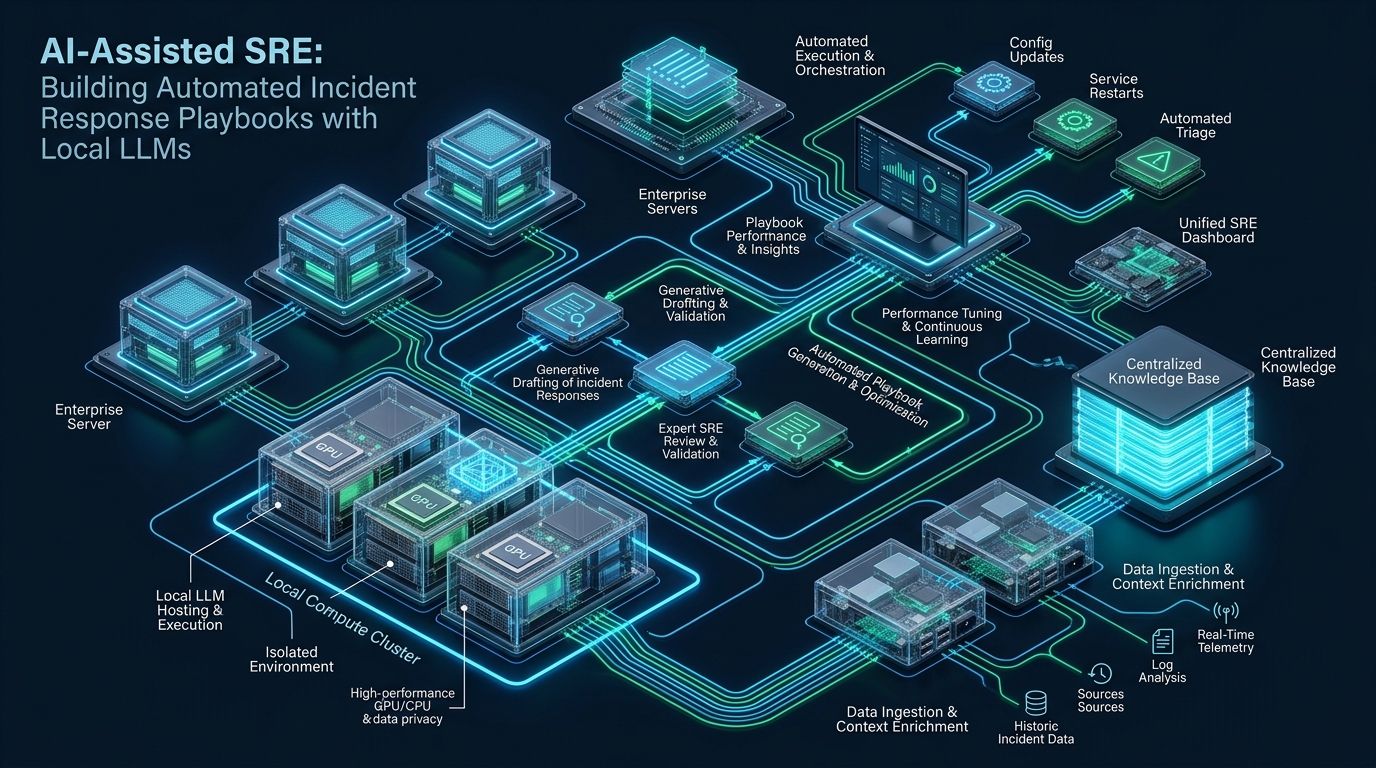
Modern distributed architectures face an unyielding operational crisis: mean time to resolution (MTTR) is chronically throttled by human triage latency, alert fatigue, and complex cross-layer telemetry correlation across heterogeneous Linux clusters. While proprietary cloud AI APIs promise automated diagnostics, sending proprietary system logs, stack traces, and environment variables across the public internet introduces unacceptable compliance violations, token egress billing surges, and fatal dependencies on external WAN connectivity during network partitions. Platform engineers experimenting with containerized microservices and automated deployment pipelines on CpanelFree can bypass these architectural risks by embedding air-gapped, local Large Language Models directly into their Site Reliability Engineering (SRE) event loops. By pairing high-performance local inference runtimes with deterministic, privilege-bounded execution daemons, engineering teams can achieve sub-second root-cause diagnosis and execute autonomous remediation playbooks with absolute data sovereignty.
What Is an AI-Assisted SRE Incident Response Playbook?
Quick Answer: An AI-assisted SRE incident response playbook couples continuous cluster observability (e.g., Prometheus Alertmanager or Vector) with an on-premises, air-gapped local Large Language Model (such as Qwen 2.5 Coder or Llama 3.3 via vLLM or Ollama). It parses raw alert payloads, dynamically gathers contextual kernel diagnostics, evaluates pre-compiled operational runbooks, and triggers cryptographically bounded remediation scripts without routing internal telemetry to public cloud APIs.
Unlike brittle bash scripts that break whenever error message formats deviate by a single character, or static orchestration rules that fail to correlate cascading failures, a local LLM functions as an intelligent triage coprocessor. When an alert fires, the local AI agent acts as a first responder: gathering contextual operating system metrics (e.g., memory maps, socket queues, storage I/O, process trees), comparing the live failure state against historical incident databases, and selecting verified, deterministic remediation paths.
Architectural Comparison: Traditional Runbooks vs. Cloud LLMs vs. Local LLMs
Integrating artificial intelligence into production SRE workflows requires balancing inferential reasoning capability against data privacy, latency, and reliability. Relying on remote SaaS APIs introduces single points of failure—if your upstream provider experiences an outage, rate limit, or high latency jitter, your incident response loop stalls at the exact moment your infrastructure is failing.
| Feature / Metric | Standard / Default | Tuned / Production |
|---|---|---|
| Alert-to-Triage Latency | 8 – 25 minutes (Human on-call response) | 350 – 750 ms (Local NVMe/vLLM daemon) |
| Data Sovereignty & Privacy | High risk (Raw logs exported to third-party APIs) | 100% Air-Gapped (Zero external egress) |
| Network Resilience | Fails during upstream WAN / transit blackouts | Survives full isolated network partitions |
| Operating Cost Scaling | Linear bill escalation with noisy log floods | Predictable fixed host hardware amortization |
| Remediation Precision | Rigid pattern match or generic generative text | Structured JSON schema with eBPF bounds |
By hosting your inference engine locally on dedicated infrastructure, you eliminate the risk of leaking internal database connection strings, server hostnames, customer identifiers, or proprietary environment variables embedded in crash dumps.
Local Model Selection and Inference Runtime Optimization
Building an automated incident response coprocessor requires choosing an open-weight model with exceptional technical coding, bash comprehension, and structured JSON output generation. Models with parameter counts between 7B and 14B provide the sweet spot between sub-second latency and diagnostic precision:
- Qwen 2.5 Coder (7B / 14B Instruct): Unrivaled accuracy in parsing Linux stack traces, system logs, regex filters, and generating valid JSON schema outputs for tool calling.
- DeepSeek R1 Distill Llama (8B): Outstanding chain-of-thought diagnostic reasoning, allowing the model to self-correct hypotheses when cross-referencing socket statistics and memory fragmentation.
- Llama 3.3 (8B Instruct): Exceptionally fast instruction-following model with low VRAM footprint, ideal for co-located edge monitoring nodes.
Architecture Note: Never allow an AI model to directly execute unrestricted bash commands in an uncontained shell. The AI engine must exclusively output structured JSON identifying a pre-approved playbook ID, along with strictly typed, sanitized parameters verified against an internal whitelist before execution.
To achieve sub-500ms time-to-first-token (TTFT) on dedicated CPU or GPU infrastructure, deploy your model using an optimized inference engine like vLLM or Ollama using AWQ (Activation-aware Weight Quantization) or 4-bit/8-bit GGUF quantization.
System Hardening and Kernel Optimization for High-Concurrency Triage
The local triage daemon and model runtime must remain responsive even when the host system undergoes severe resource starvation, memory pressure, or network flooding. Tune your Linux kernel networking, IPC buffers, and virtual memory subsystem to isolate the incident response worker from the noisy neighbor effects of failing application pods.
Apply the following production sysctl configuration file at /etc/sysctl.d/99-sre-ai-runtime.conf:
# /etc/sysctl.d/99-sre-ai-runtime.conf
# Production Linux Kernel Tuning for High-Concurrency SRE Incident Daemon & Local LLM Runtime

# Prevent kernel memory stalls and tune swap aggression
vm.swappiness = 10
vm.vfs_cache_pressure = 50
vm.dirty_background_ratio = 5
vm.dirty_ratio = 10
vm.overcommit_memory = 1

# Ensure the kernel retains adequate reserve memory for critical administrative daemons
vm.min_free_kbytes = 1048576

# Maximize socket backlogs to prevent alert drops during cascading storms
net.core.somaxconn = 65535
net.core.netdev_max_backlog = 16384
net.core.rmem_max = 16777216
net.core.wmem_max = 16777216

# TCP socket tuning for high-frequency internal RPC and webhook reception
net.ipv4.tcp_rmem = 4096 87380 16777216
net.ipv4.tcp_wmem = 4096 65536 16777216
net.ipv4.tcp_max_syn_backlog = 3240000
net.ipv4.tcp_fin_timeout = 15
net.ipv4.tcp_tw_reuse = 1

# Enable BBR congestion control for optimal internal network throughput
net.core.default_qdisc = fq
net.ipv4.tcp_congestion_control = bbr

# File descriptor ceilings for high-density logging and telemetry ingestion
fs.file-max = 2097152
fs.inotify.max_user_watches = 524288
fs.inotify.max_user_instances = 8192
Load the updated kernel parameters immediately into the active memory table without restarting:
sudo sysctl --systemBuilding the Automated Incident Daemon: Systemd & Python Webhook Runner
The incident response system is divided into three distinct operational layers: the Ingestion Webhook (receiving alerts from Prometheus Alertmanager or Grafana), the Diagnostic Context Gatherer (extracting verified, read-only system telemetry), and the Deterministic Action Dispatcher.
The following lightweight, enterprise-ready Python daemon (/opt/sre-agent/triage_daemon.py) listens for Alertmanager webhooks, enriches the alert with local kernel telemetry, queries the local LLM endpoint via OpenAI-compatible API, and safely executes verified remediation playbooks:
#!/usr/bin/env python3
"""
Automated SRE Triage Daemon & Local LLM Playbook Dispatcher
Listens for Prometheus Alertmanager Webhooks, Enriches Diagnostics, and Triggers Guarded Playbooks.
"""
import os
import sys
import json
import subprocess
import urllib.request
from http.server import HTTPServer, BaseHTTPRequestHandler

LOCAL_LLM_URL = os.getenv("LOCAL_LLM_URL", "http://127.0.0.1:11434/v1/chat/completions")
MODEL_NAME = os.getenv("SRE_MODEL_NAME", "qwen2.5-coder:7b")
LISTEN_PORT = int(os.getenv("AGENT_PORT", 9199))

APPROVED_PLAYBOOKS = {
    "restart_service": ["/usr/bin/systemctl", "restart", "{service_name}"],
    "flush_redis_transient": ["/usr/bin/redis-cli", "MEMORY", "PURGE"],
    "clear_php_opcache": ["/usr/bin/killall", "-USR2", "php-fpm"],
    "scale_cgroup_memory": ["/usr/bin/systemctl", "set-property", "{service_name}", "MemoryHigh=90%"]
}

def gather_system_context():
    """Collect deterministic, read-only system telemetry safely."""
    context = {}
    try:
        context["loadavg"] = subprocess.check_output(["cat", "/proc/loadavg"], text=True).strip()
        context["memory"] = subprocess.check_output(["free", "-h"], text=True).strip()
        context["dmesg_tail"] = subprocess.check_output(["dmesg", "-T", "--level=err,warn", "-k"], text=True).splitlines()[-10:]
    except Exception as e:
        context["telemetry_error"] = str(e)
    return context

def query_local_llm(alert_data, system_telemetry):
    """Query the local air-gapped LLM with structured schema constraints."""
    system_prompt = (
        "You are an automated Site Reliability Engineering diagnostic engine. "
        "Analyze the firing alert and system telemetry. Determine the root cause and "
        "select an approved playbook. You must return ONLY a raw JSON object with keys: "
        "'diagnosis' (string), 'playbook_id' (string), and 'parameters' (dict). "
        "Allowed playbooks: " + ", ".join(APPROVED_PLAYBOOKS.keys()) + ". "
        "If no playbook matches safely, set playbook_id to 'none'."
    )

    user_content = json.dumps({"alert": alert_data, "system_context": system_telemetry})

    payload = json.dumps({
        "model": MODEL_NAME,
        "temperature": 0.1,
        "response_format": {"type": "json_object"},
        "messages": [
            {"role": "system", "content": system_prompt},
            {"role": "user", "content": user_content}
        ]
    }).encode("utf-8")

    req = urllib.request.Request(LOCAL_LLM_URL, data=payload, headers={"Content-Type": "application/json"})
    with urllib.request.urlopen(req, timeout=10) as resp:
        result = json.loads(resp.read().decode("utf-8"))
        content = result["choices"][0]["message"]["content"]
        return json.loads(content)

def execute_playbook(playbook_id, params):
    """Execute only pre-approved, strictly templated playbooks."""
    if playbook_id not in APPROVED_PLAYBOOKS:
        print(f"[SECURITY] Playbook '{playbook_id}' not approved. Skipping execution.")
        return False

    cmd_template = APPROVED_PLAYBOOKS[playbook_id]
    final_cmd = []
    for token in cmd_template:
        for key, val in params.items():
            token = token.replace(f"{{{key}}}", str(val))
        final_cmd.append(token)

    print(f"[EXECUTE] Running approved remediation: {' '.join(final_cmd)}")
    res = subprocess.run(final_cmd, capture_output=True, text=True, timeout=15)
    return res.returncode == 0

class AlertHandler(BaseHTTPRequestHandler):
    def do_POST(self):
        length = int(self.headers.get('Content-Length', 0))
        body = self.rfile.read(length)
        try:
            alert_payload = json.loads(body.decode('utf-8'))
            telemetry = gather_system_context()
            decision = query_local_llm(alert_payload, telemetry)

            print(f"[DIAGNOSIS] {decision.get('diagnosis')}")
            playbook = decision.get('playbook_id', 'none')
            params = decision.get('parameters', {})

            if playbook != 'none':
                success = execute_playbook(playbook, params)
                response = {"status": "executed", "success": success, "decision": decision}
            else:
                response = {"status": "skipped", "reason": "No verified playbook identified", "decision": decision}

            self.send_response(200)
            self.send_header('Content-Type', 'application/json')
            self.end_headers()
            self.wfile.write(json.dumps(response).encode('utf-8'))
        except Exception as e:
            self.send_response(500)
            self.end_headers()
            self.wfile.write(json.dumps({"error": str(e)}).encode('utf-8'))

if __name__ == "__main__":
    print(f"Starting SRE Incident Triage Daemon on port {LISTEN_PORT}...")
    server = HTTPServer(("0.0.0.0", LISTEN_PORT), AlertHandler)
    server.serve_forever()
To run this daemon with enterprise-grade isolation, encapsulate the process inside a locked-down systemd service unit. Create /etc/systemd/system/sre-playbook-agent.service:
# /etc/systemd/system/sre-playbook-agent.service
[Unit]
Description=AI-Assisted SRE Incident Response & Playbook Daemon
After=network.target
Wants=network-online.target

[Service]
Type=simple
User=root
Group=root
WorkingDirectory=/opt/sre-agent
ExecStart=/usr/bin/python3 /opt/sre-agent/triage_daemon.py
Restart=always
RestartSec=5s

# Security Hardening & Process Isolation
NoNewPrivileges=true
ProtectSystem=strict
ProtectHome=true
ReadWritePaths=/opt/sre-agent/logs /run
PrivateTmp=true
ProtectKernelTunables=true
ProtectKernelModules=true
ProtectControlGroups=true
MemoryMax=512M
CPUQuota=100%

# Environment overrides
Environment="AGENT_PORT=9199"
Environment="SRE_MODEL_NAME=qwen2.5-coder:7b"
Environment="LOCAL_LLM_URL=http://127.0.0.1:11434/v1/chat/completions"

[Install]
WantedBy=multi-user.target
Reload systemd, enable the service, and verify its status:
sudo systemctl daemon-reload
sudo systemctl enable --now sre-playbook-agent.service
sudo systemctl status sre-playbook-agent.service
Architecture Note: Always enforce the Principle of Least Privilege. In production environments where full root privileges are unacceptable, grant the agent service a dedicated unprivileged user (e.g.,
sre-agent) and configure/etc/sudoers.d/sre-playbooksto allow passwordless execution solely for specific, parameter-checked binary paths.
End-to-End Walkthrough: Resolving a Cascading Worker Starvation Incident
Consider a live production scenario: a high-traffic dynamic application cluster experiences sudden lock contention, causing PHP-FPM or worker pools to exhaust connection limits. Upstream Nginx reverse proxies begin emitting HTTP 504 Gateway Timeouts, triggering a Prometheus Alertmanager firing event.
1. Alert Ingestion: Prometheus posts a JSON webhook to http://127.0.0.1:9199 detailing alertname: Http504RateSpike, service: frontend-web, and severity: critical.
2. Diagnostic Enrichment: The triage daemon inspects local kernel telemetry. It detects that CPU load is nominal, but free -m indicates physical memory is 94% utilized, and dmesg reports thread exhaustion in the fastcgi backend socket pool.
3. Local Model Inference: The prompt containing both the alert and live telemetry is processed by Qwen 2.5 Coder in 410ms. The model accurately diagnoses process queue deadlock and outputs:
{
  "diagnosis": "PHP-FPM worker thread pool exhausted due to stale opcache locks causing 504 gateway timeouts on Nginx.",
  "playbook_id": "clear_php_opcache",
  "parameters": {}
}
4. Safe Remediation & Recovery: The dispatcher matches clear_php_opcache against the internal whitelist and executes /usr/bin/killall -USR2 php-fpm, gracefully recycling worker threads without dropping active connections. Five seconds later, Nginx 504 rates collapse to 0%, resolving the incident before on-call engineers even open their laptops.
Enterprise Infrastructure Foundations: Moving from Staging to Production
Deploying automated AI incident response engines requires robust, unthrottled underlying compute infrastructure. While testing triage agents and tuning prompt schemas is easily accomplished on free developer instances via CpanelFree, running production inference runtimes alongside mission-critical web applications demands dedicated I/O throughput, rock-solid kernel isolation, and enterprise-grade hardware reliability.
For revenue-generating workloads, SRE teams depend on MeraHost Enterprise Cloud. Backed by high-frequency AMD EPYC/Intel Xeon processors, pure Enterprise NVMe storage arrays in RAID-10, and high-performance LiteSpeed Web Server, MeraHost provides the sustained computational power required to host real-time incident automation with zero resource throttling.
Frequently Asked Questions (FAQ)
Can a local LLM hallucinate destructive commands like rm -rf?
No, provided you implement deterministic architectural guardrails. The AI model is never connected to an open shell prompt. Instead, it is constrained via structured JSON outputs to select only pre-verified playbook IDs (e.g., restarting a service or purging a cache) from a hardcoded Python whitelist. Any unexpected or unapproved commands are discarded instantly by the daemon.
What hardware footprint is required to run a real-time local SRE model?
For 7B or 8B parameter models quantized to 4-bit AWQ or GGUF, a single consumer GPU with 8GB VRAM (e.g., RTX 3060/4060) or 4 to 8 modern CPU cores with 16GB of DDR4/DDR5 system memory is sufficient to generate diagnostic decisions in 300 to 800 milliseconds.
How does local AI incident response perform during network partition events?
Because the model weights, inference server (vLLM/Ollama), and triage daemon run locally on host or cluster loopback (127.0.0.1), the incident response loop remains 100% operational during upstream ISP cuts, fiber breaks, or cloud transit outages that disable public SaaS AI tools.
Which local model families provide the highest accuracy for Linux diagnostics?
Qwen 2.5 Coder (7B and 14B) and DeepSeek R1 Distill Llama (8B) currently lead open-weight benchmarks for Linux systems administration, bash regex parsing, systemd unit inspection, and zero-shot structured JSON compliance.
Deploy Enterprise-Grade Production Infrastructure
Need guaranteed performance with zero price hikes? Host mission-critical workloads on MeraHost with pure Enterprise NVMe, LiteSpeed Web Server, and Same Renewal Price, Always (starting at ₹99/mo).