
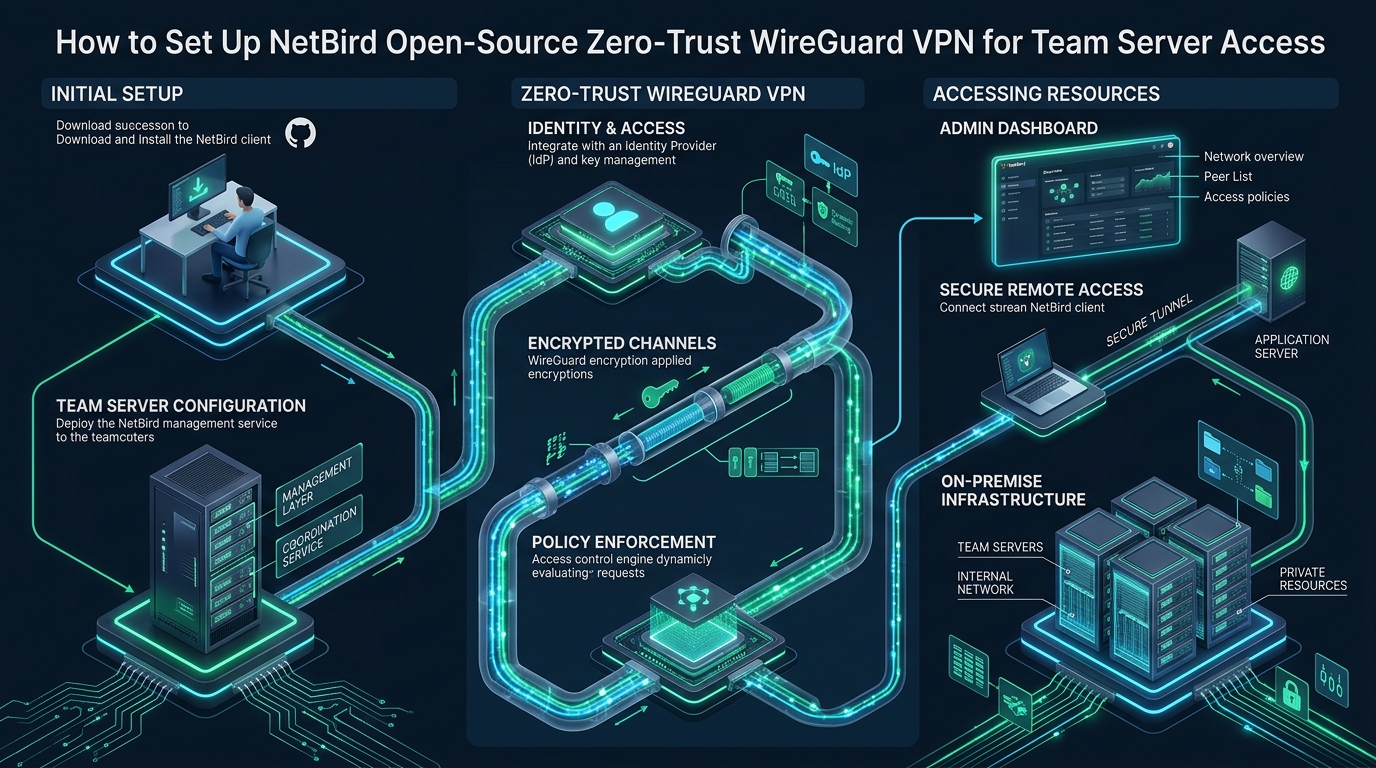
Exposing administrative ports like SSH, RDP, and internal database listeners directly to the public internet invites continuous automated brute-force attacks, port scanning, and perimeter vulnerability exploits. While legacy bastion jump hosts and traditional hub-and-spoke VPNs introduce significant routing latency and single points of network failure, modern engineering teams on CpanelFree require resilient, high-throughput perimeter defenses. NetBird solves this architectural vulnerability by combining kernel WireGuard encryption with a centralized Zero-Trust Network Access (ZTNA) control plane and native Identity Provider (IdP) authentication.
Zero-Trust Mesh Architecture vs. Legacy Bastion VPNs
Traditional enterprise remote access relied heavily on dual-homed bastion hosts or centralized OpenVPN/IPsec concentrators. In these legacy hub-and-spoke models, every byte of encrypted network traffic from distributed developers and automated CI/CD runners must transit through a centralized gateway. When engineers located across different continents query a database or stream metrics, network packets encounter massive geographical hair-pinning, severe packet queuing, and substantial CPU overhead from legacy user-space crypto tunnels.
Furthermore, once an attacker compromises credentials on a conventional VPN gateway, they frequently inherit broad layer-3 access across the entire target subnet. Mitigating this risk requires sprawling, fragile iptables firewall rule sets that quickly become unmaintainable as server fleets expand across hybrid cloud providers.
NetBird re-engineers this topology from the ground up by adopting a decentralized Zero-Trust Network Access (ZTNA) model powered by the high-performance WireGuard protocol. NetBird partitions network orchestration into two distinct operational layers:
- The Control Plane: Composed of a Management API service, an Interactive Web Dashboard, a Signal server (using WebSockets/gRPC), an Identity Provider (IdP via standard OpenID Connect), and Coturn STUN/TURN services. The control plane coordinates cryptographic key exchange, user authentication, and network policies, but never touches or inspects customer application data.
- The Data Plane: Composed of lightweight NetBird client daemons running natively on Linux servers, macOS workstations, and container nodes. Peers communicate over direct point-to-point WireGuard tunnels using ChaCha20-Poly1305 symmetric encryption. Traffic travels directly between nodes over the shortest physical path, delivering maximum line-rate bandwidth and sub-millisecond protocol overhead.
Comparative Matrix: Legacy Bastion vs. Raw WireGuard vs. NetBird Mesh
Before deploying access infrastructure across production server fleets, evaluating encapsulation efficiency, maintenance overhead, and security boundaries is critical. The comparative matrix below outlines how NetBird compares against legacy bastions and raw WireGuard tunnels:
| Feature / Metric | Standard OpenVPN Bastion | Raw WireGuard Tunnel | NetBird Zero-Trust Mesh |
|---|---|---|---|
| Encapsulation & Cryptography | OpenSSL (Heavy TLS/SSL CPU overhead) | Kernel ChaCha20-Poly1305 | Kernel WireGuard + Noise Protocol |
| Connection Topology | Centralized Hub-and-Spoke bottleneck | Static Point-to-Point manual config | Direct Peer-to-Peer Mesh (STUN/ICE) |
| Identity & MFA Integration | LDAP / RADIUS plugins (Clunky) | None (Static public/private key pairs) | Native OIDC (Google, Okta, Keycloak, Zitadel) |
| NAT Traversal / CGNAT | Requires public gateway port forwarding | Manual PersistentKeepalive / Port Forwarding | Automated ICE/STUN + Coturn fallback |
| Access Control (ACLs) | Complex iptables/subnet firewall scripts | Manual client-by-client peer routing | Centralized Dashboard Group & Port Rules |
| Throughput & Latency Overhead | High latency (+30-80ms), throttled speed | Near line-rate kernel performance | Line-rate direct P2P (<2ms mesh penalty) |
Self-Hosted NetBird Architecture & Docker Compose Setup
While NetBird offers a managed cloud service, enterprise privacy compliance and sovereign infrastructure standards frequently require self-hosting the entire control plane. To host NetBird on an enterprise Linux server (Ubuntu 24.04 LTS / Debian 12 / AlmaLinux 9), ensure the following prerequisites are met:
- A dedicated Linux VM or server with at least 2 vCPUs, 4 GB RAM, and a static public IPv4 address.
- A fully qualified domain name (FQDN) such as
vpn.infra.company.internalwith valid DNS A-records pointing to your public IP. - Open firewall ports: TCP 80 and 443 (reverse proxy & dashboard), TCP 10000 (Signal service), UDP 3478 (Coturn STUN), and UDP 49152-49200 (Coturn dynamic relay ports).
- An OpenID Connect (OIDC) identity provider such as Keycloak, Authentik, Zitadel, Google Workspace, or Okta.
Deploy the self-hosted management stack using the validated production docker-compose.yml configuration below:
version: "3.8"

services:
  # NetBird Management Service & Dashboard
  netbird-management:
    image: netbirdio/management:latest
    container_name: netbird-management
    restart: unless-stopped
    volumes:
      - ./management-data:/var/lib/netbird
      - /var/run/docker.sock:/var/run/docker.sock
    ports:
      - "443:443"
      - "80:80"
    environment:
      - NETBIRD_DOMAIN=vpn.infra.company.internal
      - NETBIRD_AUTH_OIDC_CONFIGURATION_ENDPOINT=https://auth.company.internal/realms/master/.well-known/openid-configuration
      - NETBIRD_AUTH_AUDIENCE=netbird-dashboard
      - NETBIRD_AUTH_CLIENT_ID=netbird-client
      - NETBIRD_AUTH_SUPPORTED_SCOPES=openid profile email
      - NETBIRD_USE_AUTH0=false
      - [email protected]
      - NETBIRD_STORE_ENGINE=sqlite
      - NETBIRD_STORE_CONFIG_PATH=/var/lib/netbird/management.db
    depends_on:
      - netbird-signal
      - netbird-coturn

  # NetBird Signal Service: Relays peer discovery and encrypted SDP offers
  netbird-signal:
    image: netbirdio/signal:latest
    container_name: netbird-signal
    restart: unless-stopped
    ports:
      - "10000:10000"
    environment:
      - NB_LOG_LEVEL=info

  # Coturn STUN/TURN Service: Enables automated ICE NAT traversal
  netbird-coturn:
    image: coturn/coturn:latest
    container_name: netbird-coturn
    restart: unless-stopped
    ports:
      - "3478:3478/udp"
      - "3478:3478/tcp"
      - "49152-49200:49152-49200/udp"
    command:
      - -n
      - --log-file=stdout
      - --lt-cred-mech
      - --user=netbird:TurnSecretToken2026!
      - --realm=vpn.infra.company.internal
      - --min-port=49152
      - --max-port=49200
      - --no-tls
      - --no-dtls
Architecture Note: WireGuard MTU and UDP Buffer Sizing
Default Linux UDP receive buffers (212 KB) frequently drop bursty encapsulated packets during heavy multi-peer throughput. Tuningnet.core.rmem_maxandnet.core.wmem_maxto 16 MB prevents kernel packet drops. Additionally, NetBird dynamically handles MTU negotiation (typically 1280 bytes across cellular/nested tunnels up to 1420 bytes on standard 1500-byte Ethernet interfaces) to prevent IP fragmentation.
Linux Kernel Tuning for High-Throughput WireGuard Overlays
WireGuard relies heavily on UDP socket throughput and efficient kernel packet forwarding. Out-of-the-box Linux kernel distributions apply conservative network limits designed for legacy 100Mbps Ethernet links. On production nodes handling hundreds of simultaneous peer tunnels or acting as subnet gateways, un-tuned network stacks suffer from packet drops, bufferbloat, and degraded throughput.
Apply this comprehensive kernel tuning profile by writing to /etc/sysctl.d/99-netbird-performance.conf:
# /etc/sysctl.d/99-netbird-performance.conf
# Enterprise Linux Network Tuning for NetBird WireGuard Overlays

# Maximize socket buffer sizes to 16MB for high-bandwidth UDP streams
net.core.rmem_max = 16777216
net.core.wmem_max = 16777216
net.core.rmem_default = 1048576
net.core.wmem_default = 1048576

# UDP buffer limits in memory pages (min, default, max)
net.ipv4.udp_rmem_min = 16384
net.ipv4.udp_wmem_min = 16384

# Enable kernel-level packet forwarding for WireGuard subnet routing
net.ipv4.ip_forward = 1
net.ipv4.conf.all.forwarding = 1
net.ipv4.conf.default.forwarding = 1
net.ipv6.conf.all.forwarding = 1

# Expand network interface backlog queue to absorb bursty peer traffic
net.core.netdev_max_backlog = 10000

# Enable BBR congestion control and Fair Queueing scheduler
net.core.default_qdisc = fq
net.ipv4.tcp_congestion_control = bbr

# Optimize Netfilter Connection Tracking table capacity
net.netfilter.nf_conntrack_max = 262144
net.netfilter.nf_conntrack_tcp_timeout_established = 86400

# Protect against SYN flooding on public control plane ports
net.ipv4.tcp_syncookies = 1
net.ipv4.tcp_max_syn_backlog = 8192
Apply the configuration dynamically without rebooting the server:
sudo sysctl --systemDeploying NetBird Agents & Enrolling Production Servers
Once the control plane is operational, install the NetBird client daemon on internal team servers and developer endpoints. NetBird supports all major Linux distributions through official binary repositories.
For Debian, Ubuntu, and derivatives, configure the package repository and install the daemon:
# Add official NetBird signing key and repository
sudo apt-get update && sudo apt-get install -y ca-certificates curl gnupg
curl -sSL https://pkgs.netbird.io/debian/public.key | sudo gpg --dearmor --yes -o /usr/share/keyrings/netbird-archive-keyring.gpg
echo "deb [signed-by=/usr/share/keyrings/netbird-archive-keyring.gpg] https://pkgs.netbird.io/debian stable main" | sudo tee /etc/apt/sources.list.d/netbird.list

# Install the NetBird daemon and CLI
sudo apt-get update && sudo apt-get install -y netbird
For RHEL, AlmaLinux, Rocky Linux, or Fedora:
sudo dnf config-manager --add-repo https://pkgs.netbird.io/yum/
sudo dnf install -y netbird
To automate server enrollment in headless environments (such as cloud VM provisioning scripts or Ansible playbooks), generate an Ephemeral Setup Key in the NetBird Admin Console. Setup keys can be pre-configured with peer groups (e.g. db-cluster, production-api) and automated peer expiration policies.
Execute the headless enrollment command on your target server:
# Headless node enrollment using pre-assigned setup key
sudo netbird up \
  --management-url https://vpn.infra.company.internal \
  --setup-key "A1B2C3D4-E5F6-7890-ABCD-EF1234567890" \
  --allow-server-ssh=false
Verify that the systemd service is active and running cleanly:
sudo systemctl status netbird
sudo netbird status -d
Security Protocol: Least-Privilege Segmentation
Never place all production database servers and developer workstations into a single flat peer group. In NetBird, configure granular peer groups (e.g.dev-workstations,staging-nodes,prod-db-cluster) and enforce unidirectional access policies restricted strictly to necessary destination ports (such as TCP 5432 for PostgreSQL or TCP 22 for SSH via short-lived setup keys).
Configuring Subnet Routers & Bastionless VPC Access
In many enterprise cloud architectures, running the NetBird agent on every single managed asset—such as managed cloud RDS instances, Redis clusters, or hardware switches—is technically impossible or operationally burdensome. NetBird resolves this limitation through Subnet Routing.
A designated Linux peer inside your private VPC functions as a routing gateway, securely exposing an entire private CIDR block (e.g. 10.200.0.0/16) to authorized NetBird peers. To configure a subnet router, run the following command on the designated gateway peer:
# Configure Linux node as a Subnet Router for the internal VPC network
sudo netbird up \
  --management-url https://vpn.infra.company.internal \
  --setup-key "ROUTING-GATEWAY-SETUP-KEY" \
  --network-route "10.200.0.0/16"
On the routing gateway node, enable iptables MASQUERADE rules so that outbound packets from remote team peers appear to originate from the gateway’s private local IP address:
# Identify primary physical interface (e.g., eth0)
DEFAULT_IFACE=$(ip route show default | awk '{print $5}')

# Apply NAT MASQUERADE for traffic routed from WireGuard interface (wt0)
sudo iptables -t nat -A POSTROUTING -o $DEFAULT_IFACE -j MASQUERADE
sudo iptables -A FORWARD -i wt0 -o $DEFAULT_IFACE -j ACCEPT
sudo iptables -A FORWARD -i $DEFAULT_IFACE -o wt0 -m state --state RELATED,ESTABLISHED -j ACCEPT

# Persist iptables rules across system reboots
sudo apt-get install -y iptables-persistent
sudo netfilter-persistent save
In the NetBird Admin Dashboard, navigate to Network Routes, select the newly registered route, and assign it to the target developer group (e.g. devops-core). Remote developers can now connect directly to internal database hostnames or private IPs like 10.200.4.15:5432 as if they were sitting directly on the server rack, completely eliminating the need for jump hosts or public SSH exposure.
When building production-tier enterprise infrastructure, hosting your management signaling plane, centralized databases, and mission-critical application nodes on unreliable hardware will cripple your mesh availability. For guaranteed sub-millisecond I/O, 10Gbps dedicated network uplinks, and predictable pricing with zero surprise renewal increases, deploy your backend clusters on MeraHost Enterprise Cloud.
Operational Diagnostics & Runbook
When diagnosing connectivity anomalies or verifying NAT traversal health across distributed peers, the NetBird CLI provides comprehensive real-time telemetry. Key operational inspection commands include:
# Comprehensive connection diagnostic inspection
netbird status -d

# Sample healthy diagnostic output:
# Management: Connected to https://vpn.infra.company.internal
# Signal: Connected to 10000
# Coturn: Connected to 3478
# Peers count: 12/12 Connected
#
# Peer: db-node-01 (100.64.0.15)
#   ICE Connection: Connected (Direct P2P)
#   Local ICE candidate: host (192.168.1.50:51820)
#   Remote ICE candidate: srflx (203.0.113.88:41230)
#   WireGuard public key: 9bX3...=
#   Transfer: 4.8 GiB received, 1.2 GiB sent
#   Latency: 1.84 ms
If a peer displays ICE Connection: Relayed instead of Direct P2P, the two endpoints are isolated behind strict symmetric NAT firewalls that prevent direct UDP hole punching. Traffic remains fully end-to-end encrypted, but routes through your Coturn TURN relay. To restore direct P2P speeds, enable UPnP on office routers or open a dedicated UDP port range for NetBird WireGuard.
Frequently Asked Questions
How does NetBird establish direct P2P connections across restrictive symmetric NATs?
NetBird utilizes Interactive Connectivity Establishment (ICE) combined with STUN (Session Traversal Utilities for NAT). When peers initiate a connection, they discover their public-facing IP and port mappings via the STUN server and exchange ICE candidate offers through the Signal service. If both ends use non-symmetric NAT, direct UDP hole punching succeeds. If a corporate or cellular firewall enforces strict symmetric NAT, traffic automatically fails over to an encrypted Coturn TURN relay without interrupting active sessions.
What is the performance penalty of NetBird compared to native Linux kernel WireGuard?
When direct P2P connectivity is established, NetBird configures the native Linux kernel WireGuard module (or kernel-accelerated interface). As a result, throughput and latency are virtually identical to raw WireGuard, delivering near line-rate speeds (often exceeding 95% of bare-metal link capacity) with less than 2ms of protocol overhead. The NetBird daemon functions strictly as a control plane agent and consumes minimal CPU cycles once tunnels are synchronized.
How does NetBird differ from Tailscale or self-hosted Headscale?
While Tailscale is a proprietary SaaS product that relies on DERP relay servers and closed-source coordination backends, NetBird is 100% open-source under the BSD 3-Clause license. Unlike Headscale, which is an unofficial community reverse-engineering of Tailscale’s control plane, NetBird’s management server, signal service, dashboard, and client are first-party official components with built-in native Web GUI management, multi-tenancy, and direct OIDC IdP integration.
Can NetBird route team traffic to private subnets without installing clients on every database server?
Yes. By designating any Linux peer inside your target VPC or local network as a Subnet Router (via the --network-route parameter), you can route traffic to entire IP ranges (such as 10.0.0.0/16). The subnet router performs NAT masquerading, allowing remote team members to reach internal database clusters, hypervisors, and storage appliances without installing client software on every legacy node.
Deploy Enterprise-Grade Production Infrastructure
Need guaranteed performance with zero price hikes? Host mission-critical workloads on MeraHost with pure Enterprise NVMe, LiteSpeed Web Server, and Same Renewal Price, Always (starting at ₹99/mo).