
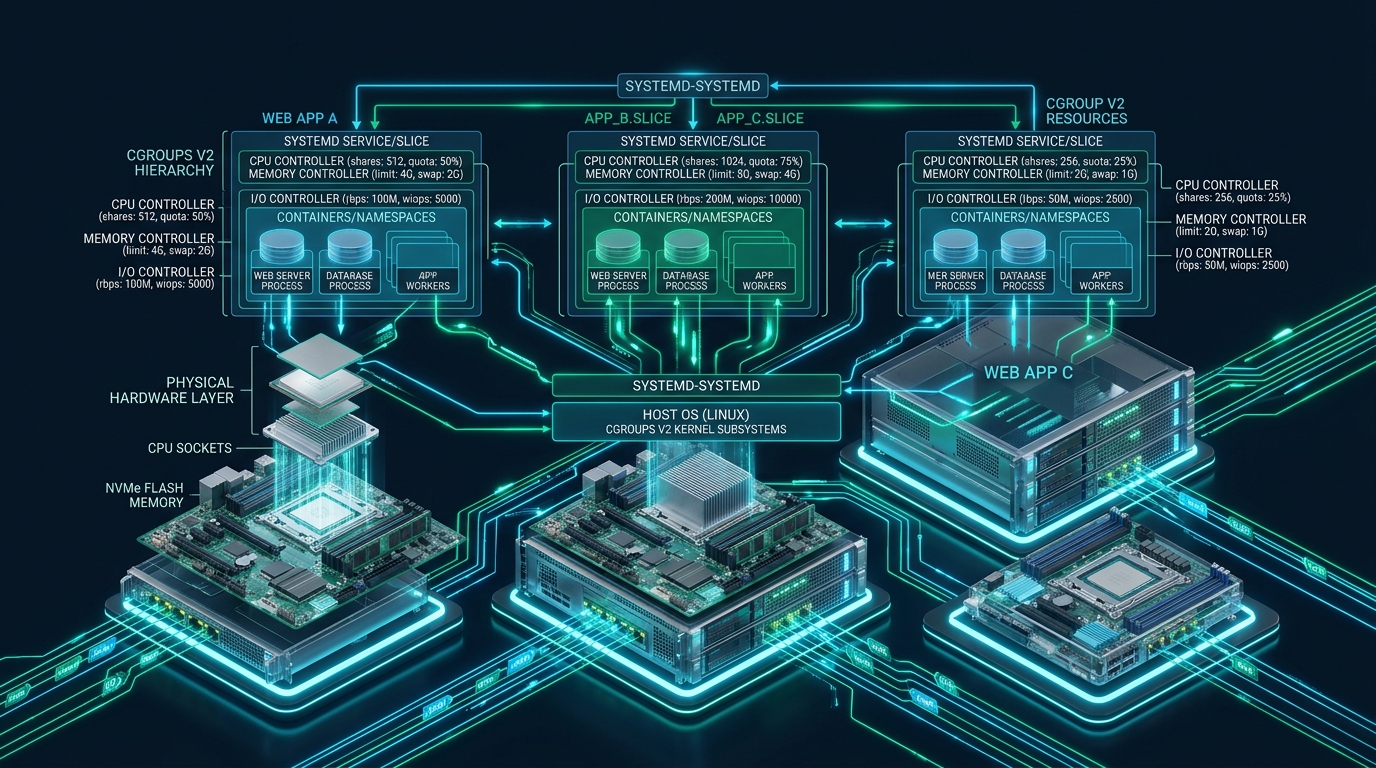
In high-density web hosting environments, unconstrained tenant processes—such as runaway PHP-FPM worker pools, unindexed MySQL queries, or memory-leaking background scripts—can rapidly trigger catastrophic noisy-neighbor resource starvation across an entire production server. At CpanelFree, isolating multi-tenant web workloads on bare-metal infrastructure requires moving beyond antiquated POSIX ulimits and fragmented cgroups v1 hierarchies to a unified, deterministic control plane. By combining systemd unit slices with modern Linux cgroups v2 controllers, systems architects can enforce strict CPU fair-share weights, dual-tier memory thresholds, NVMe block I/O throttles, and atomic process group lifecycle controls without the hypervisor virtualization penalty.
Understanding cgroups v2 Architecture in Modern Multi-Tenant Web Hosting
Direct Answer: Systemd cgroups v2 resource management enforces deterministic tenant isolation through a unified single-hierarchy tree mounted at /sys/fs/cgroup. By defining nested systemd slices, administrators configure proportional CPU scheduling (CPUWeight), dual-stage memory throttling (MemoryHigh, MemoryMax), and absolute NVMe I/O limits (IOReadBandwidthMax, IOWriteBandwidthMax) to completely eliminate noisy-neighbor server degradation.
The historical architecture of Linux Control Groups (cgroups v1) suffered from a fundamental design flaw: individual resource controllers (CPU, memory, blkio, freezer, pids) operated in completely disconnected filesystem hierarchies under /sys/fs/cgroup/<controller>/. Because these subsystems did not communicate, the Linux kernel could not accurately attribute buffered disk writeback to the specific tenant that allocated the dirty pages. If a rogue PHP script flushed hundreds of megabytes of file uploads into page cache, the kernel flush daemon (kworker) attempted to write the data asynchronously. The blkio controller saw these writes originating from kernel threads rather than the tenant cgroup, rendering disk throttles useless and locking up NVMe queues for every tenant on the host.
Control Groups v2 (cgroups v2), fully integrated into modern Linux kernels and systemd, resolves this paradigm through a strictly unified hierarchy. Mounted at /sys/fs/cgroup, every process belongs to exactly one cgroup path in a single coherent tree. Controllers are enabled selectively down the tree using cgroup.subtree_control, enforcing the structural rule that internal nodes cannot host worker processes—only leaf nodes execute code. Because memory allocation, page cache caching, and block I/O writeback are unified in the same kernel context, storage throttling acts deterministically on both synchronous read calls and asynchronous buffered write operations.
Legacy cgroups v1 vs Unified cgroups v2: Production Comparison Matrix
The following comparative matrix outlines why modern enterprise hosting stacks mandate systemd with cgroups v2 over legacy implementations:
Architecting Multi-Tenant Hierarchies with Systemd Slices
Systemd implements control groups using four basic unit concepts: slices, scopes, services, and sockets. For multi-tenant hosting, systemd slices (.slice) represent the primary organizational boundary. A slice is an abstract grouping node that does not run processes directly; rather, it hosts child slices, individual tenant system services (like isolated PHP-FPM daemons), and interactive scopes (such as SSH sessions or cron executions).
In a high-performance web architecture, the slice topology mirrors the tenant business tiers. By default, systemd provides system.slice for core operating system daemons and user.slice for logged-in sessions. In a dedicated multi-tenant web server, systems engineers construct an isolated customer.slice, beneath which individual tenant slices (e.g., customer-tenant101.slice) reside. This establishes hierarchical parent-child resource inheritance. If the parent customer.slice is constrained to 80% total host memory and 70% CPU cycles, no combination of tenant spikes can ever starve critical system services like OpenSSH, MariaDB, or the Nginx edge reverse proxy.
/sys/fs/cgroup/ manually. Systemd actively acts as the single cgroup manager on the operating system. Manual writes to /sys/fs/cgroup will be overwritten during unit reloads or process migrations. Always apply configurations via slice unit files or drop-in directories in /etc/systemd/system/.
Core cgroups v2 Subsystem Directives in Systemd
Configuring deterministic tenant isolation requires configuring four primary subsystem controllers: CPU, Memory, Block I/O, and Task Limits (PIDs). Systemd provides native unit parameters that map directly to underlying cgroups v2 kernel interfaces:
1. CPU Controller (Proportional Weight & Hard Quotas)
The CPU controller in cgroups v2 provides two complementary mechanisms: proportional fair-share distribution and absolute hard runtime limits.
CPUWeight=100: Replaces the legacycpu.sharesmodel. Values range from 1 to 10000 (default: 100). When CPU cores are saturated, CPU cycles are divided strictly in proportion to each tenant’s assigned weight. When cores are idle, a single tenant can utilize all available compute cycles without penalty.CPUQuota=150%: Enforces a strict ceiling regardless of system idle capacity. A setting of 150% limits the tenant’s processes to 1.5 full CPU cores per 100ms CFS scheduler period.
2. Memory Controller (Multi-Stage Reclamation & Protection)
Legacy cgroups v1 only offered a binary threshold (memory.limit_in_bytes), which immediately triggered the brutal kernel OOM killer when exceeded. In cgroups v2, systemd unlocks a four-tier defense-in-depth model:
MemoryMin=256M: Hard memory protection. The kernel will never reclaim memory below this threshold, guaranteeing that high-priority worker processes avoid paging latency.MemoryLow=512M: Soft memory protection. Memory below this boundary will only be reclaimed if all unprotected memory on the server has been exhausted.MemoryHigh=2G: The primary throttling ceiling. When a tenant exceeds this value, processes are not killed. Instead, the kernel triggers aggressive asynchronous page reclaim and intentionally throttles the allocating processes by injecting microsecond sleep delays into system calls. This gives database queries and web requests a chance to finish cleanly.MemoryMax=2.5G: The unyielding absolute ceiling. If memory exceeds this value despite throttling and swapping, the kernel out-of-memory handler intervenes inside the tenant slice only.MemorySwapMax=512M: Limits the amount of swap space the slice can consume, preventing disk thrashing.
MemoryMax with ManagedOOMMemoryPressure=kill or systemd-oomd. Furthermore, setting MemoryOOMScoreAdjust=-500 on core daemon services (Nginx, MySQL) and +200 on tenant slices guarantees that edge infrastructure remains online while misbehaving tenant pools are reaped cleanly.3. Block I/O Controller (NVMe Bandwidth & IOPS Throttling)
Because cgroups v2 links the memory page cache directly to the block layer, systemd I/O directives reliably control both direct I/O and buffered asynchronous writes:
IOWeight=100: Fair-share scheduling on blk-mq block devices across slices (values 1 to 10000).IOReadBandwidthMax=/dev/disk/by-id/nvme-eui... 120M: Enforces hard read throughput limits per second on specific NVMe drives.IOWriteBandwidthMax=/dev/disk/by-id/nvme-eui... 60M: Enforces hard write throughput limits per second, capturing dirty page flushes.IOReadIOPSMax=5000andIOWriteIOPSMax=2500: Restricts random input/output operations per second to preserve drive latency for neighboring websites.
4. Tasks and Process Limiting (Fork-Bomb Mitigation)
A single compromised WordPress site running a recursive bash script or malicious cron loop can exhaust the operating system process table (PIDs), causing kernel starvation. Setting TasksMax=512 restricts the total concurrent threads and processes in the slice to 512, instantly neutralizing fork attacks.
Production Configuration Files & Implementation Walkthrough
To deploy this architecture in enterprise environments, systems administrators configure kernel parameters, slice hierarchies, and unit drop-ins. Below are complete, validated production configuration templates:
Step 1: Kernel Boot Parameter Verification
Ensure your Linux distribution (Ubuntu 22.04+, Debian 12+, AlmaLinux 9+, or RHEL 9+) has unified cgroups v2 and Pressure Stall Information (PSI) enabled at the kernel boot level. Edit /etc/default/grub.d/99-cgroups.cfg:
# /etc/default/grub.d/99-cgroups.cfg
# Enforce unified cgroup v2 hierarchy and enable Pressure Stall Information (PSI)
GRUB_CMDLINE_LINUX="$GRUB_CMDLINE_LINUX systemd.unified_cgroup_hierarchy=1 cgroup_no_v1=all psi=1"
After updating the GRUB configuration, regenerate your bootloader configuration with update-grub or grub2-mkconfig -o /boot/grub2/grub.cfg and reboot the host.
Step 2: Defining the Customer Root Slice
Create the parent slice that bounds all tenant activity across the multi-tenant host. Create /etc/systemd/system/customer.slice:
[Unit]
Description=Multi-Tenant Customer Root Slice
Documentation=https://cpanelfree.com/docs/linux-architecture/cgroups-v2
Before=slices.target

[Slice]
# Overall boundaries for all combined tenants
CPUWeight=100
CPUQuota=600%
MemoryHigh=24G
MemoryMax=28G
MemorySwapMax=4G
TasksMax=16384

# Block device IO boundaries on primary NVMe storage
IOWeight=100
IOReadBandwidthMax=/dev/disk/by-id/nvme-SAMSUNG_MZQL2960HCJR-00A07 1500M
IOWriteBandwidthMax=/dev/disk/by-id/nvme-SAMSUNG_MZQL2960HCJR-00A07 800M
Step 3: Creating Individual Tenant Slices
Define granular boundaries for a specific hosting tenant (e.g., tenant101). Create /etc/systemd/system/customer-tenant101.slice:
[Unit]
Description=Resource Slice for Tenant 101
Documentation=https://cpanelfree.com
PartOf=customer.slice

[Slice]
# Dynamic fair-share CPU allocation with burst ceiling
CPUWeight=100
CPUQuota=200%

# Tiered Memory thresholds
MemoryMin=128M
MemoryLow=256M
MemoryHigh=1800M
MemoryMax=2048M
MemorySwapMax=512M

# Storage constraints
IOWeight=100
IOReadBandwidthMax=/dev/disk/by-id/nvme-SAMSUNG_MZQL2960HCJR-00A07 80M
IOWriteBandwidthMax=/dev/disk/by-id/nvme-SAMSUNG_MZQL2960HCJR-00A07 40M
IOReadIOPSMax=/dev/disk/by-id/nvme-SAMSUNG_MZQL2960HCJR-00A07 4000
IOWriteIOPSMax=/dev/disk/by-id/nvme-SAMSUNG_MZQL2960HCJR-00A07 2000

# Anti-forkbomb process protection
TasksMax=384
Step 4: Binding Tenant Services (PHP-FPM Worker Pool)
To place the tenant’s execution processes inside their allocated slice, configure a systemd template service override. Create /etc/systemd/system/[email protected]/override.conf:
[Unit]
Description=PHP-FPM Dedicated Pool for Tenant 101
After=customer-tenant101.slice

[Service]
# Attach service directly into the tenant slice
Slice=customer-tenant101.slice

# Execution security and hardening
User=tenant101
Group=tenant101
ProtectSystem=strict
ProtectHome=read-only
ReadWritePaths=/var/www/vhosts/tenant101/htdocs /tmp
PrivateTmp=true

# Graceful OOM protection score adjustment
OOMScoreAdjust=100
KillMode=control-group
Restart=on-failure
RestartSec=3s
Step 5: Kernel Memory & PSI Sysctl Optimizations
Fine-tune kernel memory eviction behavior and asynchronous writeback buffering by deploying /etc/sysctl.d/99-cgroups-psi.conf:
# /etc/sysctl.d/99-cgroups-psi.conf
# Optimize kernel page cache writeback for cgroups v2 multi-tenancy

# Lower dirty memory threshold to trigger background flushes earlier
vm.dirty_background_ratio = 5
vm.dirty_ratio = 10

# Control kernel swap aggression (balanced for NVMe with zswap/cgroups)
vm.swappiness = 30

# Ensure kernel respects cgroup v2 memory watermarks during reclaiming
vm.zone_reclaim_mode = 0

# Prevent kernel overcommit panic
vm.overcommit_memory = 0
Apply the sysctl parameters immediately using sysctl --system and reload systemd to detect the new slice configurations with systemctl daemon-reload.
Runtime Telemetry, Monitoring, and Pressure Stall Information (PSI)
Monitoring multi-tenant hosts under cgroups v2 moves beyond legacy 1-minute load averages. The Linux kernel provides Pressure Stall Information (PSI), exposing exact microsecond metrics regarding how long processes were stalled waiting for CPU cycles, memory page allocations, or disk I/O.
To inspect the live hierarchy, run the built-in systemd cgroup utilities:
# View hierarchical tree of active control groups and child tasks
systemd-cgls /customer.slice

# Real-time top monitor sorted by CPU, Memory, and Disk I/O per slice
systemd-cgtop -m -c -p
Administrators can query the raw kernel PSI telemetry for any individual tenant slice directly from the filesystem:
# Check memory pressure stall percentages (some vs full stalls)
cat /sys/fs/cgroup/customer.slice/customer-tenant101.slice/memory.pressure

# Sample Output:
# some avg10=0.00 avg60=0.02 avg300=0.01 total=48210
# full avg10=0.00 avg60=0.00 avg300=0.00 total=1240

# Check IO pressure stall information
cat /sys/fs/cgroup/customer.slice/customer-tenant101.slice/io.pressure
In the output above, some indicates the percentage of wall-clock time in which at least one thread in the slice was delayed waiting for resource access, whereas full indicates that all threads in the cgroup were completely stalled. If a tenant’s memory.pressure full spikes above 10% on a 60-second rolling window, their PHP workers are spending more time thrashing memory than executing application bytecode—an actionable indicator for upselling compute tiers or optimizing database indexes.
systemctl set-property. For example: systemctl set-property customer-tenant101.slice MemoryHigh=3G CPUQuota=300% instantly reconfigures kernel boundaries without dropping a single active client connection.Frequently Asked Questions
How does cgroups v2 solve the buffered I/O writeback accounting problem that plagued cgroups v1?
In cgroups v1, the memory controller and the block I/O controller resided in independent filesystem hierarchies. When an application executed write calls to disk, the data entered the kernel page cache managed by the memory controller, but when the background flush worker flushed those dirty pages to disk, the I/O controller could not associate the writes with the originating cgroup. In cgroups v2’s unified single hierarchy, every page in memory carries an explicit pointer to its parent cgroup. As a result, both buffered writes and direct I/O are correctly throttled according to the originating tenant’s IOWeight and IOWriteBandwidthMax.
What is the operational difference between MemoryHigh and MemoryMax in a shared hosting environment?
MemoryHigh acts as an elastic, soft throttling ceiling. When a tenant’s memory usage crosses MemoryHigh, the kernel actively initiates proactive page reclamation and inserts microsecond scheduling delays into allocating processes. This slows down fast allocations without crashing the web application. Conversely, MemoryMax is an unyielding hard limit. If a tenant breaches MemoryMax and memory cannot be reclaimed or paged to swap, the kernel invokes the OOM killer on the tenant’s processes. Utilizing MemoryHigh ensures that temporary traffic surges trigger graceful performance degradation rather than fatal 502/500 errors.
Can systemd cgroups v2 resource limits be modified dynamically on live production servers without dropping active HTTP connections?
Yes. By using the command systemctl set-property customer-tenant.slice MemoryHigh=4G CPUQuota=400%, systemd immediately writes the updated parameters to the live /sys/fs/cgroup hierarchy and creates persistent configuration drop-ins in /etc/systemd/system.control/. The changes take effect instantly in kernel space without restarting the slice, terminating worker processes, or dropping active HTTP/TCP sessions.
How do CPU weights (CPUWeight) differ from hard quotas (CPUQuota) when provisioning multi-tenant tiers?
CPUWeight is a proportional fair-share allocator operating between 1 and 10000. It only restricts compute cycles when the host’s physical cores are actively contending for resources; if neighboring tenants are idle, a tenant can utilize 100% of available compute capacity. In contrast, CPUQuota defines an inflexible runtime ceiling (e.g., 200% restricts tasks to a maximum of 2 full cores per scheduling period), regardless of whether other cores are sitting idle. Best practice for multi-tenant hosting is to combine a base CPUWeight with a safety CPUQuota ceiling to allow burst performance while preventing total CPU monopolization.
Ready to Deploy High-Performance Infrastructure?
Experience blazing-fast NVMe storage, unmetered bandwidth, and enterprise LiteSpeed caching on CpanelFree.