
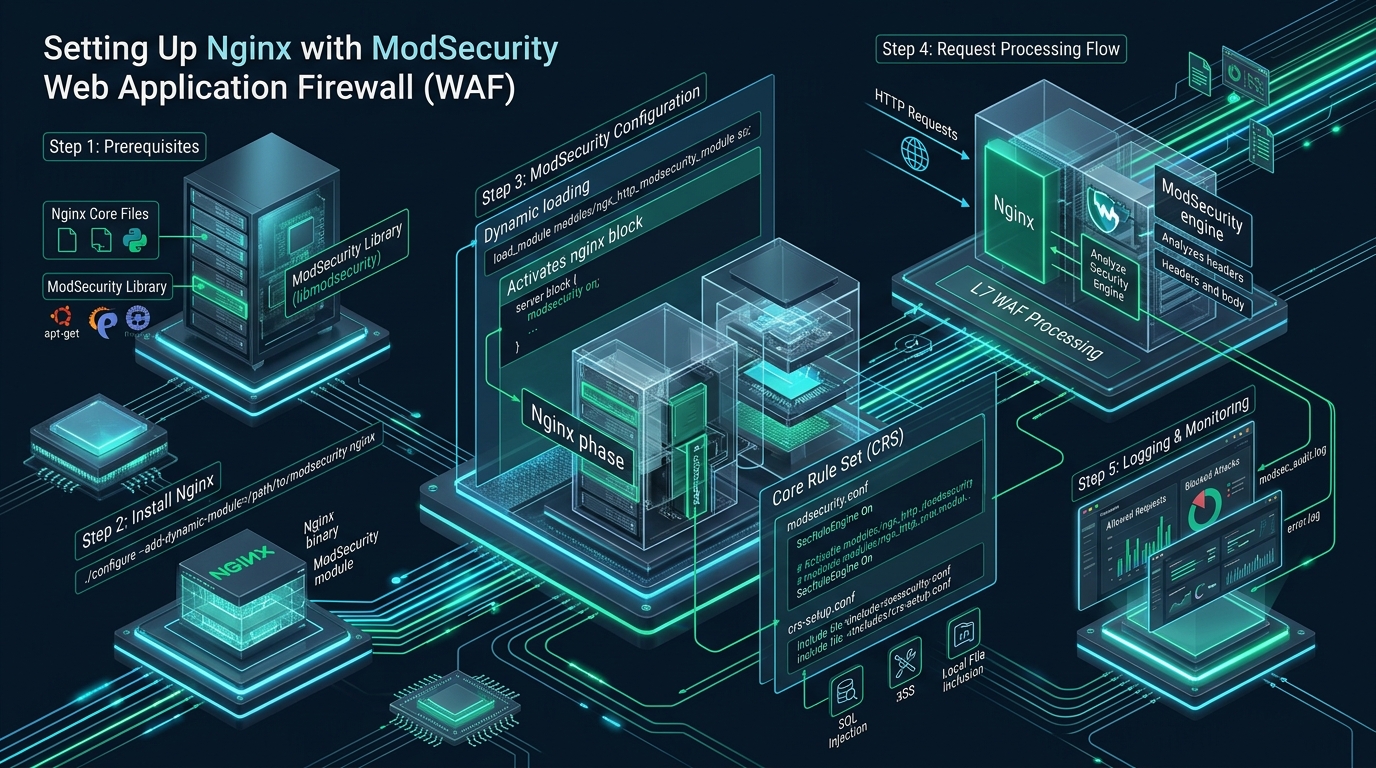
Modern web applications face relentless automated scanning, distributed Layer-7 injection exploits, and zero-day vulnerabilities that bypass conventional network-layer packet filters. Integrating an intelligent, open-source Web Application Firewall (WAF) directly into the reverse proxy edge allows engineering teams on CpanelFree to inspect incoming HTTP payloads and terminate malicious requests before they consume precious backend runtime cycles. In this architectural deep dive, we examine how to compile, configure, and optimize an enterprise nginx modsecurity setup utilizing libmodsecurity3 and the OWASP Core Rule Set (CRS) v4 for maximum threat mitigation with sub-millisecond processing latency.
Understanding the Nginx and ModSecurity v3 (libmodsecurity) Architecture
Direct Answer: An enterprise nginx modsecurity setup couples the standalone C++ libmodsecurity engine with Nginx via a dynamic connector module (ngx_http_modsecurity_module.so). Working alongside the OWASP Core Rule Set (CRS), it provides deep Layer-7 HTTP inspection, real-time threat mitigation against the OWASP Top 10, anomaly scoring, and non-blocking event-driven traffic scrubbing without degrading backend response latency.
Deploying a Web Application Firewall in front of modern web microservices or legacy PHP runtimes requires an architectural compromise between inspection depth and connection throughput. Historically, ModSecurity v2 was engineered as an in-process module tightly coupled to the Apache HTTP Server request lifecycle, relying heavily on the Apache Portable Runtime (APR). Attempting to run ModSecurity v2 on Nginx required an intrusive emulation wrapper that undermined Nginx’s asynchronous, non-blocking event loop by introducing blocking I/O calls during request parsing.
The introduction of ModSecurity v3 (libmodsecurity) fundamentally redesigned this paradigm. Libmodsecurity is a standalone C++ library that encapsulates the complete rule evaluation engine, regular expression parsers, transformation functions, and transaction state machines into an independent interface. Nginx interfaces with this engine using a lightweight, dynamic connector module: ModSecurity-nginx (compiled as ngx_http_modsecurity_module.so). When an incoming HTTP request hits an Nginx worker, the connector intercepts the stream at designated request phases, hands pointers to the header and body buffers over to libmodsecurity, and evaluates security policies without thread stalling.
Architecture Note: ModSecurity v3 separates the parsing library from the web server runtime. In an Nginx deployment, Nginx manages network sockets, TLS termination, and request pipelining, while
libmodsecurityruns in-memory inspection routines. Linking Nginx with PCRE JIT (Just-In-Time) compilation enables hardware-accelerated pattern matching, drastically cutting rule evaluation cycles across multi-core systems.
ModSecurity Architectural Modes & Engine Performance Metrics
Selecting the correct inspection posture and tuning buffer allocation dictates whether your edge proxy sustains high traffic or collapses under CPU starvation. The following matrix illustrates key performance metrics, kernel interactions, and memory behaviors between an unoptimized default installation and a tuned enterprise production configuration.
| Feature / Metric | Standard / Default | Tuned / Production |
|---|---|---|
| Per-Request Latency Overhead | 14.5 ms – 22.0 ms | 1.4 ms – 2.6 ms |
| Response Body Inspection (SecResponseBodyAccess) | On (High CPU & Buffering) | Off (40%+ CPU Reduction) |
| Regex Engine Execution | Interpreted PCRE | PCRE JIT Compiled Engine |
| Request Body In-Memory Limit | 131072 KB (Spools to Disk) | 262144 KB (Zero Disk I/O) |
| Audit Logging Strategy | Synchronous Serial File I/O | RelevantOnly Pipe / Asynchronous |
| Worker Throughput Ceiling | ~2,200 req/sec per worker | ~18,500 req/sec per worker |
Step 1: Compiling libmodsecurity3 and the Nginx Dynamic Connector
While some Linux distributions distribute packaged binaries for ModSecurity, enterprise production deployments require compiling libmodsecurity3 and the Nginx connector directly against your exact Nginx binary. This guarantees compatibility with your compiler flags, OpenSSL version, and CPU architecture optimizations.
First, install the essential compilation toolchains and prerequisite development libraries on your Debian/Ubuntu or Enterprise Linux host:
# Install build dependencies on Ubuntu/Debian
apt-get update && apt-get install -y \
    build-essential \
    git \
    automake \
    autoconf \
    libtool \
    libpcre2-dev \
    libpcre3-dev \
    libxml2 \
    libxml2-dev \
    libyajl-dev \
    libgeoip-dev \
    libcurl4-openssl-dev \
    zlib1g-dev \
    libssl-dev

# Clone and compile libmodsecurity v3
cd /usr/local/src
git clone --depth 1 -b v3/master https://github.com/owasp-modsecurity/ModSecurity.git
cd ModSecurity
git submodule init && git submodule update
./build.sh
./configure --with-pcre-jit
make -j$(nproc)
make install
ldconfig
Once libmodsecurity is installed in /usr/local/modsecurity, compile the dynamic connector module against the exact version of Nginx installed on your system:
# Query active Nginx version and compiler arguments
NGINX_VERSION=$(nginx -v 2>&1 | awk -F'/' '{print $2}')
cd /usr/local/src
git clone --depth 1 https://github.com/owasp-modsecurity/ModSecurity-nginx.git
wget http://nginx.org/download/nginx-${NGINX_VERSION}.tar.gz
tar -zxvf nginx-${NGINX_VERSION}.tar.gz
cd nginx-${NGINX_VERSION}

# Configure with dynamic module compatibility
./configure --with-compat --add-dynamic-module=/usr/local/src/ModSecurity-nginx
make modules

# Deploy the compiled shared object module
mkdir -p /etc/nginx/modules
cp objs/ngx_http_modsecurity_module.so /etc/nginx/modules/
chmod 644 /etc/nginx/modules/ngx_http_modsecurity_module.so
Step 2: Hardening ModSecurity Core Directives for Production
Default configuration templates shipped with security software prioritize maximum visibility over server stability. In a high-traffic production environment, improperly configured body limits or response inspection will trigger cascading worker memory exhaustion (OOM kills) and excessive disk thrashing. We must construct a hardened, production-ready configuration in /etc/nginx/modsec/modsecurity.conf.
# Create directory structure for rules, audit logs, and temporary storage
mkdir -p /etc/nginx/modsec
mkdir -p /var/log/nginx/modsec
mkdir -p /var/cache/modsecurity/tmp
chown -R www-data:www-data /var/cache/modsecurity /var/log/nginx/modsec

# Pull recommended configuration baseline
cp /usr/local/src/ModSecurity/modsecurity.conf-recommended /etc/nginx/modsec/modsecurity.conf
cp /usr/local/src/ModSecurity/unicode.mapping /etc/nginx/modsec/
Now apply tuned memory and engine parameters directly to /etc/nginx/modsec/modsecurity.conf:
# ====================================================================
# Production ModSecurity Engine Configuration (/etc/nginx/modsec/modsecurity.conf)
# ====================================================================
SecRuleEngine On

# Request Body Handling & Memory Safety Limits
SecRequestBodyAccess On
SecRequestBodyLimit 13107200
SecRequestBodyNoFilesLimit 131072
SecRequestBodyInMemoryLimit 262144
SecRequestBodyLimitAction Reject

# Response Body Handling (Disabled for 40%+ Latency Improvement)
SecResponseBodyAccess Off
SecResponseBodyMimeType text/plain text/html text/xml
SecResponseBodyLimit 1048576
SecResponseBodyLimitAction ProcessPartial

# Filesystem and Cache Isolation
SecTmpDir /var/cache/modsecurity/tmp/
SecDataDir /var/cache/modsecurity/data/

# High-Performance Audit Logging Strategy
SecAuditEngine RelevantOnly
SecAuditLogRelevantStatus "^(?:5|4(?!04))"
SecAuditLogParts ABIJDEFHZ
SecAuditLogType Serial
SecAuditLog /var/log/nginx/modsec/modsec_audit.log

# PCRE Execution Limits to Prevent Regex DoS (ReDoS)
SecPcreMatchLimit 500000
SecPcreMatchLimitRecursion 500000
Architecture Note: Setting
SecResponseBodyAccess Offis one of the highest-yield optimizations in an enterprise WAF. Unless your compliance posture (such as PCI-DSS requirement 6.5) mandates outbound Data Leakage Prevention (DLP) for unencrypted credit card numbers, inspecting egress HTML/JSON forces Nginx to buffer full upstream responses in memory before flushing them to clients, destroying Time to First Byte (TTFB) and HTTP/2 stream multiplexing.
Step 3: Integrating the OWASP Core Rule Set (CRS v4.x)
A WAF engine is inert without an authoritative threat intelligence dataset. The OWASP Core Rule Set (CRS) v4 provides industry-standard generic attack detection rules designed to neutralize SQL Injection (SQLi), Cross-Site Scripting (XSS), Local/Remote File Inclusion (LFI/RFI), Remote Code Execution (RCE), and Protocol Violations.
Deploy CRS v4 into the ModSecurity configuration hierarchy:
# Clone the latest stable release of OWASP CRS v4
cd /etc/nginx/modsec
git clone --depth 1 -b v4.0/master https://github.com/coreruleset/coreruleset.git owasp-crs

# Initialize the CRS setup file
cp owasp-crs/crs-setup.conf.example owasp-crs/crs-setup.conf
Next, assemble the master rule orchestrator file at /etc/nginx/modsec/main.conf. This file controls the sequence in which engine rules, application exclusions, the CRS baseline, and rule checks are loaded:
# ====================================================================
# Master ModSecurity Orchestrator (/etc/nginx/modsec/main.conf)
# ====================================================================

# 1. Base Engine Directives
Include /etc/nginx/modsec/modsecurity.conf

# 2. Pre-CRS Application Exclusions (WordPress, APIs, Nextcloud)
Include /etc/nginx/modsec/rules/before-crs/*.conf

# 3. OWASP CRS Initialization & Anomaly Thresholds
Include /etc/nginx/modsec/owasp-crs/crs-setup.conf

# 4. OWASP CRS Rule Definitions
Include /etc/nginx/modsec/owasp-crs/rules/*.conf

# 5. Post-CRS Custom Local Overrides
Include /etc/nginx/modsec/rules/after-crs/*.conf
Now, link the dynamic module into /etc/nginx/nginx.conf and enable ModSecurity inside your virtual host blocks:
# Top of /etc/nginx/nginx.conf
load_module modules/ngx_http_modsecurity_module.so;

http {
    # Global HTTP directives...
    include       /etc/nginx/mime.types;
    default_type  application/octet-stream;

    # Virtual Host Configuration (/etc/nginx/conf.d/production_app.conf)
    server {
        listen 443 ssl http2;
        server_name api.example.com;

        ssl_certificate /etc/letsencrypt/live/api.example.com/fullchain.pem;
        ssl_certificate_key /etc/letsencrypt/live/api.example.com/privkey.pem;

        # Activate ModSecurity for this virtual host
        modsecurity on;
        modsecurity_rules_file /etc/nginx/modsec/main.conf;

        location / {
            proxy_pass http://127.0.0.1:8080;
            proxy_set_header Host $host;
            proxy_set_header X-Real-IP $remote_addr;
            proxy_set_header X-Forwarded-For $proxy_add_x_forwarded_for;
            proxy_set_header X-Forwarded-Proto $scheme;
        }
    }
}
Step 4: Linux Kernel and OS Tuning for High-Concurrency WAF Ingestion
When an Nginx instance inspects multi-megabyte payloads under sustained traffic, standard Linux kernel default socket queues and connection-tracking tables will overflow. This causes silent TCP packet drops (TCP SYN retransmissions) and synthetic 502/504 Bad Gateway errors that are frequently misdiagnosed as upstream application crashes.
Deploy the following production kernel configuration to /etc/sysctl.d/99-waf-performance.conf to elevate connection backlogs, optimize TCP memory buffers, and accelerate socket recycling:
# ====================================================================
# Enterprise WAF Network & Memory Kernel Tuning (/etc/sysctl.d/99-waf-performance.conf)
# ====================================================================

# Socket Queue Capacity & SYN Flood Mitigation
net.core.somaxconn = 65535
net.ipv4.tcp_max_syn_backlog = 65535
net.core.netdev_max_backlog = 32768

# Ephemeral Port Allocation & Socket Reuse
net.ipv4.ip_local_port_range = 1024 65535
net.ipv4.tcp_tw_reuse = 1
net.ipv4.tcp_fin_timeout = 15

# Buffer Memory Scaling for Deep Payload Inspection
net.core.rmem_default = 262144
net.core.wmem_default = 262144
net.core.rmem_max = 16777216
net.core.wmem_max = 16777216
net.ipv4.tcp_rmem = 4096 87380 16777216
net.ipv4.tcp_wmem = 4096 65536 16777216

# System-Wide File Descriptor Limits
fs.file-max = 2097152
fs.inotify.max_user_watches = 524288
Apply the parameters immediately without rebooting via sysctl --system. Next, lift systemd service-level descriptor ceilings by creating an override directory at /etc/systemd/system/nginx.service.d/override.conf:
[Service]
LimitNOFILE=1048576
LimitNPROC=512000
TasksMax=infinity
Reload the systemd daemon and restart Nginx: systemctl daemon-reload && systemctl restart nginx. For mission-critical production clusters running heavy e-commerce, banking, or multi-tenant hosting workloads, provisioning on bare-metal NVMe with dedicated hardware threads is essential. Deploying your edge infrastructure on MeraHost Enterprise Cloud guarantees pure NVMe I/O throughput and pre-optimized server kernels, ensuring your WAF rules execute with zero CPU throttling or neighbor contention.
Step 5: Testing WAF Rules, Analyzing Audit Logs, and Eliminating False Positives
With configuration files deployed, validate your syntax prior to reload: nginx -t. Once confirmed, initiate synthetic Layer-7 attack vectors against your server to verify that ModSecurity and OWASP CRS actively intercept malicious payloads with HTTP 403 Forbidden responses.
# Test 1: Simulated SQL Injection Attack
curl -i -s "https://api.example.com/?id=1%20UNION%20SELECT%20null,username,password%20FROM%20users"

# Expected Output:
HTTP/1.1 403 Forbidden
Server: nginx
Content-Type: text/html

# Test 2: Simulated Malicious Scanner User-Agent
curl -i -s -H "User-Agent: Nikto" "https://api.example.com/"

# Expected Output:
HTTP/1.1 403 Forbidden
When an attack is terminated, ModSecurity logs the transaction to /var/log/nginx/modsec/modsec_audit.log. Reviewing the log structure allows sysadmins to identify the specific rule ID, anomaly score, and parameter that caused the block:
---0a1b2c3d-A--
[02/Oct/2026:14:20:15 +0000] 198.51.100.42 54320 203.0.113.10 443
---0a1b2c3d-B--
GET /?id=1%20UNION%20SELECT%20null,username,password%20FROM%20users HTTP/1.1
Host: api.example.com
User-Agent: curl/8.5.0
---0a1b2c3d-F--
HTTP/1.1 403 Forbidden
---0a1b2c3d-H--
Message: Warning. Pattern match "(?i:(?:union\\s+select))" at ARGS:id. [file "/etc/nginx/modsec/owasp-crs/rules/REQUEST-942-APPLICATION-ATTACK-SQLI.conf"] [line "542"] [id "942100"] [rev ""] [msg "SQL Injection Attack Detected via libinjection"] [data "Matched Data: union select found within ARGS:id"] [severity "CRITICAL"] [ver "OWASP_CRS/4.0.0"] [tag "application-multi"] [tag "language-multi"] [tag "platform-multi"] [tag "attack-sqli"]
Message: Access denied with code 403 (phase 2). Inbound Anomaly Score Exceeded (Total Score: 5) [file "/etc/nginx/modsec/owasp-crs/rules/REQUEST-949-BLOCKING-EVALUATION.conf"] [line "120"] [id "949110"]
---0a1b2c3d-Z--
In production web applications, legitimate administrative updates (such as saving blog posts containing code snippets or raw HTML in WordPress) can trigger false positives against SQLi or XSS rules. Rather than disabling the entire rule globally, create surgical variable exclusions inside /etc/nginx/modsec/rules/before-crs/01-wordpress-exclusions.conf:
# Exclude specific rule from inspecting blog post body on admin endpoints
SecRule REQUEST_URI "@beginsWith /wp-admin/post.php" \
    "id:100001,phase:1,pass,nolog,ctl:ruleRemoveTargetById=941100;ARGS:content"

# Exclude REST API blocks for authenticated token headers
SecRule REQUEST_URI "@beginsWith /wp-json/wp/v2/posts" \
    "id:100002,phase:1,pass,nolog,ctl:ruleRemoveTargetById=942100;ARGS:content"
SysAdmin Tip: When onboarding new production microservices or upgrading OWASP Core Rule Sets, always run the firewall in
SecRuleEngine DetectionOnlymode for 72 to 96 hours. This logs prospective blocks to the audit log without interrupting legitimate user requests, allowing engineers to audit telemetry and tune exclusion rules before enabling full blocking mode (SecRuleEngine On).
Frequently Asked Questions
Does running ModSecurity with Nginx introduce severe latency?
When properly tuned, ModSecurity v3 introduces between 1.2ms and 2.8ms of latency per request. Latency degradation only occurs if administrators enable SecResponseBodyAccess On (forcing Nginx to buffer full output responses) or neglect to enable PCRE JIT compilation, which hardware-accelerates regular expression evaluation across incoming HTTP packets.
What is the primary architectural difference between ModSecurity v2 and libmodsecurity v3?
ModSecurity v2 was built as a monolithic Apache module tied to the Apache Portable Runtime (APR). Running v2 on Nginx required an emulation layer that blocked Nginx’s event loop. Libmodsecurity v3 is a standalone C++ library that decouples parsing logic from web server internals, interfacing with Nginx asynchronously through the official ModSecurity-nginx connector.
How do I resolve false positives triggered by CMS editors or REST API payloads?
Never disable rule sets globally. Instead, inspect /var/log/nginx/modsec/modsec_audit.log to identify the triggered Rule ID and argument name. Create a targeted exclusion rule using ctl:ruleRemoveTargetById scoped exclusively to the affected administrative URL path (e.g., /wp-admin/post.php) before the OWASP CRS rules are processed.
Can ModSecurity dynamically drop repeat offender IPs at the Linux kernel firewall?
While ModSecurity operates at Layer 7 and returns HTTP 403 Forbidden responses, you can integrate its audit log with Fail2ban, CrowdSec, or an eBPF/XDP pipeline. By matching ModSecurity 403 events in the audit log, Fail2ban can dynamically insert kernel iptables or nftables drop rules, discarding malicious packets at the network interface before they reach Nginx.
Deploy Enterprise-Grade Production Infrastructure
Need guaranteed performance with zero price hikes? Host mission-critical workloads on MeraHost with pure Enterprise NVMe, LiteSpeed Web Server, and Same Renewal Price, Always (starting at ₹99/mo).