
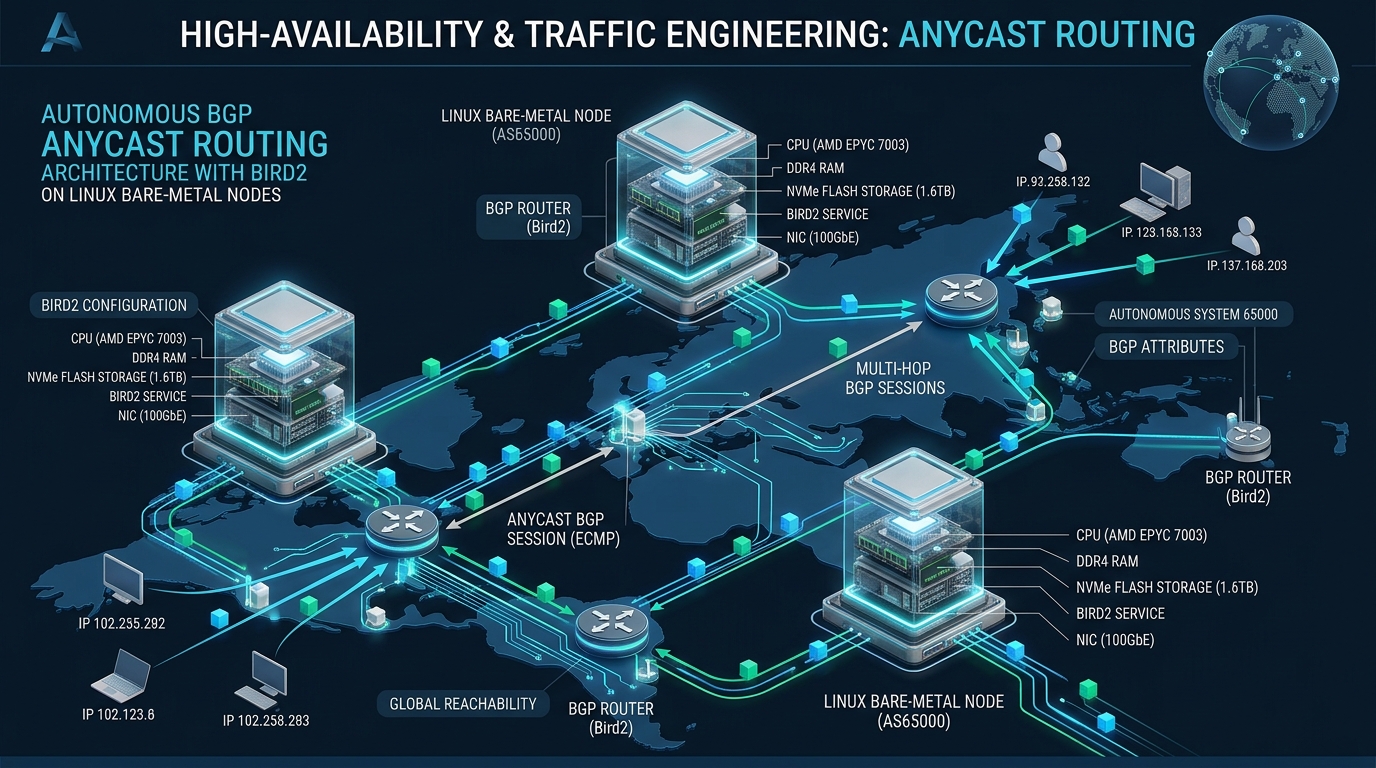
Scaling latency-sensitive distributed services across globally dispersed bare-metal clusters frequently collapses under the latency overhead and propagation delays of conventional GeoDNS routing. When upstream transit links degrade or Edge nodes suffer localized failures, legacy load-balancing layers introduce brittle failover states and prolonged DNS caching times that undermine service availability for modern cloud platforms hosted on CpanelFree. Deploying an autonomous BGP Anycast routing mesh with BIRD Internet Routing Daemon (Bird2) directly on Linux bare-metal hosts eliminates edge single points of failure by delegating path convergence to the internet’s core Border Gateway Protocol.
Understanding Linux BGP Anycast Bird2 Setup
Traditional multi-datacenter deployments rely heavily on Global Server Load Balancing (GSLB) through authoritative DNS. While DNS-based steering is simple to implement, it exhibits severe operational flaws during critical production outages: recursive resolver caching ignores reduced TTL values, ISP-level forwarders cache stale responses for hours, and volumetric DDoS attacks easily saturate unshielded authoritative nameservers. In contrast, BGP Anycast assigns the exact same IPv4 (/24 minimum) or IPv6 (/48 minimum) prefix to geographically independent bare-metal servers. Autonomous System border routers across the global internet compute optimal routing topologies using BGP path selection metrics (AS_PATH length, Local Preference, Multi-Exit Discriminator), naturally funneling user traffic to the topologically closest healthy Point of Presence (PoP).
By pairing bare-metal Linux instances with BIRD 2 (Bird Internet Routing Daemon), network engineers gain a lightning-fast, modular routing engine capable of managing full internet routing tables alongside lightweight multi-hop or direct eBGP peering sessions. Bird2 acts as the software control plane: it continuously inspects the local node’s application state, synchronizes routing tables with the Linux kernel FIB (Forwarding Information Base), and controls route advertisements to upstream transit providers via dynamic route policies.
Architectural Comparison: DNS GSLB vs. VRRP vs. Bare-Metal BGP Anycast
Before implementing Bird2 routing daemons, system architects must evaluate the performance, convergence characteristics, and operational boundaries of modern traffic steering models. The matrix below outlines key distinctions between conventional DNS failover, local network clustering, and true distributed BGP Anycast.
Linux Kernel Network Stack Tuning for Anycast Workloads
By default, the Linux networking subsystem enforces symmetric routing heuristics designed for unicast multi-homing. In a distributed Anycast topology, however, asymmetric routing is the standard operating condition: an inbound TCP SYN packet may arrive over transit provider Alpha via PoP Frankfurt, while the egress TCP SYN-ACK packet is dispatched through transit provider Bravo via lowest-cost local transit. If default kernel parameters remain active, the Linux kernel will drop asymmetric return traffic or exhaust the connection tracking table during volumetric bursts.
To prepare bare-metal nodes for high-throughput BGP Anycast handling, create an optimized sysctl configuration under /etc/sysctl.d/99-anycast-routing.conf. This configuration disables strict reverse-path filtering (which destroys asymmetric anycast flows), optimizes socket memory buffers, expands connection tracking limits, and mandates the modern TCP BBR congestion control algorithm.
# /etc/sysctl.d/99-anycast-routing.conf
# Production Linux Kernel Network Stack Tuning for BGP Anycast

# 1. Reverse Path Filtering (CRITICAL FOR ASYMMETRIC ANYCAST ROUTING)
# Value 0 = No source validation
# Value 2 = Loose reverse path validation (RFC 3704)
net.ipv4.conf.all.rp_filter = 2
net.ipv4.conf.default.rp_filter = 2
net.ipv4.conf.lo.rp_filter = 2
net.ipv4.conf.dummy0.rp_filter = 2

# 2. Enable IP Forwarding and Loopback Route Ingestion
net.ipv4.ip_forward = 1
net.ipv6.conf.all.forwarding = 1
net.ipv4.conf.all.accept_local = 1
net.ipv4.conf.all.route_localnet = 1

# 3. Connection Tracking & Backlog Hardening
net.netfilter.nf_conntrack_max = 2097152
net.netfilter.nf_conntrack_tcp_timeout_established = 600
net.netfilter.nf_conntrack_tcp_timeout_close_wait = 15
net.netfilter.nf_conntrack_tcp_timeout_fin_wait = 30
net.core.netdev_max_backlog = 65536
net.core.somaxconn = 65535

# 4. TCP Memory Buffers & BBR Congestion Control
net.core.default_qdisc = fq
net.ipv4.tcp_congestion_control = bbr
net.ipv4.tcp_rmem = 4096 87380 16777216
net.ipv4.tcp_wmem = 4096 65536 16777216
net.ipv4.tcp_max_syn_backlog = 32768
net.ipv4.tcp_syncookies = 1
net.ipv4.tcp_tw_reuse = 1
net.ipv4.tcp_fin_timeout = 15

# 5. Disable ICMP Redirects on Anycast Interfaces
net.ipv4.conf.all.send_redirects = 0
net.ipv4.conf.default.send_redirects = 0
net.ipv4.conf.all.accept_redirects = 0
net.ipv6.conf.all.accept_redirects = 0
Apply these parameters immediately to the live kernel without requiring a reboot by running sysctl --system. Verify that net.ipv4.tcp_congestion_control = bbr is actively loaded by executing sysctl net.ipv4.tcp_congestion_control.
Configuring the Dummy Anycast VIP Interface
A fundamental requirement of Linux BGP Anycast is that the service VIP (Virtual IP) must not be bound directly to a physical interface (such as eth0 or enp1s0). If the VIP were assigned to a physical adapter, the node would broadcast ARP requests for that IP onto the local rack switch, conflicting with neighboring nodes on shared Layer 2 segments. Instead, the VIP is bound to a local dummy virtual interface or the loopback device lo.
Create a dedicated dummy interface configuration using systemd-networkd to persist across reboots. For this guide, assume our anycast prefix is 198.51.100.1/32 (IPv4) and 2001:db8:a00::1/128 (IPv6).
# /etc/systemd/network/10-dummy0.netdev
[NetDev]
Name=dummy0
Kind=dummy

# /etc/systemd/network/20-dummy0.network
[Match]
Name=dummy0

[Network]
Address=198.51.100.1/32
Address=2001:db8:a00::1/128

[Link]
ActivationPolicy=up
Reload and activate the virtual device: systemctl restart systemd-networkd. Verify that dummy0 holds the anycast IP addresses via ip addr show dev dummy0.
Production Bird 2 Routing Daemon Configuration
BIRD 2 combines IPv4 and IPv6 address families into a unified runtime binary. Our production configuration establishes external BGP (eBGP) peering with two independent upstream transit upstream routers (Upstream-A and Upstream-B), implements BFD for sub-second failure detection, filters private subnets, and imports the anycast VIP from the kernel interface table.
Deploy the following configuration to /etc/bird/bird.conf:
# /etc/bird/bird.conf
# Enterprise Bird2 BGP Anycast Production Configuration

log syslog all;
router id 198.51.100.1;

# Define Anycast Constants
define ANYCAST_IPV4 = 198.51.100.0/24;
define ANYCAST_IPV6 = 2001:db8:a00::/48;
define LOCAL_ASN = 65001;

# Physical Interface Discovery Protocol
protocol device {
    scan time 5;
}

# Kernel Routing Table Synchronization (IPv4)
protocol kernel kernel4 {
    ipv4 {
        table master4;
        import none;
        export filter {
            # Do not overwrite Linux kernel default gateways
            krt_prefsrc = 198.51.100.1;
            accept;
        };
    };
}

# Kernel Routing Table Synchronization (IPv6)
protocol kernel kernel6 {
    ipv6 {
        table master6;
        import none;
        export filter {
            krt_prefsrc = 2001:db8:a00::1;
            accept;
        };
    };
}

# Bidirectional Forwarding Detection (BFD)
protocol bfd {
    interface "*" {
        min rx interval 100 ms;
        min tx interval 100 ms;
        multiplier 3;
    };
}

# Static Direct Protocol: Reads Anycast VIP from dummy0
protocol direct anycast_vip {
    interface "dummy0";
    ipv4 {
        table master4;
    };
    ipv6 {
        table master6;
    };
}

# Filter: Only announce authorized Anycast prefixes
filter anycast_export_filter {
    if (net = ANYCAST_IPV4) || (net = ANYCAST_IPV6) then {
        # Set standard BGP community if required by upstream transit
        bgp_community.add((LOCAL_ASN, 100));
        accept;
    }
    reject;
}

# BGP Peering Template for Upstream Transit Links
template bgp UPSTREAM_PEER {
    local as LOCAL_ASN;
    multihop 2;
    bfd yes;
    graceful restart on;
    connect retry time 5;
    hold time 15;
    keepalive time 5;

    ipv4 {
        table master4;
        import none; # Do not ingest full internet routing tables on edge nodes
        export filter anycast_export_filter;
    };

    ipv6 {
        table master6;
        import none;
        export filter anycast_export_filter;
    };
}

# Upstream Transit Provider A (Primary)
protocol bgp ISP_A from UPSTREAM_PEER {
    neighbor 203.0.113.1 as 64512;
    description "Transit Uplink ISP-A";
    password "SuperSecretBgpKeyAlpha";
}

# Upstream Transit Provider B (Secondary / Redundant)
protocol bgp ISP_B from UPSTREAM_PEER {
    neighbor 198.51.100.254 as 64513;
    description "Transit Uplink ISP-B";
    password "SuperSecretBgpKeyBravo";
}
Before restarting the daemon, validate configuration syntax using the BIRD interactive control client: bird -p -c /etc/bird/bird.conf. A zero return code indicates syntax compliance. Once verified, restart and enable the service: systemctl enable --now bird.
Automated Health Checking and Service Guard Engine
An anycast node must never advertise its routing prefix if its underlying application workloads (e.g. NGINX, DNS, Envoy, or HAProxy) are down or degrading. Advertising a prefix on a dead node creates an internet “black hole,” permanently discarding all user packets routed toward that region. To prevent this, deploy an autonomous health check script that continuously evaluates the local application layer and communicates with BIRD via the Unix control socket (birdc).
Create the automated watchdog script under /usr/local/bin/anycast-healthcheck.sh:
#!/usr/bin/env bash
# /usr/local/bin/anycast-healthcheck.sh
# Autonomous Application Health Probe for Bird2 Anycast Routing

set -euo pipefail

CHECK_URL="http://127.0.0.1:80/healthz"
TIMEOUT=2
PROTOCOL_NAME="anycast_vip"
STATE_FILE="/run/anycast-state"

check_service() {
    curl --silent --fail --max-time "${TIMEOUT}" "${CHECK_URL}" > /dev/null 2>&1
}

withdraw_route() {
    if [ ! -f "${STATE_FILE}" ] || [ "$(cat "${STATE_FILE}")" != "WITHDRAWN" ]; then
        logger -t anycast-healthcheck "CRITICAL: Health probe failed! Disabling ${PROTOCOL_NAME} in Bird2."
        birdc disable "${PROTOCOL_NAME}" > /dev/null 2>&1 || true
        echo "WITHDRAWN" > "${STATE_FILE}"
    fi
}

announce_route() {
    if [ ! -f "${STATE_FILE}" ] || [ "$(cat "${STATE_FILE}")" != "ACTIVE" ]; then
        logger -t anycast-healthcheck "SUCCESS: Health probe passed. Enabling ${PROTOCOL_NAME} in Bird2."
        birdc enable "${PROTOCOL_NAME}" > /dev/null 2>&1 || true
        echo "ACTIVE" > "${STATE_FILE}"
    fi
}

# Execute verification cycle
if check_service; then
    announce_route
else
    withdraw_route
fi
Ensure executable permissions are granted: chmod +x /usr/local/bin/anycast-healthcheck.sh. Next, configure a systemd timer to execute this probe every two seconds, ensuring immediate failover without polling bottlenecks.
# /etc/systemd/system/anycast-healthcheck.service
[Unit]
Description=Anycast Bird2 Health Watchdog Probe
After=bird.service

[Service]
Type=oneshot
ExecStart=/usr/local/bin/anycast-healthcheck.sh

# /etc/systemd/system/anycast-healthcheck.timer
[Unit]
Description=Run Anycast Health Probe Every 2 Seconds

[Timer]
OnBootSec=5
OnUnitActiveSec=2s
AccuracySec=100ms

[Install]
WantedBy=timers.target
Activate the watchdog timer: systemctl daemon-reload && systemctl enable --now anycast-healthcheck.timer. System administrators can now safely perform zero-downtime rolling maintenance: simply stopping the local web service triggers an instant route withdrawal, allowing global traffic to seamlessly route to the nearest surviving bare-metal node.
Observability, Diagnostics, and Operational Runbook
Maintaining a multi-homed BGP mesh requires immediate visibility into active peering states, prefix exports, and BFD session stability. BIRD provides the interactive birdc shell for inspection and dynamic protocol control.
Execute the following diagnostic commands during deployment verification:
birdc show protocols— Displays high-level protocol status (Established, Idle, Down) for all configured BGP peers and kernel synchronization threads.birdc show protocols all ISP_A— Outputs verbose peering telemetries including BGP State, hold timers, received/exported route counts, and uptime.birdc show bfd sessions— Confirms sub-second BFD hardware echo packets and transmitter intervals with upstream transit routers.birdc show route export ISP_A— Verifies exactly which IPv4/IPv6 prefixes are actively permitted through export filters.
To inspect real-time BGP routing packets and neighbor session handshakes over the wire, utilize tcpdump focused on standard BGP port 179:
tcpdump -nn -i any port 179 or port 3784 -vFrequently Asked Questions
How does BGP Anycast handle stateful TCP connections during internet route changes?
While UDP services (DNS, NTP) are naturally connectionless, stateful TCP flows (HTTPS, TLS) can experience TCP Reset (RST) spikes if upstream tier-1 route churn shifts mid-flight packets to a different Anycast node that lacks the established socket state. To mitigate this, enterprise architectures maintain stable BGP announcements without route flapping, deploy TCP BBR congestion control, enable TCP Fast Open, and use consistent-hashing edge proxies (such as Maglev or Cilium BGP with shared session state) across regional edge servers.
Why is strict reverse path filtering (rp_filter = 1) catastrophic for bare-metal anycast nodes?
Strict reverse path filtering requires the Linux kernel to verify that an incoming packet’s source IP address matches the exact interface the host would use to send a packet back to that source. In multi-homed BGP anycast networks, ingress traffic frequently arrives through one upstream ISP while egress responses take a completely different transit route (asymmetric routing). Setting rp_filter to 1 causes the kernel to silently drop valid asymmetric packets. Setting rp_filter to 2 (loose mode) or 0 prevents silent packet drops while maintaining routing integrity.
What is the minimum prefix size required to announce BGP Anycast over the public internet?
The global default-free zone (DFZ) enforces strict minimum route filtering: the smallest routable IPv4 block accepted by Tier-1 internet carriers is a /24 (256 IP addresses), and the minimum IPv6 block accepted is a /48. Anycast prefixes smaller than /24 or /48 will be discarded by upstream ISP prefix filters and will not propagate globally across public internet exchange points (IXPs).
Can BIRD 2 run simultaneously alongside Docker and Kubernetes network overlays?
Yes. BIRD 2 operates entirely in the host networking namespace and interfaces with the standard Linux kernel FIB. When running alongside container engines like Docker or CNI plugins (such as Calico or Cilium), BIRD 2 can be configured with explicit device scan filters (ignoring cali*, flannel*, or docker0 interfaces) and dedicated kernel table routing protocols, ensuring zero interference with local container overlays.
Ready to Deploy High-Performance Infrastructure?
Experience blazing-fast NVMe storage, unmetered bandwidth, and enterprise LiteSpeed caching on CpanelFree.