
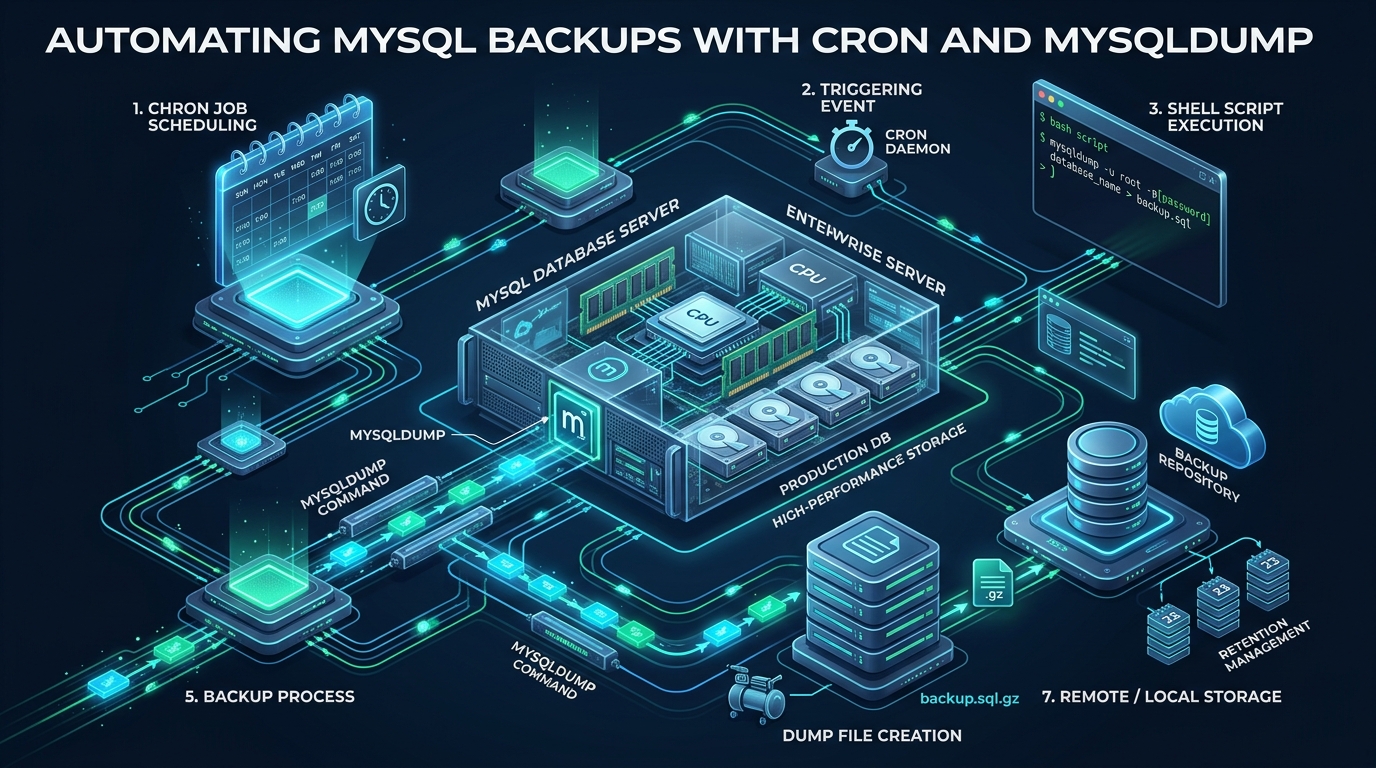
In production database engineering, untested and unautomated disaster recovery plans are indistinguishable from having no recovery plan at all. Relying on manual database exports inevitably leads to catastrophic data loss during unannounced hardware failures, software regressions, or security incidents, while unoptimized backup routines can lock active database tables, exhaust system memory, and degrade online transactional processing (OLTP) performance. For developers and system administrators scaling environments on CpanelFree, establishing an automated, zero-lock logical backup pipeline is the cornerstone of operational resilience.
Automating MySQL Backups: Architectural Overview & Core Workflow
Direct Answer: To automate MySQL backups reliably with cron and mysqldump, create a hardened wrapper script that executes mysqldump with --single-transaction, --quick, and --routines using credentials securely mounted via a ~/.my.cnf options file. Pipe the logical dump directly through parallel compression (pigz or zstd) governed by ionice, verify dump completion tags, and schedule via cron using flock to prevent concurrent run collisions.
At its core, a mysqldump cron job extracts structured database entities—DDL schema definitions, table indexes, triggers, stored routines, and raw table rows—into deterministic SQL statements. When executed correctly, these SQL dumps provide portable, human-readable recovery snapshots that can be restored across heterogeneous MySQL, MariaDB, or Percona Server instances.
However, running logical backups in high-concurrency production environments introduces several engineering challenges:
- Read Lock Saturation: Naive dump commands issue table read locks (
LOCK TABLES), halting write traffic across web applications and API endpoints. - Buffer Pool Pollution: Streaming gigabytes of table rows can evict frequently queried working sets from the InnoDB buffer pool, driving query latencies upward.
- Process Table Credential Exposure: Supplying passwords directly via command-line flags exposes sensitive credentials to local unprivileged users through
ps auxand/procentries. - Silent Failures in Shell Pipes: Standard shell piping (e.g.,
mysqldump | gzip > backup.sql.gz) masks upstream exit errors, masking incomplete or corrupted dumps as successful operations.
By architecting a robust automation script that combines proper InnoDB transaction isolation, secure credential management, background I/O throttling, and deterministic exit verification, administrators can ensure reliable, non-blocking backups.
Enterprise Comparison: Default mysqldump vs. Hardened Production Architecture
Many systems administrators start with an elementary one-line cron entry that triggers a raw mysqldump command into a static directory. As datasets expand into tens of gigabytes, this default approach breaks down under lock contention and resource starvation. The table below illustrates the critical architectural differences between default dumping and an enterprise-tuned deployment.
| Feature / Metric | Standard / Default | Tuned / Production |
|---|---|---|
| Table Locking Behavior | Global read lock (blocks all writes) | Zero-lock MVCC snapshot (–single-transaction) |
| Client Memory Footprint | Buffers whole tables (OOM risk on >10GB) | Row-by-row streaming stream (–quick) |
| Credential Security | Cleartext passwords in crontab or shell args | Dedicated ~/.my.cnf (chmod 600) / mysql_config_editor |
| Compression & I/O Overhead | Uncompressed disk writes or single-thread gzip | Multi-core pigz/zstd piped via ionice -c3 |
| Integrity & Completion Validation | Exit code check only (fails on partial pipe write) | Pipefail + EOF dump validation + SHA256 checksum |
| Concurrency & Overlap Handling | None (overlapping jobs spawn I/O thrashing) | Atomic file-descriptor locking via flock |
Eliminating Plaintext Credentials: Secure Option Files and Authentication
A frequent security failure in cron automation is embedding database credentials directly into the cron schedule or command string, such as mysqldump -u root -p'Secret123' dbname. In Linux, any local user running ps -ef, top, or inspecting /proc can read the command line arguments of active processes. Furthermore, bash command logs and cron system logs capture these arguments in plain text.
To eliminate this vulnerability, utilize standard MySQL option files (.my.cnf) stored with strict POSIX permissions restricted exclusively to the root user or dedicated backup service account.
Architecture Note: Always create a dedicated administrative MySQL user with minimal required privileges (
SELECT,RELOAD,SHOW DATABASES,LOCK TABLES,REPLICATION CLIENT,EVENT,TRIGGER). Never grant fullSUPERor globalALL PRIVILEGESto automated backup service principals.
Create the hardened option file at /root/.my.cnf:
# /root/.my.cnf - Hardened MySQL client authentication configuration
[client]
user = backup_operator
password = "xK8#mQ9$Lp2!vN4zR7@jD"
host = 127.0.0.1
port = 3306

[mysqldump]
quick
single-transaction
max_allowed_packet = 512M
hex-blob
routines
events
triggers
Enforce strict filesystem security on the credential file immediately after creation:
chown root:root /root/.my.cnf
chmod 600 /root/.my.cnf
With this configuration in place, mysqldump automatically reads the authentication parameters without requiring any -u or -p flags on the command line, preventing credential leakage in process lists and system logs.
Kernel I/O Tuning for Heavy Database Dumps
When dumping a database consisting of tens or hundreds of gigabytes, the Linux page cache can become overwhelmed by sequentially read blocks that are unlikely to be read again. Left untuned, the operating system kernel dirty writeback mechanism will aggressively flush dirty pages to storage, choking NVMe/SATA I/O bandwidth and causing micro-stalls in the MySQL server daemon.
Deploy the following kernel sysctl configuration to balance virtual memory dirty page ratios and prevent background backup sweeps from starving production database threads:
# /etc/sysctl.d/99-mysql-backup-io.conf - Kernel I/O and Virtual Memory Tuning
# Reduce dirty ratio thresholds to trigger early, continuous background writeback
vm.dirty_background_ratio = 5
vm.dirty_ratio = 10

# Shorten dirty page expiration interval to prevent massive unwritten page surges
vm.dirty_expire_centisecs = 1500
vm.dirty_writeback_centisecs = 500

# Protect InnoDB buffer pool caching by preventing aggressive swapping
vm.swappiness = 1
vm.vfs_cache_pressure = 50
Apply the tuned sysctl parameters without rebooting by executing:
sysctl -p /etc/sysctl.d/99-mysql-backup-io.confComplete Production Automation Script: Zero-Locking, Compression, and Rotation
The following production script implements an enterprise-grade backup workflow. It dynamically discovers all user databases, skips volatile internal system tables (such as performance_schema and information_schema), executes non-blocking transactional dumps, streams data directly through multi-threaded parallel gzip (pigz), validates the dump integrity marker, generates SHA256 cryptographic checksums, and purges expired retention snapshots.
Architecture Note: The
--single-transactionflag relies on InnoDB Multi-Version Concurrency Control (MVCC) to obtain a consistent snapshot without blocking DML operations (SELECT,INSERT,UPDATE,DELETE). However, running DDL operations (ALTER TABLE,DROP TABLE) during a backup will encounter metadata lock (MDL) conflicts. Always avoid scheduling schema migrations during backup execution windows.
Save the following bash script to /usr/local/bin/mysql-backup.sh:
#!/usr/bin/env bash
# /usr/local/bin/mysql-backup.sh - Enterprise Production MySQL Backup Orchestrator
# Strict execution flags: exit immediately on unset vars or pipeline failures
set -euo pipefail

# Operational configuration
readonly BACKUP_BASE_DIR="/var/backups/mysql"
readonly TIMESTAMP="$(date +'%Y%m%d_%H%M%S')"
readonly TARGET_DIR="${BACKUP_BASE_DIR}/${TIMESTAMP}"
readonly LOG_FILE="${BACKUP_BASE_DIR}/backup.log"
readonly RETENTION_DAYS=14
readonly COMPRESSOR="pigz" # Fallback to 'gzip' if pigz is not installed
readonly PIGZ_THREADS=4

# Logging utility
log() {
    echo "[$(date +'%Y-%m-%d %H:%M:%S')] [$1] $2" | tee -a "${LOG_FILE}"
}

# Ensure root directory and logging path exist
mkdir -p "${TARGET_DIR}"
touch "${LOG_FILE}"

log "INFO" "Starting automated MySQL enterprise backup sequence..."

# Check available storage before starting (require at least 10GB free)
AVAILABLE_KB=$(df -P "${BACKUP_BASE_DIR}" | awk 'NR==2 {print $4}')
if [ "${AVAILABLE_KB}" -lt 10485760 ]; then
    log "ERROR" "Insufficient disk space on ${BACKUP_BASE_DIR}. Aborting backup."
    exit 1
fi

# Retrieve active user databases, filtering out standard system schemas
DATABASES=$(mysql -N -e "SHOW DATABASES;" | grep -Ev "^(information_schema|performance_schema|sys|mysql)$")

for DB in ${DATABASES}; do
    log "INFO" "Processing database: ${DB}..."
    DUMP_FILE="${TARGET_DIR}/${DB}_${TIMESTAMP}.sql.gz"

    # Execute throttled, non-locking dump streamed directly into parallel compressor
    # ionice -c3 runs process in idle I/O scheduling class
    # nice -n 19 assigns lowest CPU scheduling priority
    nice -n 19 ionice -c 3 mysqldump \
        --defaults-file=/root/.my.cnf \
        --single-transaction \
        --quick \
        --routines \
        --triggers \
        --events \
        --hex-blob \
        --master-data=2 \
        --flush-logs \
        --databases "${DB}" \
        | "${COMPRESSOR}" -p "${PIGZ_THREADS}" > "${DUMP_FILE}"

    # Integrity check: Validate gzip stream and verify MySQL footer marker
    log "INFO" "Validating stream integrity for ${DB}..."
    if ! gzip -t "${DUMP_FILE}" 2>/dev/null; then
        log "ERROR" "Gzip integrity check failed for ${DUMP_FILE}!"
        exit 1
    fi

    # Check for the canonical termination string emitted by mysqldump
    if ! zcat "${DUMP_FILE}" | tail -n 10 | grep -q "Dump completed on"; then
        log "ERROR" "Dump completion footer missing in ${DUMP_FILE}! Partial dump suspected."
        exit 1
    fi

    # Compute SHA256 checksum for immutable auditing
    sha256sum "${DUMP_FILE}" > "${DUMP_FILE}.sha256"

    FILE_SIZE=$(du -h "${DUMP_FILE}" | cut -f1)
    log "INFO" "Database ${DB} successfully backed up (${FILE_SIZE})."
done

# Retention management: Prune backup directories older than RETENTION_DAYS
log "INFO" "Pruning snapshots older than ${RETENTION_DAYS} days..."
find "${BACKUP_BASE_DIR}" -maxdepth 1 -mindepth 1 -type d -name "20*" -mtime +"${RETENTION_DAYS}" -exec rm -rf {} +

log "INFO" "Automated backup cycle completed successfully."
exit 0
Set appropriate executable permissions on the script:
chmod 700 /usr/local/bin/mysql-backup.shScheduling and Collision Prevention: Cron vs. Systemd Timers
When automating backups with cron, a common failure mode in growing databases is job overlap. If a daily backup scheduled at 02:00 takes 75 minutes, and a secondary maintenance job or subsequent backup triggers while the first is still holding database connections and writing to storage, severe I/O degradation and lock contention ensue.
To prevent concurrent runs of the backup script, use flock (file locking) within your crontab entry. flock acquires an exclusive lock on an arbitrary lockfile and exits gracefully if another instance is already executing.
Create a dedicated cron definition file at /etc/cron.d/mysql-backup:
# /etc/cron.d/mysql-backup - Automated zero-downtime database snapshot
SHELL=/bin/bash
PATH=/usr/local/sbin:/usr/local/bin:/sbin:/bin:/usr/sbin:/usr/bin
[email protected]

# Run daily at 02:15 AM UTC with non-blocking file locking
15 2 * * * root /usr/bin/flock -n /var/run/mysql-backup.lock /usr/local/bin/mysql-backup.sh >> /var/log/mysql-backup-cron.log 2>&1
The -n flag directs flock to fail non-blocking. If a previous run is still active, the new instance will immediately terminate rather than waiting in line and multiplying the server load.
Modern Alternative: Systemd Timer and Service
For modern Linux distributions (Debian 12+, Ubuntu 22.04+, RHEL 9+), systemd timers provide richer telemetry, execution history, and failure restart capabilities compared to classic cron.
Define the service unit at /etc/systemd/system/mysql-backup.service:
[Unit]
Description=Enterprise MySQL Backup Job
After=network.target mysql.service

[Service]
Type=oneshot
ExecStart=/usr/local/bin/mysql-backup.sh
StandardOutput=journal
StandardError=journal
Nice=19
IOSchedulingClass=idle
Define the matching timer unit at /etc/systemd/system/mysql-backup.timer:
[Unit]
Description=Trigger MySQL Backup Daily at 02:15 UTC

[Timer]
OnCalendar=*-*-* 02:15:00
Persistent=true
RandomizedDelaySec=300

[Install]
WantedBy=timers.target
Enable and activate the timer with:
systemctl daemon-reload
systemctl enable --now mysql-backup.timer
systemctl list-timers --all
Scaling Beyond Logical Dumps: When to Upgrade Database Infrastructure
While mysqldump coupled with cron is exceptionally reliable for databases up to 50GB–100GB, restoration times scale linearly with data volume. Rebuilding secondary indexes and parsing multi-gigabyte SQL text files during a total disaster recovery event can lead to unacceptable Recovery Time Objectives (RTO). If your database exceeds several hundred gigabytes or demands sub-second Recovery Point Objectives (RPO), you will need to complement your logical dumps with physical binary log replication, Percona XtraBackup, or enterprise infrastructure built with dedicated NVMe storage channels.
For high-throughput web applications, e-commerce stores, and production workloads requiring consistent performance without unpredictable price spikes, deploying on MeraHost Enterprise Cloud delivers enterprise-grade infrastructure. Built on pure enterprise NVMe storage arrays and LiteSpeed Web Server, MeraHost provides the sustained I/O throughput necessary to absorb heavy database snapshot cycles without degrading client request response times.
Frequently Asked Questions
How does –single-transaction ensure consistency without locking tables?
The --single-transaction flag sets the transaction isolation level to REPEATABLE READ and issues a START TRANSACTION WITH CONSISTENT SNAPSHOT. For all transactional InnoDB tables, MySQL creates an internal snapshot read view at the point in time the transaction opens. Any subsequent updates, inserts, or deletes made by other applications are written normally to table pages, while mysqldump reads the original unmodified row state from InnoDB undo logs, ensuring 100% data consistency without holding table locks.
What causes “mysqldump: Error 2020: Got packet bigger than ‘max_allowed_packet’ bytes”?
This error occurs when a single row or BLOB/TEXT column exceeds the client or server buffer packet threshold during extraction. To resolve this, configure max_allowed_packet = 512M (or 1G) in both the [mysqldump] and [mysqld] sections of your configuration files, and ensure the --hex-blob flag is supplied so binary fields are dumped safely as hexadecimal strings without triggering character encoding issues.
Can I use mysqldump cron jobs for zero-downtime backups on MyISAM tables?
No. MyISAM does not support transactions or MVCC snapshots. If your database contains MyISAM tables, mysqldump must acquire a global read lock (LOCK TABLES) across each table during the dump, freezing all write operations until the table export finishes. For modern high-availability environments, convert all legacy MyISAM tables to InnoDB using ALTER TABLE tbl_name ENGINE=InnoDB; before implementing automated cron backups.
How do I verify that my automated MySQL backups can actually be restored?
A backup is unverified until an end-to-end restoration test succeeds. Implement an automated staging recovery pipeline that spins up an ephemeral MySQL instance or Docker container once a week, pulls the latest .sql.gz snapshot, verifies its SHA256 checksum, executes zcat backup.sql.gz | mysql staging_db, and runs CHECK TABLE or synthetic application health queries against the restored schemas.
Deploy Enterprise-Grade Production Infrastructure
Need guaranteed performance with zero price hikes? Host mission-critical workloads on MeraHost with pure Enterprise NVMe, LiteSpeed Web Server, and Same Renewal Price, Always (starting at ₹99/mo).