
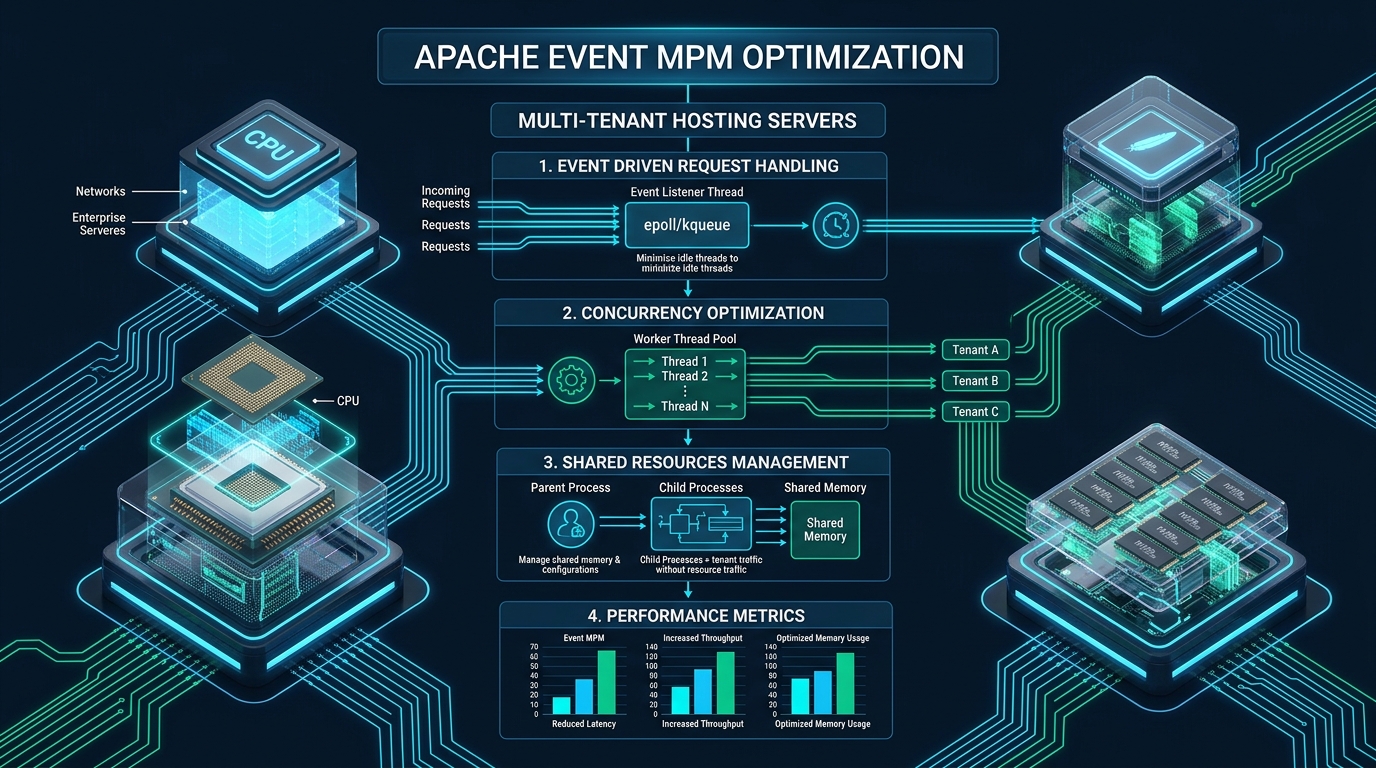
In high-density shared and multi-tenant hosting environments, legacy process-per-connection architectures like Apache Prefork MPM inevitably succumb to thread exhaustion, massive RAM bloat, and Out-Of-Memory (OOM) kernel panics during sudden concurrency spikes. By decoupling Keep-Alive connection management from active worker threads through kernel-level asynchronous event notification (epoll), Apache’s Event Multi-Processing Module (MPM) enables multi-tenant hosting platforms like CpanelFree to handle tens of thousands of concurrent clients with a fraction of the hardware footprint. This deep-dive operational guide breaks down the underlying Linux socket mechanics, mathematical sizing formulas, production kernel configurations, and security isolation layers required to tune Apache Event MPM for enterprise-grade multi-tenant hosting clusters.
Architectural Foundations: Why Apache Event MPM Outperforms Prefork and Worker
To understand why Event MPM is mandatory for modern multi-tenant hosting, one must first examine the connection lifecycle bottleneck in earlier Apache MPM architectures. In traditional shared hosting deployments running the Prefork MPM, every incoming TCP connection binds directly to an entire dedicated Apache child process. If a client establishes an HTTP/1.1 connection with Keep-Alive enabled, that entire 40MB–80MB child process sits completely idle in memory waiting for the client’s next request until KeepAliveTimeout expires. On a server hosting 500 websites with 2,000 idle browser connections, Prefork requires over 100 GB of RAM simply to maintain idle TCP sockets.
The Worker MPM introduced hybrid multi-process and multi-threaded processing. Each child process spawns a fixed number of threads, dramatically reducing memory overhead. However, Worker MPM still suffers from a critical limitation: an idle Keep-Alive connection continues to tie up an active execution thread. If all worker threads are occupied waiting on idle clients, new incoming connections from other tenants are queued or dropped, causing artificial thread starvation.
The Event MPM completely resolves this concurrency dilemma through an asynchronous state machine. When an active worker thread finishes sending an HTTP response, it detaches from the socket. Instead of terminating the connection or keeping the worker thread blocked, the socket descriptor is transferred to a dedicated Listener Thread within the child process. The listener thread registers the socket with the Linux kernel’s epoll subsystem. The worker thread is immediately returned to the execution pool to process incoming traffic for other tenants. Only when the client transmits new data on that socket does epoll trigger an event, prompting the listener thread to reassign the socket to an idle worker thread.
Multi-Tenant Architecture Comparison: Prefork vs Worker vs Event
The following matrix illustrates how architectural differences between Apache Multi-Processing Modules impact high-density multi-tenant hosting environments under heavy production loads.
Mathematical Sizing Formulas for Multi-Tenant Concurrency
Arbitrary directive values in Apache configuration files are the primary cause of service degradation and OOM kernel panics. In multi-tenant environments, you must compute ServerLimit, MaxRequestWorkers, and ThreadsPerChild based on verified hardware metrics and tenant memory boundaries.
On a dedicated web server node, memory allocation must account for three core layers: Linux kernel and system reserves, the Apache HTTP Server daemon itself, and isolated tenant backend pools (typically PHP-FPM). Use the following mathematical framework:
Usable_RAM = Total_System_RAM – (OS_Reserve [4GB] + Monitoring_DB_Reserve [2GB])
2. Apache vs PHP-FPM Allocation:
In Event MPM, Apache acts strictly as a high-concurrency static and reverse-proxy layer.
Apache_RAM_Pool = Usable_RAM × 0.25 (25% to Apache)
PHP_FPM_RAM_Pool = Usable_RAM × 0.75 (75% to Tenant Backend Pools)
3. Concurrency Limits:
Average_Apache_Process_Size ≈ 25 MB (with stripped modules)
ThreadsPerChild = 64 (Optimal balance between CPU cache lines and lock contention)
ServerLimit = Apache_RAM_Pool / Average_Apache_Process_Size
MaxRequestWorkers = ServerLimit × ThreadsPerChild
Total_Allowed_Connections = (AsyncRequestWorkerFactor + 1) × MaxRequestWorkers
For a standard 32 GB RAM / 16 Core dedicated multi-tenant host, Usable RAM is approximately 26 GB. Allocating 6.5 GB to Apache allows ServerLimit 32 with ThreadsPerChild 64, yielding 2,048 active worker threads. With an AsyncRequestWorkerFactor of 3, the server seamlessly maintains up to 8,192 concurrent client connections with negligible resource degradation.
Production Configuration: Tuning Apache Event MPM
The following production configuration applies enterprise-grade parameters to the Apache Event MPM. Save this configuration in your Apache configuration directory (e.g., /etc/httpd/conf.modules.d/00-mpm.conf on Enterprise Linux / cPanel or /etc/apache2/mods-available/mpm_event.conf on Debian/Ubuntu systems).
# /etc/httpd/conf.modules.d/00-mpm.conf
# Production Tuned Apache Event MPM for Multi-Tenant Hosting

<IfModule mpm_event_module>
    # Initial child server processes spawned on startup
    StartServers             4

    # Maximum number of child server processes that may exist simultaneously
    ServerLimit              32

    # Maximum number of worker threads allowed per child process
    ThreadLimit              64

    # Number of worker threads created by each child process
    ThreadsPerChild          64

    # Minimum number of idle worker threads across all processes
    MinSpareThreads          64

    # Maximum number of idle worker threads across all processes
    MaxSpareThreads          256

    # Maximum number of simultaneous active requests served
    # Must be: ServerLimit * ThreadsPerChild
    MaxRequestWorkers        2048

    # Multiplier for total concurrent connections (Active + Keep-Alive)
    # Total Connections = (AsyncRequestWorkerFactor + 1) * MaxRequestWorkers
    # 2048 * (3 + 1) = 8192 simultaneous connected clients
    AsyncRequestWorkerFactor 3

    # Recycle child processes after handling N requests to prevent memory leaks
    # Set to a non-zero value in multi-tenant environments
    MaxConnectionsPerChild   10000

    # HTTP/1.1 Persistent Connection Settings
    KeepAlive                On
    MaxKeepAliveRequests     1000
    KeepAliveTimeout         3

    # Overall request timeout to guard against slow clients
    Timeout                  30
</IfModule>KeepAlive Off when running Event MPM. Unlike Prefork where Keep-Alive held expensive processes hostage, Event MPM relies on persistent connections to eliminate repeated TCP three-way handshakes and TLS cryptographic negotiation overhead. Furthermore, keep KeepAliveTimeout low (between 2 and 4 seconds); keeping idle sockets beyond 5 seconds yields diminishing returns while consuming kernel socket buffers.Kernel & Network Subsystem Tuning: /etc/sysctl.d/99-apache-event-tuning.conf
Even a perfectly tuned Apache MPM will experience connection drops and SYN floods if the underlying Linux kernel network parameters bottleneck incoming socket queues. Deploy the following sysctl parameters to harden the TCP stack for multi-tenant HTTP concurrency.
# /etc/sysctl.d/99-apache-event-tuning.conf
# Enterprise Linux Kernel Tuning for High-Concurrency Web Workloads

# Maximum socket listen backlog for pending connection requests
net.core.somaxconn = 65535

# Maximum number of remembering connection requests (SYN backlog queue)
net.ipv4.tcp_max_syn_backlog = 65535

# Maximum number of packets queued on the input side when interface receives packets faster than kernel can process
net.core.netdev_max_backlog = 16384

# Time in seconds to hold socket in TIME_WAIT state after FIN transmission
net.ipv4.tcp_fin_timeout = 15

# Allow reusing TIME-WAIT sockets for new connections when safe from protocol viewpoint
net.ipv4.tcp_tw_reuse = 1

# Local ephemeral port range for outgoing proxy connections (e.g. to PHP-FPM or reverse proxies)
net.ipv4.ip_local_port_range = 10240 65535

# TCP socket memory buffers (min, default, max in bytes)
net.ipv4.tcp_rmem = 4096 87380 16777216
net.ipv4.tcp_wmem = 4096 65536 16777216
net.core.rmem_max = 16777216
net.core.wmem_max = 16777216

# Disable slow start after idle to maintain high TCP window scaling across keep-alive connections
net.ipv4.tcp_slow_start_after_idle = 0

# System-wide file descriptor limit across all processes
fs.file-max = 2097152
Apply these parameters immediately without a reboot by executing sysctl -p /etc/sysctl.d/99-apache-event-tuning.conf.
Systemd Resource Limits: /etc/systemd/system/httpd.service.d/override.conf
Modern Linux distributions enforce strict per-service resource limits via systemd cgroups. If your systemd unit restricts file descriptors, Apache will throw (24)Too many open files: AH00056: connect to listener failed during traffic bursts regardless of your sysctl settings. Create a systemd drop-in override:
# /etc/systemd/system/httpd.service.d/override.conf
# (Use apache2.service.d on Debian/Ubuntu systems)

[Service]
# Set open file descriptor limit for all Apache child workers
LimitNOFILE=1048576

# Maximum number of processes and threads
LimitNPROC=524288

# Eliminate systemd task execution throttling
TasksMax=infinity
Reload the systemd daemon and restart the web server to enforce the new resource boundaries:
systemctl daemon-reload
systemctl restart httpd   # or systemctl restart apache2
Multi-Tenant PHP-FPM Pool Architecture and Security Isolation
Because Event MPM is heavily multi-threaded, running embedded scripting runtimes like mod_php is strictly forbidden. Embedded PHP is not thread-safe (non-ZTS), and running it under Event MPM will result in catastrophic memory corruption, segmentation faults, and server crashes. Instead, multi-tenant architectures decouple script execution using PHP-FPM (FastCGI Process Manager) over high-speed Unix domain sockets.
In a shared hosting environment, every tenant must have an isolated PHP-FPM pool executing under their own unique POSIX user and group. This architecture guarantees complete tenant boundary isolation: even if a tenant’s web application is compromised, the attacker cannot read files or database credentials belonging to neighboring tenants.
# /etc/php-fpm.d/tenant_client1.conf
# Dedicated Tenant Pool with On-Demand Resource Scaling

[client1]
user = client1
group = client1

# High-speed local UNIX domain socket
listen = /run/php-fpm/client1.sock
listen.owner = apache
listen.group = apache
listen.mode = 0660

# Use ondemand process management to minimize idle memory in shared hosting
pm = ondemand
pm.max_children = 25
pm.process_idle_timeout = 10s
pm.max_requests = 1000

# Resource isolation and execution timeouts
request_terminate_timeout = 60s
php_admin_value[memory_limit] = 256M
php_admin_value[open_basedir] = /home/client1/public_html:/tmp
Within Apache’s VirtualHost configuration, route dynamic execution cleanly via mod_proxy_fcgi:
<VirtualHost *:443>
    ServerName client1.example.com
    DocumentRoot /home/client1/public_html

    SSLEngine on
    Protocols h2 http/1.1

    # Proxy PHP requests to tenant dedicated Unix socket
    <FilesMatch \.php$>
        SetHandler "proxy:unix:/run/php-fpm/client1.sock|fcgi://localhost"
    </FilesMatch>

    <Directory /home/client1/public_html>
        Options -Indexes +FollowSymLinks
        AllowOverride All
        Require all granted
    </Directory>
</VirtualHost>
Real-Time Telemetry and Concurrency Verification
Once deployed, monitor real-time thread utilization and async connection states using Apache’s built-in mod_status module. Ensure ExtendedStatus On is enabled in your configuration, then query the status endpoint:
# Query Apache real-time scoreboard metrics
apachectl fullstatus | grep -E "(Current|Scoreboard|Async)"
A healthy, tuned Event MPM under load will exhibit high numbers in the Async connections: keep-alive counter while the active worker thread count remains stable and well below MaxRequestWorkers. To validate concurrency under load, execute a benchmark simulating 1,000 persistent clients using wrk:
wrk -t8 -c1000 -d60s -H "Connection: keep-alive" https://example.com/During the test, observe kernel socket allocation using ss -s. You will note that thousands of active TCP connections are serviced smoothly without thread exhaustion or context-switching thrash.
Frequently Asked Questions
Can Apache Event MPM run traditional mod_php scripts securely in multi-tenant environments?
No. Traditional mod_php is not thread-safe and requires the single-threaded Prefork MPM to avoid random segfaults and memory corruption. In multi-tenant environments, you must decouple PHP execution using PHP-FPM via mod_proxy_fcgi. This setup not only enables Event MPM’s high-speed asynchronous processing, but also enforces strict user isolation by assigning each tenant their own separate PHP-FPM pool with unique UID/GID permissions.
What is the optimal value for AsyncRequestWorkerFactor in multi-tenant hosting?
The default value of AsyncRequestWorkerFactor is 2. For modern multi-tenant hosting nodes with high-traffic websites that load dozens of static assets (CSS, JS, images, fonts) over persistent HTTP/1.1 and HTTP/2 connections, setting AsyncRequestWorkerFactor to 3 or 4 is recommended. This allows the listener thread to accept up to (Factor + 1) × MaxRequestWorkers connections, maintaining thousands of idle keep-alive sockets without consuming execution threads.
How do we prevent a single tenant from exhausting the shared Event MPM thread pool?
Because Apache Event MPM delegates PHP execution to PHP-FPM, tenant isolation is primarily enforced at the PHP-FPM pool layer. By configuring `pm = ondemand` and setting a strict `pm.max_children` limit (e.g., 20 to 30 processes per tenant), one tenant’s slow database queries or infinite loops cannot exhaust resources allocated to neighboring accounts. Additionally, deploy `mod_qos` or `mod_evasive` at the Apache layer to rate-limit connections per VirtualHost.
How does Apache Event MPM interact with HTTP/2 and HTTP/3 multiplexing?
Event MPM is the required foundation for Apache’s `mod_http2`. With HTTP/2, a single TCP connection multiplexes dozens of concurrent streams. Event MPM handles the persistent TCP socket asynchronously via its listener thread, allocating worker threads on demand as individual HTTP/2 streams transmit request frames. This eliminates the massive connection overhead inherent to older HTTP/1.1 pipelines.
Ready to Deploy High-Performance Infrastructure?
Experience blazing-fast NVMe storage, unmetered bandwidth, and enterprise LiteSpeed caching on CpanelFree.