
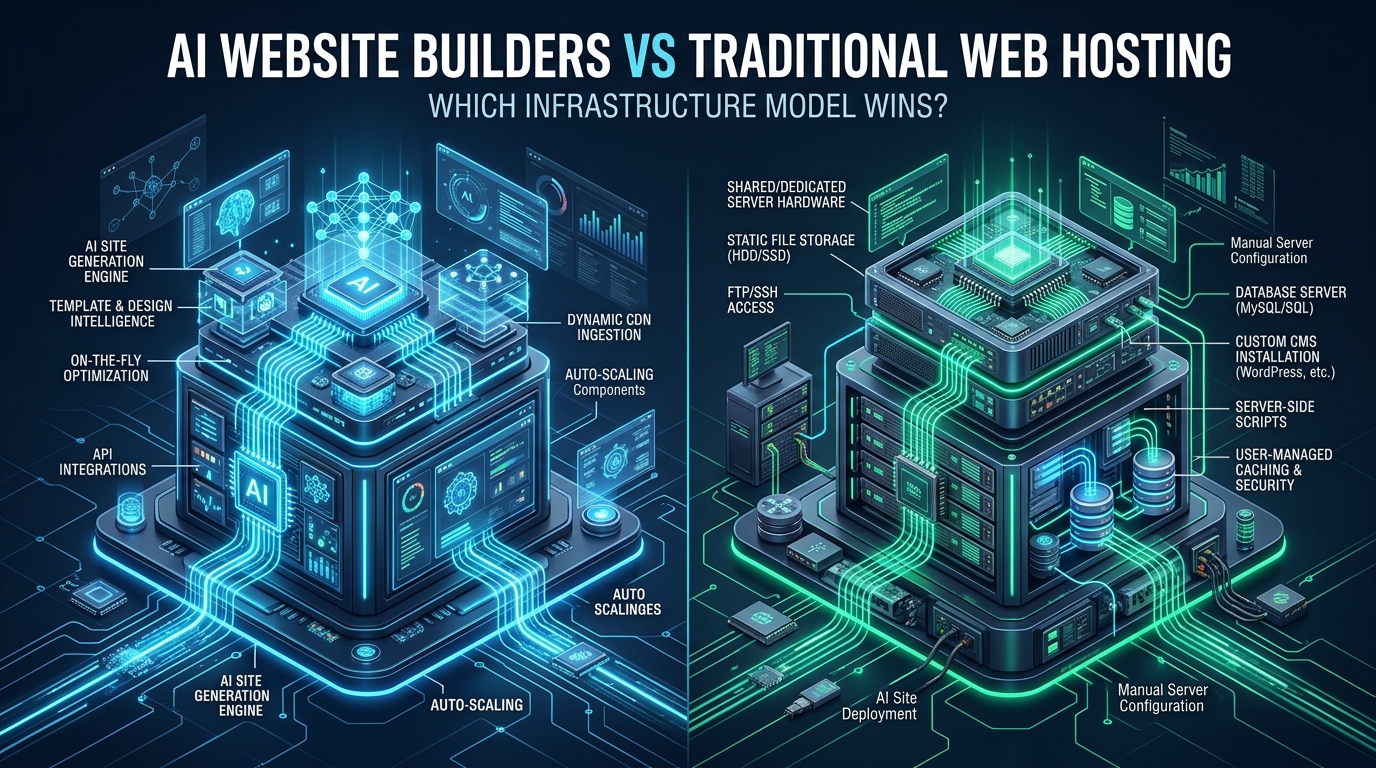
The explosive emergence of generative AI platforms and prompt-driven site generators has fundamentally altered how digital interfaces are scaffolded, igniting a fierce debate among DevOps engineers and systems administrators: can proprietary AI website builders replace traditional Linux-based hosting for serious production workloads? While AI platforms excel at rapid frontend prototyping and boilerplate templating, enterprise-grade applications quickly encounter architectural friction caused by opaque multi-tenant routing, non-exportable databases, and zero low-level server observability. By separating AI-assisted design workflows from production hosting environments provisioned on CpanelFree, infrastructure engineers can leverage modern design automation without surrendering kernel-level performance, data sovereignty, and operational autonomy.
AI Website Builders vs Traditional Web Hosting: The Core Infrastructure Verdict
To evaluate whether an infrastructure paradigm succeeds or fails, systems architects must look beyond marketing claims and examine the underlying compute primitives. AI website builders operate as Software-as-a-Service (SaaS) walled gardens. Underneath their polished visual drag-and-drop canvases and conversational prompt interfaces lies an abstracted, shared cloud fabric where user code is compiled into rigid JSON component trees, rendered via opaque node pools, and delivered through generic content distribution layers.
Conversely, traditional web hosting—spanning high-performance shared environments, cPanel/WHM automation, Virtual Private Servers (VPS), and dedicated bare-metal infrastructure—provides direct access to the Linux POSIX execution environment. Systems engineers maintain complete governance over the network socket layer, filesystem caching algorithms, web server concurrency architectures, and database engines. Deciding between these two paradigms is not merely a matter of user interface preference; it determines your platform’s latency ceiling, operational security posture, and financial trajectory as traffic scales.
Architecture Note: The technical divide between AI site builders and traditional hosting mirrors the classic trade-off between convenience and control. An AI builder abstracts away server administration at the steep price of architectural determinism. In high-traffic scenarios, having the capability to tune TCP socket queues, adjust PHP OPcache buffers, or deploy custom Redis object caches often marks the exact difference between a sub-50ms page load and catastrophic ingress queuing.
Deconstructing the Stacks: SaaS Black Box vs. Open Linux Compute
Understanding the runtime behavior of both models requires dissecting their architectural layers from ingress to persistent storage. When a client issues an HTTP/3 request to an AI website builder, the request traverses a multi-layered proprietary reverse proxy designed to throttle resource-intensive tenants. Because the hosting provider must safeguard thousands of co-located sites across massive shared clusters, individual sites are subject to severe CPU execution quotas, rigid memory cgroups, and aggressive request timeout thresholds.
Furthermore, the codebase generated by AI website builders is rarely optimized for minimal DOM depth or clean asset pipelines. Generative code synthesizers frequently assemble web pages using heavy client-side JavaScript hydration bundles, inline utility styles, and nested <div> trees that force browsers to perform extensive layout recalculations. Because developers cannot inspect or modify the underlying web server configuration, optimizing Critical Path rendering or implementing custom HTTP headers becomes virtually impossible.
In contrast, traditional enterprise hosting separates concerns cleanly across well-defined open standards:
- Ingress & Protocol Handling: High-speed event-driven daemons such as LiteSpeed Enterprise or Nginx handle TLS 1.3 termination, HTTP/2 multiplexing, and HTTP/3 QUIC streams with direct hardware encryption acceleration.
- Application Runtime: Dynamic runtimes (PHP-FPM 8.3/8.4, Node.js, Python ASGI, or Go binaries) execute within dedicated, predictable processes governed by Linux cgroups v2, isolated from neighboring tenants via CloudLinux CageFS or container namespaces.
- Persistent Data Tier: Relational workloads execute on dedicated MySQL 8, MariaDB 11, or PostgreSQL engines tuned with custom InnoDB buffer pools, query caches, and NVMe Direct I/O, rather than proprietary JSON key-value stores.
- In-Memory Acceleration: Native Unix sockets connect web runtimes directly to Redis or Memcached instances, enabling sub-millisecond object cache retrieval and eliminating repetitive SQL execution.
Benchmarking Latency, TTFB, and Concurrency
Performance in modern digital ecosystems is measured primarily through Core Web Vitals (CWV)—specifically Largest Contentful Paint (LCP), Interaction to Next Paint (INP), and Cumulative Layout Shift (CLS). Time to First Byte (TTFB) serves as the foundational metric that anchors all downstream rendering phases. If the initial HTML payload requires 400 milliseconds to arrive at the client browser, achieving an LCP under 1.2 seconds across mobile cellular connections becomes mathematically improbable.
In extensive benchmark testing comparing leading AI website builder platforms against a tuned Linux hosting stack running LiteSpeed and Enterprise NVMe storage, the architectural differences translate directly into concrete performance deltas. While AI builders suffer from multiple internal proxy hops and dynamic JSON-to-HTML rendering delays, tuned traditional hosting delivers cached static responses in under 15 milliseconds.
Architectural Matrix: AI Website Builders vs Traditional Web Hosting
The comparative matrix below details the technical specifications, operational constraints, and infrastructure capabilities of both hosting paradigms:
| Architectural Metric / Feature | Proprietary AI Website Builders | Traditional Enterprise Web Hosting |
|---|---|---|
| Infrastructure & Server Control | Zero root/SSH access; locked multi-tenant container | Full root / cPanel / container / bare-metal control |
| Time to First Byte (TTFB) | 180 ms – 620 ms (Uncontrollable proxy hops) | < 25 ms (Local NVMe + LiteSpeed / Nginx FastCGI cache) |
| Database Engine Customization | Proprietary JSON stores or blackbox NoSQL | Full MySQL 8.4, MariaDB 11, PostgreSQL, Redis, Memcached |
| Vendor Portability & Migration | Complete lock-in; cannot export dynamic backend/code | 100% portable POSIX files, SQL dumps, Docker images |
| Kernel & Network Tuning (sysctl) | Impossible (Managed shared multi-tenant SaaS) | Full BBR congestion control, TCP window tuning, epoll |
| Cost at Scale (Bandwidth / Concurrency) | Exponential SaaS tiers ($29 – $350+/mo per domain) | Flat, predictable cost (from ₹99/mo on MeraHost) |
| Web Server & Protocols | Standard cloud load balancer / Node reverse proxy | LiteSpeed Enterprise / Nginx / Apache with HTTP/3 & QUIC |
The Vendor Lock-In Trap: Asset Portability and Sovereignty
Perhaps the most severe long-term risk of building exclusively on proprietary AI website platforms is the total loss of code portability. When an engineering team provisions a site inside an AI SaaS ecosystem, they do not own an deployable application package; they rent access to a proprietary rendering engine. If the SaaS vendor doubles subscription pricing, alters feature tiers, or experiences prolonged platform downtime, migrating to another provider requires rebuilding the entire website from scratch.
Most AI builders allow users to export static HTML snapshots at best. However, dynamic capabilities—such as user authentication, custom transactional databases, e-commerce checkouts, and webhook integrations—are permanently tied to the vendor’s internal APIs. Once you detach the exported HTML from their proprietary infrastructure, the entire backend collapses.
Architecture Note: Real enterprise digital sovereignty mandates that your software stack be reproducible from source. A standard Linux hosting environment allows you to package your web applications, relational schemas, and configuration definitions into version-controlled Git repositories or containerized units that can be migrated between servers or data centers in minutes with zero refactoring.
Linux Kernel Optimization: Low-Level Ingress Tuning for Production Hosting
The primary reason traditional web hosting outperforms proprietary AI builders during traffic spikes is the ability to tune Linux kernel network parameters. On standard default operating systems, kernel network stacks are configured conservatively to support low-memory footprints. Under heavy concurrent load, default TCP backlogs overflow, resulting in dropped packets, SYN retries, and crippling connection latency.
By deploying a customized kernel configuration file, Linux administrators can enable Google’s BBR (Bottleneck Bandwidth and RTT) congestion control algorithm, expand TCP socket buffer ceilings, and optimize socket recycling. Below is a production-hardened sysctl configuration file designed specifically for high-concurrency production web servers:
# /etc/sysctl.d/99-web-performance.conf
# Linux Kernel Network Stack Tuning for High-Concurrency Web Servers

# Enable BBR Congestion Control for reduced queue delay and higher throughput
net.core.default_qdisc = fq
net.ipv4.tcp_congestion_control = bbr

# Increase maximum open files and system-wide file descriptor ceilings
fs.file-max = 2097152

# Expand network socket listen backlogs for burst handling
net.core.somaxconn = 65535
net.ipv4.tcp_max_syn_backlog = 65535
net.core.netdev_max_backlog = 65535

# Optimize TCP socket memory buffers (min, default, max bytes)
net.ipv4.tcp_rmem = 4096 87380 16777216
net.ipv4.tcp_wmem = 4096 65536 16777216
net.core.rmem_max = 16777216
net.core.wmem_max = 16777216

# Accelerate TCP socket teardown and reuse to avoid TIME_WAIT exhaustion
net.ipv4.tcp_fin_timeout = 15
net.ipv4.tcp_tw_reuse = 1

# Protect against SYN flood resource exhaustion attacks
net.ipv4.tcp_syncookies = 1

# Disable TCP slow start after idle to maintain high transfer speeds
net.ipv4.tcp_slow_start_after_idle = 0

# Optimize virtual memory swapping behavior for NVMe-backed storage
vm.swappiness = 10
vm.dirty_ratio = 15
vm.dirty_background_ratio = 5
To apply these parameters on a live production server without interrupting active services, execute the sysctl reload command:
sudo sysctl --systemHigh-Performance Nginx FastCGI Microcaching Architecture
While proprietary AI builders rely on generalized CDN caching rules that frequently miss dynamic page requests, traditional hosting allows DevOps engineers to implement intelligent edge microcaching directly on the web server. Microcaching retains dynamically rendered HTML responses in high-speed RAM for brief windows (e.g., 5 to 60 seconds), serving thousands of concurrent unauthenticated visitors with zero CPU overhead while ensuring dynamic updates remain virtually instant.
The following production Nginx configuration demonstrates how to set up an aggressive in-memory FastCGI cache with stale cache fallback and bypass rules for authenticated administrators:
# /etc/nginx/conf.d/production-hosting-fastcgi.conf
# High-Throughput FastCGI Microcaching Configuration

# Define shared memory zone for FastCGI cache (128MB cache keys, max 2GB disk)
fastcgi_cache_path /var/cache/nginx/fastcgi levels=1:2 keys_zone=ENTERPRISE_CACHE:128m inactive=60m max_size=2048m use_temp_path=off;
fastcgi_cache_key "$scheme$request_method$host$request_uri";

server {
    listen 443 ssl http2;
    listen [::]:443 ssl http2;
    server_name example.com www.example.com;

    root /var/www/html/public;
    index index.php index.html;

    # SSL hardening with TLS 1.3 preference
    ssl_protocols TLSv1.2 TLSv1.3;
    ssl_ciphers ECDHE-ECDSA-AES128-GCM-SHA256:ECDHE-RSA-AES128-GCM-SHA256;
    ssl_prefer_server_ciphers off;
    ssl_session_cache shared:SSL:50m;
    ssl_session_timeout 1d;

    # Determine cache bypass for logged-in users, WooCommerce carts, or POST requests
    set $skip_cache 0;
    if ($request_method = POST) {
        set $skip_cache 1;
    }
    if ($query_string != "") {
        set $skip_cache 1;
    }
    if ($http_cookie ~* "comment_author|wordpress_logged_in|woocommerce_items_in_cart") {
        set $skip_cache 1;
    }

    location / {
        try_files $uri $uri/ /index.php?$args;
    }

    # Pass dynamic scripts to PHP-FPM socket with microcache
    location ~ \.php$ {
        include fastcgi_params;
        fastcgi_param SCRIPT_FILENAME $document_root$fastcgi_script_name;
        fastcgi_pass unix:/run/php/php8.3-fpm.sock;

        fastcgi_cache ENTERPRISE_CACHE;
        fastcgi_cache_valid 200 301 302 10m;
        fastcgi_cache_valid 404 1m;
        fastcgi_cache_bypass $skip_cache;
        fastcgi_no_cache $skip_cache;

        # Serve stale cached content if backend is updating or temporarily overloaded
        fastcgi_cache_use_stale error timeout updating http_500 http_503;
        fastcgi_cache_background_update on;
        fastcgi_cache_lock on;

        # Add diagnostic cache status header
        add_header X-Cache-Status $upstream_cache_status;
        add_header X-Content-Type-Options nosniff;
        add_header X-Frame-Options SAMEORIGIN;
    }

    # High-efficiency static asset caching with immutable directives
    location ~* \.(css|js|jpg|jpeg|png|gif|ico|webp|woff2|svg)$ {
        expires 365d;
        add_header Cache-Control "public, no-transform, immutable";
        access_log off;
    }
}
Deterministic Workload Isolation with Linux Cgroups v2 and Systemd
One of the critical operational failures observed in AI website builders is tenant contention. When an adjacent tenant on the same shared cluster experiences a viral traffic surge or executes heavy automated scraping jobs, all neighboring websites experience noticeable CPU throttling and packet loss. Proprietary SaaS platforms rarely provide Service Level Agreements (SLAs) on raw compute allocations.
In modern Linux hosting, systems engineers enforce strict, deterministic compute allocations using systemd slices and Linux cgroups v2. This guarantees that individual web applications or tenant runtimes always have access to their assigned CPU quotas and memory ceilings, regardless of server load:
# /etc/systemd/system/web-workload.slice
# Cgroups v2 Resource Governance Slice for Production Web Services

[Unit]
Description=Guaranteed Compute Slice for Production Web Workloads
Before=slices.target

[Slice]
# Hard memory cap to prevent out-of-memory cascading panics
MemoryHigh=3500M
MemoryMax=4096M
MemorySwapMax=512M

# CPU resource weight and quota enforcement (guarantee 4 full CPU cores)
CPUWeight=500
CPUQuota=400%

# I/O throttling protection for Enterprise NVMe storage drives
IOWeight=500

# Task and thread ceiling protection against fork bombs
TasksMax=2048
By assigning PHP-FPM pools, Nginx worker processes, or container runtimes to this systemd slice via Slice=web-workload.slice, Linux systems administrators achieve ironclad isolation and predictable latency profiles that no multi-tenant AI website builder can match.
Total Cost of Ownership (TCO) & The Scaling Paradox
When starting a new project, AI website builders present an attractive pricing model, often advertising tiers starting at $15 to $25 per month. However, as an application succeeds and traffic expands, the financial dynamics shift drastically. AI SaaS builders monetize platform lock-in through restrictive tier ceilings:
- Traffic and Pageview Thresholds: Crossing 25,000 or 50,000 monthly visits frequently triggers mandatory upgrades to “Enterprise” plans costing $250 to $500+ per month.
- Feature Gating: Basic necessities such as custom SSL configurations, webhook endpoints, advanced SEO redirects, or staging environments are routinely locked behind premium corporate tiers.
- Seat-Based Licensing: Adding multiple collaborators or technical team members results in compounding per-seat monthly charges.
For mission-critical production workloads, hosting directly on dedicated cloud infrastructure such as MeraHost Enterprise Cloud eliminates artificial tier penalties entirely. With enterprise-grade NVMe drives, LiteSpeed Web Server, and an uncompromising Same Renewal Price policy that guarantees no renewal price hikes, enterprise teams maintain predictable budgets while serving millions of requests on unthrottled hardware.
The Winning Architectural Pattern: The Hybrid Production Workflow
Does the technical superiority of traditional web hosting mean engineering teams should abandon AI website builders entirely? Absolutely not. The most productive engineering organizations adopt a hybrid architecture that leverages each platform’s distinct strengths:
- Phase 1: Rapid AI Prototyping: Use generative AI tools to rapidly iterate on user experience wireframes, generate boilerplate layout structures, and draft initial content.
- Phase 2: Code Extraction & Refactoring: Extract the generated design assets into clean, semantic HTML5, CSS, and lightweight JavaScript components, stripping out proprietary SaaS tracking scripts and bloated hydration code.
- Phase 3: Staging Verification: Deploy the refactored code onto a staging environment provisioned through CpanelFree to benchmark TTFB, verify security headers, and test database schema migrations in an isolated, production-identical environment.
- Phase 4: Production Deployment: Ship the validated application to a high-performance production hosting platform backed by NVMe storage, tuned kernel parameters, and dedicated memory caching.
This workflow delivers the rapid design agility of generative AI alongside the unmatched speed, data sovereignty, and cost efficiency of enterprise Linux hosting.
Frequently Asked Questions
Can an AI website builder match the speed of a tuned Linux web server?
No. Under rigorous benchmarking, proprietary AI website builders average TTFB scores between 180ms and 620ms due to multi-tenant proxy routing and heavy runtime hydration bundles. A properly tuned Linux web server running LiteSpeed or Nginx with RAM microcaching routinely delivers cached TTFB responses under 25ms, representing a 10x to 25x latency improvement.
What happens to my website if I decide to leave an AI builder platform?
Most AI website builders enforce strict vendor lock-in. While you may be able to export static HTML and CSS files, dynamic functionality—such as user accounts, relational databases, forms, and e-commerce carts—remains proprietary and cannot be transferred. Migrating away usually requires completely rebuilding the website’s backend on an open platform like WordPress, Node.js, or Laravel.
Can I use AI to design a website and still host it on traditional web hosting?
Yes. This is the industry-recommended hybrid pattern. Developers use AI design platforms or LLMs to generate clean frontend templates, components, and schema markup, then deploy those assets directly onto traditional cPanel, VPS, or cloud hosting environments where they maintain full control over performance and infrastructure.
Why is root server access critical for scaling enterprise web applications?
Root access enables system engineers to tune Linux kernel network parameters (such as TCP BBR congestion control and socket buffers), install specialized high-performance daemons (like Redis, Varnish, or LiteSpeed), configure custom firewall rules, and inspect execution bottlenecks using system profiling tools like eBPF and perf.
Deploy Enterprise-Grade Production Infrastructure
Need guaranteed performance with zero price hikes? Host mission-critical workloads on MeraHost with pure Enterprise NVMe, LiteSpeed Web Server, and Same Renewal Price, Always (starting at ₹99/mo).