
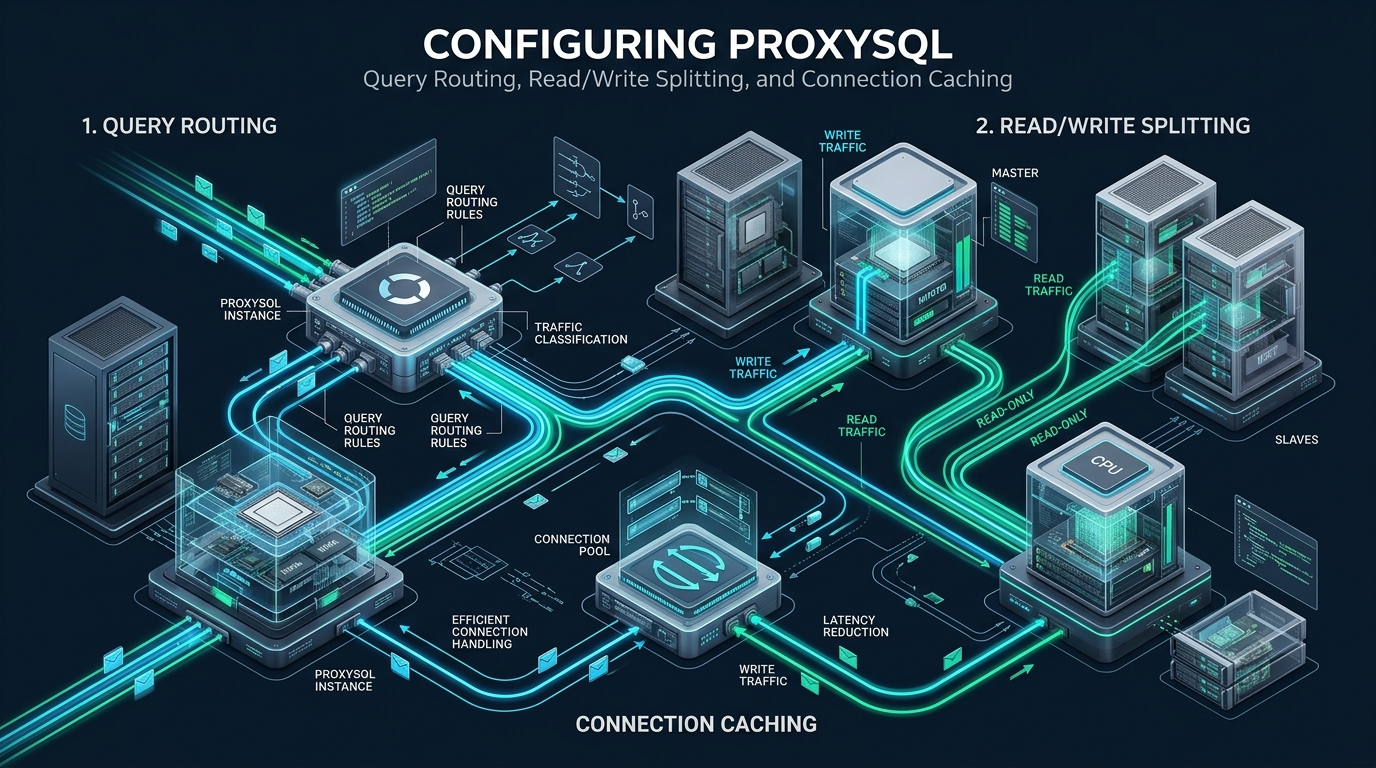
Enterprise relational database clusters frequently hit performance walls not because the underlying storage engines lack raw compute, but because client connection churn, unsegregated query paths, and thread contention overwhelm primary database nodes. In high-traffic environments, decoupling application database drivers from physical backend topologies using an intelligent layer-7 database proxy is the gold standard for achieving horizontal read scalability and sub-millisecond query delivery. By deploying an optimized ProxySQL layer on CpanelFree high-performance infrastructure, systems engineers can transparently implement dynamic read/write splitting, sub-microsecond connection multiplexing, and in-memory query result caching without altering a single line of application source code.
What is ProxySQL Read/Write Splitting and Query Routing?
Unlike basic Layer-4 TCP balancers (such as HAProxy in raw stream mode) that merely balance incoming socket connections across backend endpoints, ProxySQL operates with deep MySQL protocol intelligence. It continuously analyzes SQL statement syntax, abstracts backend connection pools from client threads, monitors replication lag, and enforces fine-grained traffic policies at line rate. This architectural separation resolves three critical database scaling challenges:
- Thundering Herd Connection Overhead: Each direct MySQL connection consumes substantial memory (default thread stack, per-connection buffers, and OS descriptors). ProxySQL enables tens of thousands of client frontend connections to share a compact, persistent pool of backend connections via multiplexing.
- Application Coupling: Traditional read/write splitting requires application frameworks to maintain separate database connection handles (e.g., master vs. slave database pools). ProxySQL centralizes this logic into regular-expression query rules, decoupling infrastructure topology from software codebases.
- Failover and High Availability: During master node failovers or replica maintenance, ProxySQL dynamically repoints traffic without throwing application connection termination errors, handling transient disconnects gracefully.
ProxySQL Performance & Architectural Comparison
Before examining concrete configuration directives, review how a tuned ProxySQL proxy deployment contrasts with legacy direct-to-database connections under high concurrent throughput:
Linux Kernel & Operating System Tuning for ProxySQL
ProxySQL is an event-driven, multi-threaded C++ engine utilizing non-blocking epoll sockets. Under enterprise workloads handling thousands of concurrent transactions, the Linux kernel must be tuned to prevent TCP socket exhaustion, SYN queue drops, and file descriptor starvation.
Create a dedicated sysctl configuration file at /etc/sysctl.d/99-proxysql-networking.conf with the following production-grade kernel parameters:
# /etc/sysctl.d/99-proxysql-networking.conf
# Production Kernel Network Optimization for ProxySQL Database Gateways

# Maximize socket listen backlog for burst connections
net.core.somaxconn = 65535
net.ipv4.tcp_max_syn_backlog = 65535

# Optimize ephemeral port range for massive backend connection pools
net.ipv4.ip_local_port_range = 1024 65535

# Enable fast reuse of TIME_WAIT sockets for outgoing connections
net.ipv4.tcp_tw_reuse = 1

# Reduce TCP keepalive parameters to rapidly detect dead backend nodes
net.ipv4.tcp_keepalive_time = 300
net.ipv4.tcp_keepalive_intvl = 15
net.ipv4.tcp_keepalive_probes = 5

# TCP buffer sizing for high throughput (min, default, max in bytes)
net.ipv4.tcp_rmem = 4096 87380 16777216
net.ipv4.tcp_wmem = 4096 65536 16777216
net.core.rmem_max = 16777216
net.core.wmem_max = 16777216

# Protect against SYN flood attacks while maintaining responsiveness
net.ipv4.tcp_syncookies = 1
net.ipv4.tcp_fin_timeout = 15

# Increase system-wide file descriptor limit
fs.file-max = 2097152
Apply the parameters immediately without rebooting:
sudo sysctl --systemNext, configure process limits for the ProxySQL systemd service to prevent EMFILE: Too many open files errors. Create a systemd drop-in override at /etc/systemd/system/proxysql.service.d/override.conf:
# /etc/systemd/system/proxysql.service.d/override.conf
[Service]
LimitNOFILE=1048576
LimitNPROC=524288
LimitMEMLOCK=infinity
Restart=always
RestartSec=5s
Reload systemd daemon configurations and restart ProxySQL:
sudo systemctl daemon-reload
sudo systemctl restart proxysql
Production ProxySQL Global Configuration File (/etc/proxysql.cnf)
The global configuration file establishes the administrative socket, daemon threading model, and memory buffers. The admin interface is hosted by default on TCP port 6032, while incoming application MySQL traffic binds to TCP port 6033.
# /etc/proxysql.cnf
# Enterprise ProxySQL Configuration for High-Concurrency Read/Write Splitting

datadir="/var/lib/proxysql"

admin_variables={
    admin_credentials="admin:CpanelFree_Admin_Sec2026;radmin:CpanelFree_RAdmin_Sec2026"
    mysql_ifaces="127.0.0.1:6032;/var/run/proxysql/proxysql_admin.sock"
    refresh_interval=2000
}

mysql_variables={
    threads=8                                  # Match dedicated CPU physical cores
    max_connections=10000                      # Frontend client connection ceiling
    default_query_delay=0
    default_query_timeout=3600000              # 1 hour timeout protection
    have_compress=true
    poll_timeout=2000                          # Epoll timeout in microseconds
    interfaces="0.0.0.0:6033;/var/run/proxysql/proxysql.sock"
    default_schema="information_schema"
    stacksize=1048576
    server_version="8.0.36-ProxySQL"
    connect_timeout_server=3000                # Timeout connecting to MySQL backends (ms)
    monitor_history=600000                     # 10 minutes monitor telemetry
    monitor_connect_interval=60000
    monitor_ping_interval=10000
    monitor_read_only_interval=1500
    monitor_read_only_timeout=800
    ping_interval_server_msec=120000
    ping_timeout_server=500
    commands_stats=true
    sessions_sort=true
    connect_retries_on_failure=10
    query_cache_size_MB=256                    # In-memory query result cache pool
}
Configuring Hostgroups, Servers, and Replication Awareness
ProxySQL organizes backend database nodes into logical numeric entities known as Hostgroups. In standard Master-Replica topologies, we assign:
- Hostgroup 10: Primary Master (Writer) node(s). All data mutation statements target this hostgroup.
- Hostgroup 20: Read Replica (Reader) nodes. All read queries target this group for load distribution.
Connect to the ProxySQL administrative interface using the MySQL client:
mysql -u admin -pCpanelFree_Admin_Sec2026 -h 127.0.0.1 -P 6032 --prompt='ProxySQL Admin> 'Execute the following SQL script to define the backend topology, configure replication lag thresholds, and set up health checks:
-- 1. Purge existing staging server definitions
DELETE FROM mysql_servers;

-- 2. Register Primary Master into Hostgroup 10 (Writer)
INSERT INTO mysql_servers (
    hostgroup_id, hostname, port, status, weight, compression, max_connections, max_replication_lag, use_ssl
) VALUES (
    10, '192.168.10.101', 3306, 'ONLINE', 1000, 0, 1000, 0, 1
);

-- 3. Register Read Replicas into Hostgroup 20 (Readers)
INSERT INTO mysql_servers (
    hostgroup_id, hostname, port, status, weight, compression, max_connections, max_replication_lag, use_ssl
) VALUES
(20, '192.168.10.102', 3306, 'ONLINE', 100, 0, 1000, 5, 1),
(20, '192.168.10.103', 3306, 'ONLINE', 100, 0, 1000, 5, 1),
(20, '192.168.10.104', 3306, 'ONLINE', 100, 0, 1000, 5, 1);

-- 4. Enable Dynamic Replication Hostgroups (Automatic read_only tracking)
-- If read_only=0 on a node, ProxySQL places it in writer_hostgroup (10).
-- If read_only=1 on a node, ProxySQL places it in reader_hostgroup (20).
DELETE FROM mysql_replication_hostgroups;
INSERT INTO mysql_replication_hostgroups (
    writer_hostgroup, reader_hostgroup, check_type, comment
) VALUES (
    10, 20, 'read_only', 'Automated Master/Replica Read-Only State Tracker'
);

-- 5. Commit server topology to RUNTIME and persist to DISK
LOAD MYSQL SERVERS TO RUNTIME;
SAVE MYSQL SERVERS TO DISK;max_replication_lag=5 instructs ProxySQL to inspect Seconds_Behind_Master on replicas every second. If replica lag exceeds 5 seconds, ProxySQL automatically changes the node’s status to SHUNNED, diverting read traffic to the remaining healthy replicas to guarantee read consistency.Configuring Application Users and Credentials
ProxySQL must be aware of application users so it can authenticate client sessions and match credentials when opening backend connections. Define the application user and configure default hostgroup routing:
-- Register Application User
DELETE FROM mysql_users WHERE username='app_production';

INSERT INTO mysql_users (
    username, password, active, default_hostgroup, default_schema, transaction_persistent, fast_forward
) VALUES (
    'app_production', 'Str0ng_Pr0d_Db_P@ss2026', 1, 10, 'app_db', 1, 0
);

-- Configure Monitor User for Heartbeat & Replication Telemetry
SET admin-stats_credentials='monitor:Mon1t0r_Sec_P@ss2026';
SET mysql-monitor_username='proxysql_monitor';
SET mysql-monitor_password='Mon1t0r_Sec_P@ss2026';

-- Commit Users to RUNTIME and DISK
LOAD MYSQL USERS TO RUNTIME;
SAVE MYSQL USERS TO DISK;
LOAD ADMIN VARIABLES TO RUNTIME;
SAVE ADMIN VARIABLES TO DISK;
LOAD MYSQL VARIABLES TO RUNTIME;
SAVE MYSQL VARIABLES TO DISK;transaction_persistent=1 ensures that once a client issues a BEGIN or START TRANSACTION, all subsequent queries within that session remain pinned to the writer hostgroup (10) until a COMMIT or ROLLBACK occurs. This prevents catastrophic read-your-own-writes inconsistencies inside transactional blocks.Advanced Query Routing and Read/Write Splitting Rules
ProxySQL processes queries through the mysql_query_rules table in ascending order of rule_id. When a query arrives, ProxySQL checks the rule chain. If a rule matches and specifies apply=1, rule evaluation halts, and the query routes to the target hostgroup.
A production-ready read/write splitting rule chain must implement four fundamental protections:
- Locking Read Protection: Divert
SELECT ... FOR UPDATEandLOCK IN SHARE MODEto the Master (Hostgroup 10). - Default Writer Anchor: Ensure non-SELECT statements (INSERT, UPDATE, DELETE, REPLACE, DDL) route to Hostgroup 10.
- Read Offloading: Route standard read-only
SELECTstatements to the Reader pool (Hostgroup 20). - Selective In-Memory Result Caching: Cache idempotent, high-frequency lookup queries directly in ProxySQL RAM with a tailored TTL.
Execute the following SQL script to install this enterprise rule set:
-- Clear old rules
DELETE FROM mysql_query_rules;

-- Rule 10: Fast-track and protect SELECT ... FOR UPDATE / LOCK IN SHARE MODE (Send to Master)
INSERT INTO mysql_query_rules (
    rule_id, active, match_pattern, destination_hostgroup, apply, comment
) VALUES (
    10, 1, '^SELECT.*FOR UPDATE|^SELECT.*LOCK IN SHARE MODE', 10, 1, 'Locking reads routed to Master'
);

-- Rule 20: Cache high-frequency, read-heavy catalog/metadata queries in ProxySQL RAM (TTL: 3000ms)
INSERT INTO mysql_query_rules (
    rule_id, active, match_pattern, destination_hostgroup, cache_ttl, apply, comment
) VALUES (
    20, 1, '^SELECT.*FROM `system_settings`|^SELECT.*FROM `global_config`', 20, 3000, 1, 'In-memory cached lookup queries'
);

-- Rule 30: Route all standard SELECT queries to Reader Hostgroup (Hostgroup 20)
INSERT INTO mysql_query_rules (
    rule_id, active, match_pattern, destination_hostgroup, apply, comment
) VALUES (
    30, 1, '^SELECT .*', 20, 1, 'Standard reads routed to Replicas'
);

-- Rule 40: Explicit fallback for all write and data modification operations (Hostgroup 10)
INSERT INTO mysql_query_rules (
    rule_id, active, match_pattern, destination_hostgroup, apply, comment
) VALUES (
    40, 1, '.*', 10, 1, 'Catch-all writes, DDL, and transactions routed to Master'
);

-- Commit rules to RUNTIME and DISK
LOAD MYSQL QUERY RULES TO RUNTIME;
SAVE MYSQL QUERY RULES TO DISK;
Connection Caching and Multiplexing Optimization
ProxySQL connection multiplexing is its most powerful performance mechanism. In standard setups, when 2,000 PHP-FPM or Node.js workers connect, MySQL spawns 2,000 execution threads. With ProxySQL multiplexing enabled, those 2,000 client sessions are managed inside an epoll event loop and mapped onto a compact pool of just 30 to 50 active backend connections.
Multiplexing operates at the individual statement boundary. Between queries, a backend connection is released back into the pool. However, certain SQL actions can temporarily disable multiplexing for a session (known as multiplexing inhibitors):
- Setting session variables (e.g.,
SET @my_var = 1;orSET sql_mode = ...) - Creating temporary tables (
CREATE TEMPORARY TABLE ...) - Executing
LOCK TABLES - Uncommitted active transactions
To maximize multiplexing efficiency and prevent unnecessary connection pinning, configure ProxySQL to ignore non-destructive session variables:
-- Whitelist benign session variables to preserve connection multiplexing
INSERT INTO mysql_multiplexing_variables (variable, status) VALUES
('autocommit', 'IGNORE'),
('sql_mode', 'IGNORE'),
('character_set_client', 'IGNORE'),
('character_set_connection', 'IGNORE'),
('character_set_results', 'IGNORE'),
('collation_connection', 'IGNORE'),
('time_zone', 'IGNORE');

LOAD MYSQL VARIABLES TO RUNTIME;
SAVE MYSQL VARIABLES TO DISK;
Real-Time Telemetry and Verification Benchmarks
Once traffic flows through port 6033, verify that query routing, server health checks, and connection pools function as intended using ProxySQL’s built-in statistical tables:
1. Inspect Connection Pool Utilization
SELECT hostgroup, srv_host, srv_port, status, ConnUsed, ConnFree, ConnOK, ConnERR, Queries
FROM stats_mysql_connection_pool
ORDER BY hostgroup, srv_host;
In a healthy deployment, ConnFree stays consistently positive (ready pooled connections), and Queries increases across Hostgroup 20 for reads and Hostgroup 10 for writes.
2. Monitor Query Rule Hits and Cache Efficiency
SELECT rule_id, hits, comment
FROM stats_mysql_query_rules
ORDER BY hits DESC;
Review the hits counter to confirm that Rule 30 (SELECTs to Replicas) and Rule 40 (Writes to Master) increment as expected. Rule 20 will show the volume of queries satisfied entirely from RAM without touching backend MySQL disk or compute.
Frequently Asked Questions
How does ProxySQL handle transaction consistency during read/write splitting?
When transaction_persistent=1 is enabled in mysql_users, ProxySQL automatically tracks session transaction state. When an explicit START TRANSACTION or BEGIN is issued, all queries within that transaction are pinned to the primary master hostgroup regardless of standard regex read rules. Once COMMIT or ROLLBACK completes, ProxySQL resumes normal read/write splitting.
What happens if a read replica encounters severe replication lag?
ProxySQL continuously probes replica lag using its internal monitor thread. If a replica’s lag exceeds the configured max_replication_lag (e.g., 5 seconds), ProxySQL marks that server as SHUNNED. Query traffic is instantly redistributed among remaining healthy replicas. Once the lagged replica catches up below the threshold, it is automatically returned to ONLINE status.
Can ProxySQL cache query results like Redis or Memcached?
Yes. ProxySQL features a built-in, in-memory query result cache configured via the cache_ttl parameter in mysql_query_rules. For repetitive, identical SELECT statements matching a configured pattern, ProxySQL serves results directly from memory in microseconds without dispatching requests to backend database servers.
Do I need to modify my application database code to use ProxySQL?
No. ProxySQL speaks the native MySQL wire protocol. You simply point your application database connection host and port to ProxySQL (typically 127.0.0.1:6033). All query parsing, routing to writer or reader nodes, connection pooling, and caching occur transparently at Layer 7.
Ready to Deploy High-Performance Infrastructure?
Experience blazing-fast NVMe storage, unmetered bandwidth, and enterprise LiteSpeed caching on CpanelFree.