
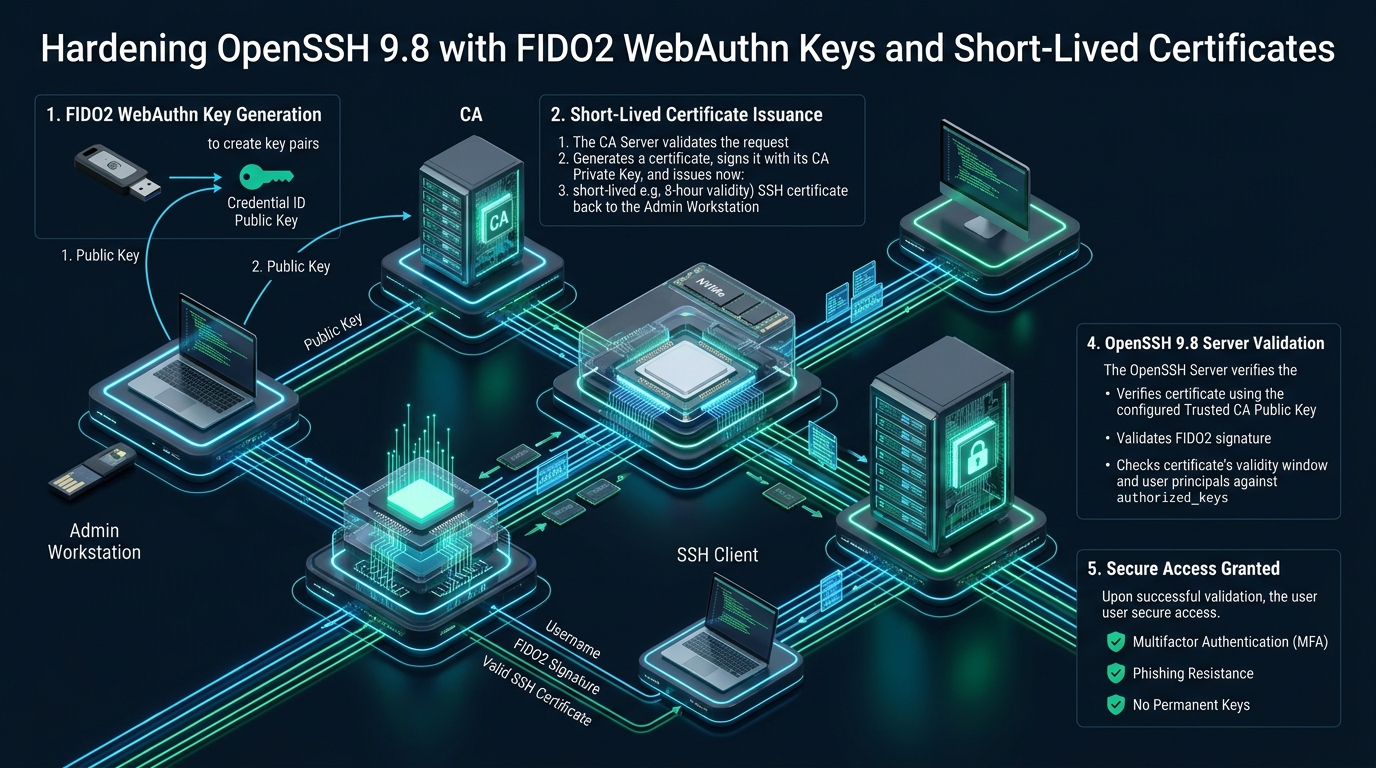
Securing administrative access across modern distributed cloud infrastructure has reached a critical turning point as conventional, long-lived SSH keypairs become prime targets for infostealers and lateral adversary movement. Relying on static public keys scattered across thousands of remote ~/.ssh/authorized_keys files creates untracked access sprawl, renders immediate revocation operationally impossible, and exposes sensitive production nodes to workstation compromise. Modern bare-metal and cloud environments hosted on CpanelFree demand an uncompromised zero-trust paradigm: pairing OpenSSH 9.8 hardware-bound FIDO2/WebAuthn keys with an automated Certificate Authority (CA) delivering short-lived, cryptographically signed certificates.
Understanding OpenSSH FIDO2 Hardware Security Keys and Ephemeral CA Infrastructure
[email protected]) with a centralized SSH Certificate Authority. Private keys never leave the hardware token’s tamper-resistant secure enclave, while the CA issues cryptographically signed user certificates valid for mere hours. This eliminates static authorized keys, stops credential theft, and automates access revocation across your entire Linux fleet.
For more than two decades, the standard pattern for Linux server administration was straightforward: developers generated an RSA or standard Ed25519 keypair on their local laptops, copied the public key to target servers via ssh-copy-id, and left it there indefinitely. Over time, enterprise fleets accumulated thousands of orphaned public keys belonging to former employees, contractors, and forgotten deployment scripts. When a developer’s workstation is compromised by malware or memory-scraping infostealers, standard private keys stored in ~/.ssh/id_rsa or loaded into standard ssh-agent sockets are instantly extracted and used to pivot across the enterprise perimeter.
OpenSSH 9.8 fundamentally eliminates this threat vector by integrating native support for FIDO2 / U2F (Universal 2nd Factor) authenticators via the Client-to-Authenticator Protocol (CTAP2) and OpenSSH’s robust public key infrastructure (PKI) certificate framework. By moving from static file-based keys to hardware-anchored credentials verified by short-lived certificates, organizations achieve true hardware-backed identity verification with zero maintenance of distributed authorized key lists.
Cryptographic Deep Dive: FIDO2 WebAuthn Keys (sk-ssh-ed25519)
Unlike standard SSH keys, where the private key consists of a byte array stored on the host’s filesystem, an OpenSSH FIDO2 key ([email protected] or [email protected]) leverages an external hardware security module—such as a YubiKey, Nitrokey, or SoloKey. During key generation, the secure enclave on the physical token creates the elliptic curve keypair internally.
What gets written to the client’s local drive (e.g., ~/.ssh/id_ed25519_sk) is not a private key. Instead, it is an opaque Key Handle accompanied by a public key. The private key cannot be extracted, cloned, or dumped from RAM by root-level malware on the client machine. When an SSH authentication handshake occurs, the OpenSSH client communicates with the security key via libfido2, sending the cryptographic server challenge to the hardware token. The token only signs the challenge after two criteria are satisfied:
- User Presence (UP): The token requires a physical capacitive touch or button press on the hardware authenticator, proving an active human is physically sitting at the terminal. Background processes and remote Trojan horse scripts cannot spoof this signal.
- User Verification (UV): The token enforces an on-chip alphanumeric PIN or biometric fingerprint check before unlocking the cryptographic enclave. Even if the physical USB key is stolen from an engineer’s bag, the attacker cannot sign SSH challenges without the biometric match or PIN.
ssh-keygen -K), the key handle and metadata are stored directly within the security token’s internal EEPROM. An engineer can plug their hardware key into any clean, authorized administrative bastion, run ssh-add -K, and immediately authenticate without needing to transfer key files across machines.Architectural Matrix: Static Keys vs. Standalone FIDO2 vs. Ephemeral CA Certificates
To understand the operational and security trade-offs, review the comparative matrix below analyzing key management architectures across enterprise Linux infrastructures.
Designing the Ephemeral OpenSSH Certificate Authority Pipeline
While standalone FIDO2 keys protect the private key from exfiltration, they do not solve the problem of server-side key management. Target servers still need to hold the public key in ~/.ssh/authorized_keys. If an engineer departs the company, operations teams must crawl across every single cluster, container, and bare-metal instance to delete that key.
The solution is an OpenSSH Certificate Authority (CA). In this architecture:
- Target Linux servers do not know or care about individual engineer public keys. Each server is configured with exactly one trusted key:
TrustedUserCAKeys /etc/ssh/ssh_ca_user_key.pub. - When an engineer initiates their work shift, they authenticate against the organization’s central identity provider (IdP) via single sign-on (SSO) and WebAuthn.
- The internal CA signs the engineer’s FIDO2 public key (
id_ed25519_sk.pub) and returns an ephemeral certificate (id_ed25519_sk-cert.pub) valid for a strictly bounded window (e.g., 4 hours). - The certificate encodes the user’s allowed system accounts (principals, e.g.,
sysadmin,deployer,root), serial number, and security extensions. - When the engineer connects to any server in the fleet, OpenSSH 9.8 inspects the certificate’s cryptographic signature against the local CA public key, verifies that the certificate has not expired, checks that the requested Unix account is listed in the certificate’s authorized principals, and verifies the hardware token challenge response.
- At the end of the 4-hour window, the certificate expires automatically. Even if a bad actor copies the certificate, it is useless without both the physical FIDO2 key and a valid validity timestamp.
[email protected] and ML-KEM hybrid modes). Combining quantum-safe key exchange with hardware-bound FIDO2 certificates neutralizes both immediate infostealer threats and long-term Harvest Now, Decrypt Later (HNDL) surveillance risks.Step-by-Step Implementation and Production Configuration Files
1. Client Workstation Hardware Access: Udev Rules
On Linux client workstations, standard unprivileged users cannot interact directly with USB HID devices without proper udev rules. Create /etc/udev/rules.d/70-u2f.rules to permit your local administrative user group to communicate with FIDO2 authenticators via libfido2:
# /etc/udev/rules.d/70-u2f.rules
# Allow unprivileged plugdev/wheel access to FIDO2 / U2F USB devices
ACTION!="add|change", GOTO="u2f_end"

# Yubico YubiKey 5 / FIDO devices
KERNEL=="hidraw*", SUBSYSTEM=="hidraw", ATTRS{idVendor}=="1050", ATTRS{idProduct}=="0407|0402|0403|0406|0410", TAG+="uaccess", GROUP="plugdev", MODE="0660"

# SoloKeys, Nitrokey, and Generic FIDO2 Authenticators
KERNEL=="hidraw*", SUBSYSTEM=="hidraw", ATTRS{idVendor}=="1209|20a0", TAG+="uaccess", GROUP="plugdev", MODE="0660"

LABEL="u2f_end"
Reload and trigger the udev daemon: udevadm control --reload-rules && udevadm trigger.
2. Generating the Hardware-Bound FIDO2 Keypair
Generate a non-extractable, PIN-enforced Ed25519 FIDO2 resident key on the engineer’s workstation. The verify-required option mandates that the hardware key prompt for the token PIN or biometric check on every authentication session:
ssh-keygen -t ed25519-sk \
  -O resident \
  -O application=ssh:cpanelfree-prod \
  -O verify-required \
  -f ~/.ssh/id_ed25519_sk \
  -C "[email protected] (YubiKey 5C)"
3. Central Certificate Authority (CA) Generation
On a dedicated, isolated CA server (or offline signing machine), generate the enterprise root SSH CA key. Keep this private key strictly protected behind hardware HSMs or encrypted storage:
# Generate dedicated ed25519 CA root signing key
ssh-keygen -t ed25519 -a 100 -f /etc/ssh/ca/ssh_ca_user_key -C "cpanelfree-production-ssh-ca-2026"
chmod 600 /etc/ssh/ca/ssh_ca_user_key
chmod 644 /etc/ssh/ca/ssh_ca_user_key.pub
4. Production Automated Certificate Signing Script
Deploy this automated signing script on your CA service to issue time-boxed certificates with granular principals. In this production example, certificates are bounded to a maximum validity window of 4 hours:
#!/usr/bin/env bash
# /usr/local/bin/issue-shortlived-ssh-cert.sh
# Production OpenSSH Ephemeral Certificate Issuance Utility
set -euo pipefail

CA_KEY="/etc/ssh/ca/ssh_ca_user_key"
USER_PUBKEY="$1"       # Path to received public key (e.g. alice_id_ed25519_sk.pub)
KEY_IDENTITY="$2"      # Identity string for audit logs (e.g. [email protected])
PRINCIPALS="$3"        # Comma-separated list of allowed system accounts (e.g. sysadmin,deployer)
TTL="+4h"              # Strict 4-hour lifespan
SERIAL_NUM=$(date +%s%N | cut -b1-16)

if [[ ! -f "${CA_KEY}" ]]; then
  echo "CRITICAL: CA Private Key not found at ${CA_KEY}" >&2
  exit 1
fi

echo "Signing ephemeral SSH certificate for ${KEY_IDENTITY} with principals: ${PRINCIPALS}..."

# Execute certificate signing with OpenSSH 9.8
ssh-keygen -s "${CA_KEY}" \
  -I "${KEY_IDENTITY}" \
  -n "${PRINCIPALS}" \
  -V "-5m:${TTL}" \
  -z "${SERIAL_NUM}" \
  -O permit-pty \
  -O permit-user-rc \
  -O permit-port-forwarding \
  "${USER_PUBKEY}"

echo "SUCCESS: Certificate generated at ${USER_PUBKEY%.pub}-cert.pub (Valid for 4 hours)"
Grant execution privileges: chmod 750 /usr/local/bin/issue-shortlived-ssh-cert.sh. To inspect the cryptographic attributes, validity window, and principals of the issued certificate, execute:
ssh-keygen -L -f ~/.ssh/id_ed25519_sk-cert.pub5. Target Host OpenSSH 9.8 Hardened Daemon Configuration
On all target servers across your fleet, deploy the CA public key to /etc/ssh/ssh_ca_user_key.pub. Then configure the hardened OpenSSH 9.8 daemon drop-in under /etc/ssh/sshd_config.d/99-hardened-fido2.conf. This configuration disables password authentication, restricts allowed algorithms exclusively to modern curves and post-quantum hybrids, and validates incoming certificates against the CA:
# /etc/ssh/sshd_config.d/99-hardened-fido2.conf
# Enterprise OpenSSH 9.8 Daemon Hardening Configuration

# 1. Ephemeral Certificate Authority & Principals Mapping
TrustedUserCAKeys /etc/ssh/ssh_ca_user_key.pub
AuthorizedPrincipalsFile /etc/ssh/auth_principals/%u

# 2. Strict Authentication Guardrails
PasswordAuthentication no
KbdInteractiveAuthentication no
PermitEmptyPasswords no
PermitRootLogin prohibit-password
PubkeyAuthentication yes
AuthenticationMethods publickey
MaxAuthTries 3
LoginGraceTime 30s

# 3. Restrict Accepted Public Key and Certificate Algorithms
PubkeyAcceptedAlgorithms [email protected],[email protected],[email protected],ssh-ed25519

# 4. Modern Post-Quantum Hybrid Key Exchange & Cryptographic Ciphers
KexAlgorithms [email protected],curve25519-sha256,[email protected],diffie-hellman-group16-sha512,diffie-hellman-group18-sha512
Ciphers [email protected],[email protected],[email protected]
MACs [email protected],[email protected]

# 5. Session Isolation and Privilege Hardening
ClientAliveInterval 300
ClientAliveCountMax 2
X11Forwarding no
AllowAgentForwarding no
TCPKeepAlive yes
Compression no
6. Principal Access Mapping Configuration
OpenSSH uses the AuthorizedPrincipalsFile directive to map certificate principals to local Unix accounts. Create the principals directory and define which certificate roles can log in as the target system user:
mkdir -p /etc/ssh/auth_principals
chmod 755 /etc/ssh/auth_principals

# /etc/ssh/auth_principals/sysadmin
# Only certificates containing one of these signed principals may log in as 'sysadmin'
echo -e "core-infrastructure\nplatform-admin\nsite-reliability-engineer" > /etc/ssh/auth_principals/sysadmin
chmod 644 /etc/ssh/auth_principals/sysadmin
Validate the OpenSSH daemon configuration syntax before reloading the systemd service: sshd -t. Once verified without errors, reload OpenSSH: systemctl reload sshd.
7. Hardened Client SSH Configuration
On the administrator workstation, configure ~/.ssh/config to automatically associate the FIDO2 key handle and its corresponding short-lived certificate:
# ~/.ssh/config
# Client-side configuration for OpenSSH 9.8 FIDO2 + Certificate authentication

Host *.cpanelfree.internal *.cpanelfree.net
    User sysadmin
    Port 22
    IdentityFile ~/.ssh/id_ed25519_sk
    CertificateFile ~/.ssh/id_ed25519_sk-cert.pub
    IdentitiesOnly yes
    PasswordAuthentication no
    PubkeyAuthentication yes
    ForwardAgent no
    ServerAliveInterval 60
    ServerAliveCountMax 3
VerifyHostKeyDNS yesOperational Runbook, Auditing, and Failure Modes
Maintaining an enterprise OpenSSH PKI deployment requires continuous observability. Because static authorized keys are no longer present, access logs generated by OpenSSH 9.8 provide rich, tamper-evident forensic trails.
When an engineer connects using a certificate, OpenSSH writes the full certificate identity, serial number, and signing CA fingerprint to the system journal:
journalctl -u sshd -g "Accepted publickey" -fA typical production log entry will output:
Accepted publickey for sysadmin from 198.51.100.45 port 52310 ssh2: ED25519-SK-CERT SHA256:7mP... ID [email protected] (serial 1789745403001) CA ED25519 SHA256:aX9...If an engineer presents an expired certificate or attempts to log in as a principal not listed in /etc/ssh/auth_principals/, OpenSSH rejects the connection instantly before any shell or session pty is allocated:
error: Certificate has expired
fatal: user sysadmin not authorized to log in with given certificate principals
Frequently Asked Questions
What happens if an engineer loses their physical FIDO2 hardware token?
Because access relies on short-lived certificates, the lost hardware key becomes completely useless the moment the current certificate expires (typically within 1 to 4 hours). Furthermore, the finder cannot use the key without knowing the user verification PIN. In the central IdP/CA directory, the administrator marks the lost token ID as revoked, preventing any future certificates from being signed for that hardware serial number. Zero changes are needed across your fleet of target production servers.
Can FIDO2 keys and ephemeral certificates work in automated CI/CD deployment pipelines?
Yes, through OpenID Connect (OIDC) workload identity federation. Instead of storing a static SSH private key in GitHub Actions or GitLab CI secrets, the runner exchanges an ephemeral OIDC JWT token with your internal CA service. The CA verifies the repository name, branch, and commit hash, and issues a 10-minute short-lived SSH certificate with the deployer principal. CI jobs achieve fully passwordless, keyless server deployment with zero persistent credentials.
Why is Ed25519-SK preferred over ECDSA-SK for production FIDO2 authenticators?
Ed25519-SK provides superior cryptographic properties compared to ECDSA (NIST P-256). It is immune to timing side-channel attacks, eliminates dependence on dubious NIST random number generation constants, computes signatures faster with lower CPU overhead, and generates shorter public keys. Unless you are constrained by legacy FIDO1/U2F tokens that only support NIST P-256, Ed25519-SK is the industry gold standard.
How does OpenSSH 9.8 protect against server-side impersonation and Man-in-the-Middle (MITM) attacks?
OpenSSH certificates work symmetrically for both users and hosts. Just as the server trusts an authority for user authentication via TrustedUserCAKeys, client workstations can trust an authority for host authentication via @cert-authority *.cpanelfree.internal ssh-ed25519 AAAAC3NzaC1lZDI1NTE5... in ~/.ssh/known_hosts. This eliminates the infamous “The authenticity of host can’t be established” prompt, guarantees host identity cryptographically, and eliminates Man-in-the-Middle attacks across ephemeral cloud fleets.
Ready to Deploy High-Performance Infrastructure?
Experience blazing-fast NVMe storage, unmetered bandwidth, and enterprise LiteSpeed caching on CpanelFree.