
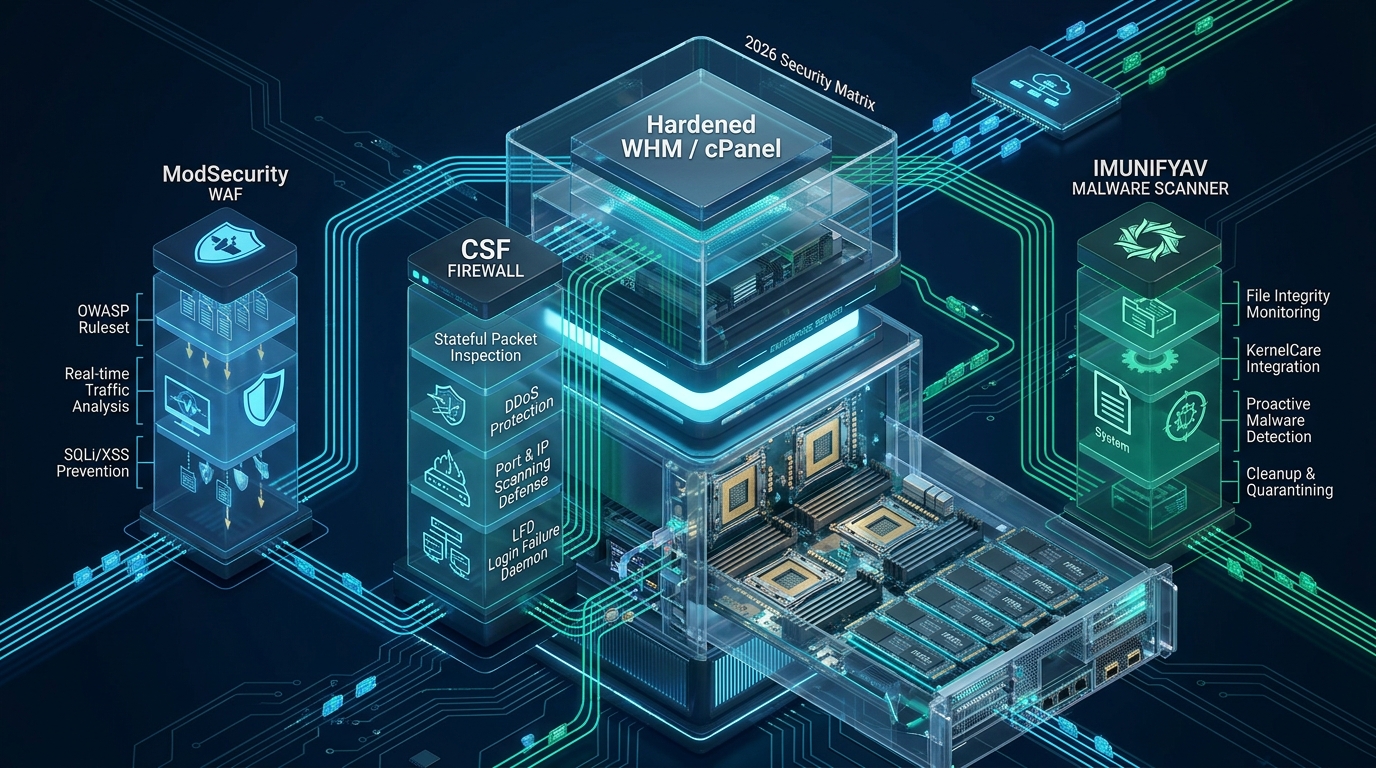
Deploying a multi-tenant web hosting server without an enterprise defense-in-depth posture exposes Linux kernels, PHP interpreters, and customer databases to automated botnet scans, credential stuffing, and web-shell execution. By deploying an orchestrated triage pipeline combining ModSecurity for Layer 7 inspection, ConfigServer Security & Firewall (CSF/LFD) for Layer 3/4 stateful packet filtering, and ImunifyAV for real-time filesystem scanning, systems engineers can eliminate attack vectors before they reach production workloads on CpanelFree. In this technical blueprint, we analyze the architectural mechanics, configuration files, and kernel-level sysctl tunings required to achieve an impenetrable, high-performance cPanel & WHM deployment in 2026.
What is the Modern Defense-in-Depth Architecture for cPanel & WHM?
1. The Anatomy of Modern Multi-Tenant Threat Vectors
The operational landscape of web hosting has drastically evolved. Contemporary adversaries no longer rely solely on basic brute-force scripts against SSH or FTP; modern threat campaigns orchestrate distributed Layer 7 API abuse, WordPress REST API weaponization, serialized object injection, and stealthy in-memory PHP web shells that evade legacy antivirus scanners. In a default cPanel & WHM installation, services are optimized for maximum compatibility rather than rigorous containment. Ports for Webmail (2096), cPanel (2083), WHM (2087), Exim (25, 465, 587), and Dovecot (993, 995) remain open to worldwide scanning unless actively restricted.
To establish a resilient infrastructure, systems architects must enforce isolation across four distinct layers of the operating stack:
- Perimeter & Transport Layer (L3/L4): Stateful packet inspection, TCP SYN cookie validation, IPSET hash filtering, and rapid threshold-based blocking via ConfigServer Security & Firewall (CSF) paired with the Login Failure Daemon (LFD).
- Application Layer (L7 WAF): Protocol validation, HTTP request body analysis, SQL injection (SQLi) neutralization, and cross-site scripting (XSS) prevention through ModSecurity v3 running OWASP Core Rule Set (CRS) v4.x.
- Filesystem & Runtime Layer: Proactive malware signature matching, inotify-driven write inspection, automated quarantine, and binary execution prevention across temporary directories via ImunifyAV.
- Kernel & OS Subsystem: Sysctl memory address space randomization (ASLR), Yama ptrace restrictions, unprivileged user namespace control, and symlink race condition mitigations.
2. Security Architecture Benchmarks: Default vs. Tuned Production
Deploying hardened configurations transforms server stability and drastically lowers mean-time-to-detection (MTTD) during active exploit attempts. The following matrix contrasts baseline defaults against our hardened 2026 production profile:
3. Hardening the Network Perimeter: CSF & LFD Deep Dive
ConfigServer Security & Firewall (CSF) is an advanced stateful packet inspection (SPI) firewall application designed specifically to wrap around Linux iptables and nftables. Operating in tandem with the Login Failure Daemon (LFD), it continuously parses system authentication logs (/var/log/secure, /var/log/maillog, and cPanel access logs) to identify authentication abuses and instantly drop offending packets.
The standard CSF configuration includes a dangerous pitfall: running with linear iptables rulesets on busy servers. When an aggressive botnet sends requests from tens of thousands of dynamic residential IPs, linear iptables chains create severe CPU softirq overhead. Enabling the LF_IPSET directive allows CSF to offload banned addresses into Linux kernel IPSET data structures, executing drop decisions in constant O(1) time regardless of whether your blacklist contains 10 or 100,000 IPs.
TESTING = "0" is set once testing is complete. Leaving testing mode active causes CSF to flush all firewall rules via a recurring 5-minute cron, rendering the server completely exposed between test cycles.Below is an enterprise-grade production snippet for /etc/csf/csf.conf optimized for high-density cPanel & WHM hosting nodes:
# ==============================================================================
# /etc/csf/csf.conf - Enterprise Production Hardening Configuration
# ==============================================================================

# Disable Testing Mode (Ensure firewall remains permanently active)
TESTING = "0"

# Restrict Incoming Ports (Only expose mandatory hosting services)
# 2222: Custom SSH, 80/443: HTTP/S, 2083: cPanel SSL, 2087: WHM SSL
TCP_IN = "2222,80,443,2083,2087,25,465,587,993,995,53"
TCP_OUT = "22,25,53,80,443,587,993,995,2087,2083"
UDP_IN = "53"
UDP_OUT = "53,123"

# High-Performance Kernel IPSET Integration (Constant Time O(1) Lookups)
LF_IPSET = "1"
LF_IPSET_MAX = "150000"

# Stateful Connection Tracking & SYN Flood Mitigation
SYNFLOOD = "1"
SYNFLOOD_RATE = "100/s"
SYNFLOOD_BURST = "150"
PACKET_FILTER = "1"

# Port Flood Protection (Rate limit excessive connection bursts)
PORTFLOOD = "2222;tcp;5;300,80;tcp;50;10,443;tcp;50;10"

# Aggressive Login Failure Daemon (LFD) Thresholds
LF_TRIGGER = "0"
LF_SSHD = "3"
LF_FTPD = "5"
LF_CPANEL = "3"
LF_POP3D = "10"
LF_IMAPD = "10"
LF_SMTPAUTH = "5"
LF_EXIMSYNTAX = "5"

# Auto-Ban Duration & Perm-Block Escalation
DENY_TEMP_IP_LIMIT = "500"
LF_PERMBLOCK = "1"
LF_PERMBLOCK_COUNT = "3"
LF_PERMBLOCK_INTERVAL = "86400"

# Process Tracking & System Binary Protection
PT_ALL_USERS = "1"
PT_LIMIT = "60"
RESTRICT_SYSLOG = "3"
After adjusting the configuration, compile and reload the firewall ruleset using the CSF CLI utility:
# Verify CSF and IPSET kernel module dependencies
csf --check

# Restart both firewall and login failure daemon
csf -r && systemctl restart lfd

# Verify active IPSET chains
ipset list | head -n 25
4. Layer 7 WAF Armor: ModSecurity v3 with OWASP CRS 4.x
While CSF shields the transport layer, malicious HTTP payloads easily traverse port 443 inside encrypted TLS tunnels. This is where ModSecurity operates as a deep-packet inspection engine for Apache, Nginx, or LiteSpeed Web Server. ModSecurity inspects HTTP headers, query strings, cookies, and POST bodies against a corpus of regular expressions and signature patterns defined by the OWASP Core Rule Set (CRS).
In high-throughput hosting environments, ModSecurity can quickly become an I/O and latency bottleneck if configured carelessly. Unchecked request body buffering causes disk swaps during large file uploads, while uncalibrated paranoia levels trigger false positives on legitimate WordPress, Joomla, or Magento administrative workflows.
SecAuditEngine RelevantOnly. Setting audit logging to On forces the server to write full HTTP transaction bodies for every single valid web request, which can exhaust millions of disk inodes and saturate NVMe write channels within hours.Save the following tuned configuration to /etc/apache2/conf.d/modsec2.user.conf (or include it within WHM’s ModSecurity Configuration editor):
# ==============================================================================
# /etc/apache2/conf.d/modsec2.user.conf - High-Throughput WAF Profile
# ==============================================================================

# Enable Active Blocking Engine
SecRuleEngine On

# Request Body Handling & Buffer Boundaries
SecRequestBodyAccess On
SecRequestBodyLimit 67108864
SecRequestBodyNoFilesLimit 131072
SecRequestBodyInMemoryLimit 262144
SecRequestBodyLimitAction Reject

# Response Body Buffering (Disabled to maximize streaming performance)
SecResponseBodyAccess Off

# Audit Log Filtering (Only capture blocking events to protect disk I/O)
SecAuditEngine RelevantOnly
SecAuditLogRelevantStatus "^(?:5|4(?!04))"
SecAuditLogParts ABIJDEFHZ
SecAuditLogType Concurrent
SecAuditLogStorageDir /var/log/apache2/modsec_audit/

# Regex Engine Resource Constraints (Mitigate ReDoS vulnerabilities)
SecPcreMatchLimit 250000
SecPcreMatchLimitRecursion 250000

# Global Whitelisting: Exempt WordPress REST API & Gutenberg from False Positives
<LocationMatch "^/wp-json/wp/v2/">
    SecRuleRemoveById 949110 980130 941100
</LocationMatch>

<LocationMatch "^/wp-admin/admin-ajax\.php">
    SecRuleRemoveById 941160 941180
</LocationMatch>
Once deployed, validate your syntax and gracefully restart Apache or LiteSpeed to apply the WAF rules without dropping active keep-alive connections:
# Test Apache/LiteSpeed web server configuration syntax
httpd -t

# Rebuild WHM Datastore and reload web service
/usr/local/cpanel/scripts/rebuildhttpdconf
systemctl reload httpd
5. Automated Storage Defense: ImunifyAV & Filesystem Isolation
Even with perimeter firewalls and WAF engines engaged, compromised customer credentials (stolen cPanel passwords or hijacked FTP tokens) allow attackers to upload obfuscated PHP backdoors directly into document roots. ImunifyAV provides a multi-tenant file integrity engine that couples heuristic signature analysis with real-time Linux inotify event subscribers.
To run ImunifyAV efficiently across multi-terabyte NVMe arrays, the background scan process must be bound to a dedicated systemd cgroup slice. This guarantees that background malware inspection threads cannot starve customer web workers of CPU cycles or saturating memory bandwidth during daily inventory audits.
# Step 1: Install ImunifyAV via official cPanel deployment script
cd /root
wget https://repo.imunify360.cloudlinux.com/defence360/imav-deploy.sh
bash imav-deploy.sh

# Step 2: Configure scan limits and inotify hooks via CLI
imunify-antivirus config update '{"MALWARE_SCANNING": {"cpu_limit": 25, "io_limit": 50, "rapid_scan": true}}'

# Step 3: Trigger full server filesystem audit across all cPanel document roots
imunify-antivirus malware user scan --all

# Step 4: Inspect quarantine status and isolated threats
imunify-antivirus malware quarantine list
In conjunction with ImunifyAV, secure all temporary directories at the OS level. Attackers frequently write compiled binaries into /tmp, /var/tmp, and /dev/shm to execute privilege escalation exploits. Mount these partitions with the noexec,nosuid,nodev flags inside /etc/fstab:
# Secure temporary mount points inside /etc/fstab
/var/tmpMnt /tmp ext4 loop,noexec,nosuid,nodev,rw 0 0
tmpfs /dev/shm tmpfs defaults,nosuid,noexec,nodev 0 0

# Apply mount options dynamically
mount -o remount,noexec,nosuid,nodev /tmp
mount -o remount,noexec,nosuid,nodev /dev/shm
6. Linux Kernel Hardening with /etc/sysctl.d/
Hardening the Linux kernel is the foundation upon which all user-space security controls depend. By tuning network stack parameters and memory protections in /etc/sysctl.d/99-cpanel-security.conf, you can mitigate TCP SYN flood exhaustion, prevent IP spoofing, block ICMP smurf amplification, and restrict debugging access across processes.
Deploy the following hardened sysctl configuration:
# ==============================================================================
# /etc/sysctl.d/99-cpanel-security.conf - Enterprise Linux Kernel Hardening
# ==============================================================================

# Mitigate TCP SYN Floods (Force SYN Cookies under connection queue saturation)
net.ipv4.tcp_syncookies = 1
net.ipv4.tcp_max_syn_backlog = 8192
net.ipv4.tcp_synack_retries = 2
net.ipv4.tcp_syn_retries = 2

# Reverse Path Filtering (Strict anti-spoofing protection)
net.ipv4.conf.default.rp_filter = 1
net.ipv4.conf.all.rp_filter = 1

# Disable ICMP Redirect Acceptance & Transmission (Prevent routing table poisoning)
net.ipv4.conf.all.accept_redirects = 0
net.ipv4.conf.default.accept_redirects = 0
net.ipv4.conf.all.send_redirects = 0
net.ipv4.conf.default.send_redirects = 0

# Ignore ICMP Echo Broadcasts (Prevent Smurf amplification attacks)
net.ipv4.icmp_echo_ignore_broadcasts = 1
net.ipv4.icmp_ignore_bogus_error_responses = 1

# Disable IP Source Routing
net.ipv4.conf.all.accept_source_route = 0
net.ipv4.conf.default.accept_source_route = 0

# Memory Protection & Address Space Layout Randomization (ASLR)
kernel.randomize_va_space = 2
fs.protected_hardlinks = 1
fs.protected_symlinks = 1
fs.protected_fifos = 2
fs.protected_regular = 2

# Restrict ptrace Scoping (Prevent unauthorized process memory inspection)
kernel.yama.ptrace_scope = 1

# Disable Unprivileged User Namespaces (Block common local container escapes)
user.max_user_namespaces = 0
Persist and verify these kernel settings immediately without rebooting:
# Reload all sysctl configurations across system directories
sysctl --system

# Confirm SYN Cookies and ASLR parameters are active
sysctl net.ipv4.tcp_syncookies kernel.randomize_va_space
7. Production Verification & Operational Maintenance
Hardening is not a one-time deployment; it is an active operational discipline. Systems administrators should automate security telemetry by integrating CSF’s blocklist sync with centralized SIEMs, periodically rotating SSH keys, and executing daily audit routines.
To ensure continuous compliance across cPanel accounts, integrate the following maintenance tasks into your automated cron schedule:
- Weekly CSF Temp-Ban Scrub: Verify that IPSET structures do not exceed memory thresholds and purge stale entries using
csf -t. - Daily Imunify Signature Updates: Keep heuristic rulesets fresh against zero-day CMS exploits by running
imunify-antivirus update. - ModSecurity Audit Log Rotation: Use
logrotateon/var/log/apache2/modsec_audit/to avoid inode exhaustion on root filesystems.
Frequently Asked Questions
Does enabling ModSecurity significantly impact Apache or LiteSpeed server latency?
When tuned properly with SecResponseBodyAccess Off and OWASP CRS Paranoia Level 1, the added processing overhead is negligible (typically under 2 to 4 milliseconds per HTTP request). However, keeping response body analysis enabled or running unfiltered regular expressions over multi-megabyte payloads can degrade throughput. Following the memory buffer boundaries outlined above guarantees optimal performance.
How do I avoid getting locked out of WHM and SSH when configuring CSF/LFD?
Before restarting CSF, always add your static management IP address or administrative VPN subnet to /etc/csf/csf.ignore and /etc/csf/csf.allow. Additionally, retain an active secondary SSH session or keep your hypervisor console (VNC/KVM) open when testing new firewall rules to quickly revert configurations if an error occurs.
What is the primary difference between ImunifyAV and Imunify360 for cPanel environments?
ImunifyAV is the free malware detection engine that scans customer filesystems for known malicious signatures, webshells, and infected scripts. Imunify360 is the commercial enterprise suite that adds automated malware cleanup, proactive PHP kernel patching (KernelCare), an integrated Layer 7 WAF, web reputation monitoring, and CAPTCHA challenge-response facilities.
How often should OWASP CRS rulesets be updated on production cPanel nodes?
OWASP Core Rule Set updates should be evaluated on a monthly staging cycle. WHM provides automated vendor rule updates via the ModSecurity Vendors manager. Always review release notes for rule ID renumbering or newly introduced detection logic to ensure custom whitelists remain compatible.
Ready to Deploy High-Performance Infrastructure?
Experience blazing-fast NVMe storage, unmetered bandwidth, and enterprise LiteSpeed caching on CpanelFree.