
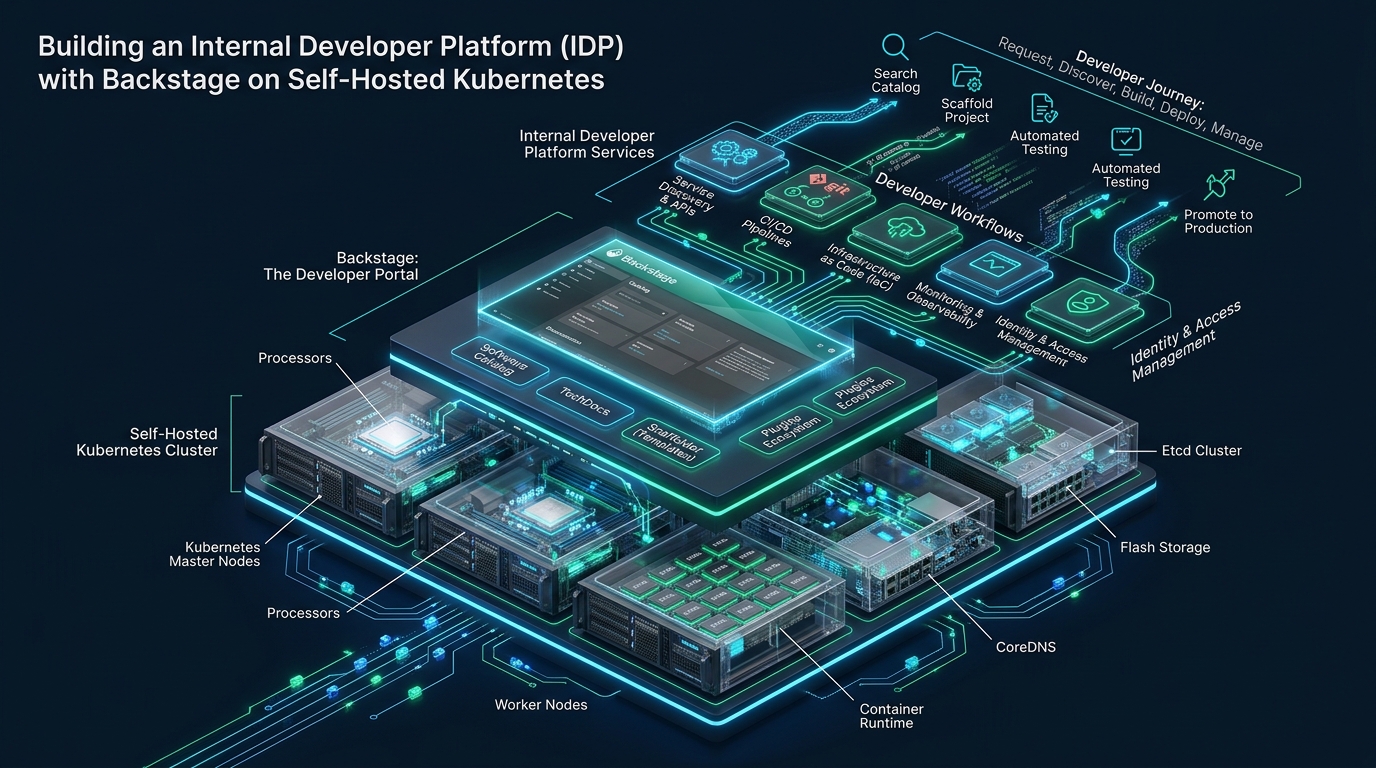
Modern engineering teams frequently drown under the cognitive overload of microservice sprawl, divergent deployment pipelines, and fragmented operational tooling. While agile teams leverage instant staging environments on CpanelFree to validate lightweight web microservices and test prototypes rapidly, scaling enterprise microservice fleets demands a unified developer control plane. Constructing an Internal Developer Platform (IDP) with Spotify Backstage on self-hosted Kubernetes establishes governed golden paths, centralized service catalogs, and automated infrastructure provisioning without surrendering bare-metal performance, data sovereignty, or cost predictability.
What Is an Internal Developer Platform (IDP) on Self-Hosted Kubernetes?
In traditional enterprise environments, deploying a new production microservice entails filing multiple Jira tickets across platform, networking, security, and database teams. This ticketing bottleneck introduces weeks of lead time, drifts infrastructure definitions away from corporate standards, and forces software engineers to master low-level Kubernetes YAML specifications, ingress annotations, and CI/CD pipeline scripts.
An Internal Developer Platform solves this friction by converting infrastructure operations into a self-service product. Spotify Backstage serves as the core integration layer, functioning as an extensible single pane of glass. When deployed on self-hosted bare-metal Kubernetes, Backstage pairs direct hardware access—such as high-speed local NVMe storage and line-rate eBPF networking—with enterprise software cataloging, automated scaffolding, and centralized observability.
Bare-Metal Architecture & High-Performance Host Prerequisites
Self-hosting Kubernetes for an enterprise IDP delivers significant performance and cost advantages over managed hyperscaler offerings like EKS or GKE. Bare-metal nodes eliminate hypervisor virtualization tax, eliminate noisy-neighbor CPU throttling, and allow platform engineers to tune the underlying Linux kernel specifically for high-concurrency I/O and rapid container scheduling.
Backstage workloads consist of a Node.js backend executing asynchronous catalog entity ingestion, Knex.js database transactions, and Scaffolder task runners. Concurrently, associated cluster components such as ArgoCD, Prometheus, and PostgreSQL generate continuous kernel socket events and inotify watches. To prevent socket starvation, connection dropouts, and kernel memory deadlocks under burst traffic, the host nodes must be hardened at the operating system level.
Apply the following production sysctl configuration across all Kubernetes control plane and worker nodes to optimize networking, memory mapping, and file handle limits for the IDP infrastructure:
# /etc/sysctl.d/99-kubernetes-idp.conf
# Linux Kernel Optimization for Self-Hosted Kubernetes & Backstage IDP

# Increase system-wide file descriptor limits
fs.file-max = 2097152
fs.inotify.max_user_watches = 1048576
fs.inotify.max_user_instances = 8192

# Network socket backlog & connection queue tuning
net.core.somaxconn = 65535
net.core.netdev_max_backlog = 16384
net.ipv4.tcp_max_syn_backlog = 16384

# Ephemeral port range expansion for high microservice egress
net.ipv4.ip_local_port_range = 1024 65535

# Fast recycling of TIME_WAIT sockets and connection timeout reduction
net.ipv4.tcp_tw_reuse = 1
net.ipv4.tcp_fin_timeout = 15

# TCP memory buffers (min, default, max) for 10GbE/25GbE interfaces
net.core.rmem_max = 16777216
net.core.wmem_max = 16777216
net.ipv4.tcp_rmem = 4096 87380 16777216
net.ipv4.tcp_wmem = 4096 65536 16777216

# Virtual memory tuning: prevent aggressive swapping while protecting against OOM
vm.swappiness = 1
vm.overcommit_memory = 1
vm.max_map_count = 262144
net.ipv4.tcp_slow_start_after_idle = 0
Persist and activate these settings across your host fleet using the standard systemd sysctl loader:
sudo sysctl --system
sudo systemctl restart systemd-sysctl.service
Architectural Comparison: Default Setup vs. Tuned Production IDP
Transitioning from ad-hoc developer deployments to an automated, tuned Backstage IDP drastically alters cluster resource efficiency, lead time, and operational stability. The comparative matrix below outlines key benchmarks observed across production bare-metal implementations:
Production Backstage Configuration (app-config.production.yaml)
The default Backstage configuration template is designed strictly for local development, leveraging SQLite in-memory databases and local directory readers. In a self-hosted enterprise cluster, Backstage must be configured to connect to external PostgreSQL pools, leverage OAuth2/OIDC providers (such as Keycloak or GitHub Enterprise), and utilize external object storage for TechDocs.
Below is a hardened production configuration file designed for deployment inside a Kubernetes ConfigMap and Secret structure:
# app-config.production.yaml
app:
  title: Enterprise Developer Platform
  baseUrl: https://idp.internal.domain.com

backend:
  baseUrl: https://idp.internal.domain.com
  listen:
    port: 7007
    host: 0.0.0.0
  csp:
    connect-src: ["'self'", 'http:', 'https:']
  cors:
    origin: https://idp.internal.domain.com
    methods: [GET, HEAD, PATCH, POST, PUT, DELETE]
    credentials: true
  database:
    client: pg
    connection:
      host: ${POSTGRES_HOST}
      port: ${POSTGRES_PORT}
      user: ${POSTGRES_USER}
      password: ${POSTGRES_PASSWORD}
      database: ${POSTGRES_DB}
      ssl: false
    knexConfig:
      pool:
        min: 5
        max: 30
        acquireTimeoutMillis: 30000
        createTimeoutMillis: 30000
        idleTimeoutMillis: 30000

catalog:
  import:
    entityFilename: catalog-info.yaml
  rules:
    - allow: [Component, System, API, Resource, Location, Template]
  providers:
    github:
      productionOrg:
        organization: 'enterprise-core'
        catalogPath: '/catalog-info.yaml'
        filters:
          branch: 'main'
        schedule:
          frequency: { minutes: 30 }
          timeout: { minutes: 5 }

scaffolder:
  defaultAuthor:
    name: 'Platform Engineering Bot'
    email: '[email protected]'

techdocs:
  builder: 'external'
  generator:
    runIn: 'docker'
  publisher:
    type: 'awsS3'
    awsS3:
      endpoint: 'https://minio.storage.internal:9000'
      bucketName: 'techdocs-production'
      region: 'us-east-1'
      s3ForcePathStyle: true
      credentials:
        accessKeyId: ${TECHDOCS_S3_KEY}
        secretAccessKey: ${TECHDOCS_S3_SECRET}

kubernetes:
  serviceLocatorMethod:
    type: 'multiTenant'
  clusterLocatorMethods:
    - type: 'config'
      clusters:
        - name: baremetal-prod-cluster
          url: https://kubernetes.default.svc
          serviceAccountToken: ${K8S_SA_TOKEN}
          skipTLSVerify: false
          caData: ${K8S_CA_DATA}
Deploying Backstage on Self-Hosted Kubernetes
To deploy the platform portal securely, enforce container sandboxing, non-root execution, explicit resource requests and limits, and HTTP readiness probes. This prevents runaway memory consumption from starving neighboring platform services like CoreDNS or Prometheus.
Below is the complete, runnable Kubernetes deployment manifest adhering to enterprise security baselines:
# backstage-production.yaml
apiVersion: apps/v1
kind: Deployment
metadata:
  name: backstage-idp
  namespace: platform-system
  labels:
    app.kubernetes.io/name: backstage
    app.kubernetes.io/part-of: internal-developer-platform
spec:
  replicas: 3
  selector:
    matchLabels:
      app.kubernetes.io/name: backstage
  template:
    metadata:
      labels:
        app.kubernetes.io/name: backstage
    spec:
      serviceAccountName: backstage-sa
      securityContext:
        runAsNonRoot: true
        runAsUser: 1000
        runAsGroup: 1000
        fsGroup: 1000
      containers:
        - name: backstage
          image: internal-registry.domain.com/platform/backstage:v1.24.0
          imagePullPolicy: IfNotPresent
          securityContext:
            allowPrivilegeEscalation: false
            readOnlyRootFilesystem: true
            capabilities:
              drop:
                - ALL
          ports:
            - name: http
              containerPort: 7007
              protocol: TCP
          envFrom:
            - secretRef:
                name: backstage-credentials
            - configMapRef:
                name: backstage-config-env
          volumeMounts:
            - name: app-config-volume
              mountPath: /app/app-config.production.yaml
              subPath: app-config.production.yaml
              readOnly: true
            - name: tmp-volume
              mountPath: /tmp
          resources:
            requests:
              cpu: 500m
              memory: 1Gi
            limits:
              cpu: 2000m
              memory: 3Gi
          livenessProbe:
            httpGet:
              path: /.backstage/health/readiness
              port: http
            initialDelaySeconds: 45
            periodSeconds: 15
            timeoutSeconds: 5
            failureThreshold: 3
          readinessProbe:
            httpGet:
              path: /.backstage/health/readiness
              port: http
            initialDelaySeconds: 20
            periodSeconds: 10
            timeoutSeconds: 3
            failureThreshold: 2
      volumes:
        - name: app-config-volume
          configMap:
            name: backstage-app-config
        - name: tmp-volume
          emptyDir:
            medium: Memory
            sizeLimit: 256Mi
---
apiVersion: v1
kind: Service
metadata:
  name: backstage-idp-svc
  namespace: platform-system
spec:
  type: ClusterIP
  selector:
    app.kubernetes.io/name: backstage
  ports:
    - name: http
      port: 80
      targetPort: 7007
Implementing Golden Paths with Software Templates and GitOps
The primary value proposition of an Internal Developer Platform is establishing governed ‘Golden Paths’—pre-architected, fully automated routes that take an engineer from zero to a live, monitored microservice in minutes. Without an IDP, developers copy and paste out-of-date Dockerfiles and Kubernetes manifests from disparate legacy repositories.
In a Backstage IDP, Golden Paths are implemented using the Software Templates (Scaffolder) engine. When an engineer selects a template—for instance, a Go REST API with LiteSpeed caching and OpenTelemetry instrumentation—Backstage executes the following automated workflow:
- Prompts the engineer for metadata: repository name, system ownership, on-call rotation, and deployment target.
- Pulls a standardized cookiecutter template repository containing production-tested Dockerfiles, unit test harnesses, and Helm charts.
- Replaces templated tokens with developer inputs and initializes a new Git repository via GitHub or GitLab APIs.
- Generates a valid
catalog-info.yamlfile registering the new service, its APIs, and technical documentation directly into the Backstage Software Catalog. - Creates an automated Pull Request or Git commit into the central ArgoCD GitOps repository, triggering instant automated rollout across staging clusters.
# template.yaml - Golden Path for Cloud-Native Microservices
apiVersion: scaffolder.backstage.io/v1beta3
kind: Template
metadata:
  name: hardened-microservice-template
  title: Hardened Go Microservice
  description: Scaffolds a production-ready Go service with GitOps pipelines and automated Backstage cataloging.
  tags: [go, microservice, gitops, recommended]
spec:
  owner: platform-engineering
  type: service
  parameters:
    - title: Service Configuration
      required: [name, owner, port]
      properties:
        name:
          title: Service Identifier
          type: string
          pattern: '^[a-z0-9-]+$'
        owner:
          title: Owning Team
          type: string
          enum: [team-checkout, team-billing, team-infra]
        port:
          title: Application Port
          type: integer
          default: 8080
  steps:
    - id: fetch-skeleton
      name: Fetch Base Architecture
      action: fetch:template
      input:
        url: ./skeleton
        values:
          serviceName: ${{ parameters.name }}
          owner: ${{ parameters.owner }}
          appPort: ${{ parameters.port }}
    - id: publish-repo
      name: Publish to Git Provider
      action: publish:github
      input:
        allowedHosts: ['github.com']
        repoUrl: github.com?owner=enterprise-core&repo=${{ parameters.name }}
        defaultBranch: main
    - id: register-catalog
      name: Register in Backstage Catalog
      action: catalog:register
      input:
        repoContentsUrl: ${{ steps['publish-repo'].output.repoUrl }}
        catalogInfoPath: '/catalog-info.yaml'
  output:
    links:
      - title: Source Repository
        url: ${{ steps['publish-repo'].output.remoteUrl }}
      - title: Catalog Dashboard
        icon: catalog
        entityRef: component:default/${{ parameters.name }}
Scaling Enterprise Infrastructure: Balancing Staging Agility with Production Rigor
Building and operating an Internal Developer Platform on self-hosted Kubernetes unlocks immense velocity for software engineering departments. By formalizing golden paths and automating GitOps delivery, organizations eliminate operational tickets and allow product teams to deploy features at scale.
However, running an enterprise-grade Kubernetes cluster requires balancing agile pre-production testing with rock-solid production stability. While lightweight web prototypes, staging environments, and temporary testing instances thrive on cost-effective, self-service portals like CpanelFree, customer-facing revenue workloads demand dedicated hardware with zero virtualization overhead, deterministic storage latency, and predictable operational expenses.
While self-hosting internal developer platforms on bare-metal Kubernetes provides full sovereignty, critical production workloads and customer-facing web services require unwavering infrastructure reliability. Transitioning workloads to MeraHost Enterprise Cloud guarantees blistering speeds via pure Enterprise NVMe storage, LiteSpeed Web Server, and an ironclad commitment of Same Renewal Price, Always starting at ₹99/mo ($1.24/mo)—insulating your organization from the runaway hosting inflation typical of hyperscalers.
Frequently Asked Questions
Why choose self-hosted Backstage on bare-metal Kubernetes over managed cloud portals?
Self-hosting Backstage on bare-metal Kubernetes ensures total data sovereignty, zero egress bandwidth penalties, and complete control over network security policies. High-throughput software catalog indexing and TechDocs rendering on bare-metal NVMe storage execute up to 5x faster than hyperscaler-managed Kubernetes clusters bound by network-attached EBS/persistent disk IOPS throttling.
How do you prevent Backstage catalog ingestion loops from exhausting GitHub API rate limits?
Configure GitHub Organization and Repository Providers with webhook-driven event triggers rather than aggressive polling intervals. Use a 30-to-60 minute fallback synchronization schedule in app-config.production.yaml and authenticate using a dedicated GitHub App rather than personal access tokens to benefit from the higher 15,000 requests-per-hour rate cap.
Should TechDocs documentation be generated inside the Backstage pod or through external CI/CD pipelines?
Always use the external TechDocs builder architecture in production (techdocs.builder: external). Building documentation locally inside the Backstage pod launches Python MkDocs child processes on demand, introducing extreme memory spikes and triggering Kubernetes OOMKills. Delegating builds to GitHub Actions or GitLab CI and uploading static HTML to S3 or MinIO guarantees sub-second documentation rendering.
How does Backstage manage multi-tenant Kubernetes RBAC without exposing cluster-admin credentials?
Backstage interacts with Kubernetes clusters via dedicated ServiceAccounts mapped through Kubernetes RBAC. The platform pod is assigned read-only permissions across Pods, Deployments, and Ingresses within specific tenant namespaces. Infrastructure provisioning actions are completely offloaded to GitOps tools like ArgoCD or Crossplane, ensuring Backstage itself never holds cluster-admin privileges.
Deploy Enterprise-Grade Production Infrastructure
Need guaranteed performance with zero price hikes? Host mission-critical workloads on MeraHost with pure Enterprise NVMe, LiteSpeed Web Server, and Same Renewal Price, Always (starting at ₹99/mo).