
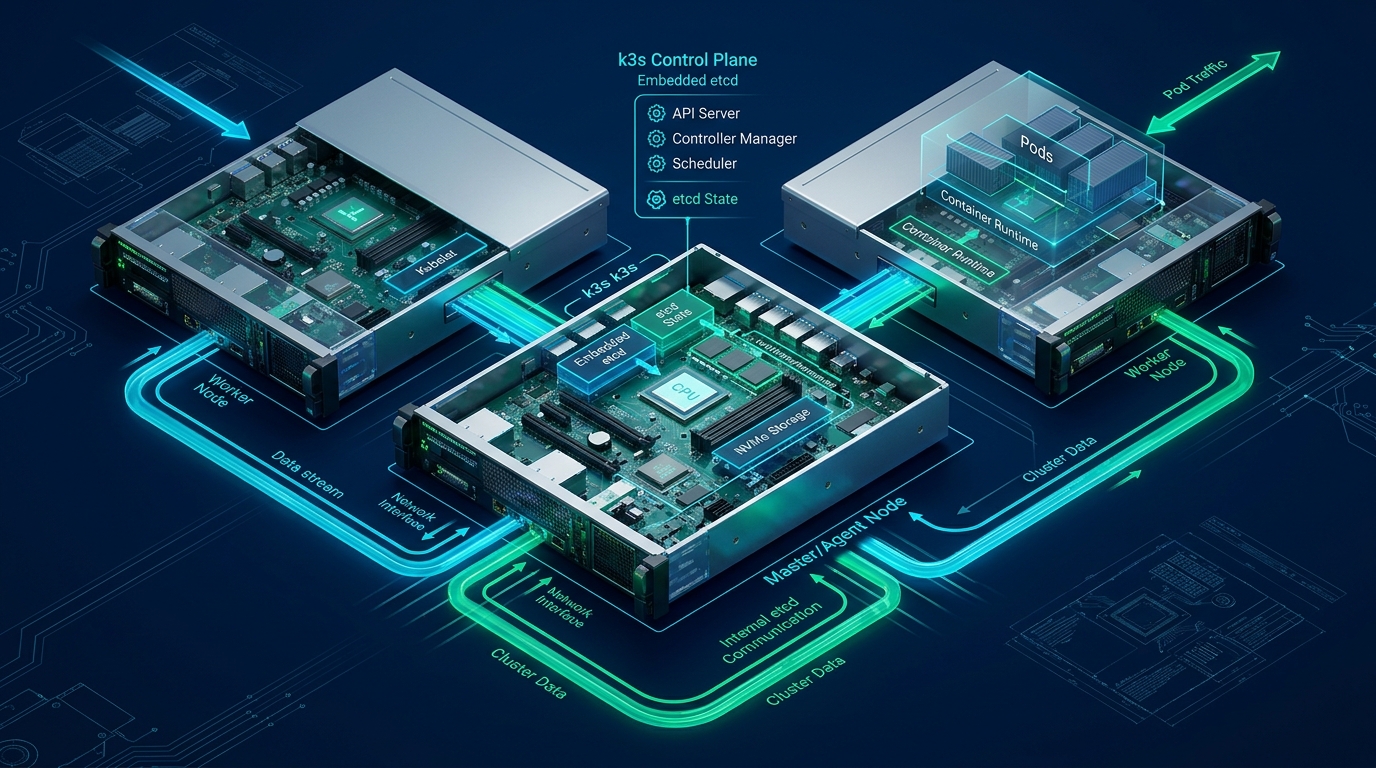
Running upstream, full-scale Kubernetes control planes across multi-node VPS fleets frequently incurs significant memory bloat, compute contention, and operational drag from sprawling daemon sets. By combining Rancher’s lightweight k3s distribution with an embedded etcd consensus engine, systems architects can achieve true enterprise-grade high availability, quorum resiliency, and automated failover within sub-1GB RAM per-node footprints. When architecting resilient edge clusters, pairing robust container runtimes with optimized compute from platforms like CpanelFree provides the foundational performance required for low-overhead microservice delivery.
Architectural Blueprint: High-Availability k3s with Embedded etcd
Traditional Kubernetes deployments mandate external etcd topologies or complex orchestration operators that consume prohibitive baseline resources on virtual private servers (VPS). In contrast, k3s collapses the API server, controller manager, scheduler, and etcd into a single, unified supervisor process. When launched with the --cluster-init flag, k3s initiates an embedded etcd cluster utilizing Raft consensus protocol directly inside the initial master process. Subsequent control-plane nodes join the existing etcd quorum via mutual TLS (mTLS), distributing the state database while maintaining absolute control plane survival in the event of a single-node failure.
This architecture is particularly advantageous for cloud VPS environments where compute cores and memory allocations are strictly partitioned. By avoiding separate dedicated nodes for external etcd clusters, engineers reduce infrastructure footprint while retaining identical disaster recovery capabilities, snapshotting mechanisms, and zero-downtime rolling upgrade guarantees.
Performance Benchmarks: Standard vs. Tuned Production Topology
While embedded etcd delivers exceptional operational simplicity, etcd is notoriously sensitive to disk I/O latency and network jitter. Disk write-ahead log (WAL) fsync operations must complete within 10 milliseconds to avoid leader election timeouts and quorum instability. The comparison matrix below details baseline k3s deployment metrics against an optimized production VPS deployment with kernel-level storage and networking tuning.
Linux Kernel and System Tuning for Low-Latency etcd
Before launching k3s, the host operating system must be tuned to prevent memory swapping, maximize file descriptor limits, optimize inotify instance capacity, and prioritize synchronous write queues on virtualized NVMe block storage. Create the following production sysctl configuration file on all control plane nodes:
# /etc/sysctl.d/99-k3s-etcd.conf
# Production Linux Kernel Tuning for k3s with Embedded etcd

# Disable swap aggressive behavior to prevent memory paging latency
vm.swappiness = 1
vm.vfs_cache_pressure = 50
vm.dirty_background_ratio = 5
vm.dirty_ratio = 10

# Network bridge and forwarding requirements for CNI
net.bridge.bridge-nf-call-iptables = 1
net.bridge.bridge-nf-call-ip6tables = 1
net.ipv4.ip_forward = 1
net.ipv4.conf.all.forwarding = 1

# Maximize socket buffer sizes and connection tracking limits
net.core.somaxconn = 32768
net.ipv4.tcp_max_syn_backlog = 16384
net.core.netdev_max_backlog = 16384
net.ipv4.ip_local_port_range = 1024 65535

# Increase inotify watchers for high-density container environments
fs.inotify.max_user_watches = 524288
fs.inotify.max_user_instances = 8192
fs.file-max = 2097152
Apply the sysctl parameters immediately without rebooting:
sudo sysctl --system
Disk I/O Pre-Flight: Benchmarking WAL fsync Latency
Shared VPS storage can suffer from “noisy neighbor” effects where virtual block storage latency spikes unpredictably. To confirm that your cloud node’s storage subsystem meets etcd’s strict fsync requirements, execute a rigorous synthetic fio benchmark targeted at the planned data directory (/var/lib/rancher/k3s/server/db/etcd):
sudo mkdir -p /var/lib/rancher/k3s/server/db/etcd-test

sudo fio --rw=write --ioengine=sync --fdatasync=1 \
  --directory=/var/lib/rancher/k3s/server/db/etcd-test \
  --size=22m --bs=2300 --name=etcd-benchmark \
  --output-format=json | jq '.jobs[0].sync.lat_ns.percentile["99.000000"] / 1000000'

sudo rm -rf /var/lib/rancher/k3s/server/db/etcd-test
If the calculated 99th percentile (p99) fdatasync latency exceeds 10.0 milliseconds, etcd will periodically drop Raft heartbeats, triggering false node evictions and cascading cluster destabilization. Ensure your cloud provider provisions dedicated NVMe IOPS or configure write caching safely.
Step-by-Step Cluster Bootstrap: Node 1 Configuration
Instead of passing dozens of command-line flags to the install script, declarative configuration management using /etc/rancher/k3s/config.yaml ensures reproducible, immutable deployments. On your first server node (e.g., 10.10.10.11), establish the cluster configuration file before downloading the binary:
# /etc/rancher/k3s/config.yaml on Node 1 (Bootstrap Node)
# Primary HA Control Plane with Embedded etcd

cluster-init: true
token: "K3sEnterpriseSecretToken2026SecureStringAlphaNumeric!"
tls-san:
  - "10.10.10.11"
  - "k8s-api.yourdomain.internal"
  - "198.51.100.11"

# Network Architecture
flannel-backend: "wireguard-native"
cluster-cidr: "10.42.0.0/16"
service-cidr: "10.43.0.0/16"
cluster-dns: "10.43.0.10"

# Embedded etcd snapshot automation
etcd-snapshot-schedule-cron: "0 */4 * * *"
etcd-snapshot-retention: 24
etcd-snapshot-dir: "/var/lib/rancher/k3s/server/db/snapshots"
etcd-snapshot-compress: true

# Component Hardening
disable:
  - "traefik"      # Replace with enterprise ingress controller (e.g. Ingress-NGINX or Envoy)
  - "servicelb"    # Replace with MetalLB or external Cloud Load Balancer

write-kubeconfig-mode: "0600"
kube-controller-manager-arg:
  - "node-monitor-grace-period=30s"
  - "node-monitor-period=5s"
Install and start the k3s server on Node 1:
curl -sfL https://get.k3s.io | sh -

# Verify cluster initialization and etcd member status
sudo k3s kubectl get nodes -o wide
sudo k3s etcdctl member list
Joining Server Nodes 2 and 3 to the Embedded etcd Quorum
With the primary server node running and the etcd Raft leader elected, provision the remaining two control-plane nodes. On Node 2 (10.10.10.12) and Node 3 (10.10.10.13), populate /etc/rancher/k3s/config.yaml with the server directive pointing to Node 1:
# /etc/rancher/k3s/config.yaml on Node 2 and Node 3
# Secondary HA Control Plane Joining Embedded etcd

server: "https://10.10.10.11:6443"
token: "K3sEnterpriseSecretToken2026SecureStringAlphaNumeric!"
tls-san:
  - "k8s-api.yourdomain.internal"

# Network Architecture (Must match cluster-init node)
flannel-backend: "wireguard-native"
cluster-cidr: "10.42.0.0/16"
service-cidr: "10.43.0.0/16"
cluster-dns: "10.43.0.10"

# Disable bundled components matching node 1
disable:
  - "traefik"
  - "servicelb"

write-kubeconfig-mode: "0600"
Execute the installation script on Node 2 and Node 3 sequentially:
curl -sfL https://get.k3s.io | sh -
Ready status and joined the etcd membership before initiating the join on the next host.
Verifying High Availability and Quorum Status
Once all three control-plane servers are online, verify the health of the etcd consensus ring and API server availability. The k3s etcdctl CLI utility wraps the upstream etcd client with the correct mTLS certificates automatically:
# Check etcd member health and raft leader status
sudo k3s etcdctl endpoint health --cluster
sudo k3s etcdctl endpoint status --cluster -w table

# List all nodes and their assigned roles
sudo k3s kubectl get nodes -l node-role.kubernetes.io/control-plane=true
The endpoint status output must reflect all three endpoints with HEALTHY: true, indicating synchronized revision IDs and stable leader election without frequent Raft term incrementation.
Disaster Recovery: Automated Snapshots and Quorum Restoration
A resilient architecture must account for catastrophic failure, such as split-brain network partitions or unexpected loss of multiple nodes exceeding quorum threshold. Because our config.yaml established automatic snapshots every 4 hours, restoring a compromised cluster to a known-clean state is straightforward.
To take an on-demand manual snapshot prior to major upgrades or schema modifications:
sudo k3s etcd-snapshot save --name pre-maintenance-snapshot

# Inspect available snapshots
sudo k3s etcd-snapshot list
In a disaster scenario where two out of three nodes are permanently lost and quorum is unrecoverable, perform an emergency quorum reset on the surviving node:
# Stop k3s service on the surviving node
sudo systemctl stop k3s

# Reset etcd cluster and restore from the latest snapshot
sudo k3s server \
  --cluster-reset \
  --cluster-reset-restore-path=/var/lib/rancher/k3s/server/db/snapshots/pre-maintenance-snapshot

# Start k3s service as the new single-member cluster root
sudo systemctl start k3s
Once the surviving node is restored and stable, you can spin up fresh replacement VPS instances and rejoin them using the standard secondary node configuration to re-establish 3-node HA quorum.
Frequently Asked Questions
Can I use 2 server nodes for an HA k3s cluster?
No. Embedded etcd relies on the Raft consensus algorithm, which mandates a strict majority of nodes (N/2 + 1) to establish quorum. In a 2-node cluster, quorum is 2. If a single node fails or network connectivity partitions the two nodes, neither node can achieve quorum, resulting in total cluster lockup. The minimum supported topology for high availability is 3 nodes.
How does embedded etcd differ from k3s with external SQLite or MySQL (Kine)?
Kine is an abstraction shim that translates etcd v3 API calls into SQL queries for backends like SQLite, PostgreSQL, or MySQL. While Kine enables simpler single-node backups or external relational DB clusters, embedded etcd is the native, highly optimized Kubernetes standard. Embedded etcd delivers lower API latency, native snapshot tooling, and zero external database dependencies.
What firewall ports must be open between k3s control-plane nodes?
For embedded etcd and internal CNI communication, ensure the following inbound ports are permitted between all server nodes: TCP port 6443 (Kubernetes API server), TCP port 2379 and 2380 (etcd client and peer consensus traffic), UDP port 51820/51821 (WireGuard-native CNI encapsulation), and TCP port 10250 (kubelet metrics and exec).
How do I back up etcd snapshots to remote S3 storage?
k3s natively supports automated S3 snapshot offloading. In your /etc/rancher/k3s/config.yaml, configure the etcd-s3: true, etcd-s3-bucket: "your-backup-bucket", etcd-s3-endpoint: "s3.region.amazonaws.com", etcd-s3-access-key: "ACCESS_KEY", and etcd-s3-secret-key: "SECRET_KEY" directives. k3s will automatically stream encrypted snapshots to the remote object store based on your cron schedule.
Ready to Deploy High-Performance Infrastructure?
Experience blazing-fast NVMe storage, unmetered bandwidth, and enterprise LiteSpeed caching on CpanelFree.