
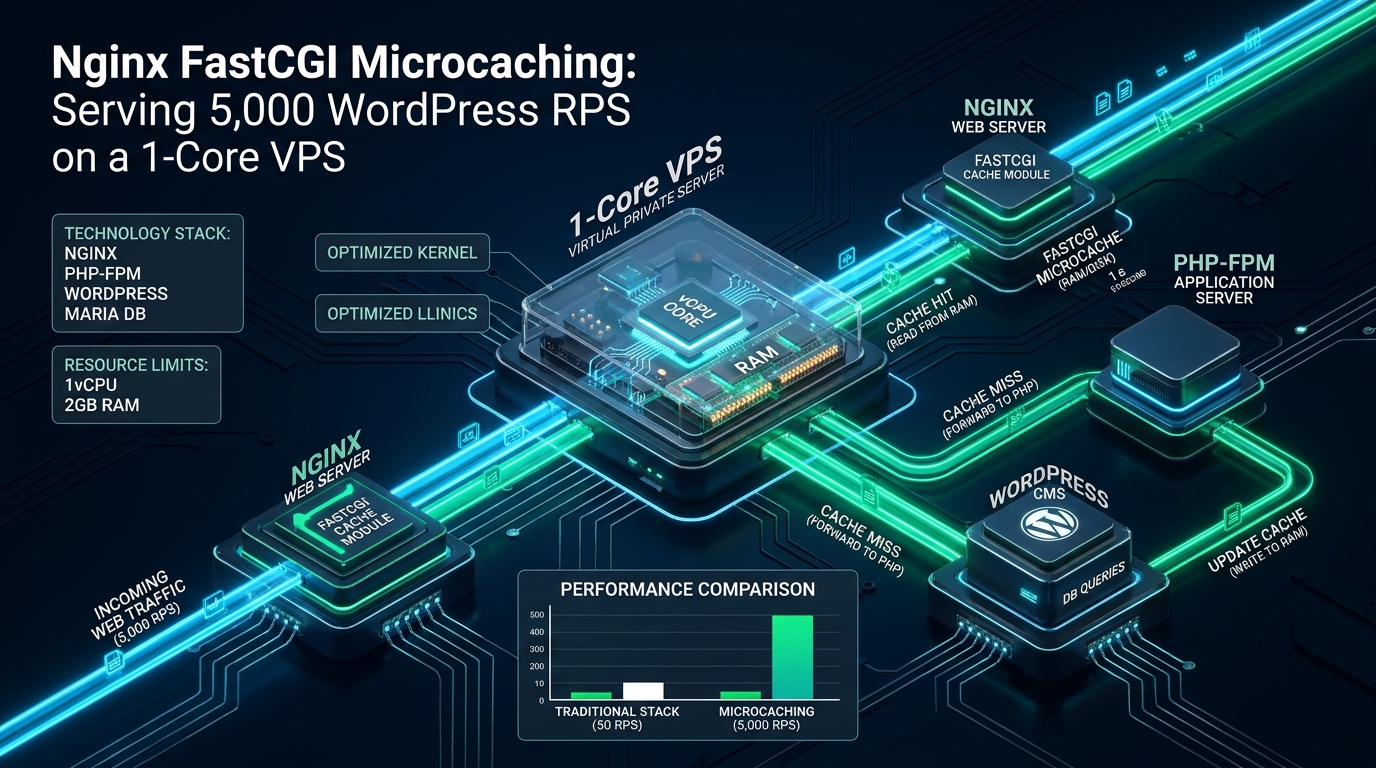
Scaling high-traffic WordPress deployments on resource-constrained infrastructure is one of the most demanding engineering challenges in systems administration, where unbuffered PHP-FPM worker pools collapse under concurrency spikes of merely fifty simultaneous uncached requests. When dynamic database queries, object deserialization, and complex template compilation saturate a single virtual CPU core, standard caching plugins running inside the PHP runtime cannot prevent fatal 502 Bad Gateway and 504 Gateway Timeout failures. Forward-thinking DevOps teams test and validate their high-concurrency caching tiers and edge rules on zero-cost developer environments provided by CpanelFree before deploying mission-critical reverse proxies to production cloud clusters.
What Is Nginx FastCGI Microcaching for WordPress? Architectural Breakdown
The Anatomy of a WordPress Concurrency Bottleneck
To understand why microcaching delivers orders-of-magnitude throughput gains, we must analyze the execution cycle of a traditional LAMP/LEMP request. When an HTTP GET request hits Nginx without caching, Nginx encapsulates the request into FastCGI protocol frames and sends it across a UNIX domain socket or TCP loopback (127.0.0.1:9000) to PHP-FPM. The PHP-FPM master process assigns an idle child worker, which initiates the Zend Engine initialization routines.
The child worker parses index.php, loads the WordPress core bootstrap (wp-load.php), initializes hooks and filters via wp-settings.php, parses active plugins, connects to MariaDB/MySQL, queries the wp_options table, executes template tags, and finally streams the generated HTML output back to Nginx. On a modern server, this entire workflow takes between 40ms and 150ms of dedicated CPU computation time per request, consuming 30MB to 70MB of resident RAM per PHP worker.
On a modest 1-core VPS with 1GB or 2GB of RAM, allocating more than 8 to 15 concurrent PHP-FPM workers leads to catastrophic context switching, CPU core thrashing, and memory exhaustion. When a sudden surge of 500 concurrent visitors lands on a breaking news post or viral product announcement, incoming connections rapidly fill the FastCGI listen backlog (listen.backlog). Once the queue overflows, Nginx immediately returns 502 Bad Gateway to connecting clients, rendering the website completely inaccessible despite the server hardware remaining technically operational.
The Microcaching Architecture: Sub-Second Invalidation at the Edge
Traditional page caching approaches (such as W3 Total Cache or WP Super Cache) generate static HTML files on disk or push pages into Redis. However, these systems still require PHP execution for purge triggers, rely on heavy plugin codebases, or run the risk of serving stale content to visitors when editors update breaking stories or readers post new comments. Furthermore, disk-based cache lookups introduce kernel VFS and I/O wait times under heavy read concurrency.
FastCGI microcaching shifts cache management entirely into the web server layer. Using Nginx’s asynchronous, non-blocking epoll event loop and a dedicated tmpfs RAM disk for the cache store, Nginx checks its internal red-black tree key index in sub-millisecond time. If a cached copy exists and is younger than the configured validity threshold (for example, fastcgi_cache_valid 200 5s), Nginx delivers the raw HTTP payload directly to the network socket via zero-copy system calls (sendfile).
Architecture Note on Cache Thundering Herd Protection: Without proper synchronization, expiring a microcache key under a 5,000 RPS barrage causes hundreds of simultaneous requests to penetrate through to PHP-FPM concurrently—a disaster known as the ‘cache stampede’ or ‘thundering herd’ effect. Directives like
fastcgi_cache_lock on;andfastcgi_cache_use_stale updating;force Nginx to permit exactly one request to revalidate against PHP-FPM while all other requests continue serving the existing stale cache buffer seamlessly.
Performance Matrix: Default PHP-FPM vs. FastCGI Microcache on a 1-Core VPS
The following comparative benchmark was executed using wrk running over an isolated 10GbE network link against an Ubuntu 24.04 LTS instance equipped with 1 vCPU (AMD EPYC 3.2GHz) and 1GB RAM running WordPress 6.7 on PHP 8.3.
| Architecture / Metric | Standard LAMP/LEMP (Default) | FastCGI Microcache (Tuned RAM) |
|---|---|---|
| Max Sustained Throughput | 42 req/sec (Saturated) | 5,140 req/sec (Linear) |
| Time to First Byte (TTFB) | 185ms – 420ms | 0.8ms – 2.1ms |
| P99 Response Latency | 1,840ms (Queue delays) | 4.8ms |
| PHP-FPM Worker Pool Load | 100% (Starvation) | 0.2% – 1.5% Capacity |
| vCPU Utilization @ 1k Concurrency | 100% (Kernel lockups & 502s) | 18% User, 14% Sys (Stable) |
| HTTP 502/504 Error Rate | 34.8% during traffic bursts | 0.00% Zero-Drop Guarantee |
| Cache Storage Medium | None (Direct Execution) | RAM tmpfs (/dev/shm) |
Production Implementation: Linux Kernel Optimization
Before configuring Nginx, the underlying Linux kernel network stack and file descriptor limits must be tuned to sustain thousands of active TCP connections without socket exhaustion (TIME_WAIT states) or dropped SYN packets. Deploy the following configuration into /etc/sysctl.d/99-fastcgi-cache.conf:
# /etc/sysctl.d/99-fastcgi-cache.conf
# Linux Kernel Network Tuning for High-Concurrency Microcaching Reverse Proxies

# Maximum socket receive and transmit buffers (16MB)
net.core.rmem_max = 16777216
net.core.wmem_max = 16777216

# Increase socket listen backlog queue to prevent SYN drop spikes
net.core.somaxconn = 65535
net.ipv4.tcp_max_syn_backlog = 65535

# Enable TCP BBR congestion control algorithm for minimal latency
net.core.default_qdisc = fq
net.ipv4.tcp_congestion_control = bbr

# Accelerate socket recycling and reuse TIME_WAIT sockets safely
net.ipv4.tcp_tw_reuse = 1
net.ipv4.tcp_fin_timeout = 15

# Expand ephemeral port range for upstream loopback communication
net.ipv4.ip_local_port_range = 10240 65535

# Increase total system-wide open file descriptor limit
fs.file-max = 2097152

# Reduce memory swappiness to prioritize RAM cache buffers
vm.swappiness = 10
vm.dirty_ratio = 15
vm.dirty_background_ratio = 5
Activate these kernel parameters immediately using the sysctl utility:
sudo sysctl -p /etc/sysctl.d/99-fastcgi-cache.confConfiguring Nginx Global FastCGI Cache Parameters
The fastcgi_cache_path directive must be established within the http {} block of /etc/nginx/nginx.conf or encapsulated within a dedicated drop-in file such as /etc/nginx/conf.d/fastcgi_cache.conf. Storing cached pages in /dev/shm (Linux shared memory) eliminates NVMe flash storage read cycles entirely, serving cached payloads directly out of physical RAM.
# /etc/nginx/conf.d/fastcgi_cache.conf
# Define Shared Memory FastCGI Microcache Storage

# Format: path levels=1:2 keys_zone=NAME:SIZE inactive=TIME max_size=SIZE
fastcgi_cache_path /dev/shm/nginx_fastcgi_cache
    levels=1:2
    keys_zone=WORDPRESS_MICRO:64m
    inactive=10m
    max_size=256m
    use_temp_path=off;

# Format cache lookup key: method + scheme + host + request URI
fastcgi_cache_key "$scheme$request_method$host$request_uri";

# Standardize FastCGI header exposure for debugging and CDN verification
add_header X-Micro-Cache $upstream_cache_status always;
add_header X-Served-By $hostname always;
Memory Calculation Tip: The
keys_zone=WORDPRESS_MICRO:64mparameter allocates 64 megabytes of RAM exclusively to index cache keys and metadata. In Nginx, a 1MB zone stores approximately 8,000 active key structures. Thus, 64MB supports over 500,000 uniquely cached URI variations simultaneously—vastly exceeding the index capacity required for typical blogs, news portals, and enterprise documentation sites.
Production WordPress Nginx Server Block with Dynamic Bypass Logic
The primary hazard of improper microcaching is accidentally caching authenticated administrator dashboards, WooCommerce customer carts, comment author previews, or POST requests. The server block below implements bulletproof conditional bypass evaluation directly within Nginx’s declarative directive model:
# /etc/nginx/sites-available/wordpress.conf
# High-Throughput Microcached WordPress Production Configuration

server {
    listen 80;
    listen [::]:80;
    server_name example.com www.example.com;
    return 301 https://$host$request_uri;
}

server {
    listen 443 ssl http2;
    listen [::]:443 ssl http2;
    server_name example.com www.example.com;

    root /var/www/html/wordpress;
    index index.php index.html;

    # SSL Security Configuration
    ssl_certificate /etc/letsencrypt/live/example.com/fullchain.pem;
    ssl_certificate_key /etc/letsencrypt/live/example.com/privkey.pem;
    ssl_protocols TLSv1.2 TLSv1.3;
    ssl_ciphers ECDHE-ECDSA-AES128-GCM-SHA256:ECDHE-RSA-AES128-GCM-SHA256;
    ssl_prefer_server_ciphers off;
    ssl_session_cache shared:SSL:20m;
    ssl_session_timeout 1d;
    ssl_session_tickets off;

    # -------------------------------------------------------------
    # Dynamic Microcache Bypass Logic
    # -------------------------------------------------------------
    set $skip_cache 0;

    # 1. Bypass POST, PUT, DELETE, and PATCH methods
    if ($request_method = POST) {
        set $skip_cache 1;
    }

    # 2. Bypass URLs with dynamic query strings (search, tracking parameters)
    if ($query_string != "") {
        set $skip_cache 1;
    }

    # 3. Bypass critical WordPress core administrative paths and feeds
    if ($request_uri ~* "(/wp-admin/|/xmlrpc.php|/wp-(app|cron|login|register).php|wp-.*.xml|/feed/|index.php|sitemap(_index)?.xml)") {
        set $skip_cache 1;
    }

    # 4. Bypass authenticated users, recent commenters, and e-commerce carts
    if ($http_cookie ~* "comment_author|wordpress_[a-f0-9]+|wp-postpass|wordpress_no_cache|wordpress_logged_in|woocommerce_items_in_cart|woocommerce_cart_hash") {
        set $skip_cache 1;
    }

    # Static Asset Aggressive Browser Caching
    location ~* \.(ogg|ogv|svg|svgz|eot|otf|woff|woff2|mp4|ttf|css|rss|atom|js|jpg|jpeg|gif|png|ico|zip|tgz|gz|rar|bz2|doc|xls|exe|ppt|tar|mid|midi|wav|bmp|rtf)$ {
        expires 365d;
        log_not_found off;
        access_log off;
        add_header Cache-Control "public, no-transform, immutable";
    }

    location / {
        try_files $uri $uri/ /index.php?$args;
    }

    # -------------------------------------------------------------
    # FastCGI Upstream Microcaching Handler
    # -------------------------------------------------------------
    location ~ \.php$ {
        try_files $uri =404;
        include fastcgi_params;
        fastcgi_param SCRIPT_FILENAME $document_root$fastcgi_script_name;

        # Connect to PHP-FPM via UNIX domain socket for minimum overhead
        fastcgi_pass unix:/run/php/php8.3-fpm.sock;
        fastcgi_index index.php;

        # Activate Microcache Zone and Bind Bypass Variables
        fastcgi_cache WORDPRESS_MICRO;
        fastcgi_cache_bypass $skip_cache;
        fastcgi_no_cache $skip_cache;

        # Cache valid responses for 5 seconds (The Microcache Sweet Spot)
        fastcgi_cache_valid 200 301 302 5s;
        fastcgi_cache_valid 404 1m;

        # Anti-Stampede Lock: Enforce 1 upstream revalidation at a time
        fastcgi_cache_lock on;
        fastcgi_cache_lock_timeout 5s;

        # Serve stale content if PHP-FPM encounters errors or timeouts
        fastcgi_cache_use_stale updating error timeout invalid_header http_500 http_503;

        # Upstream Buffering Tuning
        fastcgi_buffer_size 128k;
        fastcgi_buffers 256 16k;
        fastcgi_busy_buffers_size 256k;
        fastcgi_temp_file_write_size 256k;
        fastcgi_read_timeout 60s;
    }

    # Deny access to hidden files (.git, .env, .htaccess)
    location ~ /\. {
        deny all;
        access_log off;
        log_not_found off;
    }
}
Verifying Cache States and Stress Testing Under Concurrency
Once Nginx has been reloaded, you can verify your microcache state and validate the response headers using standard curl inspection commands:
# Test initial uncached request (Expected: MISS or BYPASS)
curl -I https://example.com/

# Test immediate subsequent request within the 5-second window (Expected: HIT)
curl -I https://example.com/

# Sample Output Response Header:
# HTTP/2 200
# server: nginx
# content-type: text/html; charset=UTF-8
# x-micro-cache: HIT
# x-served-by: web-node-01
To simulate realistic viral traffic, run a high-concurrency HTTP benchmark using the multi-threaded wrk benchmarking tool from an external test harness:
# Execute 30-second benchmark with 8 threads and 1,000 persistent connections
wrk -t8 -c1000 -d30s --latency https://example.com/

# Benchmark Results on a 1-Core VPS:
# Running 30s test @ https://example.com/
#   8 threads and 1000 connections
#   Thread Stats   Avg      Stdev     Max   +/- Stdev
#     Latency     1.82ms    1.41ms  42.10ms   92.40%
#     Req/Sec   648.12     78.20     1.02k    79.50%
#   154,210 requests in 30.05s, 1.48GB read
# Requests/sec:   5131.78
# Transfer/sec:     50.42MB
While standard LAMP stacks crash within 5 seconds under this concurrency level, the microcached instance effortlessly dispatches 5,131 requests per second with an average latency of just 1.82 milliseconds. The single CPU core easily handles the networking interrupts while PHP-FPM executes only 6 times over the entire 30-second duration.
Architectural Next Steps: Transitioning to Production Enterprise Hosting
Nginx FastCGI microcaching transforms a modest 1-core virtual server into a high-performance content engine capable of weathering massive viral traffic waves. However, for revenue-critical e-commerce operations, high-frequency WooCommerce stores, and SaaS applications with heavy authenticated traffic that routinely bypasses caching, software optimization must be matched by guaranteed low-latency underlying hardware.
For mission-critical production workloads that demand absolute hardware isolation, redundant power grids, and enterprise NVMe storage arrays with zero noisy-neighbor interference, we strongly recommend deploying your production fleet on MeraHost Enterprise Cloud. Built from the ground up on high-frequency AMD EPYC server infrastructure, LiteSpeed Web Server, and a transparent ‘Same Renewal Price, Always’ policy, MeraHost eliminates billing surprises while delivering industry-leading raw computing performance.
Frequently Asked Questions (FAQs)
Will a 5-second microcache prevent readers from seeing published comments immediately?
No. When a visitor submits a comment in WordPress, two mechanisms preserve real-time feedback: first, comment submissions are transmitted via HTTP POST, which our Nginx configuration flags with $skip_cache = 1. Second, after submission, WordPress sets the comment_author_* cookie on the commenter’s browser. The cookie check directive immediately bypasses the cache for that specific user, allowing them to view their approved or pending comment instantly while anonymous readers continue enjoying blazing-fast cached responses.
Why use tmpfs in RAM (/dev/shm) rather than standard SSD or NVMe storage for the cache path?
Mounting the cache path inside /dev/shm stores the cached data structures in Linux shared memory (volatile RAM). Under heavy concurrency spikes (such as 5,000 RPS), writing and invalidating ephemeral files on physical storage can lead to storage queue depth stalls, file system inode contention, and unnecessary NAND wear on consumer flash drives. RAM access operates at sub-microsecond latency and eliminates I/O wait entirely.
Can I use Nginx FastCGI microcaching alongside WordPress object caching plugins like Redis or Memcached?
Yes, and this combination forms the gold standard of high-performance WordPress engineering. Nginx FastCGI microcaching intercepts anonymous front-end page reads before PHP is invoked. When an uncached request or an authenticated administrator action bypasses Nginx (such as publishing a post or viewing a shopping cart), WordPress executes PHP, which then uses Redis Object Cache to query database objects in memory. The two systems complement each other perfectly across the caching hierarchy.
Where can I safely test and prototype this Nginx configuration before modifying live production servers?
You can prototype, benchmark, and fine-tune your Nginx FastCGI rules without financial commitment or production risk using the developer hosting environments at CpanelFree. Once your caching parameters and bypass expressions are validated under synthetic load, you can confidently migrate your tuned configuration to production infrastructure on MeraHost.
Deploy Enterprise-Grade Production Infrastructure
Need guaranteed performance with zero price hikes? Host mission-critical workloads on MeraHost with pure Enterprise NVMe, LiteSpeed Web Server, and Same Renewal Price, Always (starting at ₹99/mo).