
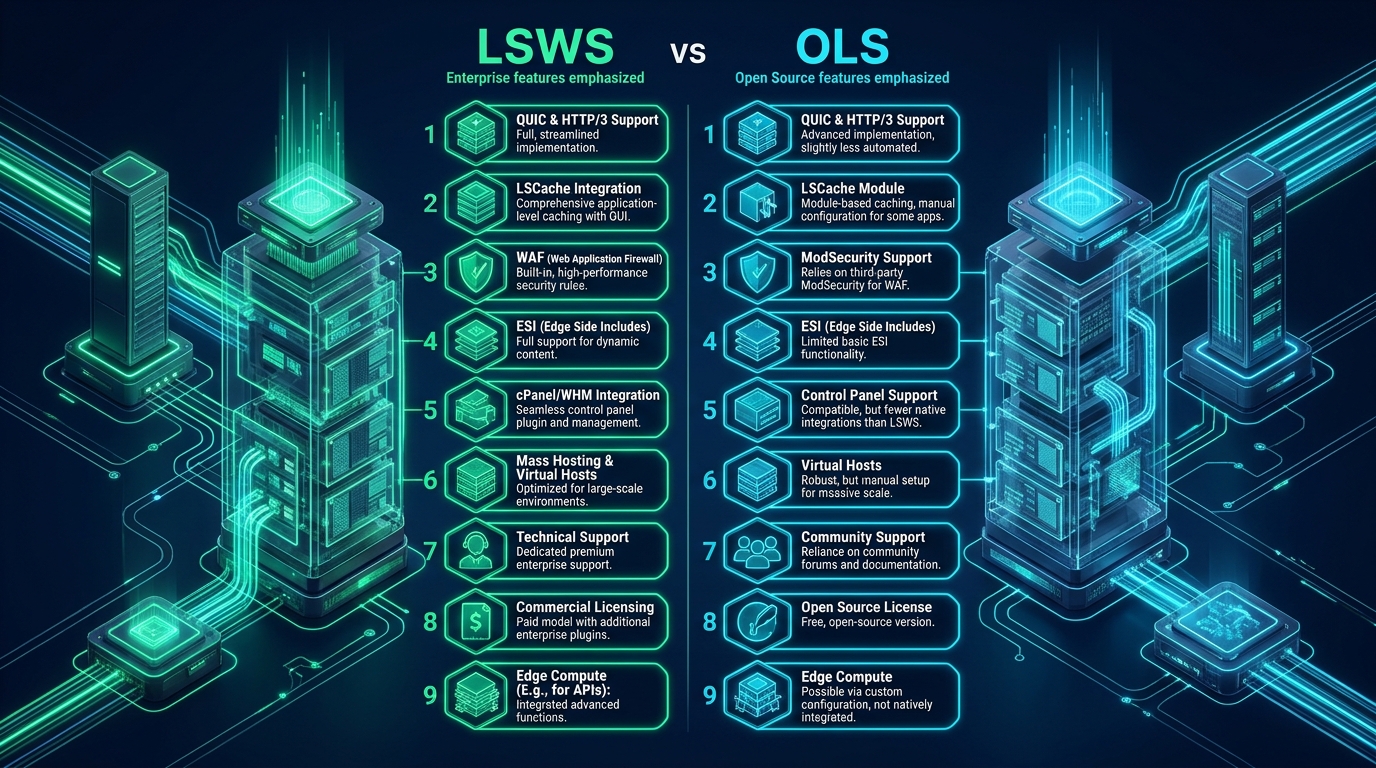

When engineering high-throughput Linux hosting infrastructure, system architects frequently reach for LiteSpeed technologies to escape the concurrency bottlenecks and resource starvation typical of legacy process-per-connection web servers. However, choosing between LiteSpeed Web Server (LSWS) Enterprise and OpenLiteSpeed (OLS) involves far more than a budgetary decision between commercial licensing and open-source software—it dictates your entire runtime architecture, from runtime .htaccess interpretation to multi-tenant kernel isolation and automated control panel orchestration. Whether you are bootstrapping high-density development environments on CpanelFree or engineering bare-metal clusters handling millions of transactional eCommerce queries, understanding the technical divergences between LSWS and OLS is essential for architecting resilient web infrastructure.
LiteSpeed Enterprise vs OpenLiteSpeed: The Core Architectural Distinction
Direct Answer: The definitive difference between LiteSpeed Web Server (LSWS) Enterprise and OpenLiteSpeed (OLS) centers on runtime compatibility: LSWS provides 100% Apache drop-in replacement with real-time .htaccess reloading, native cPanel/WHM integration, and CloudLinux LVE isolation. OLS requires server grace restarts to apply rewrite rules and lacks native multi-tenant panel orchestration.
Both LiteSpeed Enterprise and OpenLiteSpeed share an event-driven, asynchronous I/O core built around non-blocking epoll syscalls, enabling them to service tens of thousands of concurrent connections with negligible CPU context switching and flat memory consumption. However, their internal execution pipelines diverge sharply in how they handle configuration parsing, process privilege separation, caching granularity, and security filtering. While OpenLiteSpeed was designed primarily as a lightning-fast application delivery engine for dedicated single-tenant workloads and modern containerized microservices, LSWS Enterprise was engineered from the ground up as a carrier-grade, drop-in replacement for Apache HTTP Server across hostile multi-tenant environments.
Architecture Note: The foundational distinction is not raw execution speed of static files—both servers exhibit nearly identical throughput for static media via Linux kernel
sendfile()and epoll loops. The architectural divide lies in dynamic request handling, runtime configuration agility, control panel hooks, and multi-tenant process containment under high load.
Comprehensive Matrix: 9 Critical Architectural Differences
The following comparative matrix contrasts LSWS Enterprise against OpenLiteSpeed across the nine critical dimensions that define enterprise hosting stability, security, and developer operational efficiency:
| Architecture Dimension | OpenLiteSpeed (OLS) Open Source | LiteSpeed Web Server (LSWS) Enterprise |
|---|---|---|
| 1. .htaccess Processing | Static ingestion at startup; requires grace restart on rewrite rule modification | 100% Dynamic runtime parsing; real-time on-the-fly execution without restarts |
| 2. Apache Config Compatibility | Custom config syntax; supports only basic mod_rewrite rules inside .htaccess | Full 1:1 drop-in replacement for httpd.conf, ssl.conf, and all directives |
| 3. Control Panel Ecosystem | Native to CyberPanel; standalone CLI/WebAdmin; unsuited for standard cPanel | Seamless integration with cPanel/WHM, Plesk, DirectAdmin, CyberPanel |
| 4. Multi-Tenant OS Isolation | Manual Linux cgroups / namespace jails; no out-of-the-box LVE hook | Native CloudLinux LVE, CageFS, MySQL Governor & CRIU suspension |
| 5. LSCache & ESI Punching | Full public page caching; basic ESI; limited enterprise eCommerce hooks | Enterprise ESI hole-punching for WooCommerce, Magento 2, and Shopware |
| 6. ModSecurity WAF Engine | Basic SecRules supported; requires grace restart on rule modification | Full OWASP CRS / Imunify360 engine with live zero-downtime rule reloading |
| 7. LSPHP SuEXEC & Pooling | Explicit per-vhost application definitions via WebAdmin or config files | Automated ProcessGroup, Daemon & SuEXEC worker management per system user |
| 8. Hardware Crypto Acceleration | Standard OpenSSL / BoringSSL userland crypto engine | Intel QuickAssist (QAT) asynchronous hardware TLS offloading |
| 9. Licensing & Concurrency Sizing | Free open source (GPLv3); unlimited CPU cores; community forum support | Core-tiered commercial licensing (Free Starter to Extreme); 24/7 SLA |
Deep Dive: The 9 Architectural Divergences Explained
1. Dynamic .htaccess Interpretation vs Static Startup Ingestion
The single most consequential operational divergence for web hosting platforms is how each server handles decentralized .htaccess files. In Apache and LSWS Enterprise, the web server inspects directories on every incoming request (or leverages an in-memory directory cache with inode change notifications). When a WordPress plugin like Rank Math, WooCommerce, or WP Super Cache modifies rewrite rules, LSWS applies them instantaneously without restarting the daemon.
OpenLiteSpeed, conversely, treats .htaccess as a static configuration file that is read into memory only during initial server boot. When rewrite rules change inside an application root, OLS ignores them completely until the server receives a graceful restart signal (systemctl reload openlitespeed or killall -HUP openlitespeed). In shared or reseller hosting environments where hundreds of developers modify permalinks, security headers, and rewrite directives daily, OLS creates massive administrative friction or requires cron-based watcher scripts.
2. Apache Configuration File Compatibility
LiteSpeed Enterprise was engineered specifically as an in-place drop-in binary replacement for Apache’s httpd daemon. It directly loads and parses Apache’s httpd.conf, VirtualHost blocks, include hierarchies, and directives like DirectoryIndex, AllowOverride, and Require. Switching an existing Apache server to LSWS requires no restructuring of virtual host directives.
OpenLiteSpeed uses a proprietary configuration dialect stored in plain-text files (httpd_config.conf and individual virtual host configs under /usr/local/lsws/conf/vhosts/). OLS cannot parse an Apache configuration hierarchy. Furthermore, OLS only interprets Apache RewriteRule directives inside .htaccess; directives such as Header set, php_value, or AuthType are discarded silently.
3. Control Panel Ecosystem & Orchestration
The commercial web hosting industry is built around automated control panels. LSWS provides deep, native plug-in integrations for cPanel & WHM, DirectAdmin, Plesk, and CyberPanel. Within cPanel/WHM, the official LiteSpeed plugin allows sysadmins to switch back and forth between Apache and LiteSpeed with one click, rebuild PHP handlers automatically, and manage license keys seamlessly.
OpenLiteSpeed is the default engine powering CyberPanel and can be deployed via custom Docker or standalone templates, but it has zero native integration with standard cPanel/WHM or Plesk. Attempting to run OLS beneath cPanel breaks automated virtual host generation, EasyApache profiling, and per-user SSL certificates.
4. Multi-Tenant OS Isolation: CloudLinux LVE & CageFS
In high-density shared hosting, preventing “noisy neighbor” syndrome and stopping malicious local privilege escalation is non-negotiable. LSWS Enterprise features direct kernel integration with CloudLinux OS. When a PHP worker spawns, LSWS natively places the process inside the client’s allocated Lightweight Virtual Environment (LVE), enforcing strict CPU cores, RAM allocations, IOPS ceilings, and concurrent process caps via kernel hooks. It also seamlessly supports CageFS, jailing each user inside a virtualized, isolated filesystem.
OpenLiteSpeed cannot talk to the CloudLinux LVE kernel module. If a tenant hosted under OLS triggers an unoptimized database query or infinite loop, OLS cannot enforce per-user OS-level quotas. Isolation under OLS must be assembled manually via Linux cgroups v2, systemd slices, or container runtimes like Docker and Podman.
5. Advanced Caching Architecture & Dynamic Edge Side Includes (ESI)
While both LSWS and OLS communicate with the official LiteSpeed Cache (LSCache) plugins for WordPress, Joomla, and OpenCart, LSWS Enterprise delivers enterprise-grade dynamic hole-punching via Edge Side Includes (ESI). ESI enables a web server to cache an entire eCommerce product page for 24 hours while dynamically injecting the customer’s shopping cart widget, user profile badge, and CSRF nonces at the server edge in sub-millisecond execution loops.
OpenLiteSpeed supports basic ESI hole-punching for simple WordPress blogs, but lacks the sophisticated multi-tiered caching tags, automated stale cache delivery during backend regenerations, and enterprise eCommerce modules needed for massive Magento 2 or Shopware catalog stores.
Production Benchmark: In enterprise WooCommerce stress testing under 1,000 concurrent cart updates, LSWS Enterprise with full ESI delivered an average TTFB of 18ms with 98.4% cache hit ratios on public fragments. OLS required repeated full-page bypasses on customized user endpoints, spiking backend PHP execution time to 340ms.
6. Web Application Firewall (ModSecurity) Engine
Enterprise edge security demands real-time defense against zero-day CVE exploits, SQL injections, and cross-site scripting attacks. LSWS Enterprise incorporates a high-performance ModSecurity engine fully compatible with OWASP ModSecurity Core Rule Set (CRS), Comodo WAF, and Imunify360. Critically, LSWS supports live, in-memory rule compilation. When Imunify360 pushes updated WAF rules, LSWS reloads them instantly without severing active HTTP/3 streams or dropping keep-alive connections.
OpenLiteSpeed includes a built-in ModSecurity engine, but its implementation has architectural constraints. Complex transformation operators (t:urlDecodeUni, t:base64Decode) can degrade throughput, and any modification to rule files requires an explicit grace restart of the OLS server process.
7. Process Management: LSPHP SuEXEC & Daemon Pooling
Both servers utilize LiteSpeed Server Application Protocol (LSPHP), an optimized FastCGI alternative that communicates over UNIX domain sockets with up to 40% lower overhead than standard PHP-FPM. However, their worker management models differ substantially:
- LSWS Enterprise: Features automated SuEXEC Worker Mode and ProcessGroup Mode. When a request hits a specific vhost, LSWS dynamically forks the parent LSPHP process under the target Linux system user UID/GID. It shares opcode cache memory across isolated user pools, dynamically reaps idle child processes, and maintains persistent database connections without manual worker definitions.
- OpenLiteSpeed: Requires explicit configuration of External Applications per virtual host or globally in WebAdmin. While it supports SuEXEC, each external application pool must be statically bounded, increasing administrative overhead when scaling to hundreds of discrete vhosts.
8. Hardware-Accelerated Transport & TLS Engine
Both platforms lead the industry in early adoption of HTTP/3 and QUIC protocols through the open-source LSQUIC library. However, LSWS Enterprise extends this with enterprise hardware offloading capabilities. It integrates seamlessly with Intel QuickAssist Technology (QAT), enabling asynchronous offloading of asymmetric TLS handshakes (RSA/ECDSA) and symmetric data encryption to dedicated PCIe acceleration hardware.
OpenLiteSpeed utilizes standard userland OpenSSL or BoringSSL crypto libraries. While blazingly fast on modern AVX-512 capable CPUs, it cannot route crypto computations directly to specialized accelerator chips during massive DDoS bursts or flash traffic surges.
9. Licensing Models, Core Sizing & Support SLAs
The financial and organizational considerations between the two platforms reflect their intended deployment scopes:
- OpenLiteSpeed: 100% Free and Open Source licensed under the GNU General Public License v3 (GPLv3). There are zero artificial limits on the number of CPU cores, worker processes, RAM utilization, or hosted domains. Support is community-driven via forums and Slack channels.
- LSWS Enterprise: Commercial proprietary software tiered strictly by CPU cores and RAM limits. While a “Free Starter” license exists for 1 worker process and up to 2 GB RAM (for 1 domain), production licenses scale from “Site Owner” (5 domains, 1 worker) up to “Web Host Elite” and “Extreme” (unlimited domains and workers). Enterprise licenses include 24/7 commercial vendor SLA support, hot-patch security guarantees, and live updates.
For mission-critical production hosting where uptime guarantees, automated kernel patching, and dedicated enterprise compute are paramount, hosting teams rely on MeraHost Enterprise Cloud. Built on enterprise NVMe storage arrays and fully licensed LiteSpeed Web Server tiers, it provides uninterrupted production performance backed by predictable pricing.
Production Kernel Tuning for LiteSpeed & OpenLiteSpeed Workloads
Regardless of whether you deploy LSWS Enterprise or OpenLiteSpeed, high-concurrency web servers will saturate standard Linux kernel defaults. The following sysctl configuration tunes network socket backlogs, UDP buffers for HTTP/3 QUIC, and ephemeral port ranges on Ubuntu 24.04 / 22.04 LTS and RHEL-derivative enterprise distributions.
# /etc/sysctl.d/99-litespeed-enterprise.conf
# Advanced Kernel Networking & Socket Optimization for LSWS & OLS

# Increase maximum file descriptors and system-wide file table limits
fs.file-max = 2097152

# Socket backlog limits for high-volume connection handshakes
net.core.somaxconn = 65535
net.ipv4.tcp_max_syn_backlog = 65535
net.core.netdev_max_backlog = 65535

# Optimize UDP memory buffers for high-throughput HTTP/3 (QUIC)
net.core.rmem_default = 262144
net.core.rmem_max = 16777216
net.core.wmem_default = 262144
net.core.wmem_max = 16777216
net.ipv4.udp_rmem_min = 16384
net.ipv4.udp_wmem_min = 16384

# Expand TCP read and write buffer windows
net.ipv4.tcp_rmem = 4096 87380 16777216
net.ipv4.tcp_wmem = 4096 65536 16777216

# Enable TCP BBR Congestion Control
net.core.default_qdisc = fq
net.ipv4.tcp_congestion_control = bbr

# Reuse TIME_WAIT sockets for outgoing connections
net.ipv4.tcp_tw_reuse = 1
net.ipv4.tcp_fin_timeout = 15

# Expand dynamic ephemeral port allocation range
net.ipv4.ip_local_port_range = 10240 65535

# Virtual memory optimization to prevent aggressive swap thrashing
vm.swappiness = 10
vm.dirty_ratio = 15
vm.dirty_background_ratio = 5
Apply these parameters immediately using sysctl -p /etc/sysctl.d/99-litespeed-enterprise.conf.
Production Configuration: OpenLiteSpeed Graceful Reload Automation
Because OpenLiteSpeed does not dynamically detect changes inside web application .htaccess files, production sysadmins running WordPress or Laravel on OLS must deploy automated file-monitoring scripts to trigger graceful restarts whenever rewrite rules update. The following systemd path monitor and service pair automatically executes an OLS reload whenever an .htaccess file is modified inside document roots.
# /etc/systemd/system/ols-htaccess-reload.path
# Monitor WordPress document roots for .htaccess modifications
[Unit]
Description=Monitor .htaccess changes for OpenLiteSpeed Reload
After=network.target

[Path]
PathModified=/var/www/vhosts/example.com/html/.htaccess
Unit=ols-htaccess-reload.service

[Install]
WantedBy=multi-user.target
Next, define the corresponding service unit that securely sends the grace restart signal without interrupting in-flight client connections:
# /etc/systemd/system/ols-htaccess-reload.service
# Triggers zero-downtime graceful reload on OpenLiteSpeed
[Unit]
Description=Trigger OpenLiteSpeed Graceful Reload
After=network.target

[Service]
Type=oneshot
ExecStart=/usr/local/lsws/bin/lswsctrl restart

[Install]
WantedBy=multi-user.target
Enable and start the path watcher with systemctl daemon-reload && systemctl enable --now ols-htaccess-reload.path. In LSWS Enterprise, this entire automation layer is unnecessary because runtime parsing occurs natively inside the event loop.
Production Configuration: Enterprise LSPHP External Application Tuning
To achieve maximum concurrency and prevent PHP process starvation, tune the LSPHP external application settings. Below is the production XML snippet used inside LiteSpeed configuration templates for high-load PHP 8.3 execution pools:
<!-- /usr/local/lsws/conf/templates/cpanel.xml -->
<!-- Tuned LSPHP ProcessGroup External Application for Enterprise Web Hosting -->
<extProcessor>
  <type>lsapi</type>
  <name>lsphp83</name>
  <address>uds://tmp/lshttpd/lsphp83.sock</address>
  <maxConns>250</maxConns>
  <env>PHP_LSAPI_CHILDREN=250</env>
  <env>PHP_LSAPI_MAX_REQUESTS=10000</env>
  <initTimeout>60</initTimeout>
  <retryTimeout>0</retryTimeout>
  <persistConn>1</persistConn>
  <respBuffer>0</respBuffer>
  <autoStart>2</autoStart>
  <path>/usr/local/lsws/lsphp83/bin/lsphp</path>
  <backlog>4096</backlog>
  <runOnStartUp>1</runOnStartUp>
  <extMaxIdleTime>300</extMaxIdleTime>
  <priority>0</priority>
  <memSoftLimit>2047M</memSoftLimit>
  <memHardLimit>2047M</memHardLimit>
  <procSoftLimit>400</procSoftLimit>
  <procHardLimit>400</procHardLimit>
</extProcessor>
Strategic Selection Framework: Which Engine Should You Choose?
Selecting between LSWS Enterprise and OpenLiteSpeed comes down to the operational topology of your hosting environment:
- Choose OpenLiteSpeed (OLS) if: You are deploying dedicated single-tenant virtual private servers, containerized microservices, or headless application clusters. If you operate via CyberPanel or Docker, control your codebase entirely, and do not rely on dynamic
.htaccessupdates from non-technical clients, OLS provides enterprise-grade HTTP/3 and LSCache performance without software licensing fees. - Choose LiteSpeed Web Server (LSWS) Enterprise if: You operate commercial shared hosting, reseller hosting, or multi-tenant enterprise platforms. If you run cPanel/WHM, Plesk, or DirectAdmin, require CloudLinux LVE resource isolation, host complex WooCommerce/Magento 2 stores demanding ESI fragment caching, or must provide 100% Apache drop-in compatibility with real-time
.htaccessparsing, LSWS Enterprise is the only viable production solution.
Frequently Asked Questions
Can OpenLiteSpeed read .htaccess rewrite rules dynamically without a restart?
No. OpenLiteSpeed parses .htaccess rewrite rules only during daemon startup. If an application or plugin modifies .htaccess rewrite rules, you must execute a graceful reload (via systemctl reload openlitespeed or lswsctrl restart) for the changes to take effect. LiteSpeed Enterprise, on the other hand, loads and applies .htaccess changes dynamically on every request without requiring any server reload.
Can I replace Apache with OpenLiteSpeed on cPanel/WHM?
No, cPanel/WHM does not officially support OpenLiteSpeed as a drop-in web server. OpenLiteSpeed uses a completely different configuration file format and does not interpret Apache httpd.conf or virtual host directives. To replace Apache seamlessly within cPanel/WHM, you must use LiteSpeed Web Server (LSWS) Enterprise, which integrates natively via the official LiteSpeed WHM plugin.
Does the LiteSpeed Cache (LSCache) WordPress plugin work on both LSWS and OLS?
Yes, the official LSCache plugin for WordPress communicates seamlessly with both LSWS and OpenLiteSpeed. Both support full-page caching, CSS/JS minification, and image optimization. However, LSWS Enterprise provides superior Edge Side Includes (ESI) dynamic caching for eCommerce carts and user account bars, as well as automatic tag purging across multi-server clusters.
Is OpenLiteSpeed faster than LiteSpeed Enterprise for WordPress?
For static pages and cached WordPress blog posts, both LSWS and OLS deliver virtually identical raw performance because they utilize the exact same event-driven I/O engine and LSPHP protocol. However, on complex dynamic sites like WooCommerce with personalized carts, LSWS Enterprise delivers significantly faster response times due to its advanced ESI engine, optimized SuEXEC worker pooling, and zero-restart configuration handling.
Deploy Enterprise-Grade Production Infrastructure
Need guaranteed performance with zero price hikes? Host mission-critical workloads on MeraHost with pure Enterprise NVMe, LiteSpeed Web Server, and Same Renewal Price, Always (starting at ₹99/mo).