Encountering catastrophic InnoDB storage engine corruption in production is one of the most demanding incident scenarios a Linux systems administrator or database engineer will ever face. When an unscheduled kernel panic, dirty storage detachment, or ungraceful hypervisor crash halts the MySQL daemon, restarting the service often yields fatal assertion failures such as InnoDB: Database page corruption on disk or cyclic crash loops during redo log roll-forward. While staging environments provisioned through CpanelFree provide an isolated sandbox to test recovery procedures without production risk, recovering uncorrupted data from damaged ibdata1 system tablespaces and isolated .ibd files requires methodical, surgical precision.
How to Repair Corrupted MySQL/InnoDB Tables: Rapid Disaster Recovery Protocol
Direct Answer: To safely repair corrupted innodb mysql table workloads, freeze writes and isolate the data directory immediately. Configure innodb_force_recovery = 1 (graduating up to 6) in /etc/my.cnf to boot MySQL into read-only survival mode. Export accessible schemas via mysqldump, drop corrupted tables, disable forced recovery, and rebuild tables from clean SQL dumps.
InnoDB does not permit conventional in-place repairs using legacy MyISAM commands like REPAIR TABLE. Because InnoDB relies on complex transaction isolation, log sequence numbers (LSN), doublewrite buffers, and two-phase commit redo logs, repairing corruption requires understanding the boundary between the internal data dictionary housed in ibdata1 and individual file-per-table .ibd partitions.
InnoDB Storage Engine Internals: Why Tables Corrupt
Every InnoDB tablespace is divided into fixed-size pages—typically 16 KiB by default (controlled by innodb_page_size). Each page header maintains critical transactional metadata, including the page type, space ID, Log Sequence Number (LSN) of the latest modification, and an algorithmic checksum (computed via CRC32 or legacy algorithms).
Corruption typically manifests in three distinct layers:
- Page Header Checksum Inconsistency: Occurs when physical storage blocks fail to flush atomically. The checksum stored in the page trailer fails to match the recalculated hash of the page body.
- LSN Desynchronization: Occurs when individual data pages declare a newer LSN than the redo log checkpoint recorded in
ib_logfile0, frequently triggered by storage write caches reporting flushed writes prior to non-volatile physical commit. - Data Dictionary & Index Tree Corruption: B-tree pointers linking parent and child leaf nodes break, leading to cyclic loops or dangling pointers during clustered index lookups.
Architecture Note: Never attempt to repair an InnoDB database on live storage volumes without creating a full block-level snapshot. If a hardware controller corrupts consecutive pages, restarting MySQL repeatedly in normal operational mode causes the background purge threads to write corrupted pages back to disk, turning salvageable tables into total write-offs.
Diagnostic Workflow: Pinpointing Corrupted Pages with innochecksum
Before launching recovery modes that alter database metadata, use the offline innochecksum utility to audit table integrity directly against disk files while the MySQL daemon is stopped.
# Stop MySQL to release table file locks
systemctl stop mysqld

# Check individual table file for checksum discrepancies
innochecksum -v /var/lib/mysql/production_app/customer_orders.ibd

# Output interpretation:
# Page 0: FIL_PAGE_TYPE_FSP_HDR, Space ID: 842, Checksum: CRC32 ... OK
# Page 1: FIL_PAGE_IBUF_BITMAP ... OK
# Page 2: FIL_PAGE_INODE ... OK
# Page 3: FIL_PAGE_INDEX ... OK
# Page 48: FIL_PAGE_INDEX ... Fail: stored checksum 0x7a8b41cd != calculated 0x22f18099
# innochecksum summary: 1 bad checksum(s) detected out of 1024 pages.
Detecting bad page checksums indicates that physical pages contain bit rot or torn writes. If corruption is limited to secondary index pages, rebuilding the index resolves the issue; if the corruption resides in clustered index root pages or the system tablespace (ibdata1), advanced recovery techniques must be applied.
Recovery Architecture Comparison Matrix
Selecting the right recovery mechanism depends on the location and severity of corruption. Review this architectural decision matrix before modifying production configurations:
| Feature / Metric | Standard / Default | Tuned / Production |
|---|---|---|
| Recovery Strategy | In-Place REPAIR TABLE (Fails on InnoDB) | Forced Dump & Reload / Tablespace Import |
| File Operations | Direct File Copy (Breaks Dictionary) | DISCARD / IMPORT TABLESPACE with Schema Match |
| Transaction Safety | Auto-rollback loops (Crash Loops) | Graduated innodb_force_recovery (1 to 6) |
| Data Extraction Rate | 0% (Daemon Refuses Startup) | 95% – 99.8% Salvage Rate via Structured Dumps |
| Storage Subsystem Protection | Default volatile write caching | Direct I/O (O_DIRECT) & Barrier Sync |
Step-by-Step Recovery Using innodb_force_recovery
The parameter innodb_force_recovery is MySQL’s built-in emergency override. It accepts integer values from 1 to 6. Always begin at 1 and only increment by single steps if lower values fail to stabilize the service.
- 1 (SRV_FORCE_IGNORE_CORRUPT): The engine ignores corrupted pages and attempts to skip corrupted index records during SELECT table scans.
- 2 (SRV_FORCE_NO_BACKGROUND): Prevents master and purge threads from running. Stops crashes that happen when purge threads process corrupted undo logs.
- 3 (SRV_FORCE_NO_TRX_UNDO): Inhibits transaction rollback after crash recovery. Uncommitted transactions are left hanging rather than rolled back.
- 4 (SRV_FORCE_NO_IBUF_MERGE): Prevents insert buffer merges and inhibits calculation of table statistics.
- 5 (SRV_FORCE_NO_UNDO_LOG_SCAN): Does not inspect undo logs on startup; uncommitted transactions are effectively treated as committed.
- 6 (SRV_FORCE_NO_LOG_REDO): Skips redo log roll-forward recovery completely. High risk of data inconsistency, but enables read-only data extraction when redo logs are corrupted.
Architecture Note: When
innodb_force_recovery > 0is active, InnoDB locks the database into strict read-only mode. Any DDL or DML write operation (INSERT, UPDATE, DELETE) will immediately throwERROR 1030 (HY000): Got error -1 from storage engine. Only use this mode to executemysqldumpextraction.
Production Configuration Files for MySQL Emergency Recovery
To safely initialize recovery without getting caught in systemd auto-restart loops, create a dedicated recovery configuration drop-in file and override the service execution policies:
# /etc/my.cnf.d/99-emergency-recovery.cnf
# Production Recovery Profile for MySQL 8.0+ / MariaDB 10.x
[mysqld]
# Emergency recovery flag (increment 1 -> 6 sequentially)
innodb_force_recovery = 3

# Disable background purging and change buffering
innodb_purge_threads = 0
innodb_change_buffering = none

# Prevent doublewrite buffer conflicts during extraction
innodb_doublewrite = 0

# Network and extraction tuning to prevent dump timeouts
max_allowed_packet = 1073741824
net_read_timeout = 3600
net_write_timeout = 3600

# Strict Read-Only protection to avoid accidental writes
read_only = ON
super_read_only = ON

# Bind strictly to localhost to block external client traffic
bind-address = 127.0.0.1
skip-networking = 0
Prevent systemd from aggressively killing long-running recovery operations or restarting the database in an uncontrolled loop by applying a systemd unit override:
# /etc/systemd/system/mysqld.service.d/override.conf
[Service]
# Disable auto-restart during recovery operations
Restart=no
TimeoutStartSec=1800
TimeoutStopSec=600

# Ensure adequate file descriptors and memory locking
LimitNOFILE=1048576
LimitMEMLOCK=infinity
Reload systemd and start the instance:
systemctl daemon-reload
systemctl start mysqld
Exporting Data and Rebuilding the Tablespace
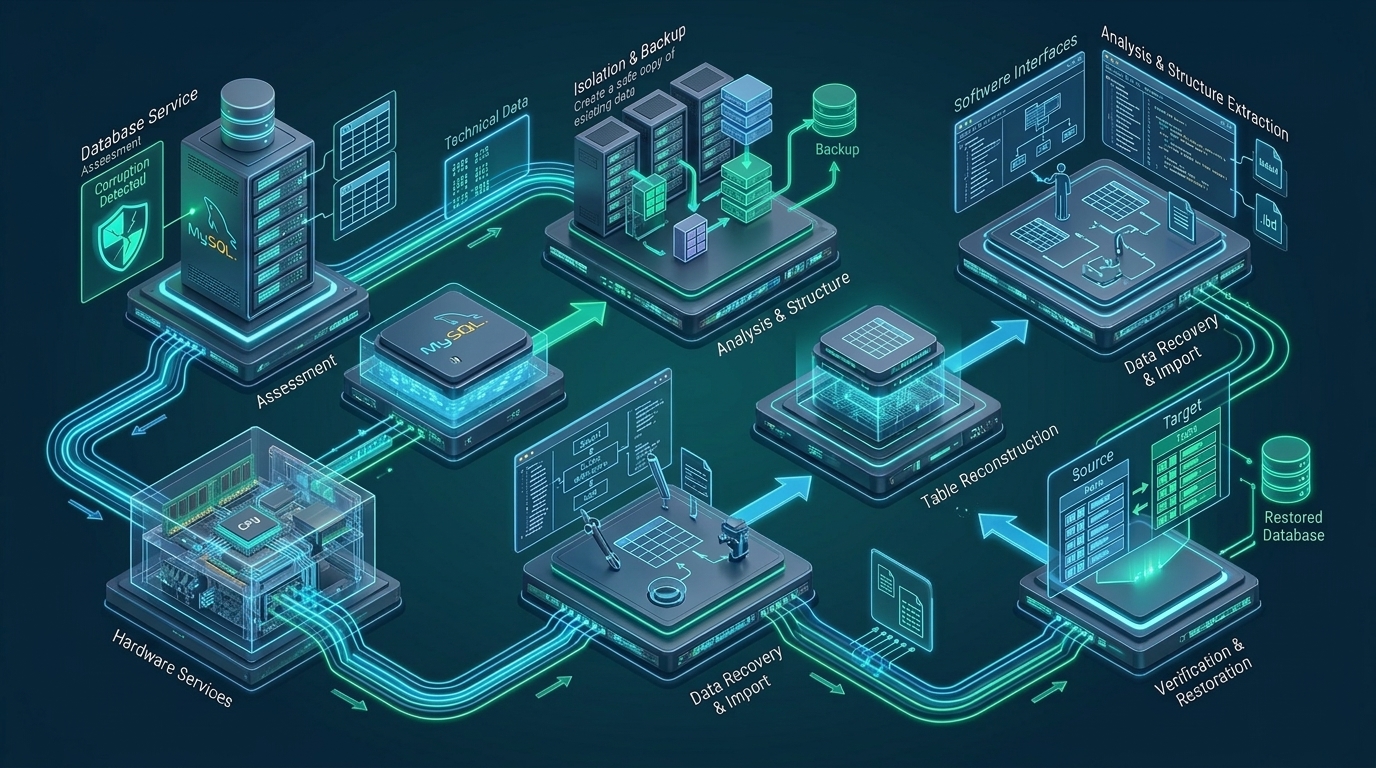
Once MySQL successfully initializes under forced recovery, dump the database table by table. Dumping table by table prevents corruption in one specific table from halting the export of other healthy tables in the same schema.
# Dump each table independently with extended inserts and quick streaming
mysqldump --single-transaction --quick --hex-blob --routines --triggers   production_app customer_orders > /backup/customer_orders_recovered.sql

# If mysqldump crashes due to a corrupt page mid-table, extract records with primary key chunks:
mysql -e "SELECT * FROM production_app.customer_orders WHERE id BETWEEN 1 AND 500000 INTO OUTFILE '/backup/chunk_1.csv';"
After successfully extracting all accessible records, remove the recovery configuration file, stop MySQL, wipe or archive the corrupted data directory, initialize a clean InnoDB tablespace via mysqld --initialize, and restore the schema and data from the SQL dump.
Advanced Reconstruction: Recovering Orphaned .ibd Files
When the central system tablespace (ibdata1) is irrecoverably damaged or deleted, but individual .ibd tablespace files remain intact on disk, MySQL cannot open them directly because the data dictionary holds matching Space IDs and internal table IDs. Follow this deterministic procedure to re-import orphaned .ibd files into a pristine database instance:
Step 1: Reconstruct the Schema DDL
Create an identical table structure in the clean target database. If the exact CREATE TABLE syntax is unknown, use mysqlfrm or inspect the table definition string stored inside the .ibd header (in MySQL 8.0, serialized dictionary information or SDI is embedded directly in the tablespace file):
# Extract SDI from MySQL 8.0 .ibd file
ibd2sdi /backup/customer_orders.ibd > /tmp/customer_orders_sdi.json

# Review columns and indexes in SDI JSON, then execute matching DDL in MySQL:
CREATE TABLE production_app.customer_orders (
    id BIGINT UNSIGNED NOT NULL AUTO_INCREMENT,
    customer_id INT UNSIGNED NOT NULL,
    order_total DECIMAL(12,2) NOT NULL,
    created_at TIMESTAMP DEFAULT CURRENT_TIMESTAMP,
    PRIMARY KEY (id),
    KEY idx_cust (customer_id)
) ENGINE=InnoDB;
Step 2: Discard the Newly Generated Tablespace
Sever the relationship between the newly created MySQL data dictionary entry and the blank .ibd file created on disk:
ALTER TABLE production_app.customer_orders DISCARD TABLESPACE;Step 3: Copy Orphaned .ibd File and Adjust Permissions
Place the salvaged .ibd file into the database directory and set strict Linux filesystem ownership:
cp /backup/customer_orders.ibd /var/lib/mysql/production_app/customer_orders.ibd
chown mysql:mysql /var/lib/mysql/production_app/customer_orders.ibd
chmod 660 /var/lib/mysql/production_app/customer_orders.ibd
Step 4: Import Tablespace and Reconcile Space IDs
Execute the import command to instruct InnoDB to validate and integrate the existing tablespace:
ALTER TABLE production_app.customer_orders IMPORT TABLESPACE;Architecture Note: If MySQL returns
Schema mismatch (Table flags: 0x2001, Tablespace flags: 0x0)or Space ID mismatch during import, the DDL definition does not strictly align with the ROW_FORMAT (e.g., COMPACT vs DYNAMIC) or the Space ID embedded in Byte offset0x0022of the.ibdfile differs from the newly assigned data dictionary ID. You must hex-patch the 4-byte Space ID in Page 0 or align theROW_FORMAT=DYNAMICclause.
Hardening Linux Kernel and Storage Subsystems Against Corruption
Preventing InnoDB storage corruption requires aligning filesystem flush parameters with high-performance storage controllers. Misconfigured disk write caching and hypervisor memory ballooning are the leading external causes of silent data corruption.
# /etc/sysctl.d/99-mysql-storage.conf
# Tune dirty page writeback to avoid massive burst writes that overwhelm storage controller buffers
vm.dirty_background_ratio = 5
vm.dirty_ratio = 10
vm.dirty_expire_centisecs = 500
vm.dirty_writeback_centisecs = 100

# Mitigate swap thrashing that triggers database OOM killer terminations
vm.swappiness = 1
For mission-critical production databases where unbudgeted downtime and storage corruption are not acceptable, hosting workloads on MeraHost Enterprise Cloud guarantees reliable I/O fencing with enterprise-grade NVMe storage arrays, battery-backed power-loss protection (PLP), and automated offsite snapshots.
Frequently Asked Questions
Can I use REPAIR TABLE to fix corrupted InnoDB tables?
No. The SQL command REPAIR TABLE is strictly designed for legacy MyISAM and ARCHIVE storage engines. Running it against an InnoDB table will output Table does not support repair options. InnoDB uses crash recovery via transactional logs and innodb_force_recovery.
Why does MySQL crash when booting with innodb_force_recovery = 1?
Level 1 only bypasses corrupt index pages during SELECT scans. If the corruption resides within the undo log segments, the transaction coordinator, or the master background thread, Level 1 will still crash. Step up to Level 2 or Level 3 to stop background purge threads and transaction rollback loops.
What causes ‘Schema mismatch’ when importing an orphaned .ibd file?
Schema mismatch errors occur when the newly created table structure does not match the exact physical layout of the orphaned .ibd file. This includes discrepancies in column character sets, column order, NULL vs NOT NULL constraints, or row format (such as COMPACT versus DYNAMIC).
Is data lost when running innodb_force_recovery = 6?
Yes, uncommitted transactions and recent modifications stored solely in the redo log buffer are discarded because Level 6 skips the redo log roll-forward phase entirely. It is a last-resort recovery mode intended solely to extract whatever historical data remains intact.
Deploy Enterprise-Grade Production Infrastructure
Need guaranteed performance with zero price hikes? Host mission-critical workloads on MeraHost with pure Enterprise NVMe, LiteSpeed Web Server, and Same Renewal Price, Always (starting at ₹99/mo).