Senior Linux systems administrators and DevOps engineers overseeing fleet migrations routinely face an inflexible operational hazard: migrating high-density multi-tenant environments through the WHM graphical Transfer Tool frequently triggers HTTP proxy timeouts, browser session drops, and uncontrolled disk space exhaustion on root partitions. When orchestrating staging deployments on CpanelFree or transferring mission-critical database workloads across high-speed networks, relying on manual web interfaces introduces silent backup truncation and uncoordinated database state drift. Harnessing WHM API 1 (whmapi1) alongside direct command-line streaming pipelines decouples migration tasks from GUI lifecycles, enabling non-blocking background transfers, real-time progress telemetry, and zero-storage footprint pipeline restoration.
Automating cPanel Account Transfers: The CLI and WHM API 1 Engineering Standard
whmapi1 enqueue_transfer_item) or direct SSH streaming (/scripts/pkgacct piped to /scripts/restorepkg). This bypasses browser timeouts, prevents local disk staging exhaustion, supports multi-threaded parallel transport, and guarantees consistent database restoration with zero operational downtime.
Architectural Deconstruction: WHM Transfer Engine vs. Low-Level Pipe Streaming
To architect a resilient migration pipeline, engineers must differentiate between the two distinct programmatic mechanisms provided within the cPanel/WHM ecosystem: the asynchronous WHM API 1 Transfer Engine and the direct POSIX Shell Pipe Architecture. Both approaches bypass the brittle HTTP request-response cycle of the WHM web interface, yet they serve fundamentally different operational constraints.
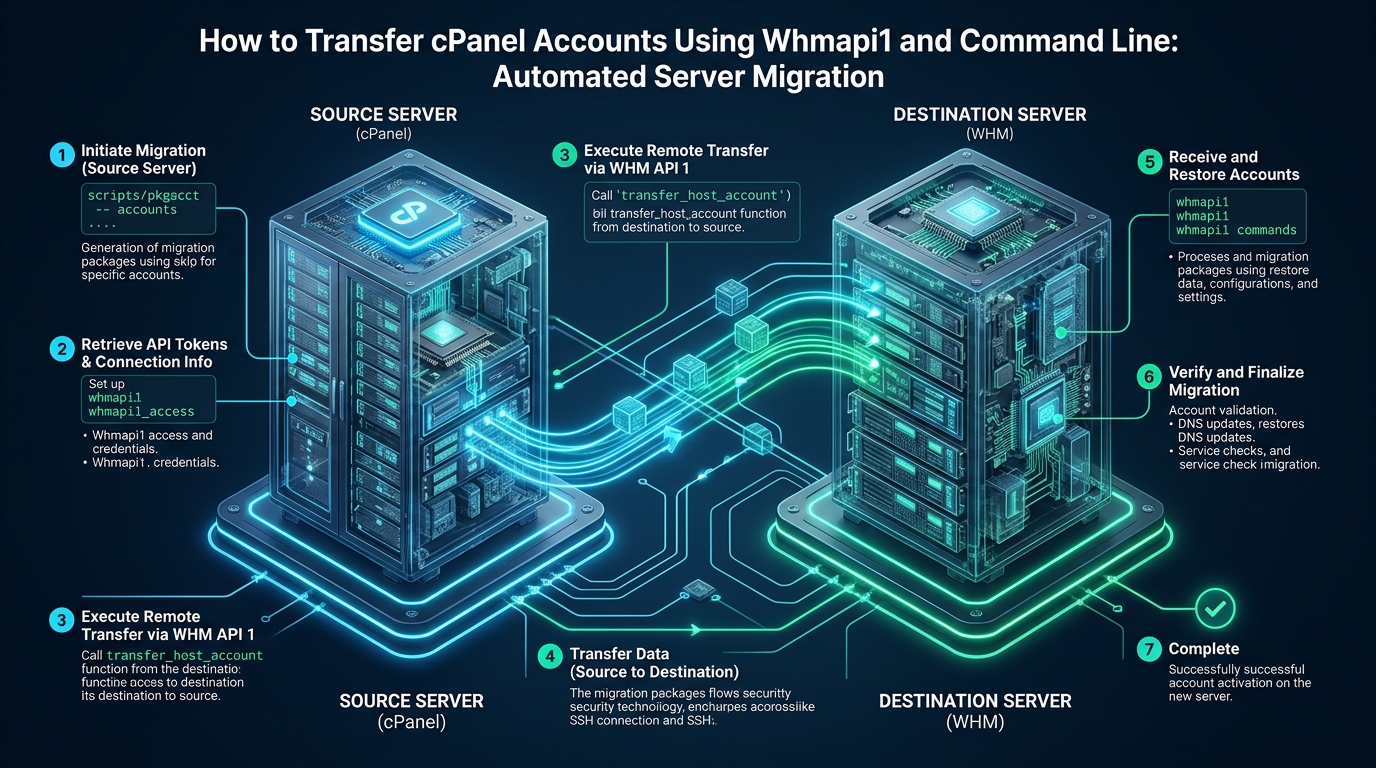
The WHM API 1 transfer subsystem operates as an asynchronous state machine managed by the background daemon queueprocd and internal perl modules located in /usr/local/cpanel/Cpanel/Transfer/. When an engineer dispatches a migration command via whmapi1 create_transfer_session and whmapi1 enqueue_transfer_item, the following deterministic workflow executes:
- Transfer Session Provisioning: The destination server initializes a cryptographically unique session ID stored in SQLite at
/var/cpanel/transfer_sessions/{session_id}.db, recording source credentials, remote SSH keys, and selected transfer modules. - Remote Agent Invocation: The destination server authenticates to the source server over SSH using public-key cryptography or an API token, spawning an isolated remote packaging agent (
/scripts/pkgacct) that operates under a lower process priority (nice -n 19). - Asynchronous Transport & Checkpointing: Payload archives are chunked and streamed across the network, tracked by byte-level status checkpoints. Operators query
whmapi1 get_transfer_session_stateto extract JSON-formatted progress telemetry without maintaining an open terminal connection. - Atomic Account Restoration: Upon receipt, the destination daemon triggers
/scripts/restorepkg, systematically reconstituting user quotas, DNS zone files, Apache vhosts, SSL certificates, PostgreSQL/MySQL relational tables, and Maildir hierarchies before executing post-restore hook scripts.
While WHM API 1 provides robust cataloging and centralized monitoring, it enforces local archive staging: the source server must write a full cpmove-{user}.tar.gz archive to disk before or during transfer. In high-density environments where source partitions are at 90%+ capacity, this local staging triggers catastrophic disk full errors (No space left on device). For storage-constrained hypervisors, the direct SSH Streaming Pipeline provides the superior alternative: executing /scripts/pkgacct directly to stdout and piping the unbuffered byte stream across an encrypted SSH tunnel directly into /scripts/restorepkg --stdin on the target server. This completely eliminates intermediate disk allocation on both hosts.
Migration Architecture Matrix: GUI vs. WHM API 1 vs. Direct SSH Streaming
Evaluating the trade-offs between transport methodologies ensures that systems engineers deploy the appropriate automation strategy based on fleet scale, storage headroom, and bandwidth availability:
| Engineering Metric | WHM Web Transfer Tool | whmapi1 REST / CLI | SSH Stream Pipe (pkgacct|restore) |
|---|---|---|---|
| Transport Execution | Web Browser HTTP/2 Session | Asynchronous queueprocd Daemon | Direct POSIX File Descriptor Pipe |
| Source Disk Overhead | 100% of Account Size (cpmove archive) | 100% of Account Size (staged) | 0 MB (Streamed directly via stdout) |
| Destination Disk Overhead | 100% Account Size until uncompressed | 100% Account Size until restored | 0 MB Temporary Files (Direct unpacking) |
| Session Disconnect Risk | High (Browser tab closure breaks monitoring) | Zero (Fully decoupled session ID) | Zero (When wrapped in tmux/systemd) |
| Compression Efficiency | Standard single-threaded gzip | Standard gzip or uncompressed | Multi-core Pigz / Zstandard integration |
| Parallel Batch Scaling | Manual checkbox selection (max 5-10) | Configurable concurrency (max_workers) | Arbitrary GNU Parallel concurrency |
Production Configuration Files and High-Throughput Kernel Tuning
Achieving line-rate migration throughput across 1Gbps or 10Gbps inter-datacenter links requires optimizing the Linux kernel network stack, SSH cipher suites, and disk I/O schedulers before launching high-volume transfers. Default Linux kernel buffers throttle single-stream TCP performance, while heavy symmetric encryption ciphers bottleneck multi-gigabyte transfers on CPU cores.
1. High-Bandwidth Migration Kernel Tuning: /etc/sysctl.d/99-cpanel-migration.conf
Deploy this sysctl profile on both source and destination servers to activate Google BBR congestion control, expand TCP window scaling buffers to 64 MB, and optimize dirty memory writeback to prevent NVMe/SSD buffer stalls during heavy tarball unpacking:
# /etc/sysctl.d/99-cpanel-migration.conf
# Optimized Linux Kernel Profile for High-Throughput Server Migration

# Enable TCP BBR Congestion Control and FQ Scheduler
net.core.default_qdisc = fq
net.ipv4.tcp_congestion_control = bbr

# Maximize Network Core Socket Receive and Send Buffers (64MB max)
net.core.rmem_max = 67108864
net.core.wmem_max = 67108864
net.core.rmem_default = 1048576
net.core.wmem_default = 1048576
net.core.optmem_max = 2048576
net.core.netdev_max_backlog = 100000

# Tune TCP Memory Windows for High Bandwidth-Delay Product (BDP) Links
net.ipv4.tcp_rmem = 4096 87380 67108864
net.ipv4.tcp_wmem = 4096 65536 67108864
net.ipv4.tcp_window_scaling = 1
net.ipv4.tcp_timestamps = 1
net.ipv4.tcp_sack = 1
net.ipv4.tcp_dsack = 1

# Memory Writeback Tuning to Prevent Storage Stalls on NVMe Restorations
vm.dirty_background_ratio = 5
vm.dirty_ratio = 10
vm.swappiness = 10
fs.file-max = 2097152
Apply the parameters immediately without rebooting via sysctl --system.
2. High-Performance SSH Transport Profile: /root/.ssh/config
When piping raw data across SSH, symmetric cipher overhead can bottleneck modern 10Gbps interconnects. Configuring OpenSSH to use hardware-accelerated AES-GCM or ChaCha20-Poly1305, disabling nested compression, and maintaining connection multiplexing eliminates handshake delays:
# /root/.ssh/config
# High-Throughput Secure Tunnel Configuration for Bulk Migration

Host migration-source
    HostName 198.51.100.25
    User root
    Port 22
    IdentityFile /root/.ssh/id_migration_rsa
    # Use AES-GCM with hardware AES-NI instructions for maximum Gbps rate
    Ciphers [email protected],[email protected]
    # Disable SSH compression to avoid CPU thrashing on pre-compressed data
    Compression no
    # Multiplex SSH sockets for rapid sub-command execution
    ControlMaster auto
    ControlPath /root/.ssh/cm-%r@%h:%p
    ControlPersist 10m
    ServerAliveInterval 15
    ServerAliveCountMax 4
    StrictHostKeyChecking accept-new
3. Production Zero-Storage Streaming Migration Script: /usr/local/bin/cpanel-stream-migrate.sh
This enterprise shell utility streams accounts directly from the source server into the destination server without writing a single byte of uncompressed archive data to disk on either host. It integrates multi-threaded compression via pigz and monitors exit codes atomically:
#!/usr/bin/env bash
# /usr/local/bin/cpanel-stream-migrate.sh
# Zero-Footprint Automated cPanel Account Migration Streamer
set -euo pipefail

SOURCE_HOST="migration-source"
LOG_FILE="/var/log/cpanel-stream-migrate.log"

log() { echo "[$(date "+%Y-%m-%d %H:%M:%S")] $*" | tee -a "$LOG_FILE"; }

if [ $# -lt 1 ]; then
    echo "Usage: $0 <cpanel_username> [destination_ip]"
    exit 1
fi

CP_USER="$1"
DEST_IP="${2:-}"

log "=== Starting Live Migration Stream for Account: ${CP_USER} ==="

# 1. Pre-flight Verification: Verify user exists on remote source
if ! ssh "$SOURCE_HOST" "id -u ${CP_USER} >/dev/null 2>&1"; then
    log "ERROR: User ${CP_USER} does not exist on source host ${SOURCE_HOST}"
    exit 2
fi

# 2. Pre-flight: Check destination capacity
AVAIL_KB=$(df -P /home | awk 'NR==2 {print $4}')
USER_DISK_KB=$(ssh "$SOURCE_HOST" "du -s /home/${CP_USER} 2>/dev/null | awk '{print \$1}'" || echo "0")
if [ "$USER_DISK_KB" -gt "$AVAIL_KB" ]; then
    log "ERROR: Insufficient disk on destination. Required: ${USER_DISK_KB}KB, Available: ${AVAIL_KB}KB"
    exit 3
fi
log "Disk check passed. Account size: ~${USER_DISK_KB} KB. Target free: ${AVAIL_KB} KB."

# 3. Stream Packaging directly via SSH Pipe into restorepkg
# Using /scripts/pkgacct writing to stdout (-) and piped into /scripts/restorepkg --stdin
log "Executing streaming pipeline for ${CP_USER}..."
RESTORE_ARGS="--force"
if [ -n "$DEST_IP" ]; then
    RESTORE_ARGS="${RESTORE_ARGS} --ip=${DEST_IP}"
fi

ssh "$SOURCE_HOST" "/scripts/pkgacct --nocompress ${CP_USER} - 2>/tmp/pkgacct_${CP_USER}.err" \
    | /scripts/restorepkg ${RESTORE_ARGS} --stdin 2>&1 | tee -a "$LOG_FILE"

# 4. Verification and Sanity Checks
if id -u "${CP_USER}" >/dev/null 2>&1; then
    log "SUCCESS: User ${CP_USER} successfully restored on destination."
    # Verify MySQL databases restored
    DB_COUNT=$(grep -c "^${CP_USER}_" /var/cpanel/databases/${CP_USER}.yaml 2>/dev/null || echo "0")
    log "Account verification passed: ${DB_COUNT} database(s) cataloged."
else
    log "CRITICAL: Restoration failed for ${CP_USER}. Check /var/cpanel/accounting.log"
    exit 4
fi

log "=== Completed Migration for ${CP_USER} ==="
4. Automated WHM API 1 Batch Orchestration Script: /usr/local/bin/cpanel-whmapi-transfer.sh
For migrations leveraging WHM native TransferQueue, this script initiates an asynchronous transfer session, enqueues accounts, and programmatically polls transfer state via JSON extraction using jq:
#!/usr/bin/env bash
# /usr/local/bin/cpanel-whmapi-transfer.sh
# Programmatic WHM API 1 Migration Orchestrator
set -euo pipefail

REMOTE_HOST="198.51.100.25"
REMOTE_PORT="22"
REMOTE_USER="root"
SSH_KEY_NAME="id_migration_rsa"

if [ $# -lt 1 ]; then
    echo "Usage: $0 <user1> [user2] [user3]..."
    exit 1
fi

ACCOUNTS=("$@")
echo "Initializing WHM API 1 Transfer Session against ${REMOTE_HOST}..."

# Step 1: Create Transfer Session
SESSION_RESP=$(whmapi1 create_transfer_session \
    host="${REMOTE_HOST}" \
    port="${REMOTE_PORT}" \
    user="${REMOTE_USER}" \
    authtype="key" \
    sshkey="${SSH_KEY_NAME}" \
    --output=json)

SESSION_ID=$(echo "$SESSION_RESP" | jq -r '.data.transfer_session_id')
if [ -z "$SESSION_ID" ] || [ "$SESSION_ID" == "null" ]; then
    echo "Failed to create transfer session:"; echo "$SESSION_RESP" | jq '.metadata.reason'; exit 1;
fi
echo "Provisioned Transfer Session ID: ${SESSION_ID}"

# Step 2: Enqueue Accounts
for USER in "${ACCOUNTS[@]}"; do
    echo "Enqueuing account: ${USER}..."
    whmapi1 enqueue_transfer_item \
        transfer_session_id="${SESSION_ID}" \
        module="AccountLocal" \
        user="${USER}" \
        --output=json > /dev/null
done

# Step 3: Start Transfer Queue
echo "Starting asynchronous transfer execution..."
whmapi1 start_transfer_session transfer_session_id="${SESSION_ID}" --output=json > /dev/null

# Step 4: Monitor Session State Until Complete
echo "Monitoring transfer session progress..."
while true; do
    STATE_DATA=$(whmapi1 get_transfer_session_state transfer_session_id="${SESSION_ID}" --output=json)
    STATUS=$(echo "$STATE_DATA" | jq -r '.data.status')
    PERCENT=$(echo "$STATE_DATA" | jq -r '.data.percentage // 0')
    echo "[$(date +%T)] Session: ${SESSION_ID} | Status: ${STATUS} | Progress: ${PERCENT}%"

    if [ "$STATUS" == "complete" ] || [ "$STATUS" == "successful" ]; then
        echo "Batch transfer completed successfully!"; break
    elif [ "$STATUS" == "failed" ]; then
        echo "CRITICAL: Transfer session failed."; echo "$STATE_DATA" | jq '.data.error'; exit 2;
    fi
    sleep 10
done
Crucial Migration Pitfalls and High-Availability Engineering Strategies
Architecture Note on Disk Quota Traps: When running
/scripts/pkgacctwithout streaming, cPanel automatically writes the temporary packaging archive to the partition holding the largest free space (typically/home,/usr, or/backup). If the source server has a 200 GB user on a volume with only 80 GB available, the command crashes midway and triggers unrecoverable filesystem unlinks. Always enforce direct stdout streaming (pkgacct username -) or specify a high-capacity secondary volume usingpkgacct username /mnt/nfs_migration_volume/.
Beyond disk constraints, database synchronization represents the highest operational failure point during live website migrations. If transactions continue executing on the source server while pkgacct generates MySQL table dumps, data written during the transfer window is irrevocably lost unless structured resynchronization occurs.
Database Integrity Rule: Never rely on a single initial dump for high-transaction e-commerce or SaaS platforms. Execute the initial account restoration while the source server remains live, then perform a low-overhead differential sync immediately prior to final DNS cutover. Temporarily suspend source Apache traffic via
whmapi1 suspendacct, stream a fresh differential mysqldump across SSH usingmysqldump --single-transaction --quick --routines --triggers, and verify row counts before updating DNS.
The 5-Phase Zero-Downtime Migration & Cutover Blueprint
Executing a flawless enterprise migration demands strict adherence to a phased operational schedule. The following sequence guarantees zero data loss and uninterrupted application uptime:
- Phase 1: TTL Degradation (T-48 Hours): Access DNS zone managers on authoritative nameservers and reduce TTL (Time-To-Live) records for all
A,AAAA, andMXrecords to 300 seconds (5 minutes). This ensures global DNS resolvers invalidate cached records almost instantaneously when records switch. - Phase 2: Baseline Bulk Transfer (T-24 Hours): Execute the bulk migration of all user accounts using
cpanel-stream-migrate.sh. The live production sites continue operating normally on the source server, absorbing 95% of data transfer volume (large media assets, core binaries, static files) without user impact. - Phase 3: Staging and Virtual Host Verification: Test restored sites on the destination server using local
/etc/hostsoverrides or testing subdomains on CpanelFree. Verify PHP versions, MariaDB/MySQL strict SQL modes, Redis/Memcached socket permissions, and SSL/TLS certificate chains. - Phase 4: Maintenance Lock and Delta Sync (Cutover Window): Place the source site into read-only or maintenance mode. Execute an optimized delta rsync for dynamic media and Maildir folders, followed by a fast database re-import:
# Fast Delta Rsync for uploads and email rsync -avz --delete -e "ssh -F /root/.ssh/config" migration-source:/home/user/public_html/wp-content/uploads/ /home/user/public_html/wp-content/uploads/ rsync -avz --delete -e "ssh -F /root/.ssh/config" migration-source:/home/user/mail/ /home/user/mail/ # Streaming MySQL Database Delta Export & Import ssh migration-source "mysqldump --single-transaction --quick --routines user_dbname" | mysql user_dbname - Phase 5: DNS Record Switch and Verification: Update authoritative DNS A-records to point to the new destination server IP. Monitor access logs on the destination server (
tail -f /usr/local/apache/domlogs/domain.com) to confirm global traffic arrival. Once traffic transitions completely, restore normal TTL values (86400s).
Production Hosting Infrastructure: Scaling Beyond Staging
While development, staging sandboxes, and low-traffic proof-of-concept workloads perform exceptionally well on lightweight staging tiers like CpanelFree, enterprise-grade production applications require hardware architectures engineered for continuous I/O saturation, zero-latency caching, and immutable renewal economics.
When operating commercial e-commerce stores, high-traffic WordPress networks, or business-critical API backends, migrating to MeraHost Enterprise Cloud guarantees dedicated compute allocations with 100% pure enterprise NVMe storage arrays in RAID-10, native LiteSpeed Web Server (LSWS) with LSCache acceleration, and MariaDB query performance optimized for sub-millisecond execution. Backed by MeraHost’s legendary “Same Renewal Price, Always” guarantee since 2012 (starting at just ₹99/mo or $1.24/mo), engineering teams ensure their production infrastructure remains fast, scalable, and entirely immune to predatory renewal price hikes.
Frequently Asked Questions (FAQs)
How do I stream /scripts/pkgacct directly across SSH without creating local archive files on the source server?
You can stream packaging directly to standard output by substituting the destination directory argument with a dash (-). On the destination server, execute: ssh user@sourceserver "/scripts/pkgacct --nocompress username -" | /scripts/restorepkg --stdin. This commands pkgacct to write the tarball stream directly to the SSH tunnel stdout without saving any file to the source disk, and feeds the stream directly into restorepkg on the destination host.
Can I use whmapi1 to migrate accounts if I only have reseller or non-root SSH access?
No. WHM API 1 transfer session operations (create_transfer_session, enqueue_transfer_item) require root-level administrative privileges on the destination server and root or wheel/sudo credentials on the source server because account restoration modifies system users (/etc/passwd), Apache virtual hosts, and MySQL root user tables. For unprivileged migrations, use cPanel user-level backup APIs (uapi Backup create_user_backup) and manually import content.
What is the operational difference between /scripts/pkgacct and /scripts/backup?
/scripts/pkgacct is the low-level, on-demand per-account packager designed specifically for migration and manual disaster recovery; it generates a complete standalone cpmove archive containing all metadata required for immediate restoration via restorepkg. Conversely, /scripts/backup is the system-wide scheduled backup daemon that respects retention rules, destination mounts (S3/FTP), incremental deduplication, and administrative backup exclusions.
How do I resolve MySQL collation and SQL mode incompatibilities after restoring an account?
When migrating between different MySQL or MariaDB versions (e.g., MySQL 5.7/8.0 to MariaDB 10.11), tables using deprecated collations (such as utf8mb4_0900_ai_ci) or strict sql_mode flags (like NO_ZERO_DATE) may generate database errors. Resolve this by standardizing database schemas using sed -i 's/utf8mb4_0900_ai_ci/utf8mb4_unicode_ci/g' dump.sql prior to re-importing, and configuring compatible default SQL modes in /etc/my.cnf.d/server.cnf on the destination server.
Deploy Enterprise-Grade Production Infrastructure
Need guaranteed performance with zero price hikes? Host mission-critical workloads on MeraHost with pure Enterprise NVMe, LiteSpeed Web Server, and Same Renewal Price, Always (starting at ₹99/mo).