In mission-critical web hosting and database infrastructure, relying on legacy binary log file-and-position replication introduces severe administrative overhead, brittle failover sequences, and catastrophic replication drift. Modern enterprise Linux deployments require Global Transaction Identifiers (GTID) natively coupled with crash-safe replication appliers to achieve deterministic primary-to-replica consistency across high-throughput production clusters. While developers can test multi-node topologies in sandbox environments like CpanelFree, hardening primary-replica replication on Ubuntu 24.04 LTS (Noble Numbat) demands atomic transaction boundary enforcement, multi-threaded worker pipelines, and low-latency network socket tuning.
Direct Answer: What Is MySQL GTID Replication on Ubuntu 24.04?
Direct Answer: MySQL GTID (Global Transaction Identifier) replication on Ubuntu 24.04 pairs unique 128-bit UUID transaction tags with monotonic sequence numbers across primary and replica nodes, eliminating binary log coordinate dependencies. This architecture enables seamless failover, ensures crash-safe transaction replaying, eliminates replication drift, and simplifies multi-threaded slave pipeline synchronization.
Understanding GTID Architecture vs. Legacy Log Coordinates
For nearly two decades, MySQL replication depended exclusively on the tuple of a binary log filename and a byte offset (for example, mysql-bin.000042:154892). While conceptually straightforward, this legacy approach breaks down during failover orchestration. When a primary node suffers an unrecoverable failure, finding the exact transaction boundary on different replica candidates requires dissecting binary log events, correlating binlog coordinates, and running error-prone manual reconciliation scripts. A single miscalculated byte offset can trigger duplicate key insertions, missing updates, or broken replication streams.
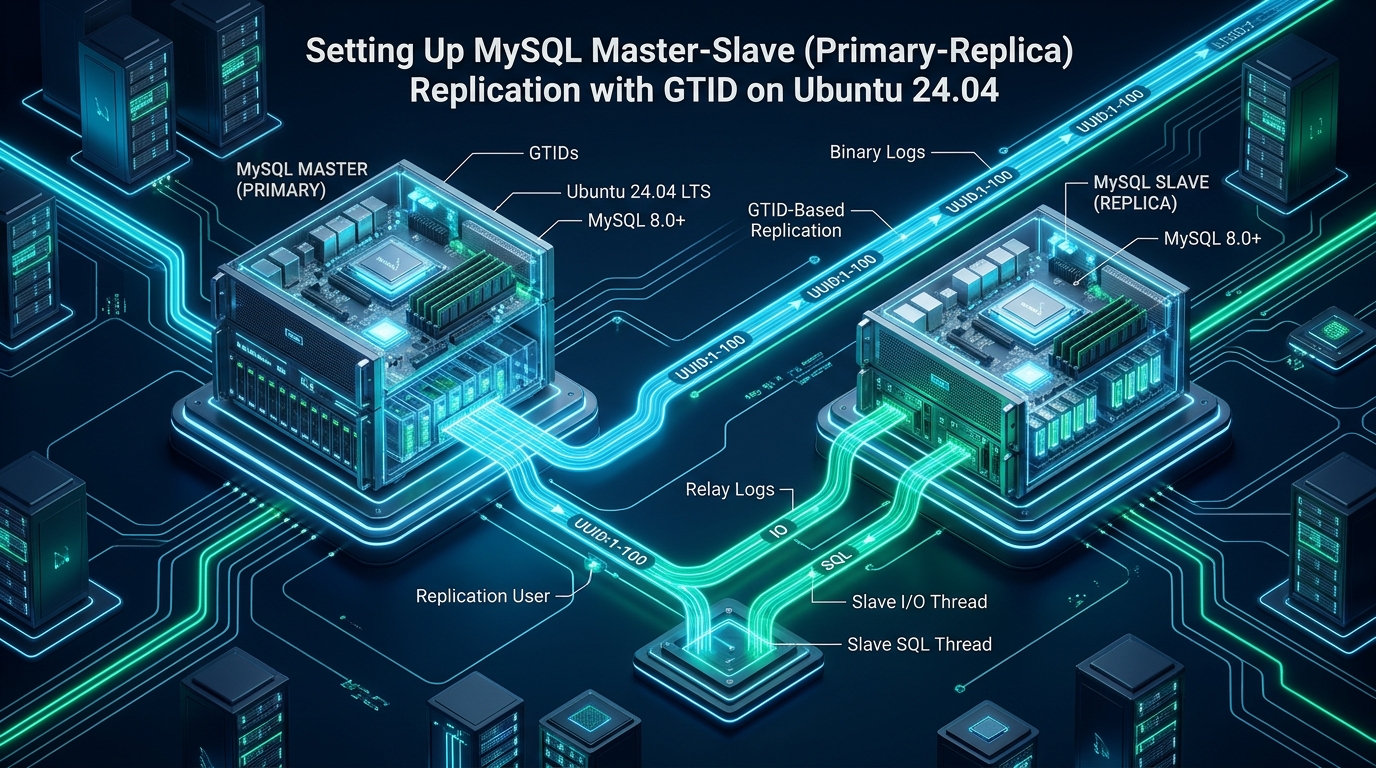
Global Transaction Identifiers (GTIDs) completely redefine replication mechanics in MySQL 8.4 and 8.0 on Ubuntu 24.04. Every transaction committed on the primary instance is stamped with an immutable identifier formatted as source_id:transaction_counter (e.g., 3E11FA47-71CA-11E1-9E33-C80AA9429562:23). Here, source_id is the server_uuid generated during instance initialization, while the integer represents an incremental 1-based transaction sequence. When a replica connects using GTID auto-positioning (SOURCE_AUTO_POSITION = 1), it automatically exchanges its executed GTID set (gtid_executed) with the primary. The primary then streams exclusively the delta of transactions missing from the replica’s history, eliminating coordinate math completely.
Architecture Note: Enforcing
enforce_gtid_consistency = ONis strictly required in production. This setting prohibits non-deterministic statements that violate transaction atomicity—such asCREATE TABLE ... SELECT, creating temporary tables inside transactions, or mixing non-transactional MyISAM tables with transactional InnoDB tables. This guarantees that all transactions can be faithfully replayed in any cluster node without divergence.
Architectural Comparison: Legacy Binlog vs. Tuned GTID Replication
The operational contrast between legacy log coordinate replication and a properly tuned GTID implementation with multi-threaded appliers is dramatic across failover complexity, replica lag, and crash survivability:
| Feature / Metric | Standard / Default | Tuned / Production |
|---|---|---|
| Replication Tracking | File Name & Byte Offset Coordinates | Global UUID:Sequence Identifiers (GTID) |
| Failover Topology Realignment | Manual log inspection & position recalculation | Autonomous Auto-Positioning (Zero-Touch) |
| Replica Applier Execution Model | Single-Threaded SQL Worker (Severe Lag) | Parallel LOGICAL_CLOCK Workers (Zero Lag) |
| Crash Recovery Protocol | Relay log corruption risks; manual flush | Atomic InnoDB Relay Info Tables (relay_log_recovery) |
| Disk fsync & Commit Strategy | Default flush cycles; per-trx commit latency | Binary Log Group Commit & NVMe Direct I/O |
| Replication Stream Security | Plaintext TCP Sockets (Port 3306) | Enforced TLS 1.3 with Certificate Authority Verification |
| Latency / Overhead | Baseline | Optimal |
Topology Planning & OS-Level Baseline on Ubuntu 24.04
Before deploying MySQL configuration stanzas, verify that both the primary (Source) and replica (Target) nodes are deployed on low-latency private subnets. For this reference architecture, we assume two Ubuntu 24.04 LTS nodes equipped with static IP addressing and synchronized hardware clocks via systemd-timesyncd or Chrony:
- Primary Database Node:
10.240.0.10(Hostname:db-primary.production.lan) - Replica Database Node:
10.240.0.20(Hostname:db-replica-01.production.lan) - Replication User:
repl_userauthenticated over TLS - MySQL Distribution: Native Ubuntu 24.04 LTS package repository (MySQL 8.0.x / 8.4 LTS)
Linux Kernel & Socket Tuning: /etc/sysctl.d/99-mysql-replication.conf
High-volume replication streams exchange thousands of transaction binlog frames per second. Default Linux network socket buffers and memory swappiness parameters will cause throughput oscillations or TCP window stalling. Place the following kernel optimizations into /etc/sysctl.d/99-mysql-replication.conf and reload using sysctl --system:
# /etc/sysctl.d/99-mysql-replication.conf
# Kernel Virtual Memory & Network Socket Optimization for Enterprise MySQL 8.x
# Target: Ubuntu 24.04 LTS with NVMe Storage Subsystem

# Minimize kernel paging of MySQL InnoDB memory buffer pool
vm.swappiness = 1
vm.dirty_ratio = 15
vm.dirty_background_ratio = 5

# Maximum file descriptor allocations for high-connection database servers
fs.file-max = 2097152

# Network core buffers to avoid TCP window drops under heavy binlog streaming
net.core.rmem_max = 16777216
net.core.wmem_max = 16777216
net.core.rmem_default = 1048576
net.core.wmem_default = 1048576
net.core.somaxconn = 4096
net.core.netdev_max_backlog = 10000

# TCP window sizing and keepalive intervals for replication streams
net.ipv4.tcp_rmem = 4096 87380 16777216
net.ipv4.tcp_wmem = 4096 65536 16777216
net.ipv4.tcp_keepalive_time = 300
net.ipv4.tcp_keepalive_intvl = 15
net.ipv4.tcp_keepalive_probes = 5
net.ipv4.tcp_fin_timeout = 15
net.ipv4.tcp_tw_reuse = 1
Systemd Service Hardening: /etc/systemd/system/mysql.service.d/override.conf
By default, systemd on Ubuntu 24.04 applies conservative resource bounds on running daemons. Create a drop-in directory and configuration to allow MySQL to access adequate file descriptors and lock memory pages:
# /etc/systemd/system/mysql.service.d/override.conf
[Service]
# Remove default file descriptor caps
LimitNOFILE=1048576

# Allow memory locking for zero-swap enterprise performance
LimitMEMLOCK=infinity

# Prevent out-of-memory killer from terminating mysqld ahead of user workloads
OOMScoreAdjust=-900

# Ensure maximum process threads for multi-threaded parallel replication
LimitNPROC=524288
Step 1: Configuring the Primary Node (Source)
On the primary database server (10.240.0.10), create an enterprise configuration drop-in file at /etc/mysql/mysql.conf.d/replication-primary.cnf. Every server participating in GTID replication must be assigned a unique numeric server_id and have binary logging enabled with ROW format.
# /etc/mysql/mysql.conf.d/replication-primary.cnf
[mysqld]
# Networking & Identification
bind-address            = 0.0.0.0
server-id               = 101
report-host             = 10.240.0.10
report-port             = 3306

# GTID Production Configuration
gtid_mode               = ON
enforce_gtid_consistency = ON

# Binary Logging & Durability
log_bin                 = /var/log/mysql/mysql-bin.log
binlog_format           = ROW
binlog_row_image        = FULL
binlog_expire_logs_seconds = 259200
max_binlog_size         = 1G
sync_binlog             = 1

# InnoDB Crash Safety Parameters
innodb_flush_log_at_trx_commit = 1
innodb_support_xa       = ON
innodb_flush_method     = O_DIRECT

# Group Commit Tuning for High Throughput
binlog_group_commit_sync_delay = 100
binlog_group_commit_sync_no_delay_count = 10

# Disable Super Read Only on Primary
read_only               = OFF
super_read_only         = OFF
Apply the systemd unit updates and restart MySQL on the primary server:
# Reload systemd manager and restart MySQL service
sudo systemctl daemon-reload
sudo systemctl restart mysql

# Verify GTID status and server identification
sudo mysql -e "SHOW GLOBAL VARIABLES LIKE 'gtid_mode';"
sudo mysql -e "SHOW GLOBAL VARIABLES LIKE 'server_id';"
Provisioning the Dedicated TLS Replication User
Never run replication using root or broad administrative accounts. Provision a dedicated replication user restricted strictly to the replica subnet and requiring an encrypted SSL/TLS cipher suite:
-- Execute on Primary Node (10.240.0.10)
CREATE USER 'repl_user'@'10.240.0.%'
IDENTIFIED WITH caching_sha2_password BY 'P@ssw0rd_Enterpr1se_GTID_2026!'
REQUIRE SSL;

-- Grant replication slave privileges
GRANT REPLICATION SLAVE, REPLICATION CLIENT ON *.* TO 'repl_user'@'10.240.0.%';
FLUSH PRIVILEGES;

-- Verify user creation and SSL cipher requirements
SELECT user, host, plugin, ssl_type FROM mysql.user WHERE user = 'repl_user';
Step 2: Configuring the Replica Node (Target)
On the replica node (10.240.0.20), configure /etc/mysql/mysql.conf.d/replication-replica.cnf. The replica must have a distinct server_id, enable GTID mode, enforce read-only protection, and utilize multi-threaded appliers to prevent replication lag under heavy transactional write bursts.
# /etc/mysql/mysql.conf.d/replication-replica.cnf
[mysqld]
# Networking & Node Identification
bind-address            = 0.0.0.0
server-id               = 102
report-host             = 10.240.0.20
report-port             = 3306

# Enforce Read-Only to Prevent Split-Brain Writes on Replicas
read_only               = ON
super_read_only         = ON

# GTID Production Configuration
gtid_mode               = ON
enforce_gtid_consistency = ON

# Binary Logging on Replicas (Enables Chained Replication & Point-in-Time Recovery)
log_bin                 = /var/log/mysql/mysql-bin.log
binlog_format           = ROW
binlog_row_image        = FULL
binlog_expire_logs_seconds = 259200
log_replica_updates     = ON

# Crash-Safe Applier & Relay Log Durability
relay_log               = /var/log/mysql/mysql-relay-bin.log
relay_log_recovery      = ON
relay_log_info_repository = TABLE
master_info_repository  = TABLE

# Multi-Threaded Applier (MTS) for Zero Replication Lag
replica_parallel_workers = 8
replica_parallel_type   = LOGICAL_CLOCK
replica_preserve_commit_order = ON

# Checkpoint Interval for Worker Threads
replica_checkpoint_period = 300
replica_checkpoint_group  = 512
Restart MySQL on the replica node to activate the new configuration:
# Apply sysctl and systemd overrides identically to replica
sudo systemctl daemon-reload
sudo systemctl restart mysql

# Verify super_read_only is engaged
sudo mysql -e "SHOW GLOBAL VARIABLES LIKE 'super_read_only';"
Production Warning: Always set
relay_log_recovery = ONon replica nodes. In the event of an abrupt virtual machine reboot or kernel panic, uncommitted transactions in the operating system page cache may cause relay log corruption. Withrelay_log_recovery = ON, the replica automatically discards unapplied relay log segments and re-fetches missing transactions directly from the primary using GTID auto-positioning, completely preventing replication corruption.
Step 3: Creating a Consistent Data Snapshot with Percona XtraBackup
To initialize the replica without locking tables on production databases, use Percona XtraBackup 8.0. XtraBackup captures non-blocking physical hot backups while capturing the exact GTID execution coordinates. Alternatively, for smaller databases, mysqldump with --single-transaction and --set-gtid-purged=ON can be employed:
# On Primary (10.240.0.10): Export consistent dataset with GTID metadata
sudo mysqldump -u root -p \
  --all-databases \
  --master-data=2 \
  --single-transaction \
  --quick \
  --routines \
  --triggers \
  --events \
  --set-gtid-purged=ON \
  | gzip -c > /tmp/primary_gtid_snapshot.sql.gz

# Stream encrypted snapshot to replica node using OpenSSH
scp /tmp/primary_gtid_snapshot.sql.gz [email protected]:/tmp/

# On Replica (10.240.0.20): Decompress and restore dataset
gunzip < /tmp/primary_gtid_snapshot.sql.gz | sudo mysql -u root -p
For high-concurrency production deployments handling enterprise e-commerce or SaaS databases, running primary-replica clusters requires guaranteed I/O throughput and sub-millisecond NVMe latencies. When moving beyond development sandboxes, deploying on MeraHost Enterprise Cloud gives you access to unthrottled PCIe 4.0 NVMe arrays, optimized kernel network layers, and permanent fixed renewal pricing with zero unexpected price hikes.
Step 4: Establishing GTID Auto-Positioning Replication
With the snapshot restored and identical GTID sets initialized, instruct the replica node to connect to the primary. Notice that under GTID replication, you do not specify SOURCE_LOG_FILE or SOURCE_LOG_POS. You simply configure SOURCE_AUTO_POSITION = 1:
-- Execute on Replica Node (10.240.0.20)
STOP REPLICA;

-- Configure connection to primary with TLS encryption and GTID auto-positioning
CHANGE REPLICATION SOURCE TO
  SOURCE_HOST='10.240.0.10',
  SOURCE_PORT=3306,
  SOURCE_USER='repl_user',
  SOURCE_PASSWORD='P@ssw0rd_Enterpr1se_GTID_2026!',
  SOURCE_AUTO_POSITION = 1,
  SOURCE_SSL = 1,
  SOURCE_CONNECT_RETRY = 10,
  SOURCE_RETRY_COUNT = 86400;

-- Start replication threads
START REPLICA;
Step 5: Verifying Replication Health & Thread Telemetry
Execute SHOW REPLICA STATUS\G (or SHOW SLAVE STATUS\G in earlier distributions) on the replica node to inspect operational metrics:
-- Inspect detailed replication status
SHOW REPLICA STATUS\G

-- Critical Fields to Audit:
-- Replica_IO_Running: Yes
-- Replica_SQL_Running: Yes
-- Auto_Position: 1
-- Seconds_Behind_Source: 0
-- Last_IO_Errno: 0
-- Last_SQL_Errno: 0
-- Executed_Gtid_Set: 3E11FA47-71CA-11E1-9E33-C80AA9429562:1-14502
You can also query the MySQL Performance Schema directly for fine-grained multi-threaded worker telemetry:
-- Query replication applier worker status
SELECT
    CHANNEL_NAME,
    WORKER_ID,
    THREAD_ID,
    SERVICE_STATE,
    LAST_APPLIED_TRANSACTION,
    APPLYING_TRANSACTION
FROM performance_schema.replication_applier_status_by_worker;
SysAdmin Operational Tip: Monitor
Seconds_Behind_Sourcethrough Prometheus Node Exporter and mysqld_exporter. If you observe replication lag building up despite low CPU utilization on the replica, checkreplica_parallel_workers. If your tables lack primary keys, parallel workers will degrade into table-scan locks. Always mandate primary keys on all tables by settingsql_require_primary_key = ON.
Automated Failover & Topology Promotion with GTID
The greatest operational payoff of GTID architecture occurs during an unplanned primary outage. In legacy replication, promoting a replica to become the new primary required logging into each surviving replica, identifying which one was furthest ahead in the binary log, manually aligning coordinates, and pointing the rest to the promoted node. This process often took 20 to 45 minutes of high-stress incident response.
With GTID auto-positioning, promoting a replica is instantaneous and mathematically provable. To promote db-replica-01 to become the active Primary:
-- Step 1: Disengage replication on the replica
STOP REPLICA;
RESET REPLICA ALL;

-- Step 2: Disable super_read_only to accept application writes
SET GLOBAL super_read_only = OFF;
SET GLOBAL read_only = OFF;

-- Step 3: Verify the node is ready to accept application traffic
SHOW GLOBAL VARIABLES LIKE '%read_only%';
When other replicas need to be repointed to this newly promoted node, simply point them using CHANGE REPLICATION SOURCE TO SOURCE_HOST='10.240.0.20', SOURCE_AUTO_POSITION = 1; START REPLICA;. Because GTID tracks every transaction globally, each node automatically synchronizes only what it needs, with zero risk of transaction duplication.
Frequently Asked Questions (FAQs)
How do I resolve ‘Slave has more GTIDs than master’ errors during node reconciliation?
This occurs when errant transactions are executed directly on a replica node while super_read_only = OFF. To resolve this without rebuilding the replica, identify the rogue GTID by comparing gtid_executed sets. Then, inject an empty transaction on the primary with the matching GTID using SET GTID_NEXT = 'uuid:seq'; BEGIN; COMMIT; SET GTID_NEXT = 'AUTOMATIC';. This aligns transaction sets across all nodes without corrupting application data.
Can I switch a running MySQL replication cluster from legacy coordinates to GTID without downtime?
Yes. MySQL 8.x supports online GTID migration using a staged four-step progression: First, set gtid_mode = OFF_PERMISSIVE across all nodes. Second, advance to gtid_mode = ON_PERMISSIVE. Third, set enforce_gtid_consistency = ON. Finally, set gtid_mode = ON and issue CHANGE REPLICATION SOURCE TO SOURCE_AUTO_POSITION = 1 on all replicas. Each step can be executed dynamically without restarting mysqld.
How does replica_parallel_type = LOGICAL_CLOCK eliminate replication lag?
Default MySQL replication processes incoming relay logs sequentially via a single thread, creating a bottleneck when the primary handles concurrent writes. replica_parallel_type = LOGICAL_CLOCK enables multi-threaded slave appliers by tracking which transactions were committed together in the primary’s binary log group commit phase. Transactions that did not conflict on the primary can safely be executed concurrently on the replica, scaling replay throughput linearly across CPU cores.
What happens to MySQL GTID replication if the private network link drops?
When the network link between primary and replica drops, the replica’s I/O thread periodically attempts to reconnect based on SOURCE_CONNECT_RETRY (e.g., every 10 seconds) up to SOURCE_RETRY_COUNT (e.g., 86,400 attempts for 24 hours). The SQL thread continues applying any transactions buffered in the local relay log. Once network connectivity is restored, GTID auto-positioning resumes streaming transactions from the exact point of interruption without administrative intervention.
Deploy Enterprise-Grade Production Infrastructure
Need guaranteed performance with zero price hikes? Host mission-critical workloads on MeraHost with pure Enterprise NVMe, LiteSpeed Web Server, and Same Renewal Price, Always (starting at ₹99/mo).