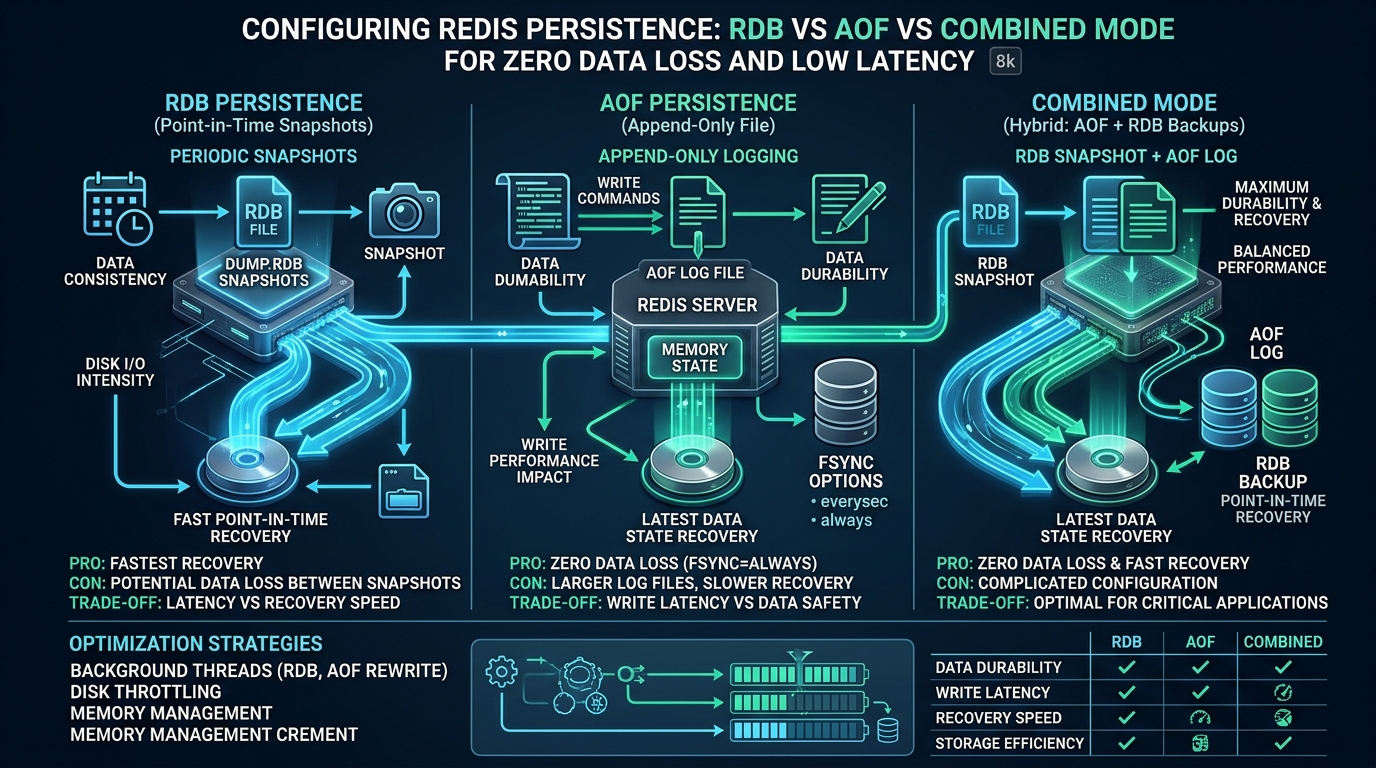
Deploying in-memory data stores in enterprise architectures presents an unforgiving engineering trade-off: maintaining sub-millisecond latency while ensuring zero data loss during sudden node reboots or operating system panics. At CpanelFree, our systems engineering teams frequently audit production infrastructures where misconfigured disk persistence degrades client P99 response times from 350 microseconds to catastrophic multi-second timeouts under heavy write volume. Mastering the operational boundaries of Redis Database (RDB) snapshots, Append-Only File (AOF) journals, and modern hybrid persistence modes is mandatory for building resilient, high-throughput caching and persistence tiers.
Redis Persistence Architecture: Balancing Durability, Recovery Time, and I/O Overhead
Direct Answer: Choosing between RDB, AOF, and combined persistence depends on your Recovery Point Objective (RPO) and Recovery Time Objective (RTO). RDB minimizes I/O latency and provides fastest restarts but risks up to several minutes of data loss. AOF provides near-zero data loss (1-second window with appendfsync everysec) at the cost of higher disk write overhead. For modern enterprise production, Redis Hybrid Persistence (aof-use-rdb-preamble yes) combines RDB compact binary snapshots with an AOF delta journal for zero data loss and rapid cold startups.
Redis is fundamentally an in-memory key-value data structure store whose core execution loop operates as a single-threaded event loop driven by multiplexed socket I/O (epoll on Linux). Because all datasets reside directly within RAM, sudden power termination, physical host failure, or an unhandled kernel panic completely purges volatile memory state. To protect stateful data—such as user session stores, rate-limiting tokens, leaderboards, shopping carts, and message queues—Redis provides two distinct disk persistence engines, along with an integrated hybrid engine that leverages the strengths of both.
Understanding how these persistence engines interact with the Linux virtual memory manager, page cache, storage controllers, and background fork operations is critical. Naive implementations frequently suffer from memory exhaustion (OOM kills) due to Copy-on-Write (COW) amplification, or severe latency spikes caused by blocking disk sync calls on saturated NVMe drives.
Core Mechanics: RDB Point-in-Time Snapshots
Redis Database (RDB) persistence produces point-in-time, compact, binary representations of the entire dataset saved into a single serialized file (typically named dump.rdb). Rather than recording individual write commands, RDB captures the physical memory structures in an optimized binary format with optional LZF compression.
To generate an RDB snapshot without interrupting client queries, Redis invokes the Linux fork() system call via the BGSAVE command. The operating system duplicates the page table of the parent Redis process into a child process. Due to Linux Copy-on-Write (COW) mechanics, the child process initially shares physical memory pages with the parent. As the child writes the serialized dataset to disk, the parent continues serving write commands. When the parent modifies a key, the Linux kernel allocates a new 4KB physical page (or 2MB huge page if THP is misconfigured), copying the original content before the modification occurs.
- Maximum Performance: The main Redis process performs zero disk I/O for persistence. The background child handles all file operations, allowing the primary event loop to execute read and write commands at wire speed.
- Rapid Disaster Recovery: Reading a single, compact binary file during cold restart is dramatically faster than parsing and replaying millions of plain-text RESP commands from an AOF file.
- Disaster Recovery Archival: Single RDB files are trivially easy to encrypt, compress, and sync to remote S3 or secondary data centers for offsite compliance backups.
- Data Loss Vulnerability (High RPO): If Redis crashes between scheduled snapshot intervals (e.g., 5 minutes or 15 minutes), all write operations executed after the last successful snapshot are permanently lost.
- Fork Latency Overhead: On large instances (e.g., 32GB to 128GB RAM), the
fork()system call must copy large page table hierarchies, causing the parent process to pause for 10ms to over 200ms, triggering micro-outages in latency-sensitive APIs.
Architecture Note on RDB Fork Pauses: While the
fork()system call does not physically copy memory pages immediately, it must duplicate page table entries. On Linux x86_64, each 4KB page requires an 8-byte page table entry. For a 64GB Redis instance holding 16 million 4KB pages, the page table alone consumes 128MB. Copying 128MB of pointer mappings in a single thread blocks the Redis event loop, during which no client requests can be processed. Ensuring small instance sizing (sharding over multiple smaller instances) dramatically bounds fork pause times.
Core Mechanics: Append-Only File (AOF) Logging
To overcome the catastrophic data loss exposure of RDB snapshots, Redis offers Append-Only File (AOF) persistence. Instead of periodic memory snapshots, AOF logs every write command received by the server in the standard Redis Serialization Protocol (RESP) format. As commands execute in the main event loop, they are simultaneously appended to an internal user-space AOF buffer (server.aof_buf).
The durability and performance characteristics of AOF are governed entirely by the appendfsync configuration directive, which dictates when the OS buffer is flushed to physical non-volatile storage:
appendfsync always: The server callsfsync()on the file descriptor after every single write transaction before returning a success response to the client. This guarantees true zero data loss (RPO = 0), but throttles Redis throughput down to the maximum random write IOPS of your storage device (typically 1,000 to 10,000 ops/sec instead of 150,000+ ops/sec in RAM).appendfsync everysec(Production Standard): The main thread writes commands to the OS page cache on every tick, while a dedicated background I/O thread invokesfsync()once every second. If the server suffers an abrupt power cut, at most 1 second of write operations can be lost (under degraded disk conditions, up to 2 seconds). This delivers near-memory throughput with enterprise-grade durability.appendfsync no: Redis never explicitly callsfsync(). Flushing is deferred completely to Linux kernel dirty page writeback routines (typically governed by/proc/sys/vm/dirty_expire_centisecs, approximately 30 seconds). While this provides maximum write throughput, data loss during a power failure is unpredictable.
AOF Log Compaction and Background Rewrites (BGREWRITEAOF)
Because AOF logs every discrete state mutation, incrementing a single key 100,000 times (INCR counter) writes 100,000 commands to disk, even though the final dataset contains only one integer value. Left unmanaged, the AOF file expands exponentially, filling disk volumes and prolonging crash recovery times to tens of minutes.
To prevent file bloating, Redis implements background AOF rewriting via BGREWRITEAOF. Similar to BGSAVE, Redis forks a child process that scans current in-memory data structures and writes the shortest possible sequence of commands needed to rebuild the state. In Redis 7+, this process is decoupled using Multi-Part AOF (base file, incremental files, and a manifest file), completely eliminating the complex copy-and-rename race conditions that affected earlier versions.
The Modern Standard: Redis Hybrid Persistence (AOF + RDB Preamble)
Historically, sysadmins faced an impossible choice: RDB offered fast reboots but high data loss, while AOF offered excellent durability but massive file sizes and painful restart delays. Redis 4.0 solved this by introducing Hybrid Persistence, enabled via aof-use-rdb-preamble yes (enabled by default in Redis 7+ and Valkey).
When hybrid persistence is active, the BGREWRITEAOF child process constructs an initial RDB-formatted binary dump representing current memory state at the beginning of the file (the preamble). Any write commands executed during the rewrite operation are appended to the end of the file as standard RESP text commands. During server reboot, Redis loads the binary RDB header at blazing speed (saturating disk bus bandwidth) and then replays only the tiny remaining delta of incremental AOF commands. This delivers the best of both architectures: minimal RPO data loss, reduced disk footprint, and ultra-fast cold restarts.
Architectural Comparison Matrix: RDB vs AOF vs Hybrid Persistence
The following matrix benchmarks durability, latency, recovery speeds, and operational overhead across all available Redis persistence topologies under production write loads.
| Feature / Metric | Standalone RDB Snapshot | Pure AOF (everysec) | Hybrid Mode (RDB+AOF Preamble) |
|---|---|---|---|
| Data Loss Window (RPO) | 5–15 Minutes (High) | ≤ 1–2 Seconds | ≤ 1–2 Seconds (Optimal) |
| Crash Recovery Time (RTO) | Ultra-Fast (Seconds) | Slow (Replays all RESP commands) | Very Fast (Binary load + small delta) |
| Disk I/O Write Pattern | Bursty, sequential sequential write | Continuous 1Hz fsync writes | Continuous delta + periodic compact rewrite |
| Storage Disk Footprint | Highly Compact (LZF compressed binary) | Large (Verbose plain-text RESP syntax) | Compact (Binary body with minimal journal) |
| P99 Latency Overhead | Zero write latency, fork pauses | Minor write latency, background fsync delays | Sub-millisecond (Bounded COW & buffered fsync) |
| Memory Multiplier Risk (COW) | High during BGSAVE | Moderate during BGREWRITEAOF | Controlled with tuned rewrite thresholds |
Production Configuration Files: Redis Enterprise Hardening
To achieve non-blocking persistence without risking Out-Of-Memory termination, the configuration files below establish hardened production baselines for modern Linux servers running Redis 7.x or Valkey.
1. Production Redis Persistence Configuration (/etc/redis/redis.conf)
This snippet configures hybrid persistence with balanced snapshot intervals, automated rewrite triggers, and background I/O decoupling.
# ==============================================================================
# Enterprise Redis Persistence Configuration (Production Hardened)
# File: /etc/redis/redis.conf (Persistence Subsystem)
# ==============================================================================

# Directory where RDB and AOF files will be stored
dir /var/lib/redis

# ------------------------------------------------------------------------------
# 1. RDB (Redis Database Snapshots)
# ------------------------------------------------------------------------------
# Save snapshots based on write velocity:
# - After 900 sec (15 min) if at least 1 key changed
# - After 300 sec (5 min) if at least 100 keys changed
# - After 60 sec (1 min) if at least 10,000 keys changed
save 900 1
save 300 100
save 60 10000

# Stop accepting writes if the background BGSAVE fails (prevents silent loss)
stop-writes-on-bgsave-error yes

# Compress string objects using LZF algorithm when dumping .rdb files
rdbcompression yes

# Checksum verification (CRC64) at end of RDB file (prevents loading corrupted dumps)
rdbchecksum yes

# The filename for the binary snapshot
dbfilename dump.rdb

# ------------------------------------------------------------------------------
# 2. AOF (Append-Only File) & Hybrid Persistence Mode
# ------------------------------------------------------------------------------
# Enable the Append-Only File engine
appendonly yes

# Multi-Part AOF base name (Redis 7+)
appenddirname "appendonlydir"

# Fsync strategy: 'everysec' provides optimal compromise of speed and safety
appendfsync everysec

# Prevent fsync() calls while BGSAVE or BGREWRITEAOF is executing
# This prevents disk I/O bottlenecks from blocking the main thread
no-appendfsync-on-rewrite yes

# Automatic AOF rewrite triggers:
# Rewrite when current file size exceeds previous base size by 100% (doubled)
auto-aof-rewrite-percentage 100

# Minimum AOF size required before triggering an automated rewrite
auto-aof-rewrite-min-size 64mb

# Load corrupted/truncated AOF files gracefully on sudden crash recovery
aof-load-truncated yes

# HYBRID PERSISTENCE (CRITICAL): Write RDB preamble into rewritten AOF files
aof-use-rdb-preamble yes

# ------------------------------------------------------------------------------
# 3. Memory & Threading Controls
# ------------------------------------------------------------------------------
# Hard memory limit (allocate 65-75% of total system RAM to reserve COW overhead)
maxmemory 12gb
maxmemory-policy volatile-lru

# Threaded I/O for client socket read/write (Redis 6+)
io-threads 4
io-threads-do-reads yes
Performance Warning on no-appendfsync-on-rewrite: Setting
no-appendfsync-on-rewrite yesstops the background fsync thread from issuingfsync()calls while a child process is generating a new RDB or AOF file. On shared or slower rotational disks, this prevents severe I/O contention that could block the main event loop. However, if the server experiences a complete kernel panic during that rewrite window, up to 30 seconds of writes stored in the OS buffer could be lost. On pure enterprise NVMe storage with high IOPS headroom, you can safely set this tonofor maximum durability.
2. Linux Kernel Sysctl Optimization (/etc/sysctl.d/99-redis-performance.conf)
Before Redis can fork safely without Out-Of-Memory errors or connection throttling, the Linux kernel virtual memory subsystem and network stack must be reconfigured.
# ==============================================================================
# Linux Kernel Parameters for High-Throughput Redis Persistence
# File: /etc/sysctl.d/99-redis-performance.conf
# Apply via: sysctl --system
# ==============================================================================

# CRITICAL: Enable memory overcommit.
# Setting to 1 instructs the kernel to always allow fork() calls even if the
# combined virtual memory footprint exceeds physical RAM. Without this,
# BGSAVE will fail with "Cannot allocate memory" when Redis uses >50% RAM.
vm.overcommit_memory = 1

# Maximize socket listen backlog to prevent SYN packet drops during bursts
net.core.somaxconn = 65535

# Increase maximum file descriptors system-wide
fs.file-max = 2097152

# Tune page cache flushing for smoother disk writes without burst stalls
# Flush dirty memory pages when they reach 5% of system RAM
vm.dirty_background_ratio = 5
# Block processes and force writeback if dirty pages exceed 10% of system RAM
vm.dirty_ratio = 10

# Minimize aggressive swap usage to keep Redis hot data strictly in physical RAM
vm.swappiness = 1
3. Disabling Transparent Huge Pages (THP) via Systemd
Linux Transparent Huge Pages (THP) consolidates standard 4KB memory pages into massive 2MB pages. For databases utilizing Copy-on-Write (like Redis), modifying a single byte in a huge page forces the kernel to duplicate all 2MB rather than 4KB. This creates extreme memory amplification and introduces 100ms+ latency spikes during writes. Disable THP permanently at boot.
# Create a dedicated systemd service to disable THP before Redis starts
# File: /etc/systemd/system/disable-transparent-huge-pages.service

[Unit]
Description=Disable Linux Transparent Huge Pages (THP) for Redis
DefaultDependencies=no
After=sysinit.target local-fs.target
Before=redis.service redis-server.service

[Service]
Type=oneshot
ExecStart=/bin/sh -c 'echo never > /sys/kernel/mm/transparent_hugepage/enabled && echo never > /sys/kernel/mm/transparent_hugepage/defrag'

[Install]
WantedBy=basic.target
Activate the unit with:
systemctl daemon-reload
systemctl enable --now disable-transparent-huge-pages.service
cat /sys/kernel/mm/transparent_hugepage/enabled
# Expected output: always madvise [never]
4. Systemd Service Resource Limits Override
Create an override file at /etc/systemd/system/redis-server.service.d/override.conf to elevate file limits and prevent systemd OOM killing:
# File: /etc/systemd/system/redis-server.service.d/override.conf
[Service]
LimitNOFILE=65536
LimitNPROC=65536
LimitMEMLOCK=infinity
TasksMax=infinity
TimeoutStartSec=120
TimeoutStopSec=120
Production Monitoring and Health Auditing CLI Scripts
To audit persistence health and verify that background rewrites are executing without blocking client traffic, execute the following diagnostic command:
# Extract critical persistence telemetry from running Redis instance
redis-cli info persistence | grep -E "(rdb_last_bgsave_status|rdb_changes_since_last_save|aof_enabled|aof_rewrite_in_progress|aof_last_bgrewrite_status|aof_delayed_fsync|loading)"

# Sample Output Analysis:
# rdb_last_bgsave_status:ok            -> Snapshots saving reliably
# rdb_changes_since_last_save:142      -> Number of unpersisted keys since last RDB
# aof_enabled:1                        -> AOF persistence active
# aof_rewrite_in_progress:0            -> No active background rewrite
# aof_last_bgrewrite_status:ok         -> Last AOF compaction succeeded
# aof_delayed_fsync:0                  -> Zero delayed fsyncs (indicates healthy disk I/O)
If aof_delayed_fsync increments continuously, your disk subsystem is saturated. When the background fsync thread takes longer than 2 seconds to complete a write, Redis pauses the main thread for 1 millisecond intervals to avoid overwhelming the write buffer, causing noticeable latency degradation in your application.
For stateful architectures where zero data loss and deterministic sub-millisecond tail latency are business-critical requirements, hosting Redis tiers on shared or oversold virtual private servers introduces severe “noisy-neighbor” disk contention. Transitioning mission-critical caching and persistence clusters to dedicated infrastructure like MeraHost Enterprise Cloud provides guaranteed physical NVMe PCIe Gen4 throughput, dedicated CPU cores, and unmetered I/O channels designed for high-write database operations.
Frequently Asked Questions (FAQ)
What is the exact performance difference between appendfsync always, everysec, and no?
appendfsync always forces a synchronous disk fsync() on every single write command before replying to the client. This guarantees zero data loss (RPO = 0) but caps Redis write throughput to roughly 2,000–5,000 ops/sec due to disk latency. appendfsync everysec flushes writes to a background thread every 1,000 milliseconds, allowing throughput of 100,000+ ops/sec while restricting potential data loss to at most 1 second. appendfsync no defers all disk synchronization to standard Linux page cache flushing (typically 30 seconds), maximizing speed but providing no deterministic recovery guarantee.
Why does Redis crash with Out-Of-Memory (OOM) during BGSAVE even when memory appears available?
When Redis forks a child process for BGSAVE or BGREWRITEAOF, Linux uses Copy-on-Write (COW). While memory is shared initially, any write by the parent process duplicates the modified memory page. In heavy write workloads, or when Transparent Huge Pages (THP) is enabled, hundreds of thousands of pages get duplicated. If vm.overcommit_memory is set to 0 (default), the Linux kernel rejects the fork() call because virtual memory exceeds physical RAM. Setting vm.overcommit_memory = 1 and reserving 25-35% of total system RAM for COW buffers prevents these sudden OOM terminations.
How does Redis Hybrid Persistence (aof-use-rdb-preamble yes) function internally during startup?
When hybrid persistence is enabled, the AOF file is partitioned into two segments: a compact binary RDB snapshot at the beginning (preamble) and an incremental sequence of plain-text RESP commands at the end. During startup, the Redis server detects the RDB magic header (“REDIS”) at the front of the AOF file, loading the bulk state directly into memory in seconds. Once the preamble completes, the server seamlessly parses and replays the remaining plain-text commands, achieving near-zero data loss with the lightning-fast boot performance of pure RDB.
Can I disable both RDB and AOF persistence completely in pure cache workloads?
Yes. If Redis functions strictly as a volatile cache (e.g., ephemeral HTML fragment caching or external API response caching) where all data can be regenerated from primary SQL/NoSQL databases upon restart, you can set save "" and appendonly no. This completely eliminates disk write I/O, prevents COW memory amplification, and maximizes throughput. However, note that replication replicas will still require an initial full RDB sync stream (disk-based or diskless via repl-diskless-sync yes) during initial master-replica handshakes.
Deploy Enterprise-Grade Production Infrastructure
Need guaranteed performance with zero price hikes? Host mission-critical workloads on MeraHost with pure Enterprise NVMe, LiteSpeed Web Server, and Same Renewal Price, Always (starting at ₹99/mo).