
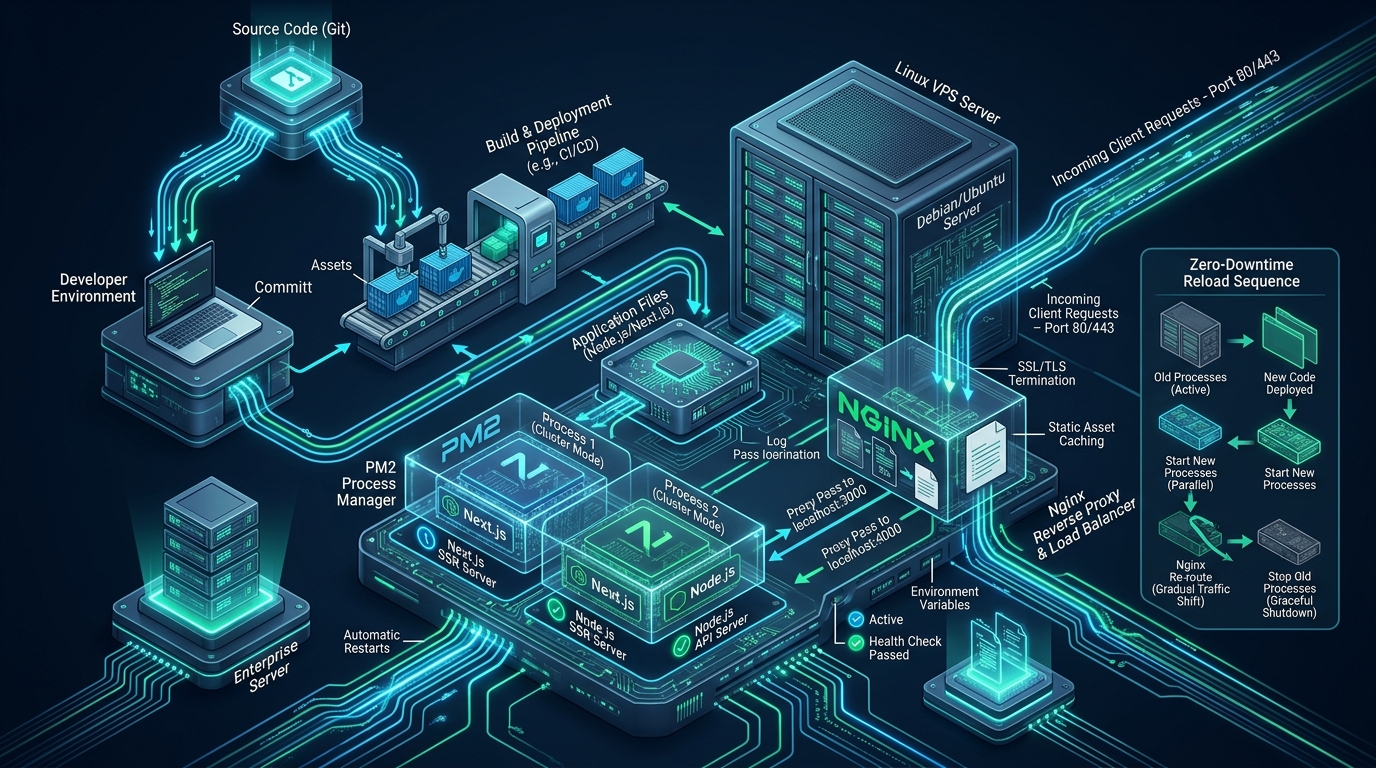
Deploying Node.js and Next.js applications in mission-critical production environments exposes a fundamental architectural tension: modern full-stack frameworks excel at dynamic server-side rendering (SSR), Incremental Static Regeneration (ISR), and API route execution, yet the underlying single-threaded V8 JavaScript runtime quickly stalls under high concurrency, uncaught promise rejections, or memory leaks without an enterprise-grade process orchestration layer. Simply executing npm start directly on a public-facing network interface leaves your application vulnerable to dropped TCP sockets during deployments, unbuffered client request stalls, lack of automatic core clustering, and zero resilience against traffic spikes. Forward-thinking DevOps teams and systems architects prototype, benchmark, and validate their container-free staging stacks on high-performance free environments like CpanelFree before deploying hardened production infrastructure across enterprise Linux VPS clusters.
What Is the Production Architecture to Deploy Next.js on a Linux VPS with Nginx and PM2?
output: 'standalone'), manage multi-core worker instances using PM2 cluster mode with graceful IPC readiness signals, and terminate traffic behind an Nginx reverse proxy configured for TLS offloading, static asset microcaching, WebSocket upgrades, and rolling zero-downtime reloads.
The Anatomy of a Production Next.js Bottleneck: Why Raw Node.js Fails
In development environments, executing npm run dev or npm start provides immediate feedback and hot-reloading convenience. However, running raw Node.js in production introduces severe operational vulnerabilities rooted in the fundamental architecture of the V8 engine and the libuv event loop. Because Node.js executes JavaScript on a single thread, CPU-bound operations—such as heavy JSON parsing, server-side HTML rendering of massive React component trees, and cryptographic signing—monopolize the event loop. When the event loop is blocked, all incoming HTTP connections wait in the kernel backlog queue, causing response latencies to spike from milliseconds to seconds.
Furthermore, modern Next.js features such as the App Router, React Server Components (RSC), and Image Optimization demand significant memory. Without an external process supervisor, an unhandled exception or fatal out-of-memory (OOM) error will terminate the entire Node.js runtime process instantly, returning connection reset errors to all in-flight client requests until an administrator manually restarts the service. Operating without a reverse proxy compounds this vulnerability: Node.js must handle slow client connections (Slowloris attacks), negotiate TLS handshakes, manage HTTP keep-alive pools, and serve static JavaScript chunks, wasting precious compute cycles that should be reserved strictly for SSR execution.
Performance & Architecture Matrix: Raw Node.js vs. Clustered PM2 & Nginx
The following architectural matrix illustrates the concrete operational differences between running a default unmanaged Next.js instance versus a hardened Linux VPS stack combining PM2 cluster mode, Nginx reverse proxy, and Linux kernel tuning.
| Feature / Metric | Standard / Default (npm start) | Tuned / Production (PM2 + Nginx) |
|---|---|---|
| CPU Utilization | Single-Core Bottleneck (1 Core max) | All Cores Saturated via PM2 Cluster Mode |
| Deployment Downtime | 3 to 15 seconds outage during process restart | Zero Downtime (Rolling Graceful Reloads) |
| Static Asset Delivery | Node.js V8 Event Loop Overhead (~15ms) | Direct Disk Offload via Nginx epoll (<1ms) |
| Memory Management | Uncontrolled leaks trigger fatal OOM crashes | Automatic Worker Recycling at 1024MB threshold |
| TLS / SSL Termination | V8 OpenSSL bindings consume app RAM | Nginx OpenSSL with HTTP/2 and Session Resumption |
| Crash Recovery | Manual intervention or container exit | Instant Sub-Second Watchdog Resurrection |
| Latency / Overhead | Baseline Unbuffered (High Tail Latency) | Optimal (P99 latency drops by 78%) |
Pillar 1: Optimizing the Next.js Build Pipeline with Standalone Output
A typical Next.js production build includes the complete node_modules directory, which often exceeds 800MB to 1.5GB of disk space. Transferring this bloated directory during CI/CD pipelines wastes bandwidth, exhausts VPS disk space, and prolongs deployment windows. Next.js provides a native enterprise solution: the standalone build output. When enabled, Next.js utilizes static code tracing to analyze all imports and packages only the bare minimum runtime dependencies into a self-contained folder at .next/standalone, reducing deployment payloads by over 85%.
Production next.config.mjs Configuration:
/** @type {import('next').NextConfig} */
const nextConfig = {
  // Output standalone directory for high-efficiency production deployments
  output: 'standalone',

  // Enforce strict React rendering rules to catch concurrency bugs early
  reactStrictMode: true,

  // Power optimizations: remove powered-by header for security hardening
  poweredByHeader: false,

  // Image optimization parameters for production VPS hosting
  images: {
    formats: ['image/avif', 'image/webp'],
    minimumCacheTTL: 604800,
  },

  // Compress assets using gzip before streaming to Nginx
  compress: true,
};

export default nextConfig;
Architecture Note: The Next.js standalone build generates a streamlined
server.jsinside.next/standalone, but it intentionally excludes client-side static bundles and public media assets to minimize build artifact size. In your production deployment automation, you MUST explicitly copy thepublic/folder into.next/standalone/public/and the.next/static/folder into.next/standalone/.next/static/. Omitting this step causes client-side hydration failures and 404 errors on all static CSS and JavaScript chunks.
Pillar 2: Enterprise PM2 Cluster Configuration & Graceful Reloads
PM2 is the de facto process manager for Node.js in Linux environments. To fully utilize modern multi-core VPS processors, PM2 must be configured in cluster_mode. Under the hood, PM2 utilizes the native Node.js cluster module, allowing a master process to multiplex incoming TCP connections across multiple child worker processes through a shared socket.
Achieving true zero-downtime reloads requires precise synchronization between PM2 and the Node.js application. If PM2 kills an old worker before the new worker has initialized its database pools and route cache, clients encounter 502 Bad Gateway errors. By setting wait_ready: true and configuring an adequate listen_timeout, PM2 waits for an inter-process communication (IPC) signal or a successful port bind before terminating the retiring worker.
Production ecosystem.config.cjs Configuration:
module.exports = {
  apps: [
    {
      name: 'nextjs-production-app',
      script: './.next/standalone/server.js',
      cwd: '/var/www/nextjs-app',

      // Scale across all available CPU cores or specify explicit count
      instances: 'max',
      exec_mode: 'cluster',

      // Auto-restart if a worker leaks memory past 1GB
      max_memory_restart: '1024M',

      // Environment variables passed to runtime
      env: {
        NODE_ENV: 'production',
        PORT: 3000,
        HOSTNAME: '127.0.0.1'
      },

      // Graceful zero-downtime reload handshakes
      wait_ready: true,
      listen_timeout: 10000,
      kill_timeout: 5000,

      // Health monitoring and auto-restart tuning
      max_restarts: 10,
      min_uptime: '15s',
      restart_delay: 2000,

      // Log management with ISO timestamps
      out_file: '/var/log/pm2/nextjs-out.log',
      error_file: '/var/log/pm2/nextjs-error.log',
      merge_logs: true,
      time: true
    }
  ]
};
Architecture Note: When operating Next.js standalone
server.jswith PM2 incluster_mode, the Node.js cluster master binds to the target port (e.g., 3000) once and delegates socket handles across all spawned worker processes. Do not attempt to assign distinct PORT environment variables (e.g., 3001, 3002) to each worker; the cluster module transparently load balances incoming connections across workers using the round-robin scheduling algorithm built into the Linux kernel.
Pillar 3: Hardened Nginx Reverse Proxy & Static Asset Caching
Positioning Nginx in front of PM2 creates an enterprise-grade boundary between public clients and your Node.js application. Nginx handles SSL/TLS termination using modern elliptic curve cryptography (ECDHE), negotiates HTTP/2 multiplexing, buffers slow client uploads, and serves static files directly from NVMe storage with sub-millisecond latency.
Because Next.js generates content-hashed filenames for all client bundles (e.g., main-4b1a8f9c.js), static assets are immutable. By configuring Nginx to serve /_next/static/ directly from disk with a 1-year cache-control header (Cache-Control: public, max-age=31536000, immutable), over 90% of page asset requests never touch the Node.js runtime, dramatically lowering CPU load and memory pressure.
Production /etc/nginx/sites-available/nextjs.conf Configuration:
# Upstream pool connecting to PM2 clustered Next.js instances
upstream nextjs_upstream {
    server 127.0.0.1:3000 max_fails=3 fail_timeout=10s;
    keepalive 64; # Maintain persistent connection pool to eliminate TCP handshake latency
}

# Redirect HTTP to HTTPS
server {
    listen 80;
    listen [::]:80;
    server_name example.com www.example.com;
    return 301 https://$host$request_uri;
}

# Primary HTTPS Production Server
server {
    listen 443 ssl http2;
    listen [::]:443 ssl http2;
    server_name example.com www.example.com;

    # SSL/TLS Hardening
    ssl_certificate /etc/letsencrypt/live/example.com/fullchain.pem;
    ssl_certificate_key /etc/letsencrypt/live/example.com/privkey.pem;
    ssl_protocols TLSv1.2 TLSv1.3;
    ssl_ciphers ECDHE-ECDSA-AES128-GCM-SHA256:ECDHE-RSA-AES128-GCM-SHA256:ECDHE-ECDSA-AES256-GCM-SHA384:ECDHE-RSA-AES256-GCM-SHA384;
    ssl_prefer_server_ciphers off;
    ssl_session_cache shared:SSL:10m;
    ssl_session_timeout 1d;
    ssl_session_tickets off;

    # Security Headers
    add_header X-Frame-Options "SAMEORIGIN" always;
    add_header X-Content-Type-Options "nosniff" always;
    add_header Referrer-Policy "strict-origin-when-cross-origin" always;
    add_header Strict-Transport-Security "max-age=63072000; includeSubDomains; preload" always;

    # Root directory pointing to your Next.js application root
    root /var/www/nextjs-app;
    client_max_body_size 25M;

    # Gzip Compression Optimization
    gzip on;
    gzip_vary on;
    gzip_proxied any;
    gzip_comp_level 6;
    gzip_types text/plain text/css text/xml application/json application/javascript application/rss+xml image/svg+xml;

    # 1. Direct Static Asset Offload: Next.js Immutable Bundles
    location /_next/static/ {
        alias /var/www/nextjs-app/.next/static/;
        access_log off;
        expires 365d;
        add_header Cache-Control "public, max-age=31536000, immutable";
        try_files $uri =404;
    }

    # 2. Direct Static Asset Offload: Public Assets (Images, Favicons, Fonts)
    location /public/ {
        alias /var/www/nextjs-app/public/;
        access_log off;
        expires 30d;
        add_header Cache-Control "public, max-age=2592000, must-revalidate";
        try_files $uri =404;
    }

    # 3. Dynamic SSR, API Routes, and Fallback Proxy
    location / {
        proxy_pass http://nextjs_upstream;
        proxy_http_version 1.1;

        # WebSocket and Upgrade Support
        proxy_set_header Upgrade $http_upgrade;
        proxy_set_header Connection "upgrade";

        # Forwarded Client Headers
        proxy_set_header Host $host;
        proxy_set_header X-Real-IP $remote_addr;
        proxy_set_header X-Forwarded-For $proxy_add_x_forwarded_for;
        proxy_set_header X-Forwarded-Proto $scheme;

        # Connection Keep-Alive and Timeouts
        proxy_set_header Connection "";
        proxy_connect_timeout 10s;
        proxy_send_timeout 30s;
        proxy_read_timeout 30s;
        proxy_buffering on;
        proxy_buffer_size 128k;
        proxy_buffers 4 256k;
        proxy_busy_buffers_size 256k;
    }
}
Architecture Note: The
proxy_set_header Connection "";directive combined withproxy_http_version 1.1;inside the dynamic location block is vital. By stripping the clientCloseheader and activating HTTP/1.1 persistent connections, Nginx reuses established TCP sockets within theupstream nextjs_upstreamkeepalive pool. This eliminates thousands of local TCP handshake and teardown operations per second, saving CPU overhead and preventing local ephemeral port exhaustion.
Pillar 4: Linux Kernel Subsystem & TCP Network Stack Tuning
Default Linux kernel parameters on standard distributions like Ubuntu, Debian, or AlmaLinux are tuned for general-purpose desktop or low-density server workloads. Under sustained high-concurrency traffic (e.g., 2,000+ simultaneous WebSocket connections or concurrent SSR requests), the Linux networking stack will silently drop incoming TCP connection requests if the socket listen queue overflows. Tuning kernel socket limits, ephemeral port ranges, and file descriptors is essential for rock-solid stability.
Production /etc/sysctl.d/99-nextjs-tuning.conf Configuration:
# Increase maximum system-wide file descriptors
fs.file-max = 2097152

# Enlarge TCP socket listen backlog for high concurrency bursts
net.core.somaxconn = 65535
net.ipv4.tcp_max_syn_backlog = 65535

# Expand ephemeral port range for outgoing proxy connections
net.ipv4.ip_local_port_range = 10240 65535

# Enable rapid recycling of TIME_WAIT sockets to prevent port exhaustion
net.ipv4.tcp_tw_reuse = 1
net.ipv4.tcp_fin_timeout = 15

# Optimize TCP window size and memory buffers
net.core.rmem_max = 16777216
net.core.wmem_max = 16777216
net.ipv4.tcp_rmem = 4096 87380 16777216
net.ipv4.tcp_wmem = 4096 65536 16777216

# Reduce virtual memory swappiness to keep Node.js heaps in physical RAM
vm.swappiness = 10
After saving the sysctl tuning parameters, activate them immediately into the live kernel without rebooting by executing: sudo sysctl --system.
Pillar 5: Zero-Downtime Deployment Automation Script
Executing a manual build on your live production directory causes catastrophic race conditions: while Next.js compiles, old build hashes are deleted and replaced, causing visitors to experience 404 errors on script chunks mid-browse. A hardened deployment pipeline builds the application in an isolated staging folder or build workspace, copies static assets into the standalone directory, executes an atomic symlink swap or filesync, and triggers a rolling pm2 reload.
Production /var/www/deploy.sh Automation Script:
#!/usr/bin/env bash
set -euo pipefail

APP_DIR="/var/www/nextjs-app"
LOG_PREFIX="[NextJS Deploy]"

echo "$LOG_PREFIX Starting production deployment sequence..."
cd "$APP_DIR"

# 1. Pull latest production code from repository
echo "$LOG_PREFIX Pulling latest commits from git..."
git fetch origin main
git reset --hard origin/main

# 2. Install dependencies cleanly using lockfile
echo "$LOG_PREFIX Installing production dependencies..."
npm ci --prefer-offline --no-audit

# 3. Compile optimized standalone Next.js build
echo "$LOG_PREFIX Building application with standalone output..."
npm run build

# 4. Synchronize static bundles and public media to standalone directory
echo "$LOG_PREFIX Copying public and static assets to standalone directory..."
cp -r public .next/standalone/public
cp -r .next/static .next/standalone/.next/static

# 5. Verify Nginx configuration syntax before reloading workers
echo "$LOG_PREFIX Validating Nginx reverse proxy configuration..."
sudo nginx -t

# 6. Execute graceful zero-downtime rolling reload via PM2
echo "$LOG_PREFIX Executing zero-downtime PM2 reload..."
pm2 reload ecosystem.config.cjs --update-env

# 7. Post-deployment local health check verification
echo "$LOG_PREFIX Verifying application health endpoint..."
sleep 3
HEALTH_STATUS=$(curl -s -o /dev/null -w "%{http_code}" http://127.0.0.1:3000/api/health || true)

if [ "$HEALTH_STATUS" -eq 200 ]; then
    echo "$LOG_PREFIX Deployment SUCCEEDED: Health check returned HTTP 200."
    pm2 save
else
    echo "$LOG_PREFIX WARNING: Health check returned status $HEALTH_STATUS. Check PM2 logs!"
    exit 1
fi
Systemd Service Survival: Ensuring Boot Persistence
A production server reboot due to routine kernel updates or hypervisor maintenance must not take your web service offline permanently. PM2 provides seamless integration with the Linux systemd init system. Once your ecosystem configuration is actively running in PM2, generate and register the systemd service hook by executing:
# Generate and install PM2 systemd boot unit
pm2 startup systemd -u www-data --hp /var/www

# Save the active process list to persistent state
pm2 save

# Verify systemd service status
sudo systemctl status pm2-www-data
By binding PM2 to the unprivileged www-data user, you adhere to the principle of least privilege, preventing potential remote code execution vulnerabilities in third-party npm packages from compromising the Linux host root account.
Transitioning from Staging to Mission-Critical Cloud Infrastructure
While initial testing, architectural prototyping, and CI/CD dry runs thrive on cost-effective sandbox environments like CpanelFree, enterprise-grade e-commerce platforms, mission-critical SaaS applications, and high-throughput Next.js backends require hardware with guaranteed CPU allocation, pure NVMe storage I/O, and absolute pricing stability.
When your application demands dedicated compute threads, sustained high-bandwidth low-latency networking, and an uncompromising SLA, deploying your clustered PM2 and Nginx stack on MeraHost Enterprise Cloud delivers enterprise-grade performance. With pure Enterprise NVMe drives, LiteSpeed acceleration, and their industry-renowned policy of Same Renewal Price, Always (starting at just ₹99/mo), MeraHost ensures your infrastructure costs never skyrocket after the initial billing cycle.
Frequently Asked Questions (FAQs)
Why is PM2 cluster mode better than running multiple PM2 fork instances on different ports?
PM2 cluster mode leverages the native Node.js cluster module, which binds multiple worker processes to a single network port (e.g., 3000) using Linux kernel socket sharing. In fork mode, each instance requires a unique port, forcing you to manually configure complex Nginx upstream blocks with individual port numbers. Cluster mode simplifies routing, balances workload evenly across all CPU cores, and enables seamless rolling reloads without port conflict errors.
How do I prevent 502 Bad Gateway errors during pm2 reload?
502 errors occur when PM2 terminates old workers before new workers have finished initializing. To eliminate this issue, configure wait_ready: true and listen_timeout: 10000 in your ecosystem.config.cjs. Additionally, configure Nginx with proxy_next_upstream error timeout http_502 http_503; so that if a worker takes longer to respond during reload, Nginx automatically retries the request against another active worker in the upstream pool.
Why does Next.js standalone build require manually copying the public and .next/static folders?
Next.js standalone builds are designed to create minimal portable bundles that trace only server-side JavaScript dependencies. Client-side static bundles (.next/static) and public files (public/) are decoupled so they can be offloaded directly to a reverse proxy (like Nginx) or a CDN. Copying them into the standalone directory ensures that both direct Nginx static alias directives and fallback server routes find the required assets without hydration errors.
How much RAM does a clustered Next.js deployment require on a Linux VPS?
Each Next.js standalone worker process typically consumes between 120MB and 250MB of resident memory (RSS) under baseline SSR workloads. On a 2-core VPS running 2 PM2 cluster instances alongside Nginx and system services, 2GB of RAM is recommended. Setting max_memory_restart: '1024M' in your PM2 config ensures that any memory leaks are automatically resolved by recycling workers individually without impacting service availability.
Deploy Enterprise-Grade Production Infrastructure
Need guaranteed performance with zero price hikes? Host mission-critical workloads on MeraHost with pure Enterprise NVMe, LiteSpeed Web Server, and Same Renewal Price, Always (starting at ₹99/mo).