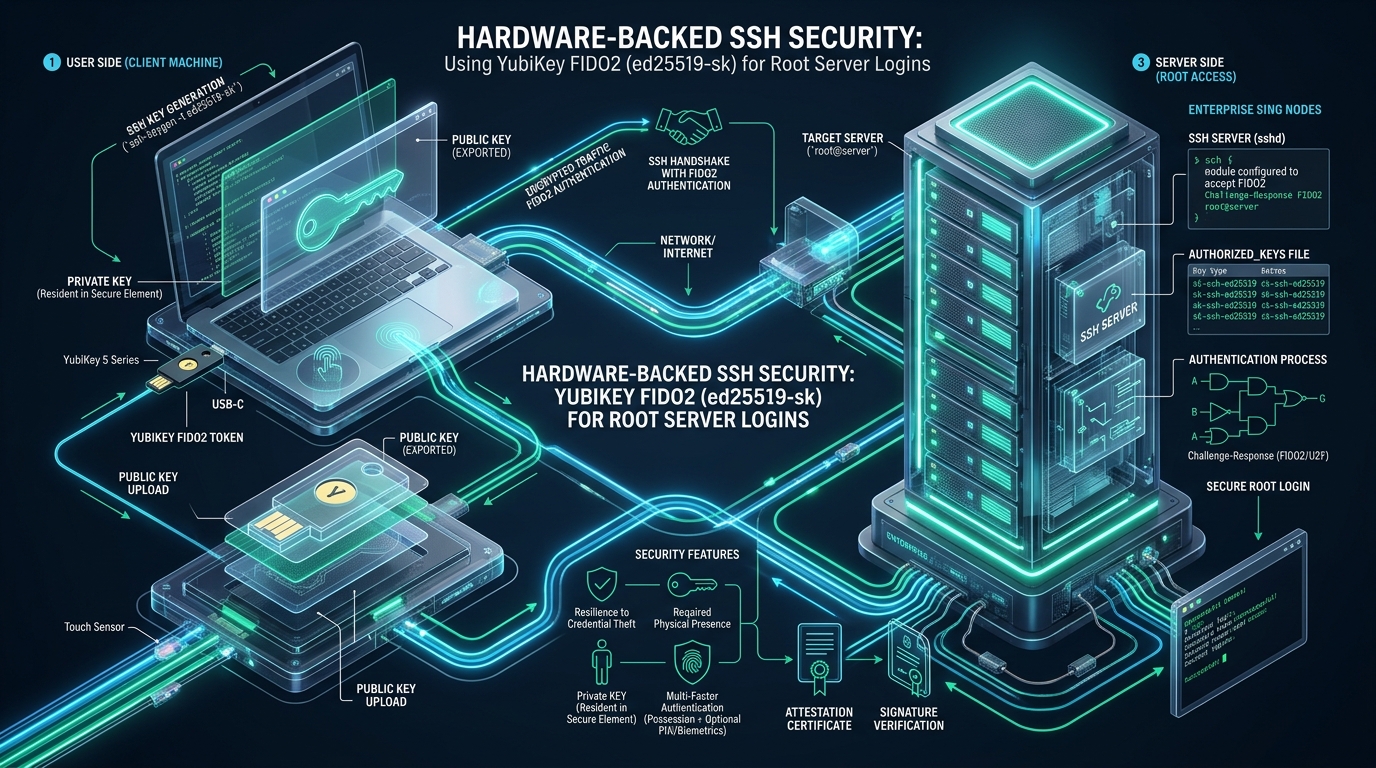
Standard OpenSSH key-based authentication has long served as the baseline standard for Linux infrastructure management, yet storing unencrypted or passphrase-protected private keys directly on developer laptops and bastion hosts introduces a persistent threat vector. If an engineer’s workstation is compromised via infostealer malware, developer dependency supply-chain attacks, or memory-dumping trojans, adversaries can quietly exfiltrate standard ~/.ssh/id_ed25519 key files or hijack running ssh-agent unix sockets to pivot unchecked into production root environments. Whether orchestrating rapid staging experiments on CpanelFree or safeguarding mission-critical cloud hypervisors, replacing software-only private keys with hardware-backed FIDO2 security tokens using the ed25519-sk key type establishes physical cryptographic boundaries that eliminate remote credential theft by design.
What Is Hardware-Backed SSH with FIDO2 (ed25519-sk) and How Does It Secure Root Logins?
Direct Answer: Hardware-backed SSH using FIDO2 (ed25519-sk) secures root Linux logins by generating cryptographic key pairs where private key material never leaves physical security tokens like YubiKeys. The client stores a lightweight key handle; authentication requires physical presence (touch) and optional PIN verification, mathematically rendering remote credential exfiltration, phishing, and automated bot compromises impossible.
Introduced natively in OpenSSH 8.2, the yubikey fido2 ssh ed25519-sk linux implementation builds upon the universal FIDO2/CTAP2 (Client to Authenticator Protocol) standards. In traditional SSH workflows, an asymmetric key pair consists of a public key distributed to ~/.ssh/authorized_keys on remote servers and a private key stored on the local file system. While passphrases protect idle private keys at rest via AES-256 encryption, the moment an engineer enters their passphrase or loads the key into an agent memory space, decrypted scalar multipliers reside in workstation RAM.
In stark contrast, the -sk (Security Key) architecture separates identity handling from raw cryptographic primitives. When generating an ed25519-sk key, OpenSSH communicates directly with the YubiKey’s onboard secure element over USB HID. The security token derives or generates a cryptographic master curve point internally. The file written to the client’s local disk is not a private key; it is an opaque, hardware-specific key handle. When an SSH connection initiates, the OpenSSH client passes the challenge from the remote OpenSSH daemon down to the YubiKey along with the key handle. The YubiKey verifies the handle, requests physical contact (User Presence) and an alphanumeric PIN (User Verification), computes the digital signature internally within its tamper-resistant hardware enclave, and returns only the final ECDSA/Ed25519 signature bytes. At no stage in the lifecycle does the private cryptographic key exist on the host OS, making software-based exfiltration mathematically impossible.
Architectural Comparison: Software SSH Keys vs. Agent Forwarding vs. FIDO2 ed25519-sk
Evaluating enterprise access controls requires analyzing threat models across credential storage, memory isolation, operational velocity, and compromise blast radiuses. The comparative matrix below contrasts standard file-based OpenSSH authentication against hardware-backed FIDO2 workflows:
| Security & Operational Dimension | Standard Software Keys (ed25519 / RSA) | SSH Agent Forwarding (-A) | Tuned Hardware FIDO2 (ed25519-sk) |
|---|---|---|---|
| Private Key Storage | Local disk (plaintext or encrypted file) | Workstation memory / IPC Unix socket | Tamper-resistant secure enclave chip |
| Vulnerability to Infostealers | High (File exfiltration & dictionary attack) | High (Socket hijacking on bastion hosts) | Immune (Key material cannot leave chip) |
| Physical Presence Proof | None (Autonomous script execution possible) | None (Remote processes can invoke socket) | Mandatory capacitive touch (User Presence) |
| Multi-Factor Enforcement | Single factor (Something you know / have) | Single factor once agent is unlocked | True 2FA (Hardware Token + FIDO2 PIN) |
| Workstation Portability | Requires manual file copying / SCP | Tied to client host | Plug-and-play via FIDO2 Discoverable Keys |
| Cryptographic Algorithm | Ed25519 (256-bit) or RSA-4096 | Inherited from loaded keys | [email protected] (Ed25519-SK) |
| SSH Handshake Latency | ~15ms (Pure software compute) | ~25ms (IPC roundtrip) | ~40ms + human touch action (~0.8s) |
Architecture Note on Hardware Latency: While the cryptographic calculation on a modern YubiKey 5 Series takes less than 35 milliseconds over USB HID, the deliberate insertion of physical human touch introduces a fractional delay. In root server administration, this sub-second friction is not a performance bottleneck; it is an impenetrable barrier that prevents automated brute-force attacks, malware-driven pivoting, and unauthorized lateral movement.
Step-by-Step Implementation: Generating and Deploying ed25519-sk Keys
Deploying FIDO2-backed authentication requires modern OpenSSH tooling (version 8.2 or newer) and the libfido2 communication library installed on administrator client workstations. Notably, remote production servers running Linux do not need libfido2 or USB hardware attached; the server-side daemon merely parses the standard OpenSSH cryptographic signature format over the wire.
1. Client Workstation Setup and Udev Permissions
On Linux client systems (Debian, Ubuntu, AlmaLinux, Fedora, or Arch), non-root users must be granted raw read/write access to USB HID devices representing U2F/FIDO2 authenticators. Without appropriate udev rules, OpenSSH commands will fail with sign_and_send_pubkey: signing failed: device not found errors.
Install the required client packages and configure udev device access:
# Install libfido2 and management tools on Debian/Ubuntu
sudo apt update && sudo apt install -y libfido2-1 libfido2-dev fido2-tools yubikey-manager

# Install on RHEL/CentOS/AlmaLinux/Rocky Linux 9
sudo dnf install -y libfido2 libfido2-devel yubikey-manager

# Verify that the Linux kernel detects your YubiKey
ykman list
# Output: YubiKey 5 NFC (5.4.3) [OTP+FIDO+CCID] Serial: 18492014
Create a dedicated udev rules file at /etc/udev/rules.d/70-u2f.rules to assign plugged YubiKeys to the system plugdev or input subsystem:
# /etc/udev/rules.d/70-u2f.rules - Grant user access to YubiKey FIDO2 HID endpoints
# Yubico YubiKey 5 Series
KERNEL=="hidraw*", SUBSYSTEM=="hidraw", ATTRS{idVendor}=="1050", ATTRS{idProduct}=="0402|0403|0404|0405|0406|0407", TAG+="uaccess", GROUP="plugdev", MODE="0660"

# Yubico Security Key Series
KERNEL=="hidraw*", SUBSYSTEM=="hidraw", ATTRS{idVendor}=="1050", ATTRS{idProduct}=="0120|0410", TAG+="uaccess", GROUP="plugdev", MODE="0660"

# Reload udev subsystem to apply immediately
sudo udevadm control --reload-rules && sudo udevadm trigger
2. Generating Hardware-Backed Keys: Resident vs. Non-Resident
OpenSSH supports two operational paradigms for FIDO2 hardware keys:
- Non-Resident Keys (Default): The YubiKey generates an internal master derivation key and outputs a unique
key handlefile stored locally at~/.ssh/id_ed25519_sk. The YubiKey cannot reconstruct the key without this specific handle file. - Resident / Discoverable Keys (Recommended for Root Ops): The key metadata and handle are stored directly within the YubiKey’s onboard persistent flash storage. When plugging the YubiKey into a brand new laptop or disaster-recovery terminal, running
ssh-add -Korssh-keygen -Kreconstructs the public key and handle immediately without needing manual backup copies.
Execute the following command on your management workstation to create a resident key with mandatory PIN verification (User Verification):
# Generate resident FIDO2 Ed25519 key requiring touch and PIN
ssh-keygen -t ed25519-sk   -O resident   -O verify-required   -O application=ssh:merahost-root   -C "root-yubikey-primary-$(date +%Y%m%d)"   -f ~/.ssh/id_ed25519_sk_root_primary

# Terminal Output Walkthrough:
# Generating public/private ed25519-sk key pair.
# You may need to touch your authenticator to authorize key generation.
# Enter PIN for authenticator: ********
# Enter passphrase (empty for no passphrase): [Optional local file encryption]
# Your identification has been saved in ~/.ssh/id_ed25519_sk_root_primary
# Your public key has been saved in ~/.ssh/id_ed25519_sk_root_primary.pub
Architecture Note on verify-required: Specifying
-O verify-requiredsets the FIDO2 User Verification (UV) flag on the generated key. This forces the client to prompt for the hardware token’s configured FIDO2 PIN before the token will blink for physical touch. Even if an attacker physically steals your YubiKey off your desk, they cannot authenticate without compromising your PIN.
3. Client-Side OpenSSH Configuration
Tune your client-side OpenSSH configuration in ~/.ssh/config to automatically route connections through the hardware token while enforcing strict cryptographic primitives:
# ~/.ssh/config - Client-side hardware key routing
Host *.production.merahost.internal bastion.infra root-prod-*
    User root
    IdentityFile ~/.ssh/id_ed25519_sk_root_primary
    IdentityFile ~/.ssh/id_ed25519_sk_root_backup
    IdentitiesOnly yes
    PubkeyAcceptedAlgorithms [email protected]
    ServerAliveInterval 30
    ServerAliveCountMax 3
    ForwardAgent no
    ControlMaster auto
    ControlPath ~/.ssh/sockets/%r@%h:%p
    ControlPersist 10m
Hardening the Production Server OpenSSH Daemon
To enforce zero-trust hardware authentication across your fleet, the production server’s sshd daemon must be explicitly configured to reject standard passwords, disable interactive keyboard prompts, and mandate FIDO2 User Presence or User Verification checks.
1. Production Drop-in Configuration (/etc/ssh/sshd_config.d/99-hardware-keys.conf)
Create a dedicated configuration drop-in file on the target server. This structure ensures that operating system package updates to openssh-server will not overwrite your security baseline:
# /etc/ssh/sshd_config.d/99-hardware-keys.conf
# Enterprise Zero-Trust Hardware SSH Baseline

# Protocol and Network Binding
Port 22
AddressFamily inet
Protocol 2

# Public Key Authentication Core
PubkeyAuthentication yes
AuthorizedKeysFile .ssh/authorized_keys

# Restrict Allowed Public Key Algorithms
# Exclude legacy RSA, DSA, and ECDSA-NIST curves; accept only Ed25519 and FIDO2 Ed25519
PubkeyAcceptedAlgorithms [email protected],ssh-ed25519

# Eliminate Password and Keyboard-Interactive Fallbacks
PasswordAuthentication no
KbdInteractiveAuthentication no
ChallengeResponseAuthentication no
KerberosAuthentication no
GSSAPIAuthentication no
UsePAM yes

# Prevent Credential Forwarding Risks
AllowAgentForwarding no
AllowTcpForwarding no
X11Forwarding no

# Root User Access Policy
# Permit root login exclusively via certified public keys
PermitRootLogin prohibit-password

# Match Block: Enforce FIDO2 Hardware-Only Access for Root
Match User root
    PubkeyAcceptedAlgorithms [email protected]
    AuthenticationMethods publickey
    Banner /etc/issue.net
    MaxAuthTries 3
Verify and apply the new configuration without dropping existing active connections:
# Test configuration syntax before reloading
sudo sshd -t

# If output is silent, restart or reload sshd safely
sudo systemctl reload sshd || sudo systemctl reload ssh

# Confirm running daemon status
sudo systemctl status sshd --no-pager
2. Server-Side Key Placement and Options Enforcement
Inspect the generated public key ~/.ssh/id_ed25519_sk_root_primary.pub on your workstation. It will appear similar to the following string:
[email protected] AAAAGnNrLXNzaC1lZDI1NTE5QG9wZW5zc2guY29tAAAAIHF8K1... root-yubikey-primary-20261108On the destination Linux server, append this key to /root/.ssh/authorized_keys. OpenSSH supports powerful embedded authorization directives that can be prepended directly to the key string in authorized_keys to enforce hardware verification at the daemon level:
# /root/.ssh/authorized_keys
# Directives:
# - no-touch-required: REJECTED (we enforce physical contact by omission)
# - verify-required: Server mandates that user passed local PIN verification
# - from: Restricts valid client IP addresses or management subnet

verify-required,from="10.200.0.0/16,192.168.10.0/24" [email protected] AAAAGnNrLXNzaC1lZDI1NTE5QG9wZW5zc2guY29tAAAAIHF8K1... root-yubikey-primary-20261108
verify-required,from="10.200.0.0/16,192.168.10.0/24" [email protected] AAAAGnNrLXNzaC1lZDI1NTE5QG9wZW5zc2guY29tAAAAIL09x2... root-yubikey-backup-20261108
Architecture Note on Server-Side Options: Prepending
verify-requiredinauthorized_keysinstructs the OpenSSH server daemon to inspect the CTAP authenticator flags received during the cryptographic exchange. If the client managed to sign the challenge with touch alone without entering a valid FIDO2 PIN, the server immediately terminates the connection with an authentication rejection.
Enterprise Resiliency: Dual-Token Topologies and Disaster Recovery
A frequent hesitation among engineering leads adopting hardware-backed SSH is the scenario of lost, damaged, or misplaced physical tokens. A catastrophic lockout can cripple recovery operations during production outages.
The standard architectural solution is the Dual-Token Provisioning Pattern:
- Primary YubiKey (Active Deployment): Carried by the systems architect or on-call engineer in a secure keychain. Configured with a unique FIDO2 PIN and registered in production
authorized_keysacross the fleet. - Secondary Backup YubiKey (Cold Storage): A secondary identical token (e.g., YubiKey 5 Nano or 5C NFC) provisioned concurrently during key generation. It is sealed in a tamper-evident bag and locked inside an offsite corporate safe or physical secure facility.
- Out-of-Band IPMI / Serial Console Access: Servers should always maintain out-of-band console access (IPMI, iDRAC, or cloud serial consoles) authenticated via distinct single sign-on (SSO) identity providers to ensure emergency recovery capability if both physical keys are compromised.
Enterprise Upsell Bridge: Mission-Critical Infrastructure Hosting
Implementing hardware-backed cryptographic security establishes unbreakable access perimeters, yet server performance and operational stability remain heavily dependent on underlying hardware quality and virtualization architecture. For high-throughput databases, Kubernetes clusters, and mission-critical enterprise workloads, MeraHost Enterprise Cloud provides bare-metal tier isolation, 100% enterprise NVMe storage arrays, and LiteSpeed Web Server acceleration backed by a permanent Same Renewal Price guarantee.
Frequently Asked Questions (FAQs)
Does the target Linux server require libfido2 installed or a physical USB token attached?
No. The target Linux server only needs an OpenSSH daemon version 8.2 or newer compiled with standard public key support. The cryptographic challenge-response protocol transfers purely over standard SSH wire packets. Only the administrator’s local workstation requires libfido2 and the physical YubiKey USB token to compute the digital signature.
Can malware on the client workstation extract the private key from the YubiKey?
No. The private key never leaves the tamper-resistant cryptographic secure element inside the YubiKey. The host workstation only holds an opaque key handle. Even if an attacker gains root access or installs memory scrapers on the client computer, they cannot extract the private key. At most, malware could attempt to request a signature, which will stall until a human physically touches the illuminated metal contact on the YubiKey.
What is the difference between FIDO2 ed25519-sk and legacy PIV/GPG SmartCard SSH?
Legacy PIV (Personal Identity Verification) and GPG implementations rely on the PKCS#11 or gpg-agent daemon layers, which often suffer from fragile smartcard middleware, high memory overhead, and complicated cross-platform portability. In contrast, ed25519-sk is natively integrated directly into OpenSSH core code, uses lightweight modern Edwards-curve cryptography, and requires zero third-party daemon background processes.
How do I recover access on a new computer using a resident discoverable key?
If you generated your key with the -O resident flag, you do not need to copy any files to your new workstation. Simply plug your YubiKey into the new machine, ensure libfido2 is installed, and execute ssh-keygen -K (or ssh-add -K). OpenSSH queries the YubiKey’s internal storage, prompts for your FIDO2 PIN, and regenerates both the public key and the corresponding key handle directly into your current directory.
Deploy Enterprise-Grade Production Infrastructure
Need guaranteed performance with zero price hikes? Host mission-critical workloads on MeraHost with pure Enterprise NVMe, LiteSpeed Web Server, and Same Renewal Price, Always (starting at ₹99/mo).