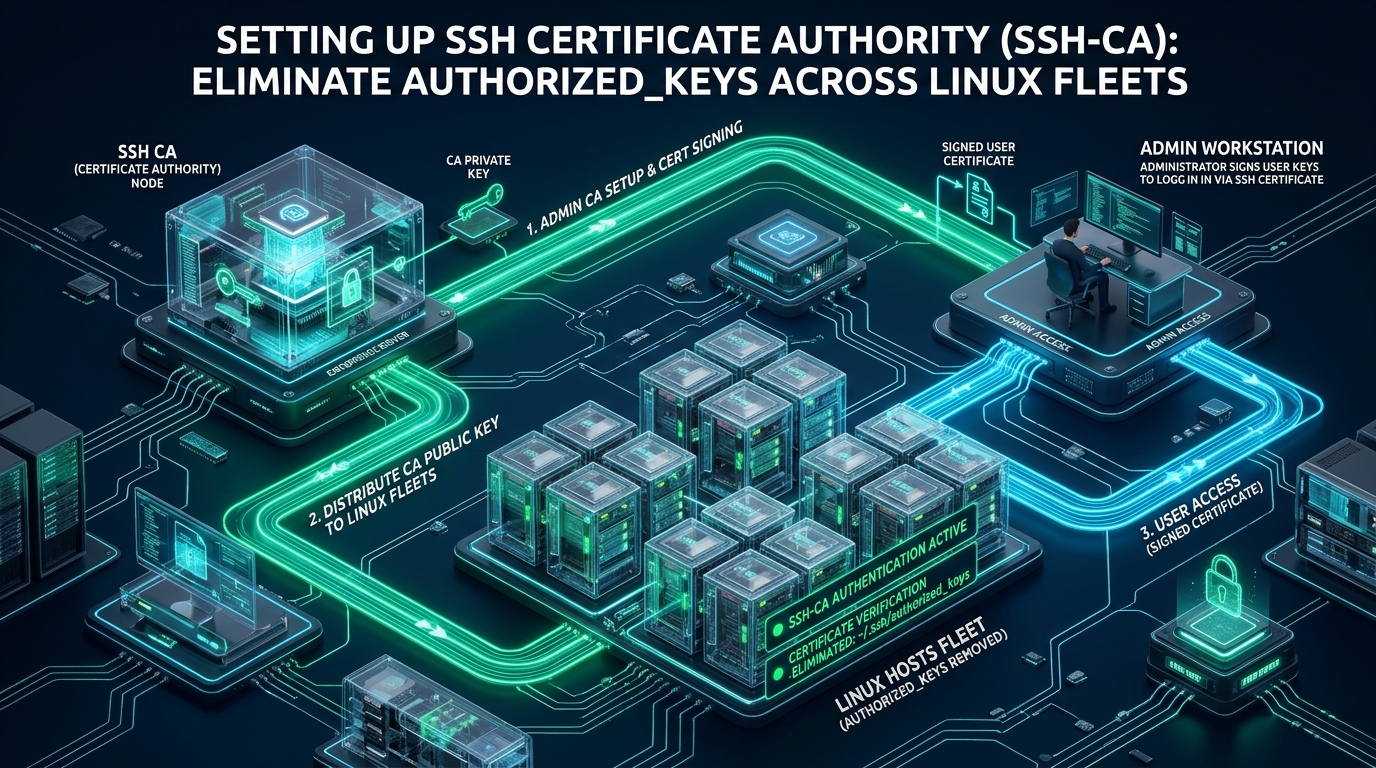
Managing static cryptographic keys via ~/.ssh/authorized_keys across distributed infrastructure inevitably introduces credential sprawl, untracked access drift, and critical offboarding security blind spots. In dynamic environments—whether spinning up ephemeral testing containers on CpanelFree or coordinating thousands of bare-metal production nodes—synchronizing flat files across disks creates massive administrative overhead and leaves orphan keys active indefinitely. Establishing an enterprise-grade ssh certificate authority linux fleet architecture eliminates authorized_keys entirely by shifting host trust to cryptographic signature validation of short-lived, principal-constrained certificates.
What Is an SSH Certificate Authority (SSH-CA) and How Does It Replace Authorized_Keys?
Direct Answer: An SSH Certificate Authority (SSH-CA) replaces static public keys with cryptographically signed, short-lived certificates. Instead of copying user public keys to ~/.ssh/authorized_keys across every fleet node, Linux servers trust a single CA public key. The CA issues time-bounded certificates embedding specific user principals, permissions, and automatic expiration, eliminating key sprawl and revocation lag.
In the traditional SSH trust model, every identity verification relies on symmetric awareness: the server must pre-record the client’s public key inside the target user account’s ~/.ssh/authorized_keys file. When an engineering team scales from five engineers to several hundred across thousands of virtual private servers (VPS) and compute instances, public key distribution becomes an O(N x M) complexity problem. Configuration management agents like Ansible, Puppet, or Chef must constantly touch every server’s filesystem to push and purge keys. If a sync fails or an agent crashes, revoked keys linger on target disks, giving terminated personnel or compromised identities undetected access pathways.
Furthermore, standard SSH public key authentication fails to protect clients against Man-in-the-Middle (MITM) attacks during initial discovery. When connecting to an unvisited server, users encounter the notorious “Trust On First Use” (TOFU) prompt: The authenticity of host ‘192.0.2.1’ can’t be established. Engineers routinely press ‘yes’ without verifying the cryptographic fingerprint against out-of-band records. By deploying dual Certificate Authorities—a User CA to authenticate incoming engineers and a Host CA to authenticate target servers—both sides of the SSH handshake establish mutual, verifiable trust cryptographically without storing single-purpose keys on disk.
Architectural Comparison: Static Authorized_Keys vs. Production SSH-CA
Transitioning to an enterprise ssh certificate authority linux fleet transforms access management from an asynchronous filesystem replication model into a centralized cryptographic signing workflow. The matrix below benchmarks the fundamental operational, security, and performance differences between legacy key distribution and a tuned SSH-CA topology:
| Feature / Metric | Standard / Default (authorized_keys) | Tuned / Production (SSH-CA Engine) |
|---|---|---|
| Key Distribution Overhead | O(N x M) disk sync across all fleet nodes | O(1) single CA public key loaded into sshd |
| Credential Expiration & TTL | Infinite / Static until manually purged | Ephemeral (8 to 16-hour valid certificate window) |
| Offboarding Revocation Latency | Hours or days depending on CM cron cycles | Instantaneous (Passive expiration or KRL push) |
| Host Identity & TOFU Mitigation | Blind acceptance of host fingerprints (MITM vulnerable) | Zero TOFU (Pre-trusted Host CA validates nodes) |
| Privilege & Principal Enforcement | Binary access tied to specific system accounts | Granular principals (e.g. ops, dbadmin, read-only) |
| Audit & Traceability | Opaque key hashes in /var/log/auth.log | Signed Key ID, Identity, and Serial logged by PAM |
Architecture Note: Unlike X.509 PKI (used in TLS/SSL and HTTPS), OpenSSH certificates do not utilize complex ASN.1 encoding or rigid certificate chains with intermediate tiers. OpenSSH uses a lightweight, native binary format defined directly inside the OpenSSH specification. This drastically reduces parsing overhead, eliminates external certificate parsing libraries, and provides wire-speed cryptographic verification within the
sshddaemon.
Cryptographic Separation: The Dual-CA Topology
An enterprise SSH-CA deployment must never use a single master signing key for both users and servers. Compromising a unified key would allow an attacker possessing a host certificate to forge user administrative credentials, or vice versa. The architecture demands strict cryptographic separation into two isolated authorities:
- The User Certificate Authority (
user_ca): Signs public keys for human engineers and automated CI/CD runners. Target servers are configured withTrustedUserCAKeys /etc/ssh/trusted_user_ca.pub. When an engineer connects, their SSH client presents both their private key and the CA-signed user certificate. The daemon verifies the cryptographic signature against the User CA public key and checks that the certificate’s embedded principals match the requested local account. - The Host Certificate Authority (
host_ca): Signs the machine host keys (e.g.,ssh_host_ed25519_key.pub) for every server in the fleet. Client workstations and bastion jumpboxes configure@cert-authority *.internal.merahost.org ...in their global/etc/ssh/ssh_known_hosts. When a user connects to any node matching the domain wildcard, the server presents its host certificate. The client validates the signature, completely bypassing the “unknown fingerprint” prompt.
Step 1: Generating the Offline and Bastion CA Keys
The root CA private keys must be generated on an air-gapped machine, a Hardware Security Module (HSM), or an isolated internal identity management bastion running an automated vault engine (such as HashiCorp Vault, Smallstep step-ca, or Netflix BLESS). We mandate Ed25519 keys for their superior cryptographic strength, immunity to timing attacks, and compact public key format.
Execute the following commands on the secure CA bastion:
# Create dedicated storage directory with restricted POSIX permissions
sudo mkdir -p /etc/ssh/ca_master
sudo chmod 700 /etc/ssh/ca_master
cd /etc/ssh/ca_master

# 1. Generate User Certificate Authority (User CA)
ssh-keygen -t ed25519 -C "Enterprise-User-CA-2026" -f user_ca -N "SuperSecretCAKeyPassphrase!"

# 2. Generate Host Certificate Authority (Host CA)
ssh-keygen -t ed25519 -C "Enterprise-Host-CA-2026" -f host_ca -N "SuperSecretCAKeyPassphrase!"

# Verify permissions: private keys MUST remain 600, public keys 644
chmod 600 user_ca host_ca
chmod 644 user_ca.pub host_ca.pub
ls -la /etc/ssh/ca_master/
The public keys (user_ca.pub and host_ca.pub) will be distributed to target servers and client machines respectively. The private keys (user_ca and host_ca) never leave the signing bastion or HSM vault.
Step 2: Hardening the Linux Fleet sshd Configuration
Target Linux servers across your fleet require three configuration updates to accept CA-signed certificates and enforce strict principal validation. Rather than editing the monolithic /etc/ssh/sshd_config, deploy a drop-in file within /etc/ssh/sshd_config.d/.
First, copy the public User CA key to the target server at /etc/ssh/trusted_user_ca.pub with chmod 644. Then, create the production configuration file:
# /etc/ssh/sshd_config.d/01-certificate-authority.conf
# Enterprise SSH Certificate Authority Integration & Fleet Hardening

# 1. Trust User Certificates signed by our enterprise User CA
TrustedUserCAKeys /etc/ssh/trusted_user_ca.pub

# 2. Map authorized principals per local operating system account
AuthorizedPrincipalsFile /etc/ssh/auth_principals/%u

# 3. Present the server's cryptographic Host Certificate to connecting clients
HostCertificate /etc/ssh/ssh_host_ed25519_key-cert.pub

# 4. Enforce Key Revocation List (KRL) checking
RevokedKeys /etc/ssh/revoked_keys.krl

# 5. Disable legacy password and interactive keyboard authentication
PasswordAuthentication no
KbdInteractiveAuthentication no
PubkeyAuthentication yes

# 6. Restrict root logins strictly to signed certificate principals
PermitRootLogin prohibit-password

# 7. Modernized cryptographic cipher suite (Post-Quantum & High-Performance)
KexAlgorithms curve25519-sha256,[email protected],diffie-hellman-group16-sha512
Ciphers [email protected],[email protected]
MACs [email protected]

# 8. Fleet connection limits and timeouts
ClientAliveInterval 300
ClientAliveCountMax 2
MaxAuthTries 3
MaxStartups 10:30:100
Security Note on AuthorizedPrincipalsFile: The token
%udynamically resolves to the username attempting authentication. If an engineer attempts to log in asdeployer, OpenSSH reads/etc/ssh/auth_principals/deployer. Only certificates containing at least one principal listed inside that file will be permitted to open a session.
Step 3: Configuring Principal Mapping on Target Hosts
Principals allow you to decouple local Linux accounts from individual engineer names. Instead of creating individual user accounts for 50 developers on every server, you create shared role-based service accounts (e.g., ops, deployer, sysadmin, auditor) and define which certificate roles can log in.
Create the principals directory and configure access rules:
# Initialize principals mapping directory
sudo mkdir -p /etc/ssh/auth_principals
sudo chmod 755 /etc/ssh/auth_principals

# Map allowed principals for the local 'root' account
cat << 'EOF' | sudo tee /etc/ssh/auth_principals/root
infra-lead
cluster-admin
emergency-breakglass
EOF

# Map allowed principals for the 'deployer' application account
cat << 'EOF' | sudo tee /etc/ssh/auth_principals/deployer
ci-runner
devops-engineer
infra-lead
EOF

# Map allowed principals for standard 'ubuntu' or 'rocky' administrative accounts
cat << 'EOF' | sudo tee /etc/ssh/auth_principals/rocky
site-reliability-engineer
devops-engineer
infra-lead
EOF

# Enforce strict permissions
sudo chmod 644 /etc/ssh/auth_principals/*
Step 4: Signing Host Certificates and Eliminating TOFU
To eliminate the TOFU security risk on client machines, each fleet host must have its public host key signed by the Host CA. On the server being onboarded (e.g., node-01.internal.merahost.org):
# Extract server's public host key
cat /etc/ssh/ssh_host_ed25519_key.pub
Submit this public key to the CA bastion and sign it with -h (indicating a host certificate), assigning all relevant DNS hostnames and internal IP addresses as valid principals:
# Execute on CA Bastion:
ssh-keygen -s /etc/ssh/ca_master/host_ca   -I "node-01.internal.merahost.org"   -h   -n "node-01.internal.merahost.org,node-01,10.240.0.12"   -V +52w   ssh_host_ed25519_key.pub

# This generates: ssh_host_ed25519_key-cert.pub
Copy ssh_host_ed25519_key-cert.pub back to /etc/ssh/ on the host and restart the daemon: sudo systemctl restart sshd.
Now, configure client workstations or developer machines. Add the Host CA public key to /etc/ssh/ssh_known_hosts:
# On developer workstations (/etc/ssh/ssh_known_hosts or ~/.ssh/known_hosts):
@cert-authority *.internal.merahost.org,10.240.0.* ssh-ed25519 AAAAC3NzaC1lZDI1NTE5AAAAIC0B7... Enterprise-Host-CA-2026
From this moment forward, when an engineer types ssh [email protected], their local OpenSSH client automatically checks the server’s certificate against the pre-configured Host CA. Zero manual confirmation prompts are displayed, and spoofed DNS/ARP MITM attacks are rejected immediately.
Step 5: Issuing Short-Lived User Certificates
In production, user certificates should never have an infinite lifespan. Enforce a maximum validity period of 8 to 16 hours. When an engineer begins their shift, they authenticate against an identity provider (SSO / OIDC with Okta, Google Workspace, or GitHub) and the internal CA issues a daily certificate.
The signing command embeds the identity, valid principals, and strict expiration:
# Execute on Signing Service:
ssh-keygen -s /etc/ssh/ca_master/user_ca   -I "engineer_alice_id8841"   -n "devops-engineer,site-reliability-engineer"   -V +8h   -O clear   -O permit-pty   -O permit-port-forwarding   -z 10042   id_ed25519.pub

# Inspect the generated certificate metadata:
ssh-keygen -L -f id_ed25519-cert.pub
When inspecting the generated certificate, ssh-keygen -L reveals the cryptographic payload:
id_ed25519-cert.pub:
        Type: [email protected] user certificate
        Public key: ED25519-CERT SHA256:qQ29vB...
        Signing CA: ED25519 SHA256:jK8x0L... (Enterprise-User-CA-2026)
        Key ID: "engineer_alice_id8841"
        Serial: 10042
        Valid: from 2026-11-08T08:00:00 to 2026-11-08T16:00:00
        Principals:
                devops-engineer
                site-reliability-engineer
        Critical Options: (none)
        Extensions:
                permit-port-forwarding
                permit-pty
The engineer places id_ed25519-cert.pub directly next to their private key ~/.ssh/id_ed25519. OpenSSH automatically discovers and transmits the certificate during authentication. No modification to any server filesystem is required.
Step 6: Real-Time Revocation with Key Revocation Lists (KRL)
While short-lived certificates inherently minimize risk—a compromised laptop’s certificate expires within a few hours—critical emergency events (such as an active insider incident) require instantaneous revocation before the TTL lapses. OpenSSH supports binary Key Revocation Lists (KRL), which provide extreme scalability and sub-millisecond check latency.
On the CA bastion, generate and maintain the binary KRL file:
# 1. Initialize or revoke a specific certificate serial number:
ssh-keygen -k -f /etc/ssh/ca_master/revoked_keys.krl   -s /etc/ssh/ca_master/user_ca.pub   serial:10042

# 2. Alternatively, revoke by public key or Key ID:
ssh-keygen -k -u -f /etc/ssh/ca_master/revoked_keys.krl compromised_key.pub

# 3. Verify the contents of the binary KRL:
ssh-keygen -Q -f /etc/ssh/ca_master/revoked_keys.krl id_ed25519-cert.pub
To distribute the KRL across your Linux fleet in real time, deploy an automated systemd sync service and timer on all target nodes:
# /etc/systemd/system/ssh-krl-sync.service
[Unit]
Description=Synchronize SSH Key Revocation List (KRL) from Secure Gateway
After=network-online.target
Wants=network-online.target

[Service]
Type=oneshot
User=root
ExecStart=/usr/bin/curl -sSf --cert /etc/ssl/certs/fleet-node.crt --key /etc/ssl/private/fleet-node.key -o /etc/ssh/revoked_keys.krl.tmp https://ca-gateway.internal.merahost.org/revoked_keys.krl
ExecStartPost=/usr/bin/mv /etc/ssh/revoked_keys.krl.tmp /etc/ssh/revoked_keys.krl
ExecStartPost=/usr/bin/chmod 644 /etc/ssh/revoked_keys.krl
StandardOutput=journal
StandardError=journal
Accompany this service with an aggressive systemd timer unit:
# /etc/systemd/system/ssh-krl-sync.timer
[Unit]
Description=Periodic Trigger for SSH KRL Sync
After=network.target

[Timer]
OnBootSec=1min
OnUnitActiveSec=5min
RandomizedDelaySec=15sec
Persistent=true

[Install]
WantedBy=timers.target
Enable and start the timer: sudo systemctl daemon-reload && sudo systemctl enable --now ssh-krl-sync.timer. Any revoked serial number is blocked fleet-wide within minutes without restarting the sshd daemon.
When running mission-critical workloads that demand high I/O throughput and ironclad security boundaries, consider hosting your infrastructure on MeraHost Enterprise Cloud. Equipped with enterprise-grade NVMe storage and predictable billing models, MeraHost ensures zero performance degradation while executing cryptographic security checks and high-concurrency fleet management operations.
Frequently Asked Questions
Does setting up an SSH Certificate Authority require rebuilding or upgrading OpenSSH?
No. OpenSSH has natively supported certificate-based authentication and Key Revocation Lists (KRL) since version 5.4 released in 2010. Modern Linux distributions—including Ubuntu 22.04/24.04, Debian 12, Rocky Linux 9, AlmaLinux, and CentOS Stream—ship with OpenSSH 8.x or 9.x out of the box, offering full compatibility without extra third-party daemons.
Can I use SSH-CA alongside existing authorized_keys during migration?
Yes. OpenSSH allows both authentication mechanisms to operate concurrently. If PubkeyAuthentication yes is set, sshd will first evaluate certificates signed by TrustedUserCAKeys; if no valid certificate is presented, it gracefully falls back to checking ~/.ssh/authorized_keys. This permits seamless, zero-downtime fleet migration.
What happens if the internal CA signing server experiences an outage?
Active SSH sessions and already-issued valid certificates continue to operate without interruption until their individual TTL expires. Target fleet servers never contact the CA during authentication; they validate certificates locally using public-key cryptography. To safeguard emergency access, organizations maintain an offline breakglass user key or an air-gapped emergency CA key.
How do SSH certificates differ from SSL/TLS x509 certificates?
OpenSSH certificates do not use X.509 standards, ASN.1 encoding, or public web trust anchors. They are structured as simple, lightweight binary blobs customized strictly for the SSH protocol. This architecture eliminates external CA dependencies, SSL handshake latency, and complex certificate chaining vulnerabilities.
Deploy Enterprise-Grade Production Infrastructure
Need guaranteed performance with zero price hikes? Host mission-critical workloads on MeraHost with pure Enterprise NVMe, LiteSpeed Web Server, and Same Renewal Price, Always (starting at ₹99/mo).