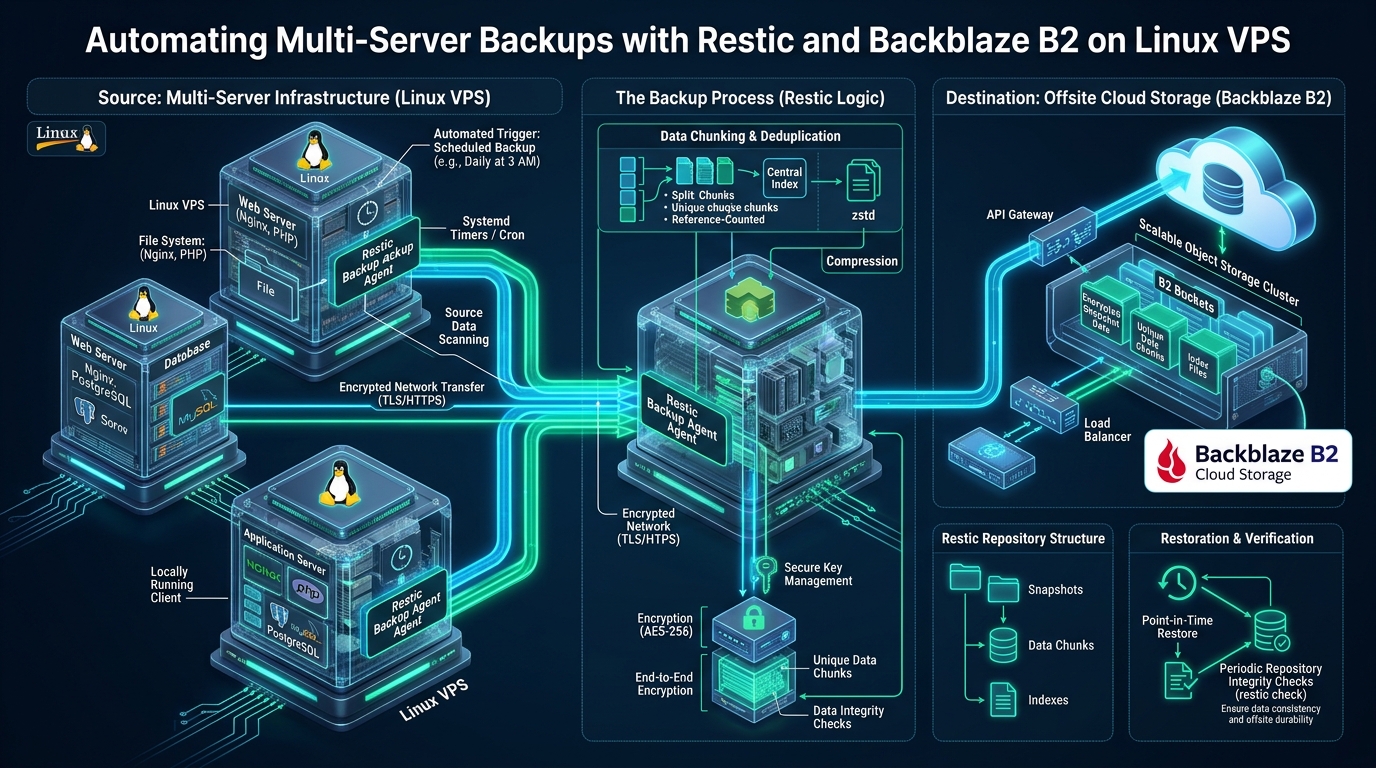
Modern Linux systems engineers managing distributed fleet environments confront a relentless disaster recovery dilemma: traditional tarball and rsync backup pipelines generate crushing I/O spikes, duplicate terabytes of identical operating system binaries across remote targets, and lack zero-knowledge client-side encryption. As infrastructure expands across staging sandboxes on CpanelFree and high-concurrency production databases, relying on fragmented shell scripts and unauthenticated rsync daemons inevitably leads to silent snapshot corruption and unmanageable object storage bills. Engineering a resilient, cryptographically verified backup architecture in 2026 requires transitioning to Content-Defined Chunking (CDC) via Restic coupled with Backblaze B2 cloud storage, automated seamlessly by hardened systemd service units.
Automating Restic Backups to Backblaze B2: The Production Architecture
--pack-size 64), and automated retention policies (--keep-daily 7 --keep-weekly 4 --keep-monthly 12), sysadmins achieve atomic, wire-speed offsite disaster recovery with near-zero compute and storage overhead.
Architectural Deconstruction: Content-Defined Chunking and Cryptographic Design
To comprehend why Restic vastly outperforms legacy utilities like Duplicity, Rdiff-backup, and raw rsync, systems architects must analyze its core repository primitives. Legacy backup software typically relies on fixed-block chunking or entire file delta algorithms. Under fixed-block chunking, if a single byte is prepended to a 10 GB MySQL database dump or application log file, every subsequent block boundary shifts, causing the deduplication engine to treat the entire file as brand-new data. This boundary-shift defect leads to massive storage ballooning and astronomical cloud egress expenses.
Restic overcomes the boundary-shift defect through Content-Defined Chunking (CDC) driven by a rolling Rabin-Karp fingerprint algorithm. Instead of splitting data at rigid byte offsets (e.g., every 4 MB), Restic evaluates a sliding 64-byte window across the byte stream. When the lower bits of the rolling polynomial hash match an internal target condition, a chunk boundary is declared. The result is variable-sized data chunks (averaging 512 KB to 8 MB) whose split points depend entirely on local content structure rather than absolute file offsets. Adding or deleting bytes in a file only alters the specific chunk containing that edit, preserving deduplication across the rest of the stream.
Under the hood, Restic organizes repository data into an immutable, content-addressable Merkle tree structure governed by strict cryptographic encapsulation:
- Blobs: The foundational atomic units. A blob is either a variable-sized slice of a payload file (data blob) or a serialized JSON manifest mapping directory hierarchies, filenames, permissions, and timestamps (tree blob). Every blob is cryptographically identified by the SHA-256 hash of its plaintext content.
- Packs: To avoid the small-file latency penalties inherent in cloud object storage, Restic aggregates multiple encrypted blobs into larger pack files (typically 16 MB by default, configurable up to 64 MB or 128 MB via
--pack-size). Pack files reside in the remote B2 bucket’sdata/prefix. - Index: Stored in the remote repository’s
index/directory, these files contain bidirectional mappings between blob SHA-256 IDs, containing pack file names, byte offsets, and encrypted lengths. When running incremental backups, Restic downloads and caches these indexes locally, allowing instantaneous diffing without scanning remote object payloads. - Snapshots: Point-in-time state roots formatted as JSON documents containing metadata, hostname, operational tags, execution timestamps, and the root tree blob ID.
- Zero-Knowledge Cryptography: All blobs, indexes, and snapshot manifests are authenticated and encrypted before leaving VPS RAM using AES-256-CTR paired with Poly1305 MAC. Key material is derived from user passphrases using
scrypt, guaranteeing that cloud storage providers (including Backblaze) have zero visibility into filenames, file contents, or directory graphs.
Transport Layer Engineering: Native B2 REST API vs. S3 Compatibility
When connecting Restic to Backblaze B2, Linux engineers have two architectural deployment paths: native Backblaze B2 API integration (b2:bucketname:path) or the S3-compatible endpoint (s3:https://s3.<region>.backblazeb2.com/bucketname/path). While both interfaces land objects in identical underlying B2 storage infrastructure, their operational characteristics and failure modes differ significantly under production multi-server concurrency.
The Native B2 Backend interacts directly with Backblaze’s proprietary endpoints (api.backblazeb2.com). It handles upload authorization tokens natively, supports granular API rate-limit exponential backoff, and provides streamlined key management using B2_ACCOUNT_ID (Application Key ID) and B2_ACCOUNT_KEY. Furthermore, Restic’s native B2 client automatically manages multi-part upload authorizations and cleans up aborted large-file fragments, eliminating the lingering partial upload charges that occasionally afflict S3-wrapped tools.
Conversely, the S3 Compatibility Layer routes through Backblaze’s S3 emulation gateway. While useful for organizations standardizing on unified AWS S3 credentials or using external proxies like MinIO, the additional translation layer can introduce minor request latency overhead during high-frequency index synchronization across dozens of concurrent VPS backup streams. For dedicated Linux VPS deployments, standardizing on the native b2: protocol delivers the highest throughput, lowest connection churn, and most reliable error handling.
Architectural Comparison: Legacy Backup Methods vs. Restic + Backblaze B2
To justify retiring legacy backup architectures across enterprise server clusters, systems engineers must evaluate quantifiable operational metrics, including CPU utilization, storage amplification, bandwidth consumption, and mean time to recovery (MTTR).
| Operational Metric / Capability | Legacy (Tar + Gzip / Rsync) | Tuned Restic + Backblaze B2 |
|---|---|---|
| Deduplication Granularity | None (Full archives) or file-level only | Sub-file Content-Defined Chunking (CDC) |
| Client-Side Cryptography | Unencrypted or slow post-hoc GPG pipelines | Zero-Knowledge AES-256-CTR + Poly1305 MAC |
| Network Transfer Bandwidth | High (Repeated transmission of modified files) | Minimal (Only unique, unseen chunks uploaded) |
| Point-in-Time Restore Speed | Slow sequential scan across unindexed tar archives | O(1) direct index lookup & parallel blob fetch |
| Storage Pruning Overhead | Manual file deletion, fragmented remote storage | Atomic repackaging via smart retention rules |
| Fleet Concurrency Management | High risk of SSH/rsync lockfile collisions | Distributed object locks with host-specific paths |
| Live Database Streaming | Requires dumping unencrypted SQL to local disk | Direct STDIN pipe streaming into encrypted blobs |
Multi-Server Namespace Strategy & Least-Privilege IAM Provisioning
When backing up multiple Linux VPS nodes to Backblaze B2, systems architects must decide between two primary repository topology designs:
- Single Shared Repository with Host Tagging: All nodes push snapshots into the exact same B2 repository root (e.g.,
b2:company-backups:production). While this maximizes cross-server deduplication (since multiple Ubuntu or Debian servers share identical OS packages and system binaries), it creates severe operational trade-offs: all servers must share identical encryption keys, one compromised node could theoretically read or prune other nodes’ snapshots, and concurrent lock contention can delay scheduled backup jobs. - Isolated Repository Per Node Prefix (Recommended Enterprise Pattern): Each VPS node targets its own distinct bucket prefix or discrete bucket (e.g.,
b2:prod-backups:node-db-01,b2:prod-backups:node-web-02). Each server possesses unique encryption passphrases and distinct Backblaze Application Keys with strict read/write scope limited exclusively to its specific prefix path.
To enforce the Principle of Least Privilege, never configure VPS backup agents with Backblaze Master Application Keys. Instead, use the Backblaze B2 Console or CLI to create an Application Key with granular constraints:
- Bucket Access: Restricted to the dedicated target bucket only.
- File Name Prefix: Constrained to the node’s dedicated prefix path (e.g.,
servers/web-vps-01/). - Capabilities: Grant only
readFiles,writeFiles, anddeleteFiles. Deny admin permissions likelistBuckets,deleteBucket, and key provisioning.
Security Architecture Note: For bulletproof ransomware defense, configure Backblaze B2 Object Lock (Immutability) on your target bucket with Compliance Mode. Even if an attacker gains root compromise on a Linux VPS and steals the local Restic credentials, they cannot execute malicious
restic forget --prunecommands to wipe historical snapshots until the immutability retention period expires.
Step 1: Kernel Tuning for High-Throughput Cloud Object Egress
By default, generic Linux distributions ship with conservative TCP buffer limits designed for low-memory appliances or legacy 100Mbps Ethernet links. Backing up multi-gigabyte data sets to cloud object storage over 1Gbps or 10Gbps VPS network interfaces requires optimizing the Linux TCP socket buffer windows and congestion control algorithms to avoid artificial bandwidth bottlenecks.
Deploy the following sysctl configuration to /etc/sysctl.d/99-restic-throughput.conf and apply it via sysctl --system:
# /etc/sysctl.d/99-restic-throughput.conf
# Linux Kernel TCP & Network Optimization for High-Throughput Cloud Backups

# Enforce BBR congestion control algorithm for optimal throughput across WAN
net.core.default_qdisc = fq
net.ipv4.tcp_congestion_control = bbr

# Increase maximum socket receive and send buffer sizes to 16MB
net.core.rmem_max = 16777216
net.core.wmem_max = 16777216
net.core.rmem_default = 1048576
net.core.wmem_default = 1048576

# Optimize TCP autotuning window sizes (min, default, max)
net.ipv4.tcp_rmem = 4096 1048576 16777216
net.ipv4.tcp_wmem = 4096 1048576 16777216

# Enable TCP Window Scaling (RFC 1323) and Selective Acknowledgments (SACK)
net.ipv4.tcp_window_scaling = 1
net.ipv4.tcp_sack = 1

# Increase maximum backlog queue for incoming socket connections
net.core.netdev_max_backlog = 10000
net.ipv4.tcp_max_syn_backlog = 8192

# Prevent socket exhaustion during high-concurrency connection teardowns
net.ipv4.tcp_fin_timeout = 15
net.ipv4.tcp_tw_reuse = 1
Step 2: Environment Configuration and Least-Privilege Permissions
Storing plain-text passwords inside shell scripts or world-readable files is a critical vulnerability. To secure the Restic deployment, create a dedicated configuration file at /etc/restic/b2-backup.env owned strictly by root:root with permissions set to 0600.
This environment file encapsulates the Backblaze B2 Application Key, the target bucket path, the repository encryption passphrase, and performance tuning variables:
# /etc/restic/b2-backup.env
# Strict Environment Configuration for Restic Backblaze B2 Integration
# Permissions must be: chmod 0600 /etc/restic/b2-backup.env

# Backblaze B2 Application Key ID and Application Key
export B2_ACCOUNT_ID="004abc123def4560000000001"
export B2_ACCOUNT_KEY="K004aBcDeFgHiJkLmNoPqRsTuVwXyZ1"

# Target B2 Repository Location (b2:bucket-name:optional/prefix/path)
export RESTIC_REPOSITORY="b2:enterprise-vps-backups:nodes/web-app-01"

# Cryptographic Passphrase for AES-256 Repository Encryption
# For enhanced security, load from a file via: RESTIC_PASSWORD_FILE="/etc/restic/repo.key"
export RESTIC_PASSWORD="SUPER_SECRET_ENTROPY_RICH_PASSPHRASE_CHANGE_ME"

# Local Metadata Cache Directory (Improves snapshot diffing by 10x)
export RESTIC_CACHE_DIR="/var/cache/restic"

# Performance & Compression Tuning (auto uses zstandard for compressible blobs)
export RESTIC_COMPRESSION="auto"

# Healthcheck / Alerting Webhook (optional, e.g., Healthchecks.io / Uptime Kuma)
export HEALTHCHECK_URL="https://hc-ping.com/your-uuid-here"
Performance Tip: In default configurations, Restic creates ~16 MB pack files. In large file systems or database dumps exceeding 200 GB, this produces tens of thousands of tiny objects, increasing Backblaze B2 Class B API transaction costs ($0.004 per 10,000 calls). Passing
--pack-size 64aggregates chunks into 64 MB packs, slashing object count by 75% and accelerating repository index operations during backups and prunes.
Step 3: Production Backup Script with Live DB Streaming and Error Traps
A robust production backup wrapper must never be a simple one-liner. It must implement distributed flock locking to prevent concurrent runs, verify remote connectivity, handle live database dumps on the fly via pipes (without storing unencrypted SQL dumps on the local SSD), prune historical snapshots according to retention tiers, and notify external monitoring services on failure.
Save the following battle-tested shell script to /usr/local/bin/restic-backup.sh and execute chmod 0700 /usr/local/bin/restic-backup.sh:
#!/usr/bin/env bash
# /usr/local/bin/restic-backup.sh
# Enterprise Automated Multi-Server Backup Wrapper for Restic & Backblaze B2
# Enforces strict bash error handling, concurrency locks, and monitoring alerts
set -euo pipefail
IFS=$"\n\t"

LOCK_FILE="/var/run/restic-backup.lock"
ENV_FILE="/etc/restic/b2-backup.env"
EXCLUDE_FILE="/etc/restic/excludes.txt"
LOG_TAG="restic-backup"

# 1. Verify environment configuration exists
if [[ ! -f "${ENV_FILE}" ]]; then
    logger -t "${LOG_TAG}" -p daemon.err "CRITICAL: Environment file ${ENV_FILE} not found."
    exit 1
fi
source "${ENV_FILE}"

# 2. Acquire non-blocking file lock to prevent concurrent execution conflicts
exec 200>"${LOCK_FILE}"
if ! flock -n 200; then
    logger -t "${LOG_TAG}" -p daemon.warning "Backup already running on this node. Exiting."
    exit 0
fi

# 3. Notification and Cleanup Traps
cleanup() {
    local exit_code=$?
    if [[ ${exit_code} -ne 0 ]]; then
        logger -t "${LOG_TAG}" -p daemon.err "Restic backup failed with exit code ${exit_code}."
        if [[ -n "${HEALTHCHECK_URL:-}" ]]; then
            curl -fsS --retry 3 "${HEALTHCHECK_URL}/fail" || true
        fi
    fi
    flock -u 200 || true
    rm -f "${LOCK_FILE}"
}
trap cleanup EXIT

# Ping healthcheck start signal
if [[ -n "${HEALTHCHECK_URL:-}" ]]; then
    curl -fsS --retry 3 "${HEALTHCHECK_URL}/start" || true
fi

# 4. Initialize repository if first run
if ! restic snapshots >/dev/null 2>&1; then
    logger -t "${LOG_TAG}" -p daemon.info "Repository not initialized. Initializing..."
    restic init --pack-size 64
fi

# 5. Clear stale locks from previously interrupted runs
restic unlock || true

# 6. Stream Live Database Dumps directly into encrypted blobs (Zero disk leak)
if command -v mysqldump >/dev/null 2>&1 && [[ -f /root/.my.cnf ]]; then
    logger -t "${LOG_TAG}" -p daemon.info "Streaming MySQL database dumps into Restic..."
    mysqldump --defaults-file=/root/.my.cnf --single-transaction --quick --all-databases \
        | restic backup --stdin --stdin-filename "mysql_all_databases.sql" \
        --tag "database" --tag "mysql" --pack-size 64
fi

# 7. Backup File System Paths (Websites, Configs, SSL certs, User home)
logger -t "${LOG_TAG}" -p daemon.info "Starting filesystem snapshot..."
restic backup \
    --exclude-file="${EXCLUDE_FILE}" \
    --one-file-system \
    --tag "system" \
    --tag "production" \
    --pack-size 64 \
    /etc /var/www /home /root

# 8. Apply GFS Retention Policy and Prune Orphaned Blobs
logger -t "${LOG_TAG}" -p daemon.info "Pruning obsolete snapshots..."
restic forget \
    --keep-daily 7 \
    --keep-weekly 4 \
    --keep-monthly 12 \
    --keep-yearly 1 \
    --prune \
    --pack-size 64

# 9. Verify Repository Integrity (Light check)
restic check --read-data-subset=2%

# Signal monitoring success
if [[ -n "${HEALTHCHECK_URL:-}" ]]; then
    curl -fsS --retry 3 "${HEALTHCHECK_URL}" || true
fi
logger -t "${LOG_TAG}" -p daemon.info "Restic backup and pruning completed successfully."
Step 4: Crafting the Strategic Exclude Filter
Backing up transient socket files, volatile temporary caches, swap files, and runtime sockets wastes bandwidth and causes file-changed-during-read errors. Populate /etc/restic/excludes.txt with high-fidelity exclude patterns:
# /etc/restic/excludes.txt
# High-Value Exclude Directives for Linux VPS Servers

# Temporary and volatile system files
/tmp/*
/var/tmp/*
/var/cache/*
/var/run/*
/run/*
/var/lock/*

# Linux kernel virtual filesystems
/proc/*
/sys/*
/dev/*
/lost+found

# Web server and package caches
/var/cache/apt/archives/*
/var/log/*.gz
/var/log/*.1
/var/log/journal/*
**/.cache
**/node_modules
**/wp-content/cache/*
**/storage/framework/cache/*
Step 5: Systemd Automation with Security Sandboxing & Jitter Timers
While legacy cron jobs are simple, they lack execution isolation, log aggregation, and resource throttling. If a cron backup fires during peak traffic, it can saturate VPS disk I/O and CPU cores. Modern Linux administration mandates orchestrating backups through systemd service units paired with monotonic timers.
By leveraging systemd sandboxing directives (ProtectSystem=strict, ProtectHome=read-only, PrivateTmp=true) and I/O scheduling classes (IOSchedulingClass=best-effort, Nice=19), we ensure the backup process runs quietly in the background without degrading web server latency.
Create the systemd service unit at /etc/systemd/system/restic-backup.service:
# /etc/systemd/system/restic-backup.service
[Unit]
Description=Automated Restic Backup to Backblaze B2
Documentation=https://restic.readthedocs.io
After=network-online.target
Wants=network-online.target

[Service]
Type=oneshot
ExecStart=/usr/local/bin/restic-backup.sh

# Resource Throttling: Run at lowest CPU and I/O priority to protect web traffic
Nice=19
IOSchedulingClass=best-effort
IOSchedulingPriority=7

# Process & Security Hardening
ProtectSystem=strict
ProtectHome=read-only
ReadWritePaths=/var/cache/restic /var/run /tmp
PrivateTmp=true
ProtectKernelTunables=true
ProtectKernelModules=true
ProtectControlGroups=true
NoNewPrivileges=true
RestrictRealtime=true
RestrictSUIDSGID=true

# Standard Output Logging to Journald
StandardOutput=journal
StandardError=journal
Next, configure a systemd timer unit at /etc/systemd/system/restic-backup.timer. A critical parameter for multi-server fleets is RandomizedDelaySec=1800 (30 minutes). In fleet environments containing 10 or 50 VPS instances, executing backups at exactly 02:00:00 causes a “thundering herd” problem that can throttle API keys and overload network gateways. Introducing jitter staggers job dispatches smoothly:
# /etc/systemd/system/restic-backup.timer
[Unit]
Description=Nightly Trigger for Restic Backblaze B2 Backup
Requires=restic-backup.service

[Timer]
# Fire daily at 02:00 UTC
OnCalendar=*-*-* 02:00:00

# Multi-Server Fleet Jitter: Staggers job start by up to 30 minutes
RandomizedDelaySec=1800

# Catch up missed backups if the VPS was powered off or rebooting
Persistent=true

[Install]
WantedBy=timers.target
Enable and start the timer using standard systemctl commands:
# Reload systemd manager configuration
systemctl daemon-reload

# Enable and activate the timer
systemctl enable --now restic-backup.timer

# Verify active status and scheduled next execution time
systemctl list-timers restic-backup.timer
Disaster Recovery Drills: Restoring Snapshots Under Pressure
An untested backup is not a backup—it is merely an unverified assumption. Enterprise disaster recovery procedures mandate regular dry-run restoration drills. Because Restic decrypts and verifies blobs on the fly, engineers can inspect repository contents and execute targeted file or full-system restorations with surgical precision.
To list all available snapshots in your Backblaze B2 repository:
source /etc/restic/b2-backup.env
restic snapshots
To restore a single corrupted Nginx configuration file or MySQL dump without pulling the entire multi-gigabyte snapshot:
# Extract specific path from the latest snapshot into a temporary directory
restic restore latest \
    --target /tmp/recovery \
    --include /etc/nginx/sites-available/production.conf
To mount the entire encrypted Backblaze B2 repository as a local virtual filesystem using FUSE (Filesystem in Userspace):
mkdir -p /mnt/restic-mount
restic mount /mnt/restic-mount

# Browse snapshots interactively via native Linux terminal commands
ls -lh /mnt/restic-mount/snapshots/latest/var/www/
umount /mnt/restic-mount
Production Scaling: Hardware Foundations and Storage Performance
While implementing automated Restic pipelines on lightweight staging instances like CpanelFree provides an outstanding sandbox for testing CDC chunking, systemd sandboxing, and B2 API calls, high-concurrency production deployments demand robust physical infrastructure. As databases scale into hundreds of gigabytes and cryptographic checksumming intensifies, background backup tasks can encounter disk I/O wait bottlenecks on overcommitted hypervisors.
For high-throughput production web servers, e-commerce applications, and high-frequency transactional clusters, deploying on MeraHost Enterprise Cloud guarantees dedicated compute resources, enterprise-grade NVMe SSD arrays running LiteSpeed Web Server, and unthrottled gigabit connectivity. With MeraHost’s locked-in renewal guarantee, your enterprise infrastructure scales reliably without unexpected renewal price hikes, providing the rock-solid hardware foundation essential for zero-downtime automated backups and lightning-fast disaster recovery restorations.
Frequently Asked Questions (FAQs)
How does Restic handle multi-server concurrency when backing up to the same Backblaze B2 repository?
Restic creates ephemeral lock files in the repository’s locks/ directory. For standard backup commands, non-exclusive read/write locks allow multiple servers to push snapshots simultaneously without conflict. However, maintenance commands like prune require an exclusive lock. If multiple servers attempt to prune the same repository at once, subsequent jobs will fail. To avoid this, either assign each node a dedicated prefix path or designate a single master orchestration node to run restic forget --prune once weekly.
What is the optimal –pack-size parameter for Backblaze B2 to minimize API transaction costs?
The optimal setting is --pack-size 64 (64 megabytes). By default, Restic creates 16 MB packs. In large repositories, this produces an excessive number of objects, driving up Backblaze Class B API call charges during index updates. Setting the pack size to 64 MB reduces total API requests by approximately 75% without consuming excessive memory on standard 1 GB or 2 GB Linux VPS instances.
Can Restic back up live MySQL or PostgreSQL databases without creating unencrypted temporary files on disk?
Yes. Restic features a native --stdin option. By piping the output of mysqldump or pg_dump directly into restic backup --stdin --stdin-filename db.sql, database dumps are chunked, deduplicated, and encrypted directly in RAM before transmission to Backblaze B2. This eliminates the security risk of unencrypted SQL text lingering on the local disk and prevents local SSD wear.
How can I protect my Backblaze B2 backup repository from ransomware that compromises the VPS?
Implement Backblaze B2 Object Lock (Immutability) on your bucket and restrict the Application Key permissions. By removing the deleteFiles capability from the VPS application key and enabling bucket-level compliance retention for 30 or 90 days, a malicious actor or ransomware strain with root access to your Linux server cannot delete or overwrite historical snapshots, guaranteeing immutable disaster recovery.
Deploy Enterprise-Grade Production Infrastructure
Need guaranteed performance with zero price hikes? Host mission-critical workloads on MeraHost with pure Enterprise NVMe, LiteSpeed Web Server, and Same Renewal Price, Always (starting at ₹99/mo).