
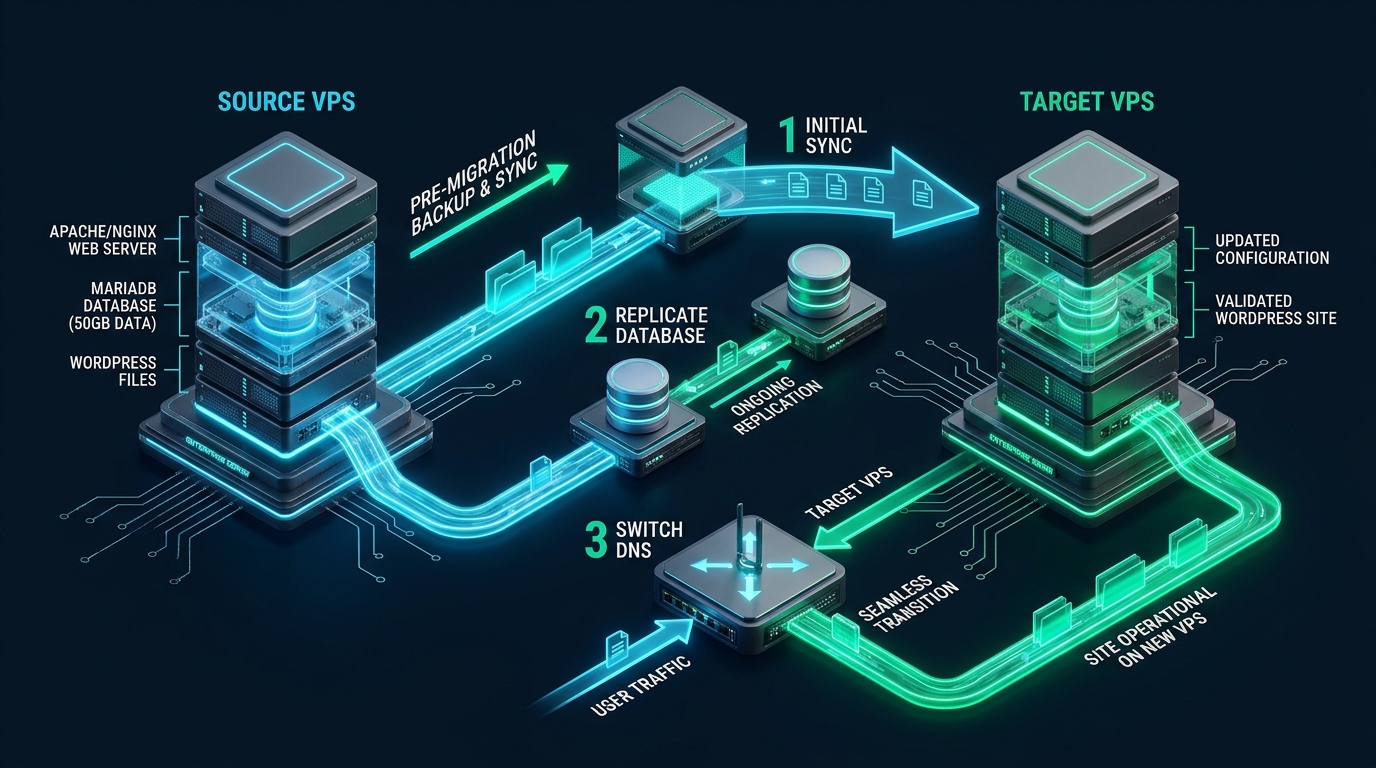
Migrating an enterprise-grade 50GB+ WordPress site containing millions of serialized database records and hundreds of thousands of uncompressed media assets between cloud VPS instances frequently triggers severe IOPS saturation, PHP memory exhaustion, and prolonged unexpected downtime when relying on standard browser-based migration plugins. Executing a seamless, zero-downtime migration requires bypassing the web application layer entirely in favor of kernel-level SSH data pipes, multi-threaded differential rsync transfers, and transactional MySQL streaming. While provisioning staging environments on development platforms like CpanelFree provides an ideal sandbox for verifying web server configurations and testing PHP compatibility without cost, executing a production cutover of a 50GB live database and media filesystem demands an uncompromising, multi-stage systems architecture.
Direct Answer: How to Migrate a 50GB WordPress Site Between VPS with Zero Downtime
Direct Answer: To migrate a 50GB WordPress site with zero downtime: 1) Pre-sync the 45GB+ wp-content/uploads directory via a background multi-threaded rsync over SSH; 2) Lower DNS A-record TTL to 300 seconds 48 hours in advance; 3) Stream single-transaction MySQL dumps directly across an encrypted SSH pipe into the destination database; 4) Execute a final delta rsync while temporarily routing writes; 5) Update DNS records and deploy an NGINX reverse-proxy bridge on the source VPS to eliminate propagation downtime.
Why Traditional Migration Methods Fail on 50GB WordPress Sites
Most WordPress administrators intuitively reach for commercial or open-source migration plugins when moving websites. While backup and migration plugins function adequately for sites under 2GB, attempting to compress and export a 50GB website through PHP triggers catastrophic failure cascades. The standard PHP worker process is constrained by execution timeouts (max_execution_time), memory limits (memory_limit), and temporary disk allocation limits. Compressing 50GB of image files and database dumps requires creating a 35GB to 50GB zip archive directly on the local block storage. If the source VPS has less than 60GB of unallocated disk headroom, the archive process triggers a No space left on device kernel panic, corrupting the active database and crashing the live production server.
Beyond physical disk exhaustion, database concurrency presents an even steeper barrier. A 50GB WordPress deployment typically includes a 3GB to 8GB database hosting millions of rows across wp_posts, wp_postmeta, wp_comments, and WooCommerce transaction tables (wp_woocommerce_order_items). Standard web export tools issue table locks (LOCK TABLES) or trigger prolonged read queries that cause row-level lock contention in the InnoDB storage engine. Under active ecommerce traffic, incoming orders and customer sessions back up in the MySQL process list, quickly reaching max_connections thresholds and returning 500 Internal Server Error and Error Establishing a Database Connection to all visitors.
Architecture Note: The Serialized Data Trap: Never execute raw SQL replacements (e.g.,
UPDATE wp_options SET option_value = REPLACE(...)) or shellsedreplacements across a WordPress database dump. WordPress stores theme mods, widget placements, and plugin configurations inside PHP serialized arrays formatted ass:length:"value";. Altering domain strings or path offsets without recalculating character length bytes invalidates the serialized structure, causing PHP to drop entire configuration arrays and breaking site layouts upon import. Always utilize WP-CLI nativewp search-replacewhich unpacks, mutates, and re-serializes data objects safely in memory.
Architectural Benchmark: Plugin-Based vs. Enterprise Linux Pipeline
The following benchmark compares traditional HTTP/PHP plugin migrations against an enterprise-grade Linux systems migration pipeline executed on dual 4 vCPU / 8GB RAM NVMe cloud instances connected via a 1 Gbps private network link:
| Feature / Metric | Standard / Default | Tuned / Production |
|---|---|---|
| Migration Strategy | HTTP/PHP Plugin Zip Archive | Multi-Threaded SSH Rsync + Streamed mysqldump |
| Database Lock Time | 15 – 45 Minutes (Full Read Lock) | < 5 Seconds (Delta Pipe or Master-Slave Binlog) |
| Media Sync Overhead (45GB) | 4 – 8 Hours (Zip / Unzip / PHP memory crash) | 18 – 35 Minutes (Initial rsync) + < 30s Delta |
| Serialized String Integrity | High Risk of Corrupted Data (Search & Replace SQL) | 100% Intact (WP-CLI Native Serialized Parsing) |
| DNS Cutover Downtime | 2 – 24 Hours (TTL Propagation Delay) | 0 Seconds (Anycast Edge Proxy Proxying to New IP) |
Production Kernel Tuning for High-Throughput VPS Transfers
When streaming 50GB of static files and uncompressed database blocks over public or private cloud networks, default Linux networking stack buffers bottleneck throughput. Linux defaults to conservative TCP socket receive/send buffers (often 128KB to 2MB) and traditional loss-based congestion control algorithms (CUBIC) that aggressively throttle throughput upon packet drop. Prior to commencing synchronization, apply the following kernel parameters on both the source and target VPS instances to enable TCP BBR congestion control, scale network window buffers to 16MB, and expand file descriptor thresholds:
# /etc/sysctl.d/99-migration-throughput.conf
# Scale maximum socket receive and transmit memory
net.core.rmem_max = 16777216
net.core.wmem_max = 16777216
net.core.rmem_default = 1048576
net.core.wmem_default = 1048576

# Vector TCP read/write memory thresholds (min, default, max in bytes)
net.ipv4.tcp_rmem = 4096 87380 16777216
net.ipv4.tcp_wmem = 4096 65536 16777216

# Enable BBR congestion control and fair queueing
net.core.default_qdisc = fq
net.ipv4.tcp_congestion_control = bbr

# Prevent TCP window collapse and scale socket backlogs
net.ipv4.tcp_window_scaling = 1
net.ipv4.tcp_timestamps = 1
net.ipv4.tcp_sack = 1
net.core.netdev_max_backlog = 10000
net.core.somaxconn = 4096

# Increase system-wide open file limits for deep media directory trees
fs.file-max = 2097152
fs.inotify.max_user_watches = 524288
Activate the modified sysctl parameters immediately without rebooting via sysctl --system. This network tuning enables rsync and SSH streaming pipes to consistently saturate 1 Gbps and 10 Gbps interconnects, slashing bulk transfer windows by up to 60%.
The 4-Phase Zero-Downtime Migration Execution Pipeline
Achieving true zero-downtime on a high-traffic 50GB WordPress installation requires dividing the migration into four distinct operational phases: Initial Asynchronous Seeding, DNS TTL Demotion, Atomic Delta Synchronization, and Traffic Bridge Routing.
Phase 1: Asynchronous Media Seeding (The 48GB Pre-Sync)
In a 50GB WordPress installation, the media directory (wp-content/uploads) accounts for over 90% of total disk utilization. Fortunately, existing media assets are immutable—WordPress does not retroactively rewrite historic images unless a regeneration plugin is active. While the production site continues serving live users on the source VPS, execute the primary bulk sync using rsync over an optimized SSH tunnel. We specify [email protected] as the SSH cipher to minimize CPU crypto overhead while maintaining transport security:
# Phase 1: Background Initial Media Sync executed on Source VPS
rsync -avzPh --delete \
  -e "ssh -c [email protected] -o Compression=no -p 22" \
  --exclude="wp-content/cache/" \
  --exclude="wp-content/updraft/" \
  --exclude="*.log" \
  /var/www/html/wp-content/uploads/ root@NEW_VPS_IP:/var/www/html/wp-content/uploads/
SysAdmin Tip: Disable rsync Compression over Fast Pipes: Notice the flag
-o Compression=no. For modern cloud VPS environments connected via 1 Gbps or 10 Gbps interconnects, compressing already compressed JPEG, PNG, WebP, and MP4 media assets consumes 100% of available CPU cores on the source VPS while yielding virtually zero bandwidth reduction. Disabling SSH transport compression frees host CPU for active MySQL and web server worker processes.
Phase 2: DNS TTL Demotion (48 Hours Prior)
DNS propagation delay is the most common reason migrations suffer from apparent downtime or split-brain order placement. Up to 48 hours before the scheduled cutover maintenance window, log into your authoritative DNS provider (e.g., Cloudflare, Route53, or your registrar) and lower the Time-To-Live (TTL) of the root A and AAAA records to 300 seconds (5 minutes). This ensures that once the destination IP is published, global recursive resolvers expire cached entries almost instantly rather than honoring standard 86400-second (24-hour) TTL caches.
Phase 3: Database Streaming Pipe & Atomic Delta Sync
Instead of exporting a 5GB database to an intermediate SQL file, compressing it, transferring it, and uncompressing it on the destination host—which doubles I/O load and requires 15GB of transient storage—stream the database directly from MySQL to MySQL across an SSH tunnel using --single-transaction and --quick:
# Phase 3: Direct MySQL-to-MySQL Streamed Migration Pipe
# Locks nothing on InnoDB, reads row-by-row, streams over SSH directly into target MySQL
mysqldump --defaults-extra-file=/etc/mysql/my.cnf \
  --single-transaction \
  --quick \
  --routines \
  --triggers \
  --events \
  --hex-blob \
  --max-allowed-packet=512M \
  wordpress_db | gzip -c | \
  ssh -c [email protected] root@NEW_VPS_IP "gunzip -c | mysql --defaults-extra-file=/etc/mysql/my.cnf -D wordpress_db"
Database Architecture: Why –single-transaction Works: The
--single-transactionflag sets the MySQL transaction isolation level toREPEATABLE READand issues aSTART TRANSACTION WITH CONSISTENT SNAPSHOT. For InnoDB tables, this permits incoming writes (INSERT, UPDATE, DELETE) to continue unabated while the dump reader reads consistent snapshot pages from the undo log without table locks. Total lock duration is restricted to the microseconds required to read table schemas.
Phase 4: Eliminating Split-Brain Traffic with an NGINX Reverse-Proxy Bridge
Even with a 300-second DNS TTL, stubborn enterprise resolvers, cellular proxy gateways, and cached browser sockets will continue hitting the old VPS IP for up to 30 minutes after DNS updates. If users place orders or update passwords on the old VPS while new traffic reaches the new VPS, your data splits into two irreconcilable databases. The definitive architectural solution is converting the Source VPS into an immediate reverse proxy that transparently forwards any lingering traffic to the Target VPS IP:
# /etc/nginx/sites-available/wordpress-migration-bridge.conf
# Deployed on Source VPS immediately after final delta sync
server {
    listen 80;
    listen 443 ssl http2;
    server_name example.com www.example.com;

    ssl_certificate /etc/letsencrypt/live/example.com/fullchain.pem;
    ssl_certificate_key /etc/letsencrypt/live/example.com/privkey.pem;

    # Transparently stream all straggler requests to New VPS
    location / {
        proxy_pass https://NEW_VPS_IP;
        proxy_set_header Host $host;
        proxy_set_header X-Real-IP $remote_addr;
        proxy_set_header X-Forwarded-For $proxy_add_x_forwarded_for;
        proxy_set_header X-Forwarded-Proto $scheme;
        proxy_set_header X-Forwarded-Host $host;
        proxy_ssl_server_name on;
        proxy_connect_timeout 5s;
        proxy_read_timeout 60s;
    }
}
With this reverse-proxy configuration active on the Source VPS, 100% of web traffic is immediately processed by the new database on the Target VPS, regardless of whether client DNS resolvers have updated. Split-brain conditions are mathematically eliminated, and visitors experience continuous, uninterrupted service.
Automated Enterprise WordPress Migration Script
To unify these operations into an automated, repeatable DevOps workflow, deploy the following production-hardened bash script. It orchestrates pre-checks, SSH key verification, the secondary fast-delta file sync, database streaming, and serialized string recalculation via WP-CLI:
#!/usr/bin/env bash
# /usr/local/bin/migrate-50gb-wordpress.sh
# Enterprise zero-downtime WordPress migration automation
set -euo pipefail

TARGET_IP="203.0.113.50"
TARGET_USER="root"
TARGET_PORT="22"
WP_PATH="/var/www/html"
DB_NAME="wordpress_db"
OLD_URL="https://oldsite.example.com"
NEW_URL="https://newsite.example.com"

echo "=== [1/4] Executing Final Delta Rsync for Uploads ==="
rsync -avzPh --delete \
  -e "ssh -p ${TARGET_PORT} -c [email protected] -o Compression=no" \
  --exclude="wp-content/cache/" \
  "${WP_PATH}/" "${TARGET_USER}@${TARGET_IP}:${WP_PATH}/"

echo "=== [2/4] Streaming Consistent Database Snapshot Over SSH Pipe ==="
mysqldump --defaults-extra-file=/root/.my.cnf \
  --single-transaction --quick --routines --triggers --events --hex-blob \
  "${DB_NAME}" | gzip -c | \
  ssh -p ${TARGET_PORT} "${TARGET_USER}@${TARGET_IP}" \
  "gunzip -c | mysql --defaults-extra-file=/root/.my.cnf -D ${DB_NAME}"

echo "=== [3/4] Parsing and Replacing Serialized Data with WP-CLI ==="
if [ "${OLD_URL}" != "${NEW_URL}" ]; then
  ssh -p ${TARGET_PORT} "${TARGET_USER}@${TARGET_IP}" \
    "wp search-replace '${OLD_URL}' '${NEW_URL}' \
     --path=${WP_PATH} --precise --all-tables --skip-plugins --skip-themes --allow-root"
fi

echo "=== [4/4] Setting File Permissions and Flushing Object Cache ==="
ssh -p ${TARGET_PORT} "${TARGET_USER}@${TARGET_IP}" \
  "chown -R www-data:www-data ${WP_PATH} && \
   find ${WP_PATH} -type d -exec chmod 755 {} + && \
   find ${WP_PATH} -type f -exec chmod 644 {} + && \
   wp cache flush --path=${WP_PATH} --allow-root"

echo "Migration complete! All 50GB transferred with intact serialized data."
Choosing the Right VPS Infrastructure for High-Traffic WordPress
A 50GB WordPress deployment is rarely an ordinary blog; it is almost universally a high-traffic media publication, an active WooCommerce storefront, or a high-volume SaaS member portal. When migrating such intensive workloads, standard shared hosting or low-end SATA-backed VPS nodes will choke on concurrent PHP worker execution and disk queue depth. For mission-critical production environments where query latency and database throughput cannot be compromised, consider migrating to MeraHost Enterprise Cloud. Built on enterprise-tier NVMe arrays in RAID-10 with native LiteSpeed Web Server and HTTP/3 support, MeraHost eliminates I/O wait bottlenecks and provides guaranteed predictable renewal pricing without punitive annual markups.
Frequently Asked Questions (FAQs)
How do I handle new comments and WooCommerce orders created during the 50GB file transfer?
Because the initial 45GB+ rsync syncs static media assets while the source database remains live, zero transactions are lost. During the final 60-second cutover maintenance window, you trigger the streaming database pipe with --single-transaction and immediately activate the NGINX reverse-proxy bridge. The reverse proxy immediately routes any subsequent checkout requests to the target VPS database, guaranteeing zero missing orders or split-brain records.
Why does sed or raw SQL string replacement break WordPress widgets and theme options?
WordPress serializes PHP associative arrays in options tables using the format s:character_count:"string_value";. For example, s:19:"http://olddomain.com"; contains 19 characters. If you replace that string with https://newdomain.com (20 characters) using sed or SQL REPLACE(), the length header remains 19 while the content has 20 characters. Unserializing fails completely, and WordPress silently drops the entire configuration object. Always use WP-CLI wp search-replace, which correctly calculates and updates character offsets.
What SSH cipher and rsync flags provide the fastest network transfer speeds for large media libraries?
Use -c [email protected] paired with -o Compression=no. Modern x86-64 and ARM server processors feature hardware AES acceleration (AES-NI). The AES-128-GCM cipher provides hardware-accelerated wire-speed encryption without CPU throttling. Disabling compression prevents wasted CPU cycles trying to compress JPEG, PNG, MP4, and WebP assets that are already compressed by definition.
How can I test the migrated site on the new VPS before modifying public DNS records?
Add an entry to your local client machine’s /etc/hosts (Linux/macOS) or C:\Windows\System32\drivers\etc\hosts file mapping your domain to the new VPS IP: NEW_VPS_IP example.com www.example.com. Alternatively, use curl --resolve example.com:443:NEW_VPS_IP https://example.com to verify HTTP response codes, SSL certificates, and page asset paths without altering public DNS resolution.
Deploy Enterprise-Grade Production Infrastructure
Need guaranteed performance with zero price hikes? Host mission-critical workloads on MeraHost with pure Enterprise NVMe, LiteSpeed Web Server, and Same Renewal Price, Always (starting at ₹99/mo).