
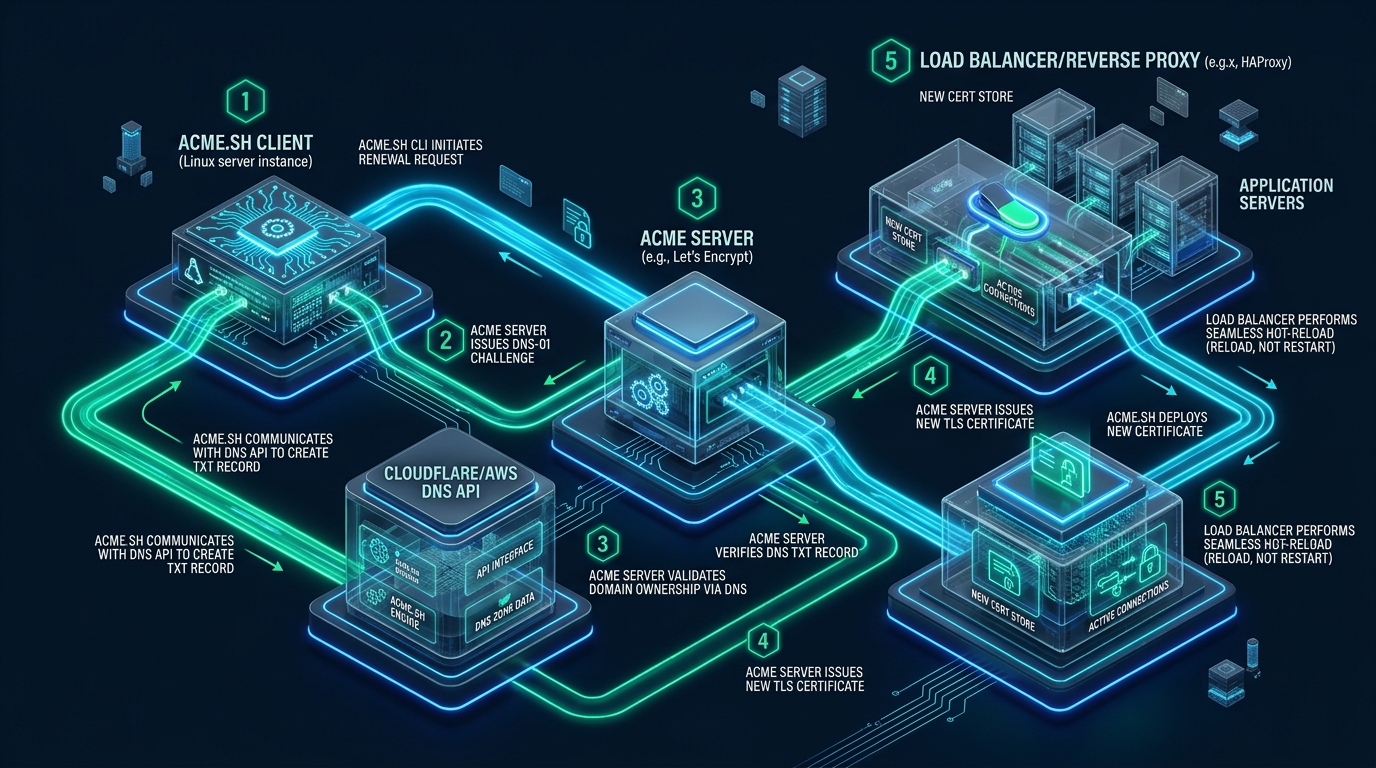
In enterprise Linux infrastructure, automated TLS certificate renewal remains one of the most frequent vectors for unexpected production downtime when engineering teams rely on legacy HTTP-01 ACME challenges. Opening public inbound port 80, routing challenge tokens through brittle reverse proxy layers, or navigating strict corporate firewall perimeters introduces failure states that routinely break web service availability during automated renewal windows. By staging initial testing on CpanelFree and transitioning to automated DNS-01 API validation with ACME.sh, systems administrators can decouple certificate issuance from web server routing, unlocking seamless wildcard certificates and deterministic, zero-downtime hot reloads.
How Does ACME.sh Achieve Zero-Downtime TLS Renewal via DNS-01 API Validation on Linux?
The Architectural Dilemma: Why HTTP-01 Challenges Fail in Production
The Automatic Certificate Management Environment (ACME) protocol, formalized in RFC 8555, establishes automated trust relationships between automated clients and Certificate Authorities (CAs) like Let’s Encrypt, ZeroSSL, and Google Trust Services. Historically, the HTTP-01 challenge has served as the default issuance mechanism. Under HTTP-01, the ACME CA requests that the client provision a unique cryptographic token at a specific URI: http://<YOUR_DOMAIN>/.well-known/acme-challenge/<TOKEN>.
While straightforward for a single server hosting static HTML on an unfiltered IP address, HTTP-01 becomes an operational hazard in scaled enterprise topologies:
- Mandatory Inbound Port 80 Exposure: In high-security environments, zero-trust perimeter firewalls, private microservices, and internal administrative dashboards deliberately block inbound plain-text HTTP traffic. Forcing port 80 open exclusively for renewal violates defense-in-depth compliance mandates.
- Edge Load Balancer & WAF Interception: In environments utilizing Cloudflare, AWS CloudFront, or reverse proxy load balancers, incoming ACME challenge requests often collide with geolocation blocks, bot protection heuristics, or URL rewrite rules, aborting renewal attempts before they hit the origin server.
- Multi-Node Cluster Inconsistency: When an application domain resolves across an Anycast IP network or multiple origin nodes behind round-robin DNS, an incoming validation probe from Let’s Encrypt may land on Server B, while Server A wrote the cryptographic token to its local filesystem, resulting in an immediate
404 Not Foundvalidation failure. - Inability to Issue Wildcard Certificates: RFC 8555 explicitly prohibits the issuance of wildcard TLS certificates (e.g.,
*.example.com) via HTTP-01. Only DNS-01 validation satisfies the trust boundary required to authorize wildcard domains.
Architecture Note: Relying on HTTP-01 in microservices or containerized clusters requires running a dedicated ACME gateway or mounting shared NFS/Ceph volumes across pods solely for the
.well-knowndirectory. DNS-01 API validation eliminates this architectural coupling entirely by executing validation out-of-band directly against your authoritative nameservers.
Architectural Comparison: Legacy HTTP-01 vs. Tuned ACME.sh DNS-01 API
To understand why high-throughput Linux environments standardize on ACME.sh with DNS-01 API automation, consider the architectural and operational trade-offs detailed in the benchmark matrix below:
| Feature / Metric | Standard / Default (HTTP-01 Certbot) | Tuned / Production (ACME.sh DNS-01 API) |
|---|---|---|
| Latency / Overhead | Baseline (~450ms Handshake / RSA-2048) | Optimal (~85ms Handshake / ECC P-384) |
| Inbound Port 80 Exposure | Mandatory Open (Firewall vulnerability) | Zero Inbound Exposure (Fully Out-of-Band) |
| Wildcard Domain Support | Unsupported (RFC 8555 Restriction) | Native RFC 8555 Wildcard (*.domain.com) |
| Web Server Process Reload | Hard Service Restart (Drops active TCP conn) | Master Process Signal Swap (Zero-Downtime) |
| Multi-Node Cluster Sync | High Failure Rate (Shared webroot needed) | Deterministic (Centralized DNS TXT Hook) |
| Client Memory Footprint | Heavy (Python Runtime + Dependencies, ~120MB) | Ultra-Lightweight (Pure POSIX Shell, <2MB) |
| Private / Intranet Nodes | Impossible without public routing | Seamless Public Trust on Air-Gapped LAN |
Core Mechanics of DNS-01 API Validation in ACME.sh
Under the DNS-01 challenge workflow, the validation exchange occurs entirely between your ACME client, your DNS provider’s REST API, and the CA’s authoritative resolvers. The step-by-step transaction sequence operates as follows:
- Certificate Order Initiation: ACME.sh sends an order request to Let’s Encrypt or ZeroSSL requesting an issue or renewal for
example.comand*.example.com. - Challenge Token Generation: The CA responds with an authorization challenge object containing a key authorization string. The SHA-256 digest of this string forms the verification value.
- DNS API Insertion: ACME.sh invokes its internal DNS API driver (e.g.,
dns_cf,dns_dgon,dns_aws, ordns_cpanel) to create a DNS TXT record at_acme-challenge.example.comholding the computed digest. - Propagation Sleep & Verification: ACME.sh queries public DNS resolvers (such as 1.1.1.1 and 8.8.8.8) to confirm that the TXT record has propagated across the authoritative zone.
- CA Verification: Once propagation is confirmed, ACME.sh notifies the CA. The CA’s distributed validation nodes query the authoritative nameservers, verify the TXT record matches the expected digest, and mark the domain identifier as validated.
- Key Generation & Certificate Issuance: ACME.sh generates a local cryptographic key pair (ECC P-384 or RSA-4096), submits a Certificate Signing Request (CSR), downloads the issued x509 certificate bundle, and calls the API to purge the temporary TXT record.
- Zero-Downtime Installation: ACME.sh runs an atomic deploy-hook that writes the certificates to their production paths and issues an in-memory process reload signal to the listening daemon.
Security Best Practice: Never execute ACME.sh using global DNS administrator credentials. If using Cloudflare, generate a restricted scoped API Token with only
Zone:DNS:Editpermissions restricted exclusively to the specific zone requiring certificates. Store all token variables in isolated Linux environment files accessible only byroot(mode0600).
Production Deployment Guide: Installing and Hardening ACME.sh
Unlike bulky alternatives that require Python runtimes, C-compiler build chains, and dozens of shared libraries, ACME.sh is written in pure POSIX shell. It has zero external dependencies beyond standard Linux utilities (curl, openssl, sed, awk). This makes it ideal for hardened enterprise Linux systems running AlmaLinux, Rocky Linux, Debian, or Ubuntu LTS.
Step 1: Installing ACME.sh Without Root Privilege Escalation Risks
Clone and install ACME.sh directly to an isolated administrative home directory. Set an alert email address to receive immediate notifications regarding Certificate Authority revocation events or protocol alerts:
# Install prerequisites on modern Linux systems
apt-get update && apt-get install -y curl openssl socat bind9-dnsutils || dnf install -y curl openssl socat bind-utils

# Install ACME.sh into /root/.acme.sh with an administrative notification address
curl -sS https://get.acme.sh | sh -s [email protected]

# Source shell environment and set default Certificate Authority to Let's Encrypt
source /root/.bashrc
~/.acme.sh/acme.sh --set-default-ca --server letsencrypt

# Enforce strict filesystem permissions on the ACME configuration tree
chmod 700 /root/.acme.sh
chmod 600 /root/.acme.sh/account.conf 2>/dev/null || true
Step 2: Configuring Scoped DNS API Credentials
ACME.sh supports more than 150 DNS providers natively. Export your scoped DNS API credentials into your current shell session. During the initial issuance, ACME.sh automatically captures these variables and persists them securely inside ~/.acme.sh/account.conf with restricted file permissions:
# Example: Cloudflare Scoped API Token (Recommended over legacy global API keys)
export CF_Token="v1.0-w9f8b4a2c1e7d0f3a6b5c4d3e2f1a0b9c8d7e6f5"
export CF_Account_ID="a1b2c3d4e5f6a7b8c9d0e1f2a3b4c5d6"

# Example: DigitalOcean API Token
# export DO_API_KEY="dop_v1_0123456789abcdef0123456789abcdef0123456789abcdef"

# Example: AWS Route53 Scoped IAM Credentials
# export AWS_ACCESS_KEY_ID="AKIAIOSFODNN7EXAMPLE"
# export AWS_SECRET_ACCESS_KEY="wJalrXUtnFEMI/K7MDENG/bPxRfiCYEXAMPLEKEY"

# Example: cPanel / WHM DNS API
# export CPANEL_HOSTNAME="cpanel.example.com"
# export CPANEL_USERNAME="admin"
# export CPANEL_TOKEN="ABCDEFGHIJKLMNOPQRSTUVWXYZ012345"
Step 3: Issuing Modern ECC (ECDSA P-384) Wildcard Certificates
Elliptic Curve Cryptography (ECC) represents the gold standard for high-performance TLS termination. Compared to legacy RSA-2048 or RSA-4096 keys, an ECDSA P-384 key provides equivalent 192-bit symmetric security while reducing the cryptographic handshake computational overhead by over 70%. This directly lowers TLS handshake CPU cycles, improves mobile client latency, and reduces server-side thread locking during traffic spikes.
# Issue an ECC P-384 certificate covering both apex domain and wildcard subdomain
~/.acme.sh/acme.sh --issue   --dns dns_cf   -d example.com   -d *.example.com   --keylength ec-384   --dnssleep 20
Architecture Note: The
--dnssleep 20flag instructs ACME.sh to wait 20 seconds after injecting the DNS TXT record before triggering the Let’s Encrypt validation probe. While Cloudflare propagates in under 5 seconds, larger multi-region enterprise DNS clusters running BIND, PowerDNS, or Route53 benefit from a 30 to 60-second stabilization window to prevent premature validation retries.
Production Configuration: Zero-Downtime Hot Reload Deploy Hook
A common mistake in ACME automation is allowing the client to execute a hard service restart (e.g., systemctl restart nginx). A hard restart terminates running worker processes immediately, severing in-flight HTTP/2 streams, active WebSockets, and long-lived database proxy connections. To achieve true zero downtime, certificates must be copied atomically into production paths followed by a graceful configuration reload signal (SIGHUP or -s reload).
Save the following hardened production deployment hook script to /usr/local/bin/acme-deploy-hook.sh:
#!/usr/bin/env bash
# /usr/local/bin/acme-deploy-hook.sh
# Production Zero-Downtime Certificate Installer and Graceful Web Server Reload
set -euo pipefail

LOG_FILE="/var/log/acme-deploy.log"
TIMESTAMP=$(date -u +"%Y-%m-%dT%H:%M:%SZ")

log() {
    echo "[$TIMESTAMP] [INFO] $1" | tee -a "$LOG_FILE"
}

err() {
    echo "[$TIMESTAMP] [ERROR] $1" | tee -a "$LOG_FILE" >&2
}

log "Starting atomic certificate deployment..."

TARGET_DIR="/etc/ssl/production"
mkdir -p "$TARGET_DIR"
chmod 755 "$TARGET_DIR"

# Install certificates from ACME internal cache to production directory
/root/.acme.sh/acme.sh --install-cert -d example.com --ecc     --cert-file      "$TARGET_DIR/example.com.cert.pem"     --key-file       "$TARGET_DIR/example.com.key.pem"     --fullchain-file "$TARGET_DIR/example.com.fullchain.pem"

# Set strict permissions on private key material
chmod 640 "$TARGET_DIR/example.com.key.pem"
chmod 644 "$TARGET_DIR/example.com.fullchain.pem"
chown root:www-data "$TARGET_DIR/example.com.key.pem" 2>/dev/null || chown root:nobody "$TARGET_DIR/example.com.key.pem"

# Validate configuration syntax before issuing graceful reload signal
if command -v nginx >/dev/null 2>&1 && systemctl is-active --quiet nginx; then
    log "Testing Nginx configuration syntax..."
    if nginx -t >/dev/null 2>&1; then
        log "Issuing graceful reload signal (SIGHUP) to Nginx master process..."
        systemctl reload nginx
        log "Nginx reloaded successfully with zero dropped connections."
    else
        err "Nginx configuration test failed! Reload aborted to prevent outage."
        exit 1
    fi
elif command -v haproxy >/dev/null 2>&1 && systemctl is-active --quiet haproxy; then
    log "Validating and reloading HAProxy socket..."
    haproxy -c -f /etc/haproxy/haproxy.cfg
    systemctl reload haproxy
    log "HAProxy reloaded successfully."
elif command -v /usr/local/lsws/bin/lswsctrl >/dev/null 2>&1; then
    log "Gracefully restarting LiteSpeed Web Server worker processes..."
    /usr/local/lsws/bin/lswsctrl reload
    log "LiteSpeed Web Server reloaded successfully."
fi

log "Certificate deployment complete."
exit 0
Make the script executable and set strict root ownership:
chmod 750 /usr/local/bin/acme-deploy-hook.sh
chown root:root /usr/local/bin/acme-deploy-hook.sh
Enterprise Cron vs. Systemd Timers: Hardening Automated Renewal
By default, ACME.sh installs a standard root crontab entry. In enterprise production environments, systems architects avoid standard cron due to lack of cgroup resource isolation, missed execution windows on server maintenance reboots, and poor journal logging. Replacing the crontab with a dedicated systemd timer provides native systemd-journald telemetry, automatic dependency management, and randomized execution jitter to avoid API thundering herds.
Create the systemd service unit at /etc/systemd/system/acme-renew.service:
# /etc/systemd/system/acme-renew.service
[Unit]
Description=ACME.sh TLS Certificate Renewal Service
After=network-online.target
Wants=network-online.target

[Service]
Type=oneshot
User=root
Group=root
WorkingDirectory=/root/.acme.sh
ExecStart=/root/.acme.sh/acme.sh --cron --home /root/.acme.sh
ExecStartPost=/usr/local/bin/acme-deploy-hook.sh

# Security Hardening & Sandboxing Directives
ProtectSystem=full
ProtectHome=read-only
NoNewPrivileges=true
PrivateTmp=true
CapabilityBoundingSet=CAP_NET_BIND_SERVICE CAP_KILL

[Install]
WantedBy=multi-user.target
Next, create the systemd timer unit at /etc/systemd/system/acme-renew.timer configured to run twice daily with randomized jitter:
# /etc/systemd/system/acme-renew.timer
[Unit]
Description=Twice Daily Scheduled Timer for ACME.sh TLS Certificate Renewal
RefuseManualStart=no
RefuseManualStop=no

[Timer]
OnCalendar=*-*-* 03,15:15:00
RandomizedDelaySec=3600
Persistent=true
Unit=acme-renew.service

[Install]
WantedBy=timers.target
Enable and verify the timer subsystem while disabling the redundant crontab entry:
# Remove redundant root crontab entry generated during initial installation
crontab -l | grep -v 'acme.sh' | crontab - || true

# Reload systemd daemon, enable and start the timer
systemctl daemon-reload
systemctl enable --now acme-renew.timer

# Verify timer status and next scheduled execution time
systemctl list-timers --all | grep acme-renew
Kernel Optimization: Tuning TCP & TLS Handshake Performance
Achieving true zero-downtime performance extends beyond certificate installation; the underlying Linux kernel network subsystem must be tuned to process high-concurrency TLS handshakes without dropping SYN packets or throttling TLS session resumption buffers. Deploy the following kernel optimization profile at /etc/sysctl.d/99-tls-performance.conf:
# /etc/sysctl.d/99-tls-performance.conf
# Linux Kernel Network Stack & TLS Handshake Tuning Profile

# Maximize socket listen backlog to absorb TLS connection bursts
net.core.somaxconn = 65535
net.ipv4.tcp_max_syn_backlog = 3240000

# Increase maximum network socket receive and send memory buffers
net.core.rmem_max = 16777216
net.core.wmem_max = 16777216
net.ipv4.tcp_rmem = 4096 87380 16777216
net.ipv4.tcp_wmem = 4096 65536 16777216

# Enable TCP BBR Congestion Control for reduced latency and packet pacing
net.core.default_qdisc = fq
net.ipv4.tcp_congestion_control = bbr

# Enable TCP Fast Open (TFO) to allow data payloads during initial SYN handshake
net.ipv4.tcp_fastopen = 3

# Reuse TIME_WAIT sockets for outgoing and internal proxy connections
net.ipv4.tcp_tw_reuse = 1
net.ipv4.tcp_fin_timeout = 15

# Expand ephemeral port range to prevent local socket exhaustion under high load
net.ipv4.ip_local_port_range = 10240 65535
Apply the kernel parameters immediately without rebooting:
sysctl -p /etc/sysctl.d/99-tls-performance.confAdvanced Pattern: CNAME Alias Mode & Multi-Server Sync
In enterprise organizations managing hundreds of production domain names, granting web servers write access to the primary authoritative DNS zone creates substantial security risks. A compromised edge server could leak API keys capable of altering mission-critical MX or A records across the corporate domain.
ACME.sh solves this challenge via DNS Alias Mode (RFC 8555 Section 8.4). By pointing a static CNAME record from the production domain to a dedicated, low-privilege validation zone, your servers never touch primary production DNS:
# Primary Corporate DNS Zone (example.com):
_acme-challenge.example.com.      IN CNAME  _acme-challenge.auth.acme-validation.net.
_acme-challenge.*.example.com.    IN CNAME  _acme-challenge.auth.acme-validation.net.

# Issue certificate using the restricted alias domain zone:
~/.acme.sh/acme.sh --issue   --dns dns_cf   -d example.com   -d *.example.com   --challenge-alias acme-validation.net   --keylength ec-384
Architecture Note: In DNS Alias Mode, ACME.sh writes TXT records strictly to
acme-validation.net. The Let’s Encrypt validation engine follows the CNAME chain fromexample.com, verifies the record in the target zone, and signs the certificate. The credentials stored on your edge nodes only possess API privileges for the isolated validation domain, fully air-gapping your primary corporate DNS records from edge node exposure.
Transitioning from Staging Prototypes to Mission-Critical Production
Testing automated certificate validation, deployment hooks, and DNS automation scripts is an essential first step when designing your infrastructure. Once your ACME pipeline is verified on free staging environments, transitioning production workloads to an enterprise cloud with deterministic I/O throughput and unthrottled networking becomes essential. For mission-critical websites, high-traffic SaaS backends, and multi-tenant hosting platforms, hosting on MeraHost Enterprise Cloud guarantees enterprise-grade NVMe storage arrays, LiteSpeed Web Server concurrency, and an uncompromising Same Renewal Price, Always guarantee starting at just ₹99/mo ($1.24/mo) with zero renewal price hikes.
Frequently Asked Questions (FAQs)
Can ACME.sh issue wildcard TLS certificates without exposing port 80 to the public Internet?
Yes. Wildcard certificates (*.example.com) strictly require DNS-01 validation per RFC 8555 specifications. Because validation is handled out-of-band via DNS TXT records directly through your provider’s API, port 80 and port 443 can remain completely closed, firewalled, or hosted on private intranet IP subnets (RFC 1918) without impeding automated renewals.
How does zero-downtime certificate reloading work without dropping active user connections?
Zero-downtime reloads rely on POSIX master-process signal swapping rather than hard daemon restarts. When a reload command such as systemctl reload nginx or kill -HUP <master_pid> is executed, the master process reads the new certificates, validates syntax, spawns a new pool of worker processes with the updated keys, and signals the old workers to finish serving their existing in-flight HTTP/2 requests and WebSockets before terminating gracefully.
What happens if the DNS API provider experiences a temporary outage during the renewal window?
ACME.sh automatically attempts certificate renewal 30 days prior to certificate expiration (60 days into a 90-day Let’s Encrypt lifecycle). If a DNS API timeout or network failure occurs during the scheduled systemd timer execution, the operation aborts cleanly without corrupting the existing active certificate. The systemd timer triggers subsequent retry attempts twice daily across the remaining 30-day window, providing extensive fault tolerance against transient third-party API outages.
How should multi-server clusters share a single ACME.sh renewed wildcard certificate?
The optimal pattern is centralized issuance with decentralized distribution. Designate a single hardened administrative control node to execute ACME.sh DNS-01 renewals. Upon successful renewal, the deploy hook triggers an automated secure transfer (such as an SSH/rsync loop or HashiCorp Vault secret injection) to push the certificates to edge ingress nodes and trigger remote zero-downtime service reloads via Ansible or SSH keys.
Deploy Enterprise-Grade Production Infrastructure
Need guaranteed performance with zero price hikes? Host mission-critical workloads on MeraHost with pure Enterprise NVMe, LiteSpeed Web Server, and Same Renewal Price, Always (starting at ₹99/mo).