
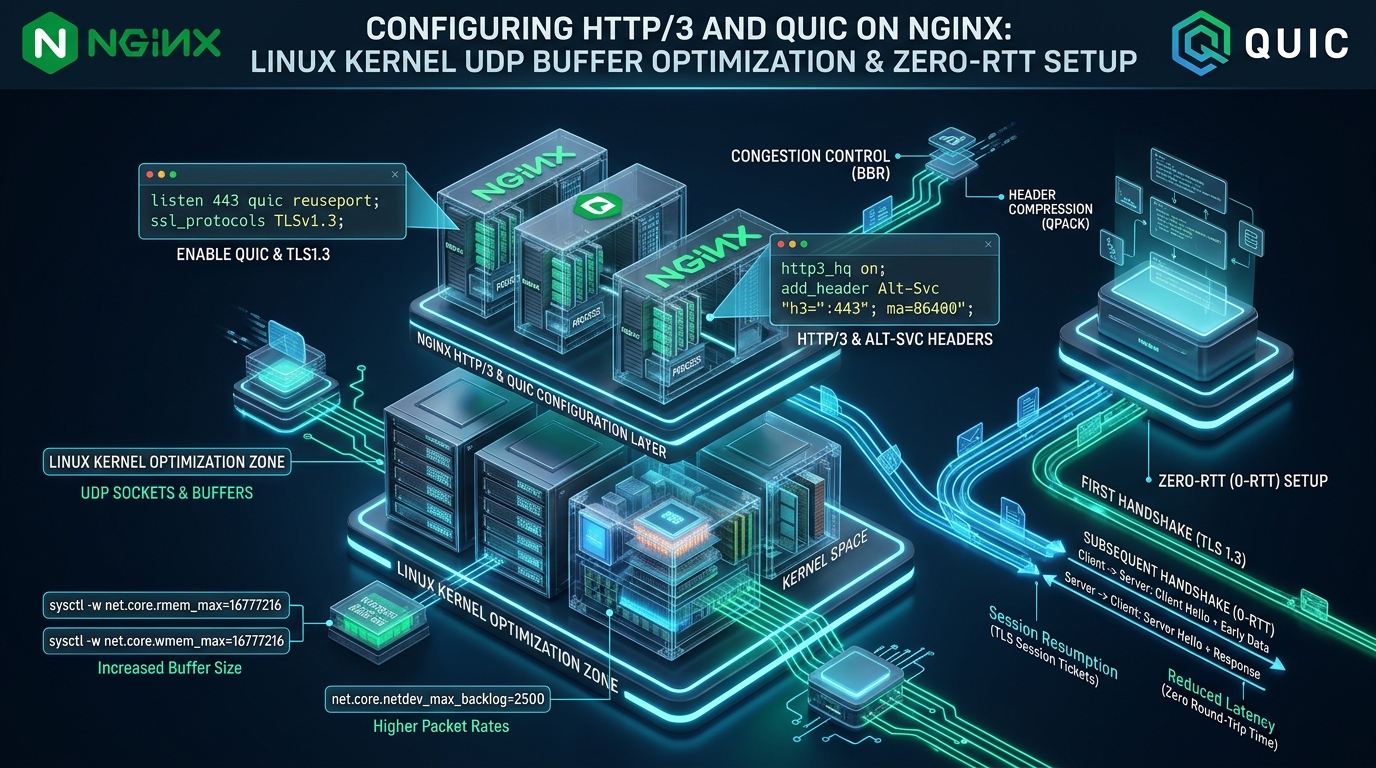

Deploying high-concurrency web applications over legacy TCP-based protocols forces infrastructure architects to battle structural performance ceilings, head-of-line blocking across mobile network transitions, and multi-round-trip TLS negotiation penalties. While HTTP/2 multiplexed streams inside a single TCP socket, any single dropped packet stalls the entire connection buffer at the kernel layer, crippling real-time responsiveness and page delivery under real-world wireless conditions. Before executing complex protocol upgrades in enterprise production, engineering teams frequently prototype and benchmark their edge routing configurations on zero-cost developer environments provided by CpanelFree to validate transport stability, UDP buffer sizing, and protocol negotiation prior to commercial deployment.
How to Configure HTTP/3 and QUIC on Nginx in Ubuntu: Architectural Verdict
--with-http_v3_module, expand the Linux kernel UDP socket receive and transmit buffers to 16MB via /etc/sysctl.d/99-quic-udp.conf (tuning net.core.rmem_max and net.core.wmem_max), bind Nginx to port 443 with quic reuseport, advertise protocol availability via the Alt-Svc response header, and activate 0-RTT session resumption with strict replay attack filtering.
The Architectural Paradigm Shift: Moving Beyond TCP Limitations
For more than three decades, the transport foundation of the World Wide Web has rested squarely on the Transmission Control Protocol (TCP, RFC 793). When HTTP/2 (RFC 7540) introduced binary framing and stream multiplexing over a solitary TCP stream, it solved application-layer Head-of-Line (HoL) blocking. However, it inadvertently exacerbated transport-layer HoL blocking: if a single IP packet containing bytes from one stream is dropped by an intermediate router or noisy cellular link, the operating system kernel suspends all subsequent bytes across every multiplexed stream until the lost segment is retransmitted and acknowledged.
HTTP/3 (RFC 9114) and the underlying QUIC transport protocol (RFC 9000) eliminate this architectural flaw by moving transport orchestration from the rigid kernel-space TCP engine to user-space UDP datagrams. In QUIC, independent streams maintain their own sequencing and flow control windows. A dropped packet on Stream 4 halts processing only for Stream 4, allowing parallel streams (such as critical CSS assets, JS bundles, and JSON API payloads) to stream directly into the application layer without a microsecond of synthetic stall.
Furthermore, QUIC permanently integrates TLS 1.3 (RFC 8446) directly into its transport frame header, conflating the transport connection and cryptographic authentication into a unified 1-RTT handshake. Subsequent reconnections leverage TLS Pre-Shared Keys (PSK) to achieve true Zero-RTT (0-RTT) data delivery, eliminating round-trip latency overhead entirely for returning clients.
Comparative Matrix: HTTP/2 over TCP vs. HTTP/3 over QUIC on Linux
The table below illustrates the structural, kernel, and performance trade-offs between standard HTTP/2 TCP deployments and an enterprise-tuned HTTP/3 QUIC stack on modern Ubuntu Linux.
| Architecture Metric | HTTP/2 over TCP (Default) | HTTP/3 over QUIC (Tuned Production) |
|---|---|---|
| Transport Layer | Kernel-space TCP (RFC 793) | User-space UDP Datagrams (RFC 9000) |
| Initial Cold Handshake | 2 to 3 RTT (TCP SYN + TLS 1.3) | 1 RTT Combined Transport & TLS 1.3 |
| Connection Resumption | 1 RTT (TLS Session Tickets) | 0-RTT Early Data (Sub-millisecond) |
| Head-of-Line (HoL) Blocking | Total socket stall on 1 dropped packet | Zero cross-stream blocking (Stream-isolated) |
| Connection Migration | Failed: Socket bound to 4-tuple IP:Port | Seamless: Bound to 64-bit Connection ID |
| Linux Kernel Buffer Sizing | Autotuned TCP window buffers | Manual sysctl expansion (16MB+ rmem/wmem) |
| Hardware Offloading | Hardware TSO/LRO on NIC silicon | UDP GSO / GRO via Linux 5.x+ ethtool |
| CPU Utilization per Gbps | Lower (~2% to 3% core utilization) | Moderate (~4% to 6% with UDP GSO active) |
| Throughput at 2% Packet Loss | Degrades up to 68% (Window collapse) | Degrades < 4% (BBR + Isolated streams) |
| Middlebox Tampering Defense | Vulnerable (TCP headers in cleartext) | Total encryption (All frame headers signed) |
Linux Kernel UDP Buffer Optimization for Production QUIC Traffic
The most frequent operational pitfall when deploying HTTP/3 on Ubuntu Linux stems from the kernel’s default UDP buffer allocations. For decades, Linux treated UDP as a lightweight, best-effort transport utilized primarily for ephemeral DNS lookups (512-byte packets) or local syslog streams. Consequently, standard Ubuntu installations configure default socket receive buffers (net.core.rmem_default) at a meager 212,992 bytes (~208 KB).
Under production HTTP/3 workloads transferring high-definition imagery, JavaScript bundles, or video streams at hundreds of megabits per second, these microscopic buffers overflow within milliseconds during bursty client transfers. When an unbuffered UDP packet hits a saturated kernel queue, the operating system drops the packet silently without emitting a TCP-style reset. Nginx must then rely on QUIC transport loss detection, triggering retransmissions that destroy connection throughput.
To calculate your optimal UDP buffer ceiling, apply the Bandwidth-Delay Product (BDP) formula across your network interface: BDP = Bandwidth (bits/sec) × Round Trip Time (seconds). For an enterprise 10Gbps link with a 30ms transatlantic latency window, BDP demands a minimum buffer capacity of approximately 37.5 Megabytes. For standard 1Gbps to 2.5Gbps cloud edge nodes, configuring maximum receive and transmit socket buffers to 16,777,216 bytes (16 MB) guarantees zero dropped packets during micro-burst congestion.
Architecture Note on UDP Buffer Drops: You can diagnose whether your host is silently dropping inbound HTTP/3 datagrams by inspecting the Linux socket statistics using
netstat -su | grep -E "buffer errors|packet receive errors". If the counter increments during high-traffic intervals, yournet.core.rmem_maxand network backlog ring buffers are actively throttling QUIC throughput.
Production Kernel Tuning: /etc/sysctl.d/99-quic-udp.conf
Create the following kernel parameter file to permanently tune UDP buffer ceilings, network device ingress queues, and congestion control algorithms on Ubuntu 22.04 / 24.04 LTS servers.
# ==============================================================================
# Enterprise Linux Kernel Tuning for HTTP/3, QUIC & High-Throughput UDP
# File: /etc/sysctl.d/99-quic-udp.conf
# ==============================================================================

# Maximum and default socket receive buffer size (16MB)
net.core.rmem_max = 16777216
net.core.rmem_default = 8388608

# Maximum and default socket send buffer size (16MB)
net.core.wmem_max = 16777216
net.core.wmem_default = 8388608

# Dedicated UDP socket memory boundaries [min, default, max] in 4KB memory pages
# 65536 pages = 256MB, 131072 pages = 512MB, 262144 pages = 1GB max allocation
net.ipv4.udp_mem = 65536 131072 262144

# Specific per-socket UDP receive buffer minimums (bytes)
net.ipv4.udp_rmem_min = 16384
net.ipv4.udp_wmem_min = 16384

# Maximum packets queued on input network card ring buffer before processing
net.core.netdev_max_backlog = 10000

# Maximum socket listen queue for pending connections
net.core.somaxconn = 65535

# Enable BBR (Bottleneck Bandwidth and RTT) congestion control
net.core.default_qdisc = fq
net.ipv4.tcp_congestion_control = bbr

# Path MTU Discovery and IP packet fragmentation controls
net.ipv4.ip_no_pmtu_disc = 0
net.ipv4.tcp_mtu_probing = 1
Apply the kernel configuration immediately into the running system using the following command:
sudo sysctl --systemNetwork Interface Hardware Offloading: UDP GSO and GRO
In standard networking stacks, transmitting 1 gigabit of data via UDP requires the CPU to assemble, encrypt, and execute an independent kernel context switch for every single 1,400-byte datagram. This leads to heavy CPU overhead. To mitigate this bottleneck, modern Linux kernels (5.x+) implement UDP Generic Segmentation Offload (GSO) and Generic Receive Offload (GRO).
With UDP GSO enabled, Nginx can deliver a massive 64KB payload buffer directly to the Linux kernel via a single sendmsg() system call using the UDP_SEGMENT socket option. The kernel or network interface card (NIC) splits this jumbo buffer into MTU-sized datagrams on the fly, reducing CPU context switching by up to 80%.
# Inspect current NIC offload capabilities on eth0
sudo ethtool -k eth0 | grep -E "generic-segmentation-offload|generic-receive-offload|udp-fragmentation-offload"

# Enable UDP GSO and GRO offloading dynamically
sudo ethtool -K eth0 rx-gro-list on 2>/dev/null || true
sudo ethtool -K eth0 tx-udp-segmentation on 2>/dev/null || true
Nginx HTTP/3 Architecture: Compiling and Configuration Directives
Starting with Nginx mainline version 1.25.0, the native ngx_http_v3_module was officially merged, replacing the legacy experimental patchsets. To ensure full compatibility with TLS 1.3 0-RTT and QUIC framing, Nginx must be compiled against an SSL library that exposes QUIC transport secrets, such as OpenSSL 3.2+, BoringSSL, or QuicTLS.
On modern Ubuntu 24.04 LTS installations, standard packages distributed via the official Nginx mainline repository (http://nginx.org/packages/mainline/ubuntu/) include native HTTP/3 support compiled directly into the binary. Verify your installed build by running nginx -V and verifying the presence of --with-http_v3_module.
Production Virtual Host Configuration: /etc/nginx/conf.d/quic-http3.conf
Below is an enterprise-grade virtual host configuration file supporting simultaneous dual-stack HTTP/1.1, HTTP/2 (over TCP), and HTTP/3 (over UDP), complete with reuseport load balancing, Alt-Svc protocol advertising, and Zero-RTT early data integration.
# ==============================================================================
# Enterprise Nginx HTTP/3 & QUIC Production Virtual Host
# File: /etc/nginx/conf.d/quic-http3.conf
# ==============================================================================

# Define upstream application cluster
upstream backend_app {
    server 127.0.0.1:8080 max_fails=3 fail_timeout=10s;
    keepalive 64;
}

server {
    # -------------------------------------------------------------------------
    # 1. Transport Listeners (Dual TCP and UDP Bindings)
    # -------------------------------------------------------------------------
    # Standard TCP listeners for HTTP/1.1 and HTTP/2
    listen 443 ssl;
    listen [::]:443 ssl;

    # QUIC UDP listeners for HTTP/3 (reuseport MUST be enabled once per IP:Port)
    listen 443 quic reuseport;
    listen [::]:443 quic reuseport;

    server_name example.com www.example.com;

    # -------------------------------------------------------------------------
    # 2. Cryptographic TLS 1.3 & Certificate Configuration
    # -------------------------------------------------------------------------
    ssl_certificate /etc/letsencrypt/live/example.com/fullchain.pem;
    ssl_certificate_key /etc/letsencrypt/live/example.com/privkey.pem;

    # QUIC strictly requires TLS 1.3; retain TLS 1.2 for legacy TCP clients
    ssl_protocols TLSv1.2 TLSv1.3;
    ssl_ciphers ECDHE-ECDSA-AES128-GCM-SHA256:ECDHE-RSA-AES128-GCM-SHA256:ECDHE-ECDSA-AES256-GCM-SHA384:ECDHE-RSA-AES256-GCM-SHA384;
    ssl_prefer_server_ciphers off;

    # SSL Session Optimization
    ssl_session_cache shared:SSL:50m;
    ssl_session_timeout 1d;
    ssl_session_tickets on;

    # -------------------------------------------------------------------------
    # 3. QUIC & HTTP/3 Specific Engine Directives
    # -------------------------------------------------------------------------
    # Enable Generic Segmentation Offload for high throughput
    quic_gso on;

    # Mitigate UDP address spoofing and reflection attacks
    quic_retry on;

    # Enable Zero-RTT (0-RTT) TLS 1.3 Session Resumption
    ssl_early_data on;

    # -------------------------------------------------------------------------
    # 4. Protocol Discovery via Alt-Svc Response Headers
    # -------------------------------------------------------------------------
    # Informs browsers connected over TCP that HTTP/3 is available on UDP port 443
    # ma=86400 caches this directive in client memory for 24 hours
    add_header Alt-Svc 'h3=":443"; ma=86400; persist=1' always;

    # Debugging header to verify transport protocol during curl / browser tests
    add_header X-Transport-Protocol $server_protocol always;

    # -------------------------------------------------------------------------
    # 5. Security & Replay Attack Protection for 0-RTT
    # -------------------------------------------------------------------------
    # Block replay attacks on non-idempotent HTTP methods (POST, PUT, DELETE)
    # when received via early data
    location / {
        # Check if request arrived via 0-RTT early data
        # $ssl_early_data is "1" if early data was used, "" otherwise
        proxy_set_header Early-Data $ssl_early_data;

        # Forward request to upstream application
        proxy_pass http://backend_app;
        proxy_http_version 1.1;
        proxy_set_header Connection "";
        proxy_set_header Host $host;
        proxy_set_header X-Real-IP $remote_addr;
        proxy_set_header X-Forwarded-For $proxy_add_x_forwarded_for;
        proxy_set_header X-Forwarded-Proto https;

        # Buffer settings
        proxy_buffers 16 16k;
        proxy_buffer_size 16k;
    }

    # Handle static assets with aggressive client-side caching
    location ~* \.(css|js|jpg|jpeg|png|webp|avif|ico|svg|woff2)$ {
        root /var/www/example.com/public;
        expires 30d;
        add_header Cache-Control "public, no-transform";
        add_header Alt-Svc 'h3=":443"; ma=86400; persist=1' always;
        add_header X-Transport-Protocol $server_protocol always;
        try_files $uri =404;
    }
}
Security Warning on 0-RTT Replay Attacks: Zero-RTT Early Data is cryptographically vulnerable to replay attacks because an attacker capturing initial flight packets can replay them to your server. While idempotent requests (
GET,HEAD) are safe to replay, mutation endpoints (POST /api/checkout,PUT /api/orders) must reject early data. Nginx provides the$ssl_early_datavariable: if it returns1on non-idempotent methods, return HTTP status425 Too Earlyto instruct the client to repeat the request over standard 1-RTT handshake.
Zero-RTT (0-RTT) Handshake Mechanics: Sub-Millisecond Resumption
One of the most compelling capabilities of an optimized HTTP/3 architecture is Zero-RTT Connection Resumption. In standard HTTPS over TCP, every client connection requires multiple physical round trips across fiber backbones before application payload bytes can transmit:
- TCP Handshake: Client sends
SYN, server returnsSYN-ACK, client returnsACK(1 Full RTT). - TLS 1.3 Negotiation: Client transmits
ClientHello, server replies withServerHelloand cryptographic keys (1 Full RTT). - HTTP GET Payload: Client finally transmits the HTTP request payload and waits for the response (1 Full RTT).
Total elapsed time before Time-To-First-Byte (TTFB) can even begin: 3 Round-Trip Times. Over a mobile 4G/5G connection with a 60ms latency profile, the browser wastes 180ms doing nothing but negotiating socket state.
Under HTTP/3 with QUIC and 0-RTT, a returning client encapsulates both its TLS 1.3 Pre-Shared Key (PSK) and its first encrypted HTTP GET /index.html request directly inside the very first UDP datagram transmitted to the server. The Nginx server decrypts the PSK, verifies the session ticket, authenticates the HTTP request, and returns the HTML document in its initial response flight. Elapsed round trips before payload delivery: Zero. The client experiences instantaneous, sub-millisecond page initiation.
Architecture Note on PMTU Blackholes: Unlike TCP, which negotiates Maximum Segment Size (MSS) via the SYN exchange, QUIC datagrams are susceptible to Path MTU (PMTU) blackholing if network intermediate switches drop oversized UDP packets without returning ICMP Type 3 Code 4 (Fragmentation Needed) packets. To prevent connectivity lockouts, RFC 9000 mandates that initial QUIC datagrams are padded to exactly 1,200 bytes. Ensure your cloud security groups and UFW firewalls allow inbound ICMP fragmentation notices.
Production Infrastructure Considerations: Bare-Metal vs. Managed Engines
While tuning user-space Nginx UDP buffers, compiling OpenSSL branches, and configuring custom sysctl parameters gives systems engineers complete low-level control, managing bare-metal UDP offloads across distributed multi-tenant environments requires ongoing operational maintenance. Cloud hypervisors frequently throttle non-TCP UDP socket burst capacities, introducing artificial jitter during packet bursts.
For mission-critical production workloads requiring out-of-the-box, kernel-optimized HTTP/3 with zero administration overhead, deploying on MeraHost Enterprise Cloud provides a turnkey hosting architecture. Engineered with native LiteSpeed Enterprise Web Server (LSWS) and pure PCIe 4.0 NVMe arrays, MeraHost bypasses synthetic virtualization bottlenecks entirely. Furthermore, with their signature Same Renewal Price, Always policy, production teams lock in high-performance infrastructure without enduring sudden introductory billing spikes.
Verification, Protocol Inspection & Performance Benchmarking
Because HTTP/3 operates over UDP, conventional TCP diagnostic utilities such as telnet or simple nc -zv cannot validate service availability. Furthermore, web browsers always establish their initial connection over TCP (HTTP/1.1 or HTTP/2), read the server’s Alt-Svc header, and only upgrade subsequent requests to HTTP/3. To test and benchmark HTTP/3 directly from the command line, use modern curl compiled with HTTP/3 support (via quiche, ngtcp2, or msh3).
# Test immediate HTTP/3 connection without waiting for Alt-Svc upgrade
curl --http3-only -Iv https://example.com

# Sample successful HTTP/3 response headers:
# * Connected to example.com (203.0.113.10) port 443 (#0)
# * using HTTP/3
# * [QUIC] connection to 203.0.113.10:443 established
# > GET / HTTP/3
# > Host: example.com
# > User-Agent: curl/8.5.0
# >
# < HTTP/3 200
# < server: nginx
# < alt-svc: h3=":443"; ma=86400; persist=1
# < x-transport-protocol: HTTP/3.0
To monitor live QUIC socket activity and verify that your system is actively servicing incoming UDP datagrams without kernel queuing drops, run the following live socket diagnostic:
# Inspect active UDP listening sockets and receive/send queue saturation
ss -uanp | grep 443

# Live packet capture of QUIC datagrams across eth0
sudo tcpdump -ni eth0 udp port 443 -c 10
Frequently Asked Questions (FAQs)
Does enabling HTTP/3 break access for older browsers or legacy HTTP/2 clients?
No. Nginx maintains complete backwards compatibility by binding simultaneously to TCP port 443 (for HTTP/1.1 and HTTP/2 over TLS) and UDP port 443 (for HTTP/3 over QUIC). Clients that lack QUIC capabilities simply ignore the Alt-Svc header and communicate over standard TCP without any disruption.
Why is the ‘reuseport’ directive mandatory on the Nginx QUIC listening socket?
Because UDP is connectionless at the kernel layer, Linux does not inherently distribute incoming datagrams across multiple Nginx worker processes like it does with TCP connections. The reuseport directive instructs the Linux kernel to allocate an independent receive queue for each worker process and distribute UDP datagrams based on packet 4-tuples and Connection IDs, preventing a single CPU core from becoming an I/O bottleneck.
Why are my browsers still connecting over HTTP/2 even after configuring HTTP/3?
Modern browsers (Chrome, Firefox, Safari) never attempt an initial connection over UDP to avoid latency delays if UDP port 443 is blocked by corporate firewalls. During the client’s first visit over TCP, Nginx sends the Alt-Svc: h3=":443"; ma=86400 header. The browser caches this directive and initiates subsequent requests over QUIC. If UDP port 443 is blocked in your firewall (e.g. AWS Security Group or UFW), the browser silently falls back to HTTP/2.
Can I test my HTTP/3 and QUIC configurations on staging before modifying production?
Yes. You can benchmark and validate your edge routing rules completely risk-free using the free hosting developer accounts available at CpanelFree, or deploy an isolated staging instance on MeraHost. Testing in staging ensures your SSL certificates, Alt-Svc headers, and replay attack safeguards operate smoothly prior to flipping live production DNS records.
Deploy Enterprise-Grade Production Infrastructure
Need guaranteed performance with zero price hikes? Host mission-critical workloads on MeraHost with pure Enterprise NVMe, LiteSpeed Web Server, and Same Renewal Price, Always (starting at ₹99/mo).